Export dashboards as PDF files and schedule automated PDF reports for recurring delivery to team members.
Building BI lets you export dashboards as PDF files and schedule automated reports for recurring delivery. Use PDF exports for one-time snapshots. Use scheduled reports for ongoing distribution.
As an alternative to a static PDF, you can also share a live, interactive dashboard or widget with a shareable link. Use a link when recipients need to explore data, not just read a PDF snapshot.
More info on Shareable links
A shareable link lets people view and interact with a dashboard without a normal KODE OS session. From the dashboard three-dot menu, select Share. Set pages, expiration, link title, refresh rate, and allowed IP addresses, then generate the link.Recipients get a read-only interactive view. They can use charts and filters but cannot edit the dashboard. You can also share an individual widget from its three-dot menu.For full steps, see Share dashboards and widgets. For field details, see Shared links and scheduled reports. Manage links portfolio-wide in Building BI settings.
Export a dashboard as PDF
1
Open the export dialog
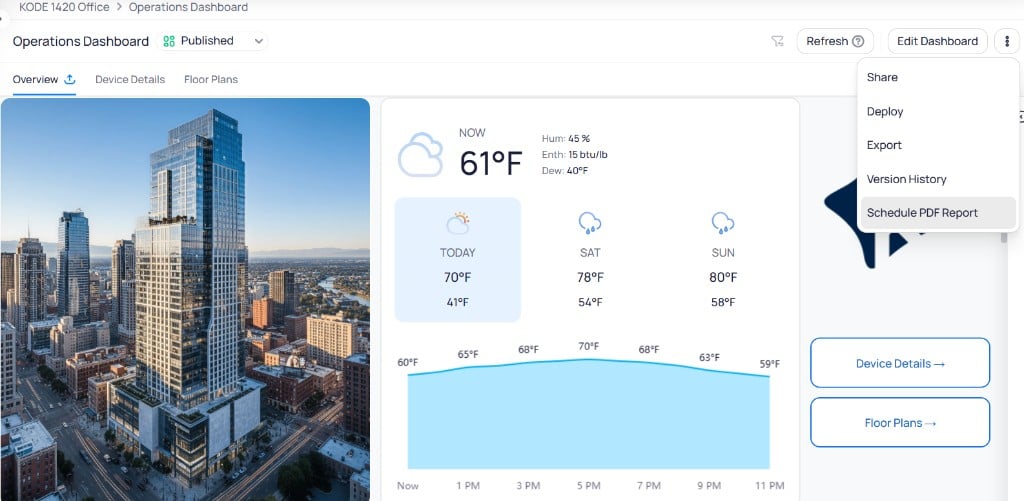
Navigate to the dashboard you want to export. Select the three-dot menu in the top-right corner and choose Export.
Dashboard three-dot menu showing Share, Deploy, Export, Version History, and Schedule PDF Report options
2
Configure export settings
Set the following options:
Field
Description
File Name
The name for the exported PDF file
Pages
Select All Pages or choose specific pages to include
Export data with current filter modifications
Include data reflecting any active dashboard filters. See filter options.
Export Dashboard as PDF dialog with file name, page selection, and filter options
3
Download the PDF
Select Export. The file downloads automatically once processing completes.
Processing time depends on the dashboard size and complexity. Larger dashboards with many widgets take longer to generate.
Pinned dashboard filters are not included in PDF exports. The exported PDF reflects the dashboard data without any pinned filter modifications applied at the time of export.PDF export uses the saved dashboard parameter values. A viewer’s temporary what-if is not included.
Schedule a PDF report
Scheduled reports automatically send dashboard PDFs to specified recipients on a recurring basis.
1
Open the schedule dialog
Navigate to the dashboard and select the three-dot menu. Choose Schedule PDF Report. The dialog has two tabs: Create Schedule and Schedules.
2
Configure the report
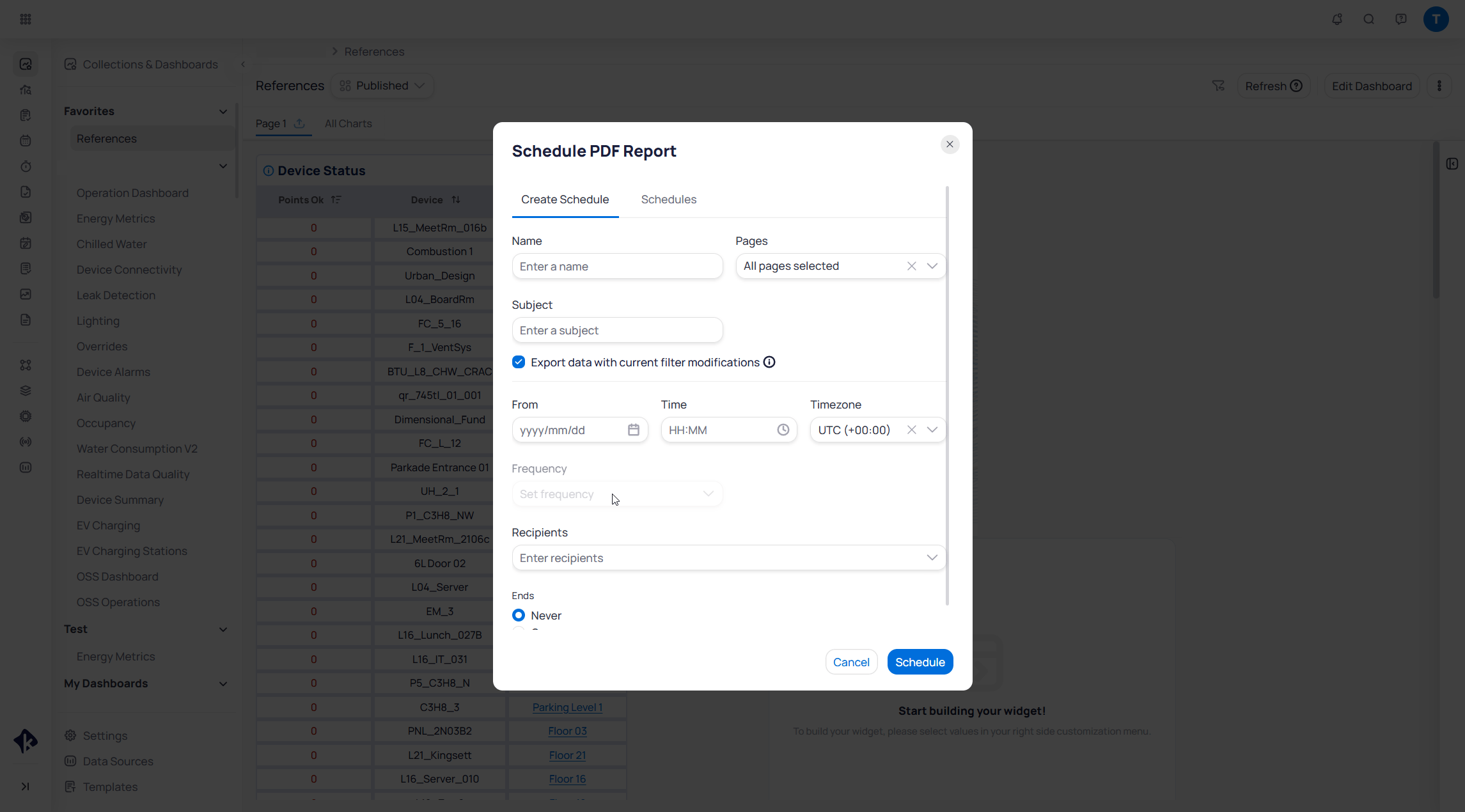
On the Create Schedule tab, complete the following fields:
Schedule PDF Report dialog showing the Create Schedule tab with all configuration fields
Field
Enter a descriptive name for the scheduled report.
Field
Select which dashboard pages to include. Choose All pages selected to export every page, or pick specific pages.
Field
Set the email subject line for the report.
Toggle
When enabled, the exported PDF reflects the current dashboard filter state.
Field
Set the first delivery date, time of day, and timezone. Later sends follow this start time on the chosen frequency.
Field
Choose how often the report repeats after the start time (for example, daily, weekly, or monthly).
Field
Add email addresses for users who should receive the report.
Field
Choose Never for an indefinite schedule, or On to set an end date.
3
Activate the schedule
Select Schedule to activate the recurring report.
Only users with a KODE Labs account can be added as recipients.
Scheduled report emails include both a PDF attachment and a live link to the dashboard. Recipients can use the PDF for a quick review and follow the link for further investigation with interactive filters and real-time data.
Manage scheduled reports
Select the Schedules tab in the Schedule PDF Report dialog to view all active report schedules. The table lists each schedule with its name, frequency, active status, and end date. Use the toggle to enable or disable a schedule, or select the three-dot menu to Edit or Delete it.
Schedules tab showing a list of scheduled reports with name, frequency, active toggle, and end date
Create shareable links for live, interactive dashboard or widget views.
Settings
Manage shared links and scheduled reports from the Building BI settings page.
Last modified on November 2, 2026
Was this page helpful?
{"docsConfig":{"theme":"aspen","$schema":"https://mintlify.com/docs.json","name":"KODE Labs - Product Documentation","colors":{"primary":"#015BFA","light":"#3A9AFF","dark":"#015BFA"},"logo":{"light":"https://mintcdn.com/kodelabs/YfYud6Al4TM68wc2/logo/logo-light.png?fit=max\u0026auto=format\u0026n=YfYud6Al4TM68wc2\u0026q=85\u0026s=00d4ffd6ad7a592e52856804d1a53d12","dark":"https://mintcdn.com/kodelabs/YfYud6Al4TM68wc2/logo/logo-dark.png?fit=max\u0026auto=format\u0026n=YfYud6Al4TM68wc2\u0026q=85\u0026s=a6769f53904d96f5a53ea0c4b3c972d6","href":"/"},"favicon":{"light":"https://mintcdn.com/kodelabs/H3HEEQdnaG21O57-/logo/favicon-light.png?fit=max\u0026auto=format\u0026n=H3HEEQdnaG21O57-\u0026q=85\u0026s=3ae881e353dfb5c2f667e175ec82c799","dark":"https://mintcdn.com/kodelabs/H3HEEQdnaG21O57-/logo/favicon-dark.png?fit=max\u0026auto=format\u0026n=H3HEEQdnaG21O57-\u0026q=85\u0026s=845431bc7d53ce5bf50f56ef53d9137f"},"api":{"params":{"expanded":"closed"},"playground":{"display":"interactive","proxy":true},"examples":{"defaults":"required","languages":["bash","javascript","python","powershell"],"prefill":true,"autogenerate":true},"url":"full"},"appearance":{"default":"light","strict":true},"background":{"color":{"light":"#ffffff","dark":"#121212"}},"navbar":{"links":[{"href":"https://kodelabs.com/contact/","label":"Contact Us"}]},"footer":{"socials":{"x":"https://twitter.com/kodelabs","instagram":"https://www.instagram.com/kode_labs","linkedin":"https://www.linkedin.com/company/kodelabs","youtube":"https://www.youtube.com/channel/UCKCnsgnYtugWxMPzu3UEHkw"},"links":[{"header":"Platform","items":[{"label":"KODE OS","href":"https://kodelabs.com"},{"label":"Integrations","href":"https://kodelabs.com/partners/integrations-library"},{"label":"Security","href":"https://kodelabs.com/security"}]},{"header":"Resources","items":[{"label":"Blog","href":"https://kodelabs.com/blog"},{"label":"Reports \u0026 Guides","href":"https://kodelabs.com/resources"},{"label":"Podcasts \u0026 Webinars","href":"https://kodelabs.com/resources"},{"label":"Case Studies","href":"https://kodelabs.com/case-studies"},{"label":"News","href":"https://kodelabs.com/news"}]},{"header":"Solutions","items":[{"label":"Commercial","href":"https://kodelabs.com/solutions/commercial-real-estate"},{"label":"Corporate","href":"https://kodelabs.com/solutions/corporate"},{"label":"Retail","href":"https://kodelabs.com/solutions/retail"},{"label":"Healthcare","href":"https://kodelabs.com/solutions/healthcare"},{"label":"Education","href":"https://kodelabs.com/solutions/education"}]},{"header":"Company","items":[{"label":"About","href":"https://kodelabs.com/about"},{"label":"Careers","href":"https://kodelabs.com/careers"},{"label":"Internships","href":"https://kodelabs.com/internships"},{"label":"Contact Us","href":"https://kodelabs.com/contact"}]}]},"search":{"prompt":"Search our docs..."},"fonts":{"heading":{"family":"Manrope","weight":600},"body":{"family":"Inter"}},"icons":{"library":"lucide"},"styling":{"eyebrows":"section","codeblocks":{"theme":{"light":"github-light","dark":"github-dark"}},"latex":false},"integrations":{"ga4":{"measurementId":"G-WKYQEE1T4B"}},"banner":{"content":"KODE 3.20 is live. See [what's new in November 2026](/whats-new/2026/v3.20-november-2026).","dismissible":true,"color":{"light":"#015BFA","dark":"#015BFA"}},"errors":{"404":{"redirect":false,"title":"We're working on it!","description":"If you're not seeing this page, we're definitely updating it."}},"contextual":{"options":["copy","view",{"title":"Email KODE support","description":"Contact KODE Labs support for help","icon":"mail","href":"mailto:support@kodelabs.com"}],"display":"toc"},"interaction":{"drilldown":false},"metadata":{"timestamp":true},"navigation":{"global":{"anchors":[{"anchor":"Home","icon":"house","href":"/"},{"anchor":"What's New","icon":"megaphone","href":"/whats-new/2026/v3.20-november-2026"}]},"pages":[]}},"deployment":{"deploymentMetadataValue":{"subdomain":"kodelabs","hasAudioNarration":false,"actualSubdomain":"kodelabs","customDomains":["docs.kodelabs.com"],"gitSource":{"type":"github","owner":"kode-labs","repo":"docs","deployBranch":"main","contentDirectory":"","isPrivate":true,"mountPath":"","label":""},"feedback":{"thumbs":true,"agentFeedback":true},"entitlements":{"AI_CHAT":{"status":"ENABLED"},"REMOVE_BRANDING":{"status":"ENABLED"},"CONTEXTUAL_FEEDBACK":{"status":"ENABLED"},"CODE_SNIPPET_FEEDBACK":{"status":"ENABLED"},"WEB_MCP":{"status":"ENABLED"},"NARRATION":{"status":"ENABLED"}},"buildId":"6af8e4f300819710da52c87a","clientVersion":"0.0.4263","searchFilterCounts":[{"language":"default","tag":"Integrations","count":214},{"language":"default","tag":"All Integrations","count":205},{"language":"default","tag":"KODE API","count":143},{"language":"default","tag":"API reference","count":132},{"language":"default","tag":"EnerG","count":61},{"language":"default","tag":"Meters","count":37},{"language":"default","tag":"Building BI","count":35},{"language":"default","tag":"AssetOps","count":32},{"language":"default","tag":"Cloud BMS","count":31},{"language":"default","tag":"Reference","count":29}],"searchSettings":{"showContentSnippets":true,"isFiltersEnabled":true,"maxResults":10}},"assistantConfig":{"enableStarterQuestions":true,"enableContextualStarterQuestions":true},"basePath":"","hasChatPermissions":true,"hasWebMcpPermissions":true,"toggles":[{"name":"kill-isr","enabled":true,"variant":{"name":"disabled","enabled":false,"feature_enabled":true},"impressionData":false},{"name":"custom-rbac-roles","enabled":true,"variant":{"name":"disabled","enabled":false,"feature_enabled":true},"impressionData":false},{"name":"agent-mintlify-slack","enabled":true,"variant":{"name":"disabled","enabled":false,"feature_enabled":true},"impressionData":false},{"name":"agent-integrations-settings","enabled":true,"variant":{"name":"disabled","enabled":false,"feature_enabled":true},"impressionData":false},{"name":"rbac-expansion","enabled":true,"variant":{"name":"disabled","enabled":false,"feature_enabled":true},"impressionData":false},{"name":"automations-pr-grouping","enabled":true,"variant":{"name":"disabled","enabled":false,"feature_enabled":true},"impressionData":false},{"name":"custom-prefix","enabled":true,"variant":{"name":"disabled","enabled":false,"feature_enabled":true},"impressionData":false},{"name":"analytics-v7","enabled":true,"variant":{"name":"disabled","enabled":false,"feature_enabled":true},"impressionData":false},{"name":"user-flows-analytics","enabled":true,"variant":{"name":"disabled","enabled":false,"feature_enabled":true},"impressionData":false},{"name":"no-publish-flow","enabled":true,"variant":{"name":"disabled","enabled":false,"feature_enabled":true},"impressionData":false},{"name":"workos-onboarding","enabled":true,"variant":{"name":"disabled","enabled":false,"feature_enabled":true},"impressionData":false},{"name":"snapshot-serving-live","enabled":true,"variant":{"name":"disabled","enabled":false,"feature_enabled":true},"impressionData":false},{"name":"stripTemperatureMiddleware","enabled":true,"variant":{"name":"disabled","enabled":false,"feature_enabled":true},"impressionData":false},{"name":"support-platform-pylon-zendesk","enabled":true,"variant":{"name":"disabled","enabled":false,"feature_enabled":true},"impressionData":false},{"name":"snapshot-serving","enabled":true,"variant":{"name":"disabled","enabled":false,"feature_enabled":true},"impressionData":false},{"name":"instant-rollback","enabled":true,"variant":{"name":"disabled","enabled":false,"feature_enabled":true},"impressionData":false},{"name":"granular-notifications-server","enabled":true,"variant":{"name":"disabled","enabled":false,"feature_enabled":true},"impressionData":false},{"name":"granular-notifications","enabled":true,"variant":{"name":"disabled","enabled":false,"feature_enabled":true},"impressionData":false},{"name":"automations-fable","enabled":true,"variant":{"name":"disabled","enabled":false,"feature_enabled":true},"impressionData":false},{"name":"fixed-ai-action-pricing","enabled":true,"variant":{"name":"disabled","enabled":false,"feature_enabled":true},"impressionData":false},{"name":"site-roles","enabled":true,"variant":{"name":"disabled","enabled":false,"feature_enabled":true},"impressionData":false},{"name":"automation-resolve-merge-conflict","enabled":true,"variant":{"name":"disabled","enabled":false,"feature_enabled":true},"impressionData":false},{"name":"scoped-publishing","enabled":true,"variant":{"name":"disabled","enabled":false,"feature_enabled":true},"impressionData":false},{"name":"mintql","enabled":true,"variant":{"name":"disabled","enabled":false,"feature_enabled":true},"impressionData":false},{"name":"page-level-analytics","enabled":true,"variant":{"name":"disabled","enabled":false,"feature_enabled":true},"impressionData":false},{"name":"editor-version-history-v2","enabled":true,"variant":{"name":"disabled","enabled":false,"feature_enabled":true},"impressionData":false},{"name":"billing-page-v2","enabled":true,"variant":{"name":"disabled","enabled":false,"feature_enabled":true},"impressionData":false},{"name":"full-page-search","enabled":true,"variant":{"name":"disabled","enabled":false,"feature_enabled":true},"impressionData":false},{"name":"workspace-projects","enabled":true,"variant":{"name":"disabled","enabled":false,"feature_enabled":true},"impressionData":false},{"name":"assistant-v5","enabled":true,"variant":{"name":"disabled","enabled":false,"feature_enabled":true},"impressionData":false},{"name":"fork-pr-previews","enabled":true,"variant":{"name":"disabled","enabled":false,"feature_enabled":true},"impressionData":false},{"name":"revalidation-jwt","enabled":true,"variant":{"name":"disabled","enabled":false,"feature_enabled":true},"impressionData":false},{"name":"workos-sso-scim","enabled":true,"variant":{"name":"disabled","enabled":false,"feature_enabled":true},"impressionData":false},{"name":"hobby-abuse-scan","enabled":true,"variant":{"name":"disabled","enabled":false,"feature_enabled":true},"impressionData":false},{"name":"dashboard-inbox","enabled":true,"variant":{"name":"disabled","enabled":false,"feature_enabled":true},"impressionData":false},{"name":"workos-signup","enabled":true,"variant":{"name":"disabled","enabled":false,"feature_enabled":true},"impressionData":false},{"name":"turbopuffer-dual-write","enabled":true,"variant":{"name":"disabled","enabled":false,"feature_enabled":true},"impressionData":false},{"name":"workos-enabled","enabled":true,"variant":{"name":"disabled","enabled":false,"feature_enabled":true},"impressionData":false},{"name":"approve-review-flow","enabled":true,"variant":{"name":"disabled","enabled":false,"feature_enabled":true},"impressionData":false},{"name":"editor-metadata","enabled":true,"variant":{"name":"disabled","enabled":false,"feature_enabled":true},"impressionData":false},{"name":"sso-setup-deadline-banner","enabled":true,"variant":{"name":"disabled","enabled":false,"feature_enabled":true},"impressionData":false},{"name":"turbopuffer-serve","enabled":true,"variant":{"name":"disabled","enabled":false,"feature_enabled":true},"impressionData":false},{"name":"live-agents","enabled":true,"variant":{"name":"disabled","enabled":false,"feature_enabled":true},"impressionData":false},{"name":"starter-pricing","enabled":true,"variant":{"name":"control","enabled":true,"payload":{"type":"string","value":"control"},"feature_enabled":true},"impressionData":false},{"name":"llms-txt-v2","enabled":true,"variant":{"name":"disabled","enabled":false,"feature_enabled":true},"impressionData":false},{"name":"wildcard-email-auth","enabled":true,"variant":{"name":"disabled","enabled":false,"feature_enabled":true},"impressionData":false}],"googleFontsInlined":true},"customCss":[{"filePath":"custom.css","href":"/_mintlify/custom/kodelabs/fd6257d3326e3afa/custom.css"}]}
{"page":{"pagePath":"products/building-bi/pdf-exports","slug":"/products/building-bi/pdf-exports","pageMetadata":{"title":"PDF exports and scheduled reports","sidebarTitle":"PDF exports","description":"Export dashboards as PDF files and schedule automated PDF reports for recurring delivery to team members.","icon":"file-down","keywords":["Building BI","PDF export","scheduled reports","automated reports","KODE OS"],"href":"/products/building-bi/pdf-exports"},"description":{"compiledSource":"\"use strict\";\nconst {jsx: _jsx} = arguments[0];\nconst {useMDXComponents: _provideComponents} = arguments[0];\nfunction _createMdxContent(props) {\n const _components = {\n p: \"p\",\n ..._provideComponents(),\n ...props.components\n };\n return _jsx(_components.p, {\n children: \"Export dashboards as PDF files and schedule automated PDF reports for recurring delivery to team members.\"\n });\n}\nfunction MDXContent(props = {}) {\n const {wrapper: MDXLayout} = {\n ..._provideComponents(),\n ...props.components\n };\n return MDXLayout ? _jsx(MDXLayout, {\n ...props,\n children: _jsx(_createMdxContent, {\n ...props\n })\n }) : _createMdxContent(props);\n}\nreturn {\n default: MDXContent\n};\n","frontmatter":{},"scope":{}},"pageType":"default","mdx":{"mdxSource":{"compiledSource":"\"use strict\";const{Fragment:_Fragment,jsx:_jsx,jsxs:_jsxs}=arguments[0];const{useMDXComponents:_provideComponents}=arguments[0];function _createMdxContent(props){const _components={a:`a`,code:`code`,p:`p`,strong:`strong`,tbody:`tbody`,td:`td`,th:`th`,thead:`thead`,tr:`tr`,..._provideComponents(),...props.components},{Accordion,AccordionGroup,Card,CardGroup,Frame,Heading,Info,Note,OptimizedImage,ParamField,Step,Steps,Table,Warning}=_components;if(!Accordion)_missingMdxReference(`Accordion`,true);if(!AccordionGroup)_missingMdxReference(`AccordionGroup`,true);if(!Card)_missingMdxReference(`Card`,true);if(!CardGroup)_missingMdxReference(`CardGroup`,true);if(!Frame)_missingMdxReference(`Frame`,true);if(!Heading)_missingMdxReference(`Heading`,true);if(!Info)_missingMdxReference(`Info`,true);if(!Note)_missingMdxReference(`Note`,true);if(!OptimizedImage)_missingMdxReference(`OptimizedImage`,true);if(!ParamField)_missingMdxReference(`ParamField`,true);if(!Step)_missingMdxReference(`Step`,true);if(!Steps)_missingMdxReference(`Steps`,true);if(!Table)_missingMdxReference(`Table`,true);if(!Warning)_missingMdxReference(`Warning`,true);return _jsxs(_Fragment,{children:[_jsx(_components.p,{children:`Building BI lets you export dashboards as PDF files and schedule automated reports for recurring delivery. Use PDF exports for one-time snapshots. Use scheduled reports for ongoing distribution.`}),`\n`,_jsx(Info,{children:_jsxs(_components.p,{children:[`As an alternative to a static PDF, you can also share a live, interactive dashboard or widget with a `,_jsx(_components.a,{href:`/products/building-bi/dashboards#share-dashboards-and-widgets`,children:`shareable link`}),`. Use a link when recipients need to explore data, not just read a PDF snapshot.`]})}),`\n`,_jsx(AccordionGroup,{children:_jsxs(Accordion,{title:`More info on Shareable links`,id:`more-info-on-shareable-links`,children:[_jsxs(_components.p,{children:[`A shareable link lets people view and interact with a dashboard without a normal KODE OS session. From the dashboard three-dot menu, select `,_jsx(_components.code,{children:`Share`}),`. Set pages, expiration, link title, refresh rate, and allowed IP addresses, then generate the link.`]}),_jsx(_components.p,{children:`Recipients get a read-only interactive view. They can use charts and filters but cannot edit the dashboard. You can also share an individual widget from its three-dot menu.`}),_jsxs(_components.p,{children:[`For full steps, see `,_jsx(_components.a,{href:`/products/building-bi/dashboards#share-dashboards-and-widgets`,children:`Share dashboards and widgets`}),`. For field details, see `,_jsx(_components.a,{href:`/products/building-bi/reference/shared-links-scheduled-reports`,children:`Shared links and scheduled reports`}),`. Manage links portfolio-wide in `,_jsx(_components.a,{href:`/products/building-bi/settings#shared-links`,children:`Building BI settings`}),`.`]})]})}),`\n`,_jsx(Heading,{level:`2`,id:`export-a-dashboard-as-pdf`,children:`Export a dashboard as PDF`}),`\n`,_jsxs(Steps,{children:[_jsxs(Step,{title:`Open the export dialog`,children:[_jsxs(_components.p,{children:[`Navigate to the dashboard you want to export. Select the three-dot menu in the top-right corner and choose `,_jsx(_components.code,{children:`Export`}),`.`]}),_jsx(Frame,{caption:`Dashboard three-dot menu showing Share, Deploy, Export, Version History, and Schedule PDF Report options`,children:_jsx(OptimizedImage,{src:`https://mintcdn.com/kodelabs/B4MTivRlYKOrn2ok/images/kode-os/building-bi/bbi-dashboards-actions-menu.png?fit=max\u0026auto=format\u0026n=B4MTivRlYKOrn2ok\u0026q=85\u0026s=8609ea4442695f5e6e6b5c8dcaf50b6d`,alt:`Operations Dashboard in Published state showing the three-dot menu with Share, Deploy, Export, Version History, and Schedule PDF Report options`,\"data-og-width\":`1024`,width:`1024`,\"data-og-height\":`501`,height:`501`,\"data-path\":`images/kode-os/building-bi/bbi-dashboards-actions-menu.png`,\"data-optimize\":`true`,\"data-opv\":`3`,srcset:`https://mintcdn.com/kodelabs/B4MTivRlYKOrn2ok/images/kode-os/building-bi/bbi-dashboards-actions-menu.png?w=280\u0026fit=max\u0026auto=format\u0026n=B4MTivRlYKOrn2ok\u0026q=85\u0026s=95b5f9e3d6b8dcdd2c8e266c6c03b923 280w, https://mintcdn.com/kodelabs/B4MTivRlYKOrn2ok/images/kode-os/building-bi/bbi-dashboards-actions-menu.png?w=560\u0026fit=max\u0026auto=format\u0026n=B4MTivRlYKOrn2ok\u0026q=85\u0026s=b4fa4601b784117bf34357385421845e 560w, https://mintcdn.com/kodelabs/B4MTivRlYKOrn2ok/images/kode-os/building-bi/bbi-dashboards-actions-menu.png?w=840\u0026fit=max\u0026auto=format\u0026n=B4MTivRlYKOrn2ok\u0026q=85\u0026s=22a9b0c36e53fe56494dd2aa2dfa48e0 840w, https://mintcdn.com/kodelabs/B4MTivRlYKOrn2ok/images/kode-os/building-bi/bbi-dashboards-actions-menu.png?w=1100\u0026fit=max\u0026auto=format\u0026n=B4MTivRlYKOrn2ok\u0026q=85\u0026s=762fac396b68f880417263c75b4d1409 1100w, https://mintcdn.com/kodelabs/B4MTivRlYKOrn2ok/images/kode-os/building-bi/bbi-dashboards-actions-menu.png?w=1650\u0026fit=max\u0026auto=format\u0026n=B4MTivRlYKOrn2ok\u0026q=85\u0026s=f7f08454a357c43f0be311e00e718b0b 1650w, https://mintcdn.com/kodelabs/B4MTivRlYKOrn2ok/images/kode-os/building-bi/bbi-dashboards-actions-menu.png?w=2500\u0026fit=max\u0026auto=format\u0026n=B4MTivRlYKOrn2ok\u0026q=85\u0026s=142031510d3e3ab3610717c687a98b16 2500w`})})]}),_jsxs(Step,{title:`Configure export settings`,children:[_jsx(_components.p,{children:`Set the following options:`}),_jsxs(Table,{children:[_jsx(_components.thead,{children:_jsxs(_components.tr,{children:[_jsx(_components.th,{children:`Field`}),_jsx(_components.th,{children:`Description`})]})}),_jsxs(_components.tbody,{children:[_jsxs(_components.tr,{children:[_jsx(_components.td,{children:_jsx(_components.strong,{children:`File Name`})}),_jsx(_components.td,{children:`The name for the exported PDF file`})]}),_jsxs(_components.tr,{children:[_jsx(_components.td,{children:_jsx(_components.strong,{children:`Pages`})}),_jsxs(_components.td,{children:[`Select `,_jsx(_components.code,{children:`All Pages`}),` or choose specific pages to include`]})]}),_jsxs(_components.tr,{children:[_jsx(_components.td,{children:_jsx(_components.strong,{children:`Export data with current filter modifications`})}),_jsxs(_components.td,{children:[`Include data reflecting any active dashboard filters. See `,_jsx(_components.a,{href:`/products/building-bi/reference/filter-options`,children:`filter options`}),`.`]})]})]})]}),_jsx(Frame,{caption:`Export Dashboard as PDF dialog with file name, page selection, and filter options`,children:_jsx(OptimizedImage,{src:`https://mintcdn.com/kodelabs/B4MTivRlYKOrn2ok/images/kode-os/building-bi/bbi-export-pdf-dialog.png?fit=max\u0026auto=format\u0026n=B4MTivRlYKOrn2ok\u0026q=85\u0026s=75889a193f76cdce9af631616128625c`,alt:`Export Dashboard as PDF dialog showing File Name set to 2026-05-15 Operations Dashboard, All Pages radio selected, Select Pages option, Export data with current filter modifications checkbox checked, and Cancel and Export buttons`,\"data-og-width\":`466`,width:`466`,\"data-og-height\":`404`,height:`404`,\"data-path\":`images/kode-os/building-bi/bbi-export-pdf-dialog.png`,\"data-optimize\":`true`,\"data-opv\":`3`,srcset:`https://mintcdn.com/kodelabs/B4MTivRlYKOrn2ok/images/kode-os/building-bi/bbi-export-pdf-dialog.png?w=280\u0026fit=max\u0026auto=format\u0026n=B4MTivRlYKOrn2ok\u0026q=85\u0026s=078412796bc9ae7b527c96d611cc1986 280w, https://mintcdn.com/kodelabs/B4MTivRlYKOrn2ok/images/kode-os/building-bi/bbi-export-pdf-dialog.png?w=560\u0026fit=max\u0026auto=format\u0026n=B4MTivRlYKOrn2ok\u0026q=85\u0026s=ada2957bf40d15e17d534b1957943f01 560w, https://mintcdn.com/kodelabs/B4MTivRlYKOrn2ok/images/kode-os/building-bi/bbi-export-pdf-dialog.png?w=840\u0026fit=max\u0026auto=format\u0026n=B4MTivRlYKOrn2ok\u0026q=85\u0026s=f4d027c8f531202968f0dfbb113975ff 840w, https://mintcdn.com/kodelabs/B4MTivRlYKOrn2ok/images/kode-os/building-bi/bbi-export-pdf-dialog.png?w=1100\u0026fit=max\u0026auto=format\u0026n=B4MTivRlYKOrn2ok\u0026q=85\u0026s=ca8e679c08b80d8461fc0d9c8b47992d 1100w, https://mintcdn.com/kodelabs/B4MTivRlYKOrn2ok/images/kode-os/building-bi/bbi-export-pdf-dialog.png?w=1650\u0026fit=max\u0026auto=format\u0026n=B4MTivRlYKOrn2ok\u0026q=85\u0026s=cd1e970c93e26a5c4efbec744ece518f 1650w, https://mintcdn.com/kodelabs/B4MTivRlYKOrn2ok/images/kode-os/building-bi/bbi-export-pdf-dialog.png?w=2500\u0026fit=max\u0026auto=format\u0026n=B4MTivRlYKOrn2ok\u0026q=85\u0026s=4ee475d562eb6d60c2fb6afb3166a1d6 2500w`})})]}),_jsx(Step,{title:`Download the PDF`,children:_jsxs(_components.p,{children:[`Select `,_jsx(_components.code,{children:`Export`}),`. The file downloads automatically once processing completes.`]})})]}),`\n`,_jsx(Note,{children:_jsx(_components.p,{children:`Processing time depends on the dashboard size and complexity. Larger dashboards with many widgets take longer to generate.`})}),`\n`,_jsxs(Warning,{children:[_jsx(_components.p,{children:`Pinned dashboard filters are not included in PDF exports. The exported PDF reflects the dashboard data without any pinned filter modifications applied at the time of export.`}),_jsxs(_components.p,{children:[`PDF export uses the saved `,_jsx(_components.a,{href:`/products/building-bi/dashboards#dashboard-parameters`,children:`dashboard parameter`}),` values. A viewer’s temporary what-if is not included.`]})]}),`\n`,_jsx(Heading,{level:`2`,id:`schedule-a-pdf-report`,children:`Schedule a PDF report`}),`\n`,_jsx(_components.p,{children:`Scheduled reports automatically send dashboard PDFs to specified recipients on a recurring basis.`}),`\n`,_jsxs(Steps,{children:[_jsx(Step,{title:`Open the schedule dialog`,children:_jsxs(_components.p,{children:[`Navigate to the dashboard and select the three-dot menu. Choose `,_jsx(_components.code,{children:`Schedule PDF Report`}),`. The dialog has two tabs: `,_jsx(_components.code,{children:`Create Schedule`}),` and `,_jsx(_components.code,{children:`Schedules`}),`.`]})}),_jsxs(Step,{title:`Configure the report`,children:[_jsxs(_components.p,{children:[`On the `,_jsx(_components.code,{children:`Create Schedule`}),` tab, complete the following fields:`]}),_jsx(Frame,{caption:`Schedule PDF Report dialog showing the Create Schedule tab with all configuration fields`,children:_jsx(OptimizedImage,{src:`https://mintcdn.com/kodelabs/B4MTivRlYKOrn2ok/images/kode-os/building-bi/bbi-dashboards-schedule-pdf.png?fit=max\u0026auto=format\u0026n=B4MTivRlYKOrn2ok\u0026q=85\u0026s=db9ad4b12d30ac59ef38234dfc6f01b8`,alt:`Schedule PDF Report dialog showing Create Schedule tab with Name, Pages set to All pages selected, Subject, Export data with current filter modifications checked, From date, Time, Timezone set to UTC, Frequency, Recipients, Ends set to Never, and Cancel and Schedule buttons`,\"data-og-width\":`2291`,width:`2291`,\"data-og-height\":`1270`,height:`1270`,\"data-path\":`images/kode-os/building-bi/bbi-dashboards-schedule-pdf.png`,\"data-optimize\":`true`,\"data-opv\":`3`,srcset:`https://mintcdn.com/kodelabs/B4MTivRlYKOrn2ok/images/kode-os/building-bi/bbi-dashboards-schedule-pdf.png?w=280\u0026fit=max\u0026auto=format\u0026n=B4MTivRlYKOrn2ok\u0026q=85\u0026s=7446407cf7c0bf86830e5157a0bdc8f8 280w, https://mintcdn.com/kodelabs/B4MTivRlYKOrn2ok/images/kode-os/building-bi/bbi-dashboards-schedule-pdf.png?w=560\u0026fit=max\u0026auto=format\u0026n=B4MTivRlYKOrn2ok\u0026q=85\u0026s=19cfb1005d3411df2c8daa4836c425de 560w, https://mintcdn.com/kodelabs/B4MTivRlYKOrn2ok/images/kode-os/building-bi/bbi-dashboards-schedule-pdf.png?w=840\u0026fit=max\u0026auto=format\u0026n=B4MTivRlYKOrn2ok\u0026q=85\u0026s=0f1f75805f2ebe3162bbe95e6868f38d 840w, https://mintcdn.com/kodelabs/B4MTivRlYKOrn2ok/images/kode-os/building-bi/bbi-dashboards-schedule-pdf.png?w=1100\u0026fit=max\u0026auto=format\u0026n=B4MTivRlYKOrn2ok\u0026q=85\u0026s=68872df639d2c1ad7386f3002a2c7975 1100w, https://mintcdn.com/kodelabs/B4MTivRlYKOrn2ok/images/kode-os/building-bi/bbi-dashboards-schedule-pdf.png?w=1650\u0026fit=max\u0026auto=format\u0026n=B4MTivRlYKOrn2ok\u0026q=85\u0026s=6c17a363a6d4be8fe4fa8af46a49a47a 1650w, https://mintcdn.com/kodelabs/B4MTivRlYKOrn2ok/images/kode-os/building-bi/bbi-dashboards-schedule-pdf.png?w=2500\u0026fit=max\u0026auto=format\u0026n=B4MTivRlYKOrn2ok\u0026q=85\u0026s=0b3e90799467e502c7d107bb27b33f82 2500w`})}),_jsx(ParamField,{path:`Name`,type:`Field`,id:`param-name`,children:_jsx(_components.p,{children:`Enter a descriptive name for the scheduled report.`})}),_jsx(ParamField,{path:`Pages`,type:`Field`,id:`param-pages`,children:_jsxs(_components.p,{children:[`Select which dashboard pages to include. Choose `,_jsx(_components.code,{children:`All pages selected`}),` to export every page, or pick specific pages.`]})}),_jsx(ParamField,{path:`Subject`,type:`Field`,id:`param-subject`,children:_jsx(_components.p,{children:`Set the email subject line for the report.`})}),_jsx(ParamField,{path:`Export data with current filter modifications`,type:`Toggle`,id:`param-export-data-with-current-filter-modifications`,children:_jsx(_components.p,{children:`When enabled, the exported PDF reflects the current dashboard filter state.`})}),_jsx(ParamField,{path:`From / Time / Timezone`,type:`Field`,id:`param-from-time-timezone`,children:_jsx(_components.p,{children:`Set the first delivery date, time of day, and timezone. Later sends follow this start time on the chosen frequency.`})}),_jsx(ParamField,{path:`Frequency`,type:`Field`,id:`param-frequency`,children:_jsx(_components.p,{children:`Choose how often the report repeats after the start time (for example, daily, weekly, or monthly).`})}),_jsx(ParamField,{path:`Recipients`,type:`Field`,id:`param-recipients`,children:_jsx(_components.p,{children:`Add email addresses for users who should receive the report.`})}),_jsx(ParamField,{path:`Ends`,type:`Field`,id:`param-ends`,children:_jsxs(_components.p,{children:[`Choose `,_jsx(_components.code,{children:`Never`}),` for an indefinite schedule, or `,_jsx(_components.code,{children:`On`}),` to set an end date.`]})})]}),_jsx(Step,{title:`Activate the schedule`,children:_jsxs(_components.p,{children:[`Select `,_jsx(_components.code,{children:`Schedule`}),` to activate the recurring report.`]})})]}),`\n`,_jsx(Note,{children:_jsx(_components.p,{children:`Only users with a KODE Labs account can be added as recipients.`})}),`\n`,_jsx(_components.p,{children:`Scheduled report emails include both a PDF attachment and a live link to the dashboard. Recipients can use the PDF for a quick review and follow the link for further investigation with interactive filters and real-time data.`}),`\n`,_jsx(Heading,{level:`2`,id:`manage-scheduled-reports`,children:`Manage scheduled reports`}),`\n`,_jsxs(_components.p,{children:[`Select the `,_jsx(_components.code,{children:`Schedules`}),` tab in the Schedule PDF Report dialog to view all active report schedules. The table lists each schedule with its name, frequency, active status, and end date. Use the toggle to enable or disable a schedule, or select the three-dot menu to `,_jsx(_components.code,{children:`Edit`}),` or `,_jsx(_components.code,{children:`Delete`}),` it.`]}),`\n`,_jsx(Frame,{caption:`Schedules tab showing a list of scheduled reports with name, frequency, active toggle, and end date`,children:_jsx(OptimizedImage,{src:`https://mintcdn.com/kodelabs/B4MTivRlYKOrn2ok/images/kode-os/building-bi/bbi-dashboards-schedule-list.png?fit=max\u0026auto=format\u0026n=B4MTivRlYKOrn2ok\u0026q=85\u0026s=8764954d63bb374367882e4920086977`,alt:`Schedule PDF Report dialog showing the Schedules tab with a table listing Monthly Report with Weekly frequency, an Active toggle enabled, no end date, and a three-dot menu with Edit and Delete options`,\"data-og-width\":`540`,width:`540`,\"data-og-height\":`580`,height:`580`,\"data-path\":`images/kode-os/building-bi/bbi-dashboards-schedule-list.png`,\"data-optimize\":`true`,\"data-opv\":`3`,srcset:`https://mintcdn.com/kodelabs/B4MTivRlYKOrn2ok/images/kode-os/building-bi/bbi-dashboards-schedule-list.png?w=280\u0026fit=max\u0026auto=format\u0026n=B4MTivRlYKOrn2ok\u0026q=85\u0026s=488b5760d6ea3073aa44ce196fb3e282 280w, https://mintcdn.com/kodelabs/B4MTivRlYKOrn2ok/images/kode-os/building-bi/bbi-dashboards-schedule-list.png?w=560\u0026fit=max\u0026auto=format\u0026n=B4MTivRlYKOrn2ok\u0026q=85\u0026s=8c1d7cf1fc9a5b186571954bc4f2fa66 560w, https://mintcdn.com/kodelabs/B4MTivRlYKOrn2ok/images/kode-os/building-bi/bbi-dashboards-schedule-list.png?w=840\u0026fit=max\u0026auto=format\u0026n=B4MTivRlYKOrn2ok\u0026q=85\u0026s=7b11c7ef5952147a64e30ce6281165b2 840w, https://mintcdn.com/kodelabs/B4MTivRlYKOrn2ok/images/kode-os/building-bi/bbi-dashboards-schedule-list.png?w=1100\u0026fit=max\u0026auto=format\u0026n=B4MTivRlYKOrn2ok\u0026q=85\u0026s=f1ceb2d824407d3c87e43d437bb45428 1100w, https://mintcdn.com/kodelabs/B4MTivRlYKOrn2ok/images/kode-os/building-bi/bbi-dashboards-schedule-list.png?w=1650\u0026fit=max\u0026auto=format\u0026n=B4MTivRlYKOrn2ok\u0026q=85\u0026s=47423230f5e39caf0cd773cfa4ef4057 1650w, https://mintcdn.com/kodelabs/B4MTivRlYKOrn2ok/images/kode-os/building-bi/bbi-dashboards-schedule-list.png?w=2500\u0026fit=max\u0026auto=format\u0026n=B4MTivRlYKOrn2ok\u0026q=85\u0026s=335a41cb6eb6b8f4d015f8a0cbd8083f 2500w`})}),`\n`,_jsx(Heading,{level:`2`,id:`related-reading`,children:`Related reading`}),`\n`,_jsx(Info,{children:_jsxs(_components.p,{children:[`Manage schedules in `,_jsx(_components.a,{href:`/products/building-bi/settings`,children:`Building BI settings`}),`. For field-level details, see `,_jsx(_components.a,{href:`/products/building-bi/reference/shared-links-scheduled-reports`,children:`Shared links and scheduled reports`}),`. For who can share or schedule, see `,_jsx(_components.a,{href:`/products/building-bi/concepts/how-permissions-work`,children:`How Building BI permissions work`}),`.`]})}),`\n`,_jsx(Heading,{level:`2`,id:`next-steps`,children:`Next steps`}),`\n`,_jsxs(CardGroup,{cols:2,children:[_jsx(Card,{title:`Share dashboards and widgets`,icon:`share-2`,href:`/products/building-bi/dashboards#share-dashboards-and-widgets`,arrow:true,children:_jsx(_components.p,{children:`Create shareable links for live, interactive dashboard or widget views.`})}),_jsx(Card,{title:`Settings`,icon:`settings`,href:`/products/building-bi/settings`,arrow:true,children:_jsx(_components.p,{children:`Manage shared links and scheduled reports from the Building BI settings page.`})})]})]})}function MDXContent(props={}){const{wrapper:MDXLayout}={..._provideComponents(),...props.components};return MDXLayout?_jsx(MDXLayout,{...props,children:_jsx(_createMdxContent,{...props})}):_createMdxContent(props)}return{default:MDXContent};function _missingMdxReference(id,component){throw new Error(`Expected `+(component?`component`:`object`)+\" `\"+id+\"` to be defined: you likely forgot to import, pass, or provide it.\")}","frontmatter":{},"scope":{"codeStyling":{"theme":{"light":"github-light","dark":"github-dark"}},"config":{},"pageMetadata":{"title":"PDF exports and scheduled reports","sidebarTitle":"PDF exports","description":"Export dashboards as PDF files and schedule automated PDF reports for recurring delivery to team members.","icon":"file-down","keywords":["Building BI","PDF export","scheduled reports","automated reports","KODE OS"],"href":"/products/building-bi/pdf-exports"}}},"mdxSourceWithNoJs":null},"mdxExtracts":{"tableOfContents":[{"title":"Export a dashboard as PDF","slug":"export-a-dashboard-as-pdf","depth":2,"children":[]},{"title":"Schedule a PDF report","slug":"schedule-a-pdf-report","depth":2,"children":[]},{"title":"Manage scheduled reports","slug":"manage-scheduled-reports","depth":2,"children":[]},{"title":"Related reading","slug":"related-reading","depth":2,"children":[]},{"title":"Next steps","slug":"next-steps","depth":2,"children":[]}],"codeExamples":{}},"jsLinks":["/_mintlify/custom/kodelabs/ce5d3bd08e955b7b/navbar-assistant.js"],"subdomain":"kodelabs","siteName":"KODE Labs - Product Documentation","title":"PDF exports and scheduled reports - KODE Labs - Product Documentation","contextualStarterQuestions":[{"_id":"6ae8ffb628328bd8d82a831f","deploymentId":"67fd4d9635f314f3a994be65","questionText":"How do I schedule automated reports?","status":"active","generatedBy":"contextual","path":"products/building-bi/pdf-exports","createdAt":"2026-11-02T21:25:10.913Z","updatedAt":"2026-11-02T21:25:10.913Z","__v":0},{"_id":"6ae8ffb628328bd8d82a831e","deploymentId":"67fd4d9635f314f3a994be65","questionText":"How do I export a dashboard as PDF?","status":"active","generatedBy":"contextual","path":"products/building-bi/pdf-exports","createdAt":"2026-11-02T21:25:10.913Z","updatedAt":"2026-11-02T21:25:10.913Z","__v":0}],"navMaps":{"firstHrefInVersion":{},"firstHrefInLanguage":{},"searchTabScopes":[]},"lastModified":"2026-11-02T21:24:50.414Z","gitLastModified":"2026-11-02T21:23:57.000Z","originalFileLocation":"products/building-bi/pdf-exports.mdx"},"headHtml":"\u003cscript data-mint-head>(function(){var d=document.documentElement,p=\"light\";if(!p){try{p=localStorage.getItem(\"isDarkMode\")}catch(e){}if(p==='true')p='dark';else if(p==='false')p='light';if(p!=='light'\u0026\u0026p!=='dark'\u0026\u0026p!=='system')p=\"light\"}var r=p==='system'?(matchMedia(\"(prefers-color-scheme: dark)\").matches?'dark':'light'):p;d.classList.remove(r==='dark'?'light':'dark');d.classList.add(r);d.setAttribute(\"data-theme-preference\",p)})();\u003c/script>\u003cmeta data-mint-head name=\"description\" content=\"Export dashboards as PDF files and schedule automated PDF reports for recurring delivery to team members.\">\u003cmeta data-mint-head name=\"application-name\" content=\"KODE Labs - Product Documentation\">\u003cmeta data-mint-head name=\"generator\" content=\"Mintlify\">\u003clink data-mint-head rel=\"icon\" type=\"image/png\" sizes=\"192x192\" href=\"/mintlify-assets/_mintlify/favicons/kodelabs/vtcGE1gj2AkAE1l2/_generated/favicon/android-chrome-192x192.png\" media=\"(prefers-color-scheme: light)\">\u003clink data-mint-head rel=\"apple-touch-icon\" type=\"image/png\" sizes=\"180x180\" href=\"/mintlify-assets/_mintlify/favicons/kodelabs/vtcGE1gj2AkAE1l2/_generated/favicon/apple-touch-icon.png\">\u003clink data-mint-head rel=\"icon\" type=\"image/png\" sizes=\"16x16\" href=\"/mintlify-assets/_mintlify/favicons/kodelabs/vtcGE1gj2AkAE1l2/_generated/favicon/favicon-16x16.png\" media=\"(prefers-color-scheme: light)\">\u003clink data-mint-head rel=\"icon\" type=\"image/png\" sizes=\"32x32\" href=\"/mintlify-assets/_mintlify/favicons/kodelabs/vtcGE1gj2AkAE1l2/_generated/favicon/favicon-32x32.png\" media=\"(prefers-color-scheme: light)\">\u003clink data-mint-head rel=\"shortcut icon\" type=\"image/x-icon\" href=\"/mintlify-assets/_mintlify/favicons/kodelabs/vtcGE1gj2AkAE1l2/_generated/favicon/favicon.ico\" media=\"(prefers-color-scheme: light)\">\u003clink data-mint-head rel=\"icon\" type=\"image/png\" sizes=\"192x192\" href=\"/mintlify-assets/_mintlify/favicons/kodelabs/vtcGE1gj2AkAE1l2/_generated/favicon-dark/android-chrome-192x192.png\" media=\"(prefers-color-scheme: dark)\">\u003clink data-mint-head rel=\"icon\" type=\"image/png\" sizes=\"16x16\" href=\"/mintlify-assets/_mintlify/favicons/kodelabs/vtcGE1gj2AkAE1l2/_generated/favicon-dark/favicon-16x16.png\" media=\"(prefers-color-scheme: dark)\">\u003clink data-mint-head rel=\"icon\" type=\"image/png\" sizes=\"32x32\" href=\"/mintlify-assets/_mintlify/favicons/kodelabs/vtcGE1gj2AkAE1l2/_generated/favicon-dark/favicon-32x32.png\" media=\"(prefers-color-scheme: dark)\">\u003clink data-mint-head rel=\"shortcut icon\" type=\"image/x-icon\" href=\"/mintlify-assets/_mintlify/favicons/kodelabs/vtcGE1gj2AkAE1l2/_generated/favicon-dark/favicon.ico\" media=\"(prefers-color-scheme: dark)\">\u003cmeta data-mint-head property=\"og:title\" content=\"PDF exports and scheduled reports - KODE Labs - Product Documentation\">\u003cmeta data-mint-head property=\"og:description\" content=\"Export dashboards as PDF files and schedule automated PDF reports for recurring delivery to team members.\">\u003cmeta data-mint-head property=\"og:site_name\" content=\"KODE Labs - Product Documentation\">\u003cmeta data-mint-head property=\"og:url\" content=\"https://docs.kodelabs.com/products/building-bi/pdf-exports\">\u003cmeta data-mint-head property=\"og:type\" content=\"website\">\u003cmeta data-mint-head property=\"og:image\" content=\"https://kodelabs.mintlify.site/_mintlify/api/og/v2?division=Dashboards\u0026amp;title=PDF+exports+and+scheduled+reports\u0026amp;description=Export+dashboards+as+PDF+files+and+schedule+automated+PDF+reports+for+recurring+delivery+to+team+members.\u0026amp;theme=ac252318c016362b89abdbd3\u0026amp;signature=e6bfc318299cca51f928829d25cc4d35006867be412f4c5aff22909b3cc5a0f3\">\u003cmeta data-mint-head property=\"og:image:width\" content=\"1200\">\u003cmeta data-mint-head property=\"og:image:height\" content=\"630\">\u003cmeta data-mint-head name=\"twitter:card\" content=\"summary_large_image\">\u003cmeta data-mint-head name=\"twitter:title\" content=\"PDF exports and scheduled reports - KODE Labs - Product Documentation\">\u003cmeta data-mint-head name=\"twitter:description\" content=\"Export dashboards as PDF files and schedule automated PDF reports for recurring delivery to team members.\">\u003cmeta data-mint-head name=\"twitter:image\" content=\"https://kodelabs.mintlify.site/_mintlify/api/og/v2?division=Dashboards\u0026amp;title=PDF+exports+and+scheduled+reports\u0026amp;description=Export+dashboards+as+PDF+files+and+schedule+automated+PDF+reports+for+recurring+delivery+to+team+members.\u0026amp;theme=ac252318c016362b89abdbd3\u0026amp;signature=e6bfc318299cca51f928829d25cc4d35006867be412f4c5aff22909b3cc5a0f3\">\u003cmeta data-mint-head name=\"twitter:image:width\" content=\"1200\">\u003cmeta data-mint-head name=\"twitter:image:height\" content=\"630\">\u003cmeta data-mint-head name=\"msapplication-config\" content=\"/mintlify-assets/_mintlify/favicons/kodelabs/vtcGE1gj2AkAE1l2/_generated/favicon/browserconfig.xml\">\u003cmeta data-mint-head name=\"apple-mobile-web-app-title\" content=\"KODE Labs - Product Documentation\">\u003cmeta data-mint-head name=\"msapplication-TileColor\" content=\"#015BFA\">\u003clink data-mint-head rel=\"canonical\" href=\"https://docs.kodelabs.com/products/building-bi/pdf-exports\">\u003clink data-mint-head rel=\"alternate\" type=\"application/xml\" href=\"/sitemap.xml\">\u003clink data-mint-head rel=\"alternate\" type=\"text/markdown\" href=\"/products/building-bi/pdf-exports.md\">\u003cscript data-mint-head type=\"application/ld+json\">{\"@context\":\"https://schema.org\",\"@graph\":[{\"@type\":\"Organization\",\"@id\":\"https://docs.kodelabs.com/#organization\",\"name\":\"KODE Labs - Product Documentation\",\"url\":\"https://docs.kodelabs.com\",\"logo\":{\"@type\":\"ImageObject\",\"url\":\"https://mintcdn.com/kodelabs/YfYud6Al4TM68wc2/logo/logo-light.png?fit=max\u0026auto=format\u0026n=YfYud6Al4TM68wc2\u0026q=85\u0026s=00d4ffd6ad7a592e52856804d1a53d12\"}},{\"@type\":\"WebSite\",\"@id\":\"https://docs.kodelabs.com#website\",\"name\":\"KODE Labs - Product Documentation\",\"url\":\"https://docs.kodelabs.com\",\"publisher\":{\"@id\":\"https://docs.kodelabs.com/#organization\"}},{\"@type\":\"WebPage\",\"@id\":\"https://docs.kodelabs.com/products/building-bi/pdf-exports#webpage\",\"url\":\"https://docs.kodelabs.com/products/building-bi/pdf-exports\",\"name\":\"PDF exports and scheduled reports\",\"description\":\"Export dashboards as PDF files and schedule automated PDF reports for recurring delivery to team members.\",\"dateModified\":\"2026-11-02T21:23:57.000Z\",\"isPartOf\":{\"@id\":\"https://docs.kodelabs.com#website\"},\"breadcrumb\":{\"@id\":\"https://docs.kodelabs.com/products/building-bi/pdf-exports#breadcrumb\"}},{\"@type\":\"BreadcrumbList\",\"@id\":\"https://docs.kodelabs.com/products/building-bi/pdf-exports#breadcrumb\",\"itemListElement\":[{\"@type\":\"ListItem\",\"position\":1,\"name\":\"Dashboards\",\"item\":\"https://docs.kodelabs.com/products/building-bi/dashboards\"},{\"@type\":\"ListItem\",\"position\":2,\"name\":\"PDF exports and scheduled reports\",\"item\":\"https://docs.kodelabs.com/products/building-bi/pdf-exports\"}]},{\"@type\":[\"Article\",\"TechArticle\"],\"@id\":\"https://docs.kodelabs.com/products/building-bi/pdf-exports#article\",\"headline\":\"PDF exports and scheduled reports\",\"name\":\"PDF exports and scheduled reports\",\"description\":\"Export dashboards as PDF files and schedule automated PDF reports for recurring delivery to team members.\",\"url\":\"https://docs.kodelabs.com/products/building-bi/pdf-exports\",\"mainEntityOfPage\":{\"@id\":\"https://docs.kodelabs.com/products/building-bi/pdf-exports#webpage\"},\"dateModified\":\"2026-11-02T21:23:57.000Z\",\"keywords\":\"Building BI, PDF export, scheduled reports, automated reports, KODE OS\",\"publisher\":{\"@id\":\"https://docs.kodelabs.com/#organization\"},\"isPartOf\":{\"@id\":\"https://docs.kodelabs.com#website\"}}]}\u003c/script>","agentPointerHref":"/products/building-bi/pdf-exports.md","siteName":"KODE Labs - Product Documentation","nav":{"global":{"anchors":[{"anchor":"Home","icon":"house","href":"/"},{"anchor":"What's New","icon":"megaphone","href":"/whats-new/2026/v3.20-november-2026"}]},"products":[{"product":"Cloud BMS","icon":"https://mintlify.s3.us-west-1.amazonaws.com/kodelabs/images/cloud-bms.svg","description":"Cloud building management, graphics, and control","pages":[{"title":"Cloud BMS","href":"/products/kode-os/get-started/introduction"}]},{"product":"Building BI","icon":"https://mintlify.s3.us-west-1.amazonaws.com/kodelabs/images/bbi.svg","description":"Dashboards and analytics for building performance","groups":[{"group":"Get Started","pages":[{"title":"What is Building BI?","sidebarTitle":"Overview","icon":"chart-bar","tag":"Must Read","href":"/products/building-bi/overview"},{"group":"Tutorials","icon":"graduation-cap","expanded":true,"pages":[{"title":"Build your first dashboard","sidebarTitle":"First dashboard","icon":"graduation-cap","tag":"Start here","mode":"wide","href":"/products/building-bi/tutorials/build-your-first-dashboard"}]}]},{"group":"Dashboards","pages":[{"title":"Dashboards","sidebarTitle":"Dashboards","icon":"layout-dashboard","href":"/products/building-bi/dashboards"},{"title":"Widget customization and styling","sidebarTitle":"Widget customization","description":"Customize widget styles, apply bulk styling, use color palettes, copy and paste styles, and add enhanced graphic views to Building BI dashboards.","icon":"palette","href":"/products/building-bi/widget-customization"},{"title":"PDF exports and scheduled reports","sidebarTitle":"PDF exports","icon":"file-down","href":"/products/building-bi/pdf-exports"},{"title":"Draft mode and version history","sidebarTitle":"Drafts and versions","description":"Learn how drafts, publishing, and version history let you edit Building BI dashboards without risking the live view.","icon":"history","href":"/products/building-bi/concepts/draft-mode-version-history"}]},{"group":"Data sources","pages":[{"title":"Data sources","sidebarTitle":"Data sources","icon":"database","href":"/products/building-bi/data-sources"},{"title":"Calculated fields","sidebarTitle":"Calculated Fields","icon":"calculator","href":"/products/building-bi/reference/calculated-fields"}]},{"group":"Collections \u0026 templates","pages":[{"title":"Collections","sidebarTitle":"Collections","icon":"folder-open","href":"/products/building-bi/collections"},{"title":"Templates","sidebarTitle":"Templates","icon":"copy","href":"/products/building-bi/templates"},{"title":"Deployment manager","sidebarTitle":"Deployment manager","icon":"rocket","href":"/products/building-bi/deployment-manager"}]},{"group":"Administration","pages":[{"title":"Building BI settings","sidebarTitle":"Settings","icon":"settings","href":"/products/building-bi/settings"},{"title":"How Building BI permissions work","sidebarTitle":"Permissions","icon":"shield","href":"/products/building-bi/concepts/how-permissions-work"}]},{"group":"Concepts","pages":[{"title":"The philosophy of Building BI","sidebarTitle":"Philosophy","icon":"lightbulb","href":"/products/building-bi/concepts/philosophy"},{"title":"Physical vs virtual data sources","sidebarTitle":"Physical vs virtual","icon":"database","href":"/products/building-bi/concepts/physical-vs-virtual-data-sources"},{"title":"How filtering works","sidebarTitle":"How filtering works","icon":"filter","href":"/products/building-bi/concepts/how-filtering-works"},{"title":"Drill-through filters","sidebarTitle":"Drill-through filters","icon":"search","href":"/products/building-bi/concepts/drill-through-filters"},{"title":"Choosing visualizations","sidebarTitle":"Choosing visualizations","icon":"chart-column","href":"/products/building-bi/concepts/choosing-visualizations"},{"title":"Dashboard performance","sidebarTitle":"Dashboard performance","icon":"gauge","href":"/products/building-bi/concepts/dashboard-performance"},{"title":"Templating vs deployment","sidebarTitle":"Templating vs deployment","icon":"git-compare","href":"/products/building-bi/concepts/templating-vs-deployment"}]},{"group":"Reference","icon":"book-a","pages":[{"group":"Charts \u0026 widgets","icon":"chart-bar","expanded":false,"pages":[{"title":"Chart types","sidebarTitle":"Chart types","icon":"trending-up","href":"/products/building-bi/reference/chart-types"},{"title":"Chart setup parameters","sidebarTitle":"Chart setup","icon":"settings-2","href":"/products/building-bi/reference/chart-setup-parameters"},{"title":"Chart styling options","sidebarTitle":"Chart styling options","icon":"palette","href":"/products/building-bi/reference/chart-styling-options"},{"title":"Slicer widget","sidebarTitle":"Slicer widget","icon":"sliders-horizontal","href":"/products/building-bi/reference/slicer-widget"},{"title":"Camera widget","sidebarTitle":"Camera widget","icon":"video","href":"/products/building-bi/reference/camera-widget"},{"title":"Color tools","sidebarTitle":"Color tools","icon":"pipette","href":"/products/building-bi/reference/color-tools"},{"title":"Table structures and polling","sidebarTitle":"Polling types","icon":"table","href":"/products/building-bi/reference/table-structures"},{"title":"Keyboard shortcuts","sidebarTitle":"Keyboard shortcuts","icon":"keyboard","href":"/products/building-bi/reference/keyboard-shortcuts"}]},{"group":"Data reference","icon":"table","expanded":false,"pages":[{"title":"Data Source Types \u0026 Databases","sidebarTitle":"Data Source Types \u0026","icon":"book-open","href":"/products/building-bi/reference/data-source-types"},{"title":"Timezone configuration","sidebarTitle":"Timezone","icon":"clock-3","href":"/products/building-bi/reference/timezone-configuration"}]},{"group":"Accessibility","icon":"accessibility","expanded":false,"pages":[{"title":"Accessibility in Building BI","sidebarTitle":"Overview","icon":"accessibility","href":"/products/building-bi/reference/accessibility/overview"},{"title":"View chart data as a table","sidebarTitle":"View as table","icon":"table-2","href":"/products/building-bi/reference/accessibility/view-chart-as-table"}]},{"group":"Filters \u0026 distribution","icon":"share-2","expanded":false,"pages":[{"title":"Filter options","sidebarTitle":"Filter Options","icon":"dot","href":"/products/building-bi/reference/filter-options"},{"title":"Shared links and scheduled reports","sidebarTitle":"Links and reports","icon":"send","href":"/products/building-bi/reference/shared-links-scheduled-reports"},{"title":"Template types","sidebarTitle":"Template types","icon":"copy","href":"/products/building-bi/reference/template-types"}]},{"title":"KODE glossary","sidebarTitle":"Glossary","icon":"book-a","href":"/products/building-bi/glossary"}]}]},{"product":"FDD","icon":"https://mintlify.s3.us-west-1.amazonaws.com/kodelabs/images/fdd.svg","description":"Fault detection and diagnostics for equipment","pages":[{"title":"FDD","href":"/products/fdd/overview"}]},{"product":"FTT","icon":"https://mintlify.s3.us-west-1.amazonaws.com/kodelabs/images/ftt.svg","description":"Automated functional testing and commissioning","pages":[{"title":"FTT","href":"/products/ftt/overview"}]},{"product":"AssetOps","icon":"https://mintlify.s3.us-west-1.amazonaws.com/kodelabs/images/assetops.svg","description":"Asset and maintenance operations","pages":[{"title":"AssetOps","href":"/products/assetops/quickstart/overview"}]},{"product":"EnerG","icon":"https://mintlify.s3.us-west-1.amazonaws.com/kodelabs/images/enerG.svg","description":"Energy management and sustainability reporting","pages":[{"title":"EnerG","href":"/products/energ/get-started/introduction"}]},{"product":"Launchpad","icon":"https://mintlify.s3.us-west-1.amazonaws.com/kodelabs/images/launchpad.svg","description":"Dynamic management for apps, users, and buildings","pages":[{"title":"Launchpad","href":"/products/launchpad/get-started/introduction"}]},{"product":"Mobile app","icon":"https://mintlify.s3.us-west-1.amazonaws.com/kodelabs/images/mobile-app.svg","description":"Monitor and operate buildings from iOS and Android","pages":[{"title":"Mobile app","href":"/products/mobile-app/overview"}]},{"product":"KODE API","icon":"braces","description":"Build services and integrations with KODE OS","pages":[{"title":"KODE API","href":"/products/kode-api"}]},{"product":"Integrations","icon":"cable","description":"Connect 200+ building systems to KODE OS","pages":[{"title":"Integrations","href":"/products/integrations/get-started/introduction"}]},{"product":"What's New","icon":"megaphone","description":"KODE platform release notes and updates","pages":[{"title":"What's New","href":"/whats-new/2026/v3.20-november-2026"}]}]},"basePath":"","title":"PDF exports and scheduled reports - KODE Labs - Product Documentation","deploymentId":"dpl_7AgmPo2RyRWZ68ZGceW618SWGEAz","buildId":"dpl_7AgmPo2RyRWZ68ZGceW618SWGEAz","dynamics":["10e4515597","07c022d89b","a74be98ba7"],"chunks":["BannerMarkdown-Cc6DT3k_.js","dist-BbIWfytJ.js","lib-DMeTj1gb.js","lib-B8HbPgcC.js","katex-Dbtb6Wk7.js","html-void-elements-mCSPHezU.js","marked.esm-CZWythHk.js","Frame-CvAlztAG.js","DynamicMarkdown-T8UDalrO.js","zoom-image-lightbox-HqsaJYmF.js","lightbox-handle-r17bVUz3.js"]}