Understand how view access, edit access, collaborators, and collections control who can use Building BI dashboards.
Building BI separates view access from edit access. You need the right permissions to view dashboards. To edit a dashboard, you must be added as a collaborator. Access is either role-based or user-based.
Two kinds of access
Access
Who gets it
How you grant it
View
Roles
Publish a collection to all roles or a subset of roles
Edit
Individual users
Add them as collaborators on the dashboard
A dashboard that is never published in a collection stays visible only to its owner and collaborators. Collections are how dashboards become visible to the wider organization.For how collections publish visibility by role, see Collections.
Platform roles live in Launchpad
KODE OS roles and product permissions are configured in Launchpad, not inside Building BI.That includes platform permissions such as Manage Collections, which is required to create and manage collections. Assign roles and product permissions in KODE OS apps and roles. For the Building BI permission list, see the Launchpad permissions reference.
Where you manage dashboard access
Use the Collections and Dashboards page in Building BI to manage how dashboards are shared.From there you can:
Publish collections and change which roles can view them
Open a dashboard’s Permissions dialog to manage collaborators
Grant edit access with collaborators
Collaborators are individual users with read and edit access to a specific dashboard.
1
Open Collections and Dashboards
In Building BI, open the Collections and Dashboards page.
2
Open dashboard permissions
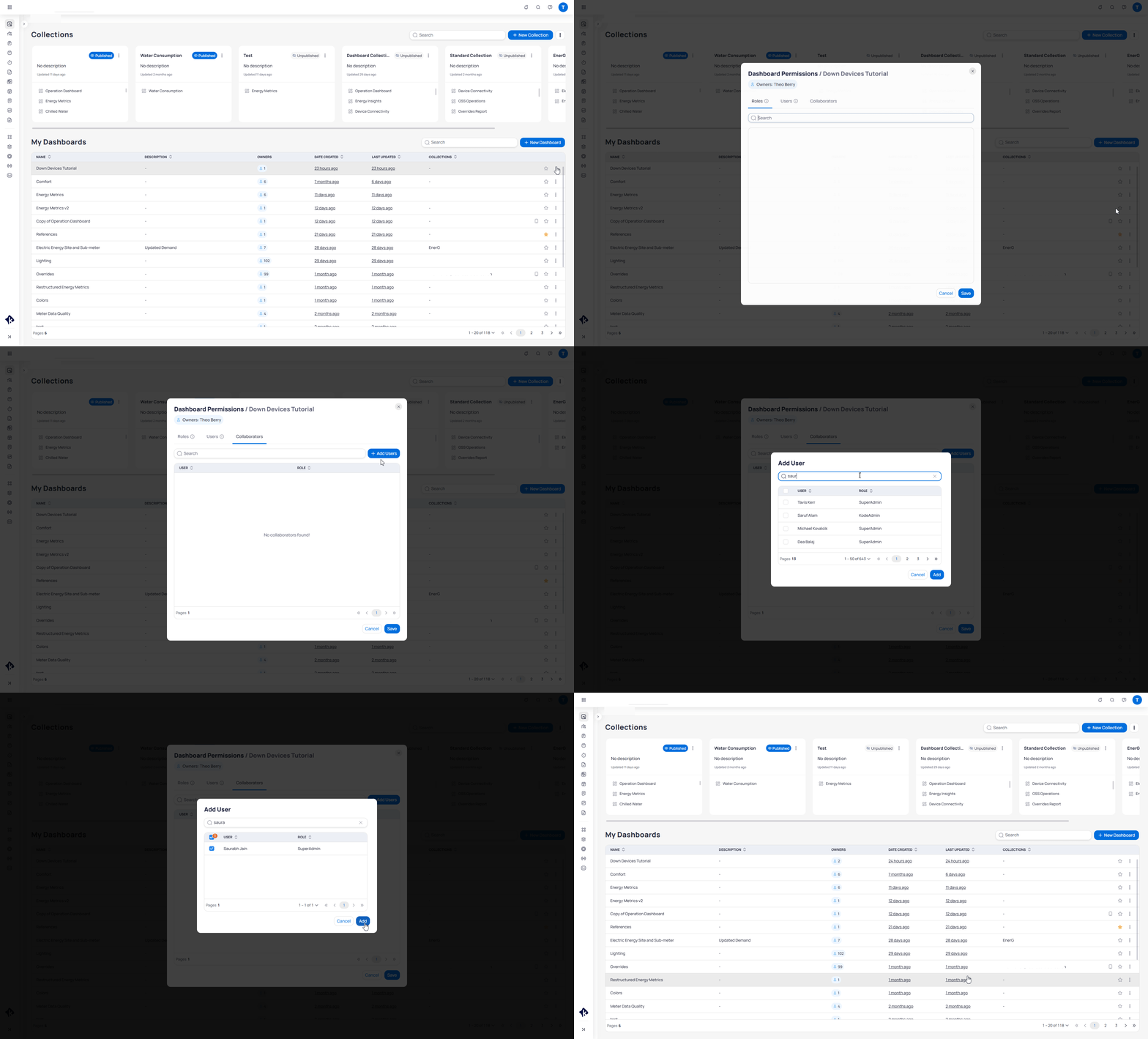
Open the three-dot (…) menu on the dashboard row and select Permissions.
3
Add collaborators
Open the Collaborators tab. Select Add Users, choose the people who should edit the dashboard, then save.
Adding a collaborator from the dashboard Permissions dialog
The person who created the dashboard appears as Owner on the collaborators list. The owner always has collaborator access. You cannot remove the owner’s collaborator access or change who the owner is. Collaborators can also edit the collaborators list.
The Users and Roles tabs in the Permissions dialog are legacy. Collection publishing supersedes them for view access. Use Collaborators for edit access and collections for view access.
Grant view access with collections
View access is role-based and managed through collections. A collection is a published set of dashboards shared with roles in your organization.When you publish a collection, you can publish to all roles or to a subset of roles. You can later change which roles can view the collection with Manage Viewers.Only users with the Manage Collections platform permission can create collections. That permission is managed in Launchpad.
1
Open the collection menu
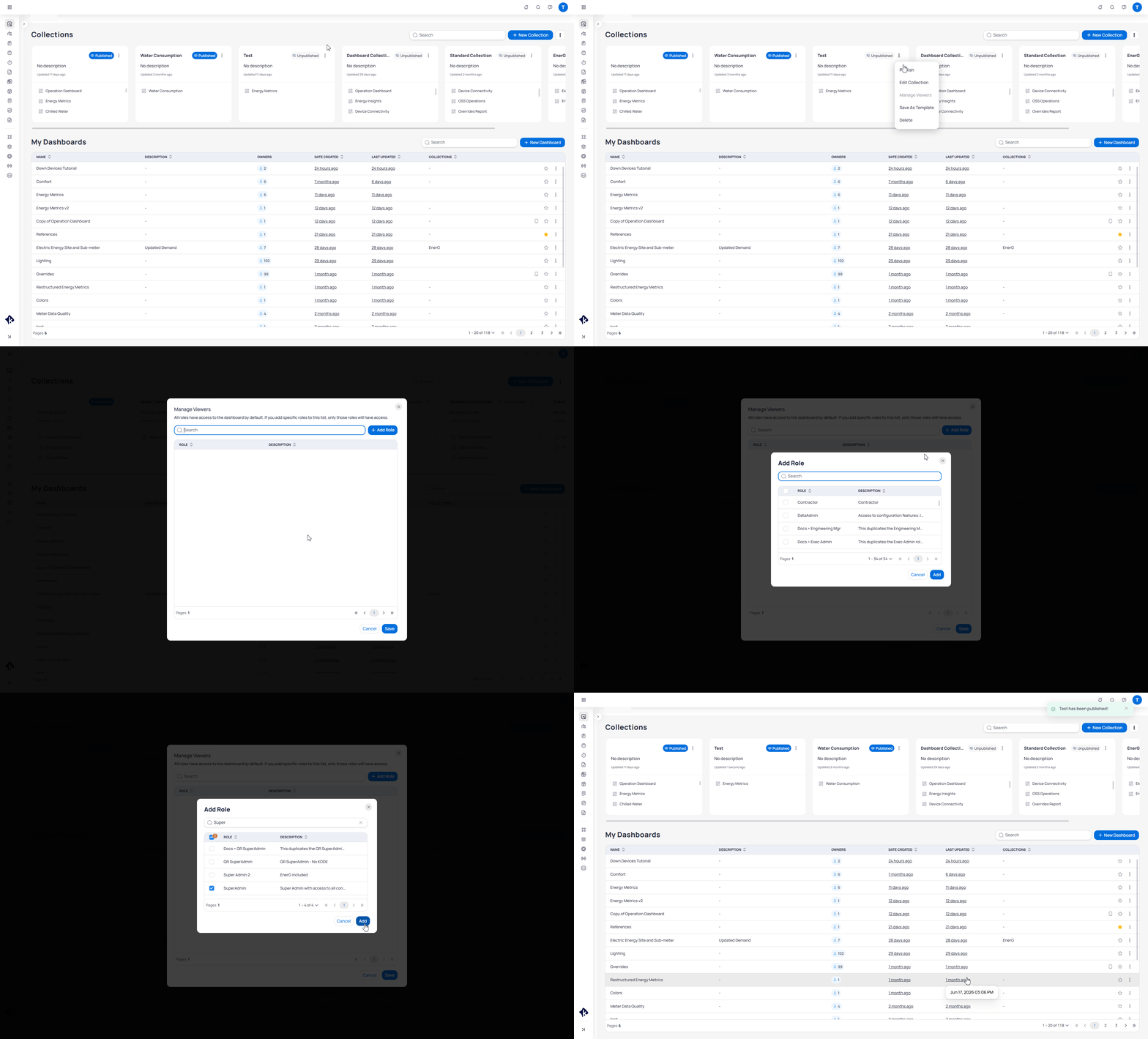
On the Collections and Dashboards page, open the three-dot (…) menu on the collection card.
2
Open Manage Viewers
Select Manage Viewers to see which roles can view the collection.
3
Add roles
Select Add Role, choose the roles that should view the collection, then save.
Adding a role as a collection viewer
For full publish and collection management steps, see Collections.
Next steps
Collections
Publish collections and manage which roles can view them.
Dashboards
Add collaborators from the dashboard permissions dialog.
KODE OS roles
Configure roles and product permissions in Launchpad.
Collections
Publish collections to control dashboard visibility by role.
Last modified on August 19, 2026
Was this page helpful?
{"docsConfig":{"theme":"aspen","$schema":"https://mintlify.com/docs.json","name":"KODE Labs - Product Documentation","colors":{"primary":"#015BFA","light":"#3A9AFF","dark":"#015BFA"},"logo":{"light":"https://mintcdn.com/kodelabs/YfYud6Al4TM68wc2/logo/logo-light.png?fit=max\u0026auto=format\u0026n=YfYud6Al4TM68wc2\u0026q=85\u0026s=00d4ffd6ad7a592e52856804d1a53d12","dark":"https://mintcdn.com/kodelabs/YfYud6Al4TM68wc2/logo/logo-dark.png?fit=max\u0026auto=format\u0026n=YfYud6Al4TM68wc2\u0026q=85\u0026s=a6769f53904d96f5a53ea0c4b3c972d6","href":"/"},"favicon":{"light":"https://mintcdn.com/kodelabs/H3HEEQdnaG21O57-/logo/favicon-light.png?fit=max\u0026auto=format\u0026n=H3HEEQdnaG21O57-\u0026q=85\u0026s=3ae881e353dfb5c2f667e175ec82c799","dark":"https://mintcdn.com/kodelabs/H3HEEQdnaG21O57-/logo/favicon-dark.png?fit=max\u0026auto=format\u0026n=H3HEEQdnaG21O57-\u0026q=85\u0026s=845431bc7d53ce5bf50f56ef53d9137f"},"api":{"params":{"expanded":"closed"},"playground":{"display":"interactive","proxy":true},"examples":{"defaults":"required","languages":["bash","javascript","python","powershell"],"prefill":true,"autogenerate":true},"url":"full"},"appearance":{"default":"light","strict":true},"background":{"color":{"light":"#ffffff","dark":"#121212"}},"navbar":{"links":[{"href":"https://kodelabs.com/contact/","label":"Contact Us"}]},"footer":{"socials":{"x":"https://twitter.com/kodelabs","instagram":"https://www.instagram.com/kode_labs","linkedin":"https://www.linkedin.com/company/kodelabs","youtube":"https://www.youtube.com/channel/UCKCnsgnYtugWxMPzu3UEHkw"},"links":[{"header":"Platform","items":[{"label":"KODE OS","href":"https://kodelabs.com"},{"label":"Integrations","href":"https://kodelabs.com/partners/integrations-library"},{"label":"Security","href":"https://kodelabs.com/security"}]},{"header":"Resources","items":[{"label":"Blog","href":"https://kodelabs.com/blog"},{"label":"Reports \u0026 Guides","href":"https://kodelabs.com/resources"},{"label":"Podcasts \u0026 Webinars","href":"https://kodelabs.com/resources"},{"label":"Case Studies","href":"https://kodelabs.com/case-studies"},{"label":"News","href":"https://kodelabs.com/news"}]},{"header":"Solutions","items":[{"label":"Commercial","href":"https://kodelabs.com/solutions/commercial-real-estate"},{"label":"Corporate","href":"https://kodelabs.com/solutions/corporate"},{"label":"Retail","href":"https://kodelabs.com/solutions/retail"},{"label":"Healthcare","href":"https://kodelabs.com/solutions/healthcare"},{"label":"Education","href":"https://kodelabs.com/solutions/education"}]},{"header":"Company","items":[{"label":"About","href":"https://kodelabs.com/about"},{"label":"Careers","href":"https://kodelabs.com/careers"},{"label":"Internships","href":"https://kodelabs.com/internships"},{"label":"Contact Us","href":"https://kodelabs.com/contact"}]}]},"search":{"prompt":"Search our docs..."},"fonts":{"heading":{"family":"Manrope","weight":600},"body":{"family":"Inter"}},"icons":{"library":"lucide"},"styling":{"eyebrows":"section","codeblocks":{"theme":{"light":"github-light","dark":"github-dark"}},"latex":false},"integrations":{"ga4":{"measurementId":"G-WKYQEE1T4B"}},"banner":{"content":"KODE 3.20 is live. See [what's new in November 2026](/whats-new/2026/v3.20-november-2026).","dismissible":true,"color":{"light":"#015BFA","dark":"#015BFA"}},"errors":{"404":{"redirect":false,"title":"We're working on it!","description":"If you're not seeing this page, we're definitely updating it."}},"contextual":{"options":["copy","view",{"title":"Email KODE support","description":"Contact KODE Labs support for help","icon":"mail","href":"mailto:support@kodelabs.com"}],"display":"toc"},"interaction":{"drilldown":false},"metadata":{"timestamp":true},"navigation":{"global":{"anchors":[{"anchor":"Home","icon":"house","href":"/"},{"anchor":"What's New","icon":"megaphone","href":"/whats-new/2026/v3.20-november-2026"}]},"pages":[]}},"deployment":{"deploymentMetadataValue":{"subdomain":"kodelabs","hasAudioNarration":false,"actualSubdomain":"kodelabs","customDomains":["docs.kodelabs.com"],"gitSource":{"type":"github","owner":"kode-labs","repo":"docs","deployBranch":"main","contentDirectory":"","isPrivate":true,"mountPath":"","label":""},"feedback":{"thumbs":true,"agentFeedback":true},"entitlements":{"AI_CHAT":{"status":"ENABLED"},"REMOVE_BRANDING":{"status":"ENABLED"},"CONTEXTUAL_FEEDBACK":{"status":"ENABLED"},"CODE_SNIPPET_FEEDBACK":{"status":"ENABLED"},"WEB_MCP":{"status":"ENABLED"},"NARRATION":{"status":"ENABLED"}},"buildId":"6af8e4f300819710da52c87a","clientVersion":"0.0.4227","searchFilterCounts":[{"language":"default","tag":"Integrations","count":214},{"language":"default","tag":"All Integrations","count":205},{"language":"default","tag":"KODE API","count":143},{"language":"default","tag":"API reference","count":132},{"language":"default","tag":"EnerG","count":61},{"language":"default","tag":"Meters","count":37},{"language":"default","tag":"Building BI","count":35},{"language":"default","tag":"AssetOps","count":32},{"language":"default","tag":"Cloud BMS","count":31},{"language":"default","tag":"Reference","count":29}],"searchSettings":{"showContentSnippets":true,"isFiltersEnabled":true,"maxResults":10}},"assistantConfig":{"enableStarterQuestions":true,"enableContextualStarterQuestions":true},"basePath":"","hasChatPermissions":true,"hasWebMcpPermissions":true,"toggles":[{"name":"kill-isr","enabled":true,"variant":{"name":"disabled","enabled":false,"feature_enabled":true},"impressionData":false},{"name":"custom-rbac-roles","enabled":true,"variant":{"name":"disabled","enabled":false,"feature_enabled":true},"impressionData":false},{"name":"agent-mintlify-slack","enabled":true,"variant":{"name":"disabled","enabled":false,"feature_enabled":true},"impressionData":false},{"name":"agent-integrations-settings","enabled":true,"variant":{"name":"disabled","enabled":false,"feature_enabled":true},"impressionData":false},{"name":"rbac-expansion","enabled":true,"variant":{"name":"disabled","enabled":false,"feature_enabled":true},"impressionData":false},{"name":"automations-pr-grouping","enabled":true,"variant":{"name":"disabled","enabled":false,"feature_enabled":true},"impressionData":false},{"name":"custom-prefix","enabled":true,"variant":{"name":"disabled","enabled":false,"feature_enabled":true},"impressionData":false},{"name":"analytics-v7","enabled":true,"variant":{"name":"disabled","enabled":false,"feature_enabled":true},"impressionData":false},{"name":"user-flows-analytics","enabled":true,"variant":{"name":"disabled","enabled":false,"feature_enabled":true},"impressionData":false},{"name":"no-publish-flow","enabled":true,"variant":{"name":"disabled","enabled":false,"feature_enabled":true},"impressionData":false},{"name":"workos-onboarding","enabled":true,"variant":{"name":"disabled","enabled":false,"feature_enabled":true},"impressionData":false},{"name":"snapshot-serving-live","enabled":true,"variant":{"name":"disabled","enabled":false,"feature_enabled":true},"impressionData":false},{"name":"stripTemperatureMiddleware","enabled":true,"variant":{"name":"disabled","enabled":false,"feature_enabled":true},"impressionData":false},{"name":"support-platform-pylon-zendesk","enabled":true,"variant":{"name":"disabled","enabled":false,"feature_enabled":true},"impressionData":false},{"name":"snapshot-serving","enabled":true,"variant":{"name":"disabled","enabled":false,"feature_enabled":true},"impressionData":false},{"name":"instant-rollback","enabled":true,"variant":{"name":"disabled","enabled":false,"feature_enabled":true},"impressionData":false},{"name":"granular-notifications-server","enabled":true,"variant":{"name":"disabled","enabled":false,"feature_enabled":true},"impressionData":false},{"name":"granular-notifications","enabled":true,"variant":{"name":"disabled","enabled":false,"feature_enabled":true},"impressionData":false},{"name":"automations-fable","enabled":true,"variant":{"name":"disabled","enabled":false,"feature_enabled":true},"impressionData":false},{"name":"fixed-ai-action-pricing","enabled":true,"variant":{"name":"disabled","enabled":false,"feature_enabled":true},"impressionData":false},{"name":"automation-resolve-merge-conflict","enabled":true,"variant":{"name":"disabled","enabled":false,"feature_enabled":true},"impressionData":false},{"name":"scoped-publishing","enabled":true,"variant":{"name":"disabled","enabled":false,"feature_enabled":true},"impressionData":false},{"name":"mintql","enabled":true,"variant":{"name":"disabled","enabled":false,"feature_enabled":true},"impressionData":false},{"name":"page-level-analytics","enabled":true,"variant":{"name":"disabled","enabled":false,"feature_enabled":true},"impressionData":false},{"name":"editor-version-history-v2","enabled":true,"variant":{"name":"disabled","enabled":false,"feature_enabled":true},"impressionData":false},{"name":"billing-page-v2","enabled":true,"variant":{"name":"disabled","enabled":false,"feature_enabled":true},"impressionData":false},{"name":"full-page-search","enabled":true,"variant":{"name":"disabled","enabled":false,"feature_enabled":true},"impressionData":false},{"name":"workspace-projects","enabled":true,"variant":{"name":"disabled","enabled":false,"feature_enabled":true},"impressionData":false},{"name":"assistant-v5","enabled":true,"variant":{"name":"disabled","enabled":false,"feature_enabled":true},"impressionData":false},{"name":"fork-pr-previews","enabled":true,"variant":{"name":"disabled","enabled":false,"feature_enabled":true},"impressionData":false},{"name":"revalidation-jwt","enabled":true,"variant":{"name":"disabled","enabled":false,"feature_enabled":true},"impressionData":false},{"name":"workos-sso-scim","enabled":true,"variant":{"name":"disabled","enabled":false,"feature_enabled":true},"impressionData":false},{"name":"hobby-abuse-scan","enabled":true,"variant":{"name":"disabled","enabled":false,"feature_enabled":true},"impressionData":false},{"name":"dashboard-inbox","enabled":true,"variant":{"name":"disabled","enabled":false,"feature_enabled":true},"impressionData":false},{"name":"workos-signup","enabled":true,"variant":{"name":"disabled","enabled":false,"feature_enabled":true},"impressionData":false},{"name":"turbopuffer-dual-write","enabled":true,"variant":{"name":"disabled","enabled":false,"feature_enabled":true},"impressionData":false},{"name":"workos-enabled","enabled":true,"variant":{"name":"disabled","enabled":false,"feature_enabled":true},"impressionData":false},{"name":"approve-review-flow","enabled":true,"variant":{"name":"disabled","enabled":false,"feature_enabled":true},"impressionData":false},{"name":"editor-metadata","enabled":true,"variant":{"name":"disabled","enabled":false,"feature_enabled":true},"impressionData":false},{"name":"sso-setup-deadline-banner","enabled":true,"variant":{"name":"disabled","enabled":false,"feature_enabled":true},"impressionData":false},{"name":"turbopuffer-serve","enabled":true,"variant":{"name":"disabled","enabled":false,"feature_enabled":true},"impressionData":false},{"name":"live-agents","enabled":true,"variant":{"name":"disabled","enabled":false,"feature_enabled":true},"impressionData":false},{"name":"starter-pricing","enabled":true,"variant":{"name":"control","enabled":true,"payload":{"type":"string","value":"control"},"feature_enabled":true},"impressionData":false},{"name":"llms-txt-v2","enabled":true,"variant":{"name":"disabled","enabled":false,"feature_enabled":true},"impressionData":false},{"name":"wildcard-email-auth","enabled":true,"variant":{"name":"disabled","enabled":false,"feature_enabled":true},"impressionData":false}],"googleFontsInlined":true},"customCss":[{"filePath":"custom.css","href":"/_mintlify/custom/kodelabs/fd6257d3326e3afa/custom.css"}]}
{"page":{"pagePath":"products/building-bi/concepts/how-permissions-work","slug":"/products/building-bi/concepts/how-permissions-work","pageMetadata":{"title":"How Building BI permissions work","sidebarTitle":"Permissions","description":"Understand how view access, edit access, collaborators, and collections control who can use Building BI dashboards.","icon":"shield","keywords":["Building BI","permissions","collaborators","collections","roles","KODE OS"],"href":"/products/building-bi/concepts/how-permissions-work"},"description":{"compiledSource":"\"use strict\";\nconst {jsx: _jsx} = arguments[0];\nconst {useMDXComponents: _provideComponents} = arguments[0];\nfunction _createMdxContent(props) {\n const _components = {\n p: \"p\",\n ..._provideComponents(),\n ...props.components\n };\n return _jsx(_components.p, {\n children: \"Understand how view access, edit access, collaborators, and collections control who can use Building BI dashboards.\"\n });\n}\nfunction MDXContent(props = {}) {\n const {wrapper: MDXLayout} = {\n ..._provideComponents(),\n ...props.components\n };\n return MDXLayout ? _jsx(MDXLayout, {\n ...props,\n children: _jsx(_createMdxContent, {\n ...props\n })\n }) : _createMdxContent(props);\n}\nreturn {\n default: MDXContent\n};\n","frontmatter":{},"scope":{}},"pageType":"default","mdx":{"mdxSource":{"compiledSource":"\"use strict\";const{Fragment:_Fragment,jsx:_jsx,jsxs:_jsxs}=arguments[0];const{useMDXComponents:_provideComponents}=arguments[0];function _createMdxContent(props){const _components={a:`a`,code:`code`,li:`li`,p:`p`,strong:`strong`,tbody:`tbody`,td:`td`,th:`th`,thead:`thead`,tr:`tr`,ul:`ul`,..._provideComponents(),...props.components},{Card,CardGroup,Frame,Heading,Note,OptimizedImage,Step,Steps,Table}=_components;if(!Card)_missingMdxReference(`Card`,true);if(!CardGroup)_missingMdxReference(`CardGroup`,true);if(!Frame)_missingMdxReference(`Frame`,true);if(!Heading)_missingMdxReference(`Heading`,true);if(!Note)_missingMdxReference(`Note`,true);if(!OptimizedImage)_missingMdxReference(`OptimizedImage`,true);if(!Step)_missingMdxReference(`Step`,true);if(!Steps)_missingMdxReference(`Steps`,true);if(!Table)_missingMdxReference(`Table`,true);return _jsxs(_Fragment,{children:[_jsxs(_components.p,{children:[`Building BI separates `,_jsx(_components.strong,{children:`view`}),` access from `,_jsx(_components.strong,{children:`edit`}),` access. You need the right permissions to view dashboards. To edit a dashboard, you must be added as a collaborator. Access is either role-based or user-based.`]}),`\n`,_jsx(Heading,{level:`2`,id:`two-kinds-of-access`,children:`Two kinds of access`}),`\n`,_jsxs(Table,{children:[_jsx(_components.thead,{children:_jsxs(_components.tr,{children:[_jsx(_components.th,{children:`Access`}),_jsx(_components.th,{children:`Who gets it`}),_jsx(_components.th,{children:`How you grant it`})]})}),_jsxs(_components.tbody,{children:[_jsxs(_components.tr,{children:[_jsx(_components.td,{children:`View`}),_jsx(_components.td,{children:`Roles`}),_jsxs(_components.td,{children:[`Publish a `,_jsx(_components.a,{href:`/products/building-bi/collections`,children:`collection`}),` to all roles or a subset of roles`]})]}),_jsxs(_components.tr,{children:[_jsx(_components.td,{children:`Edit`}),_jsx(_components.td,{children:`Individual users`}),_jsx(_components.td,{children:`Add them as collaborators on the dashboard`})]})]})]}),`\n`,_jsx(_components.p,{children:`A dashboard that is never published in a collection stays visible only to its owner and collaborators. Collections are how dashboards become visible to the wider organization.`}),`\n`,_jsxs(_components.p,{children:[`For how collections publish visibility by role, see `,_jsx(_components.a,{href:`/products/building-bi/collections`,children:`Collections`}),`.`]}),`\n`,_jsx(Heading,{level:`2`,id:`platform-roles-live-in-launchpad`,children:`Platform roles live in Launchpad`}),`\n`,_jsx(_components.p,{children:`KODE OS roles and product permissions are configured in Launchpad, not inside Building BI.`}),`\n`,_jsxs(_components.p,{children:[`That includes platform permissions such as `,_jsx(_components.code,{children:`Manage Collections`}),`, which is required to create and manage collections. Assign roles and product permissions in `,_jsx(_components.a,{href:`/products/launchpad/client-organizations/apps`,children:`KODE OS apps and roles`}),`. For the Building BI permission list, see the `,_jsx(_components.a,{href:`/products/launchpad/client-organizations/apps/permissions-reference#building-bi`,children:`Launchpad permissions reference`}),`.`]}),`\n`,_jsx(Heading,{level:`2`,id:`where-you-manage-dashboard-access`,children:`Where you manage dashboard access`}),`\n`,_jsxs(_components.p,{children:[`Use the `,_jsx(_components.code,{children:`Collections and Dashboards`}),` page in Building BI to manage how dashboards are shared.`]}),`\n`,_jsx(_components.p,{children:`From there you can:`}),`\n`,_jsxs(_components.ul,{children:[`\n`,_jsx(_components.li,{children:`Publish collections and change which roles can view them`}),`\n`,_jsxs(_components.li,{children:[`Open a dashboard’s `,_jsx(_components.code,{children:`Permissions`}),` dialog to manage collaborators`]}),`\n`]}),`\n`,_jsx(Heading,{level:`2`,id:`grant-edit-access-with-collaborators`,children:`Grant edit access with collaborators`}),`\n`,_jsx(_components.p,{children:`Collaborators are individual users with read and edit access to a specific dashboard.`}),`\n`,_jsxs(Steps,{children:[_jsx(Step,{title:`Open Collections and Dashboards`,children:_jsxs(_components.p,{children:[`In Building BI, open the `,_jsx(_components.code,{children:`Collections and Dashboards`}),` page.`]})}),_jsx(Step,{title:`Open dashboard permissions`,children:_jsxs(_components.p,{children:[`Open the three-dot (`,_jsx(_components.code,{children:`…`}),`) menu on the dashboard row and select `,_jsx(_components.code,{children:`Permissions`}),`.`]})}),_jsxs(Step,{title:`Add collaborators`,children:[_jsxs(_components.p,{children:[`Open the `,_jsx(_components.code,{children:`Collaborators`}),` tab. Select `,_jsx(_components.code,{children:`Add Users`}),`, choose the people who should edit the dashboard, then save.`]}),_jsx(Frame,{caption:`Adding a collaborator from the dashboard Permissions dialog`,children:_jsx(OptimizedImage,{src:`https://mintcdn.com/kodelabs/qpy9KTqZYAZmFRi5/images/kode-os/building-bi/bbi-permissions-add-collaborator.gif?s=6f84c3fd641f6d067a14a5262cdb7d48`,alt:`Collections and Dashboards page showing the My Dashboards three-dot menu opened to Permissions, then the Collaborators tab with Add Users to grant edit access`,\"data-og-width\":`2104`,width:`2104`,\"data-og-height\":`1270`,height:`1270`,\"data-path\":`images/kode-os/building-bi/bbi-permissions-add-collaborator.gif`,\"data-optimize\":`true`,\"data-opv\":`3`})})]})]}),`\n`,_jsxs(_components.p,{children:[`The person who created the dashboard appears as `,_jsx(_components.code,{children:`Owner`}),` on the collaborators list. The owner always has collaborator access. You cannot remove the owner’s collaborator access or change who the owner is. Collaborators can also edit the collaborators list.`]}),`\n`,_jsx(Note,{children:_jsxs(_components.p,{children:[`The `,_jsx(_components.code,{children:`Users`}),` and `,_jsx(_components.code,{children:`Roles`}),` tabs in the `,_jsx(_components.code,{children:`Permissions`}),` dialog are legacy. Collection publishing supersedes them for view access. Use `,_jsx(_components.code,{children:`Collaborators`}),` for edit access and collections for view access.`]})}),`\n`,_jsx(Heading,{level:`2`,id:`grant-view-access-with-collections`,children:`Grant view access with collections`}),`\n`,_jsxs(_components.p,{children:[`View access is role-based and managed through collections. A `,_jsx(_components.a,{href:`/products/building-bi/collections`,children:`collection`}),` is a published set of dashboards shared with roles in your organization.`]}),`\n`,_jsxs(_components.p,{children:[`When you publish a collection, you can publish to all roles or to a subset of roles. You can later change which roles can view the collection with `,_jsx(_components.code,{children:`Manage Viewers`}),`.`]}),`\n`,_jsxs(_components.p,{children:[`Only users with the `,_jsx(_components.code,{children:`Manage Collections`}),` platform permission can create collections. That permission is managed in Launchpad.`]}),`\n`,_jsxs(Steps,{children:[_jsx(Step,{title:`Open the collection menu`,children:_jsxs(_components.p,{children:[`On the `,_jsx(_components.code,{children:`Collections and Dashboards`}),` page, open the three-dot (`,_jsx(_components.code,{children:`…`}),`) menu on the collection card.`]})}),_jsx(Step,{title:`Open Manage Viewers`,children:_jsxs(_components.p,{children:[`Select `,_jsx(_components.code,{children:`Manage Viewers`}),` to see which roles can view the collection.`]})}),_jsxs(Step,{title:`Add roles`,children:[_jsxs(_components.p,{children:[`Select `,_jsx(_components.code,{children:`Add Role`}),`, choose the roles that should view the collection, then save.`]}),_jsx(Frame,{caption:`Adding a role as a collection viewer`,children:_jsx(OptimizedImage,{src:`https://mintcdn.com/kodelabs/qpy9KTqZYAZmFRi5/images/kode-os/building-bi/bbi-permissions-manage-viewers.gif?s=7c5e530bc612b28d4d5a5afe51a27e5f`,alt:`Collections and Dashboards page showing a collection three-dot menu opened to Manage Viewers, then Add Role to grant view access by role`,\"data-og-width\":`2104`,width:`2104`,\"data-og-height\":`1270`,height:`1270`,\"data-path\":`images/kode-os/building-bi/bbi-permissions-manage-viewers.gif`,\"data-optimize\":`true`,\"data-opv\":`3`})})]})]}),`\n`,_jsxs(_components.p,{children:[`For full publish and collection management steps, see `,_jsx(_components.a,{href:`/products/building-bi/collections`,children:`Collections`}),`.`]}),`\n`,_jsx(Heading,{level:`2`,id:`next-steps`,children:`Next steps`}),`\n`,_jsxs(CardGroup,{cols:2,children:[_jsx(Card,{title:`Collections`,icon:`folder-open`,href:`/products/building-bi/collections`,arrow:true,children:_jsx(_components.p,{children:`Publish collections and manage which roles can view them.`})}),_jsx(Card,{title:`Dashboards`,icon:`layout-dashboard`,href:`/products/building-bi/dashboards#dashboard-permissions`,arrow:true,children:_jsx(_components.p,{children:`Add collaborators from the dashboard permissions dialog.`})}),_jsx(Card,{title:`KODE OS roles`,icon:`users`,href:`/products/launchpad/client-organizations/apps`,arrow:true,children:_jsx(_components.p,{children:`Configure roles and product permissions in Launchpad.`})}),_jsx(Card,{title:`Collections`,icon:`folder-open`,href:`/products/building-bi/collections`,arrow:true,children:_jsx(_components.p,{children:`Publish collections to control dashboard visibility by role.`})})]})]})}function MDXContent(props={}){const{wrapper:MDXLayout}={..._provideComponents(),...props.components};return MDXLayout?_jsx(MDXLayout,{...props,children:_jsx(_createMdxContent,{...props})}):_createMdxContent(props)}return{default:MDXContent};function _missingMdxReference(id,component){throw new Error(`Expected `+(component?`component`:`object`)+\" `\"+id+\"` to be defined: you likely forgot to import, pass, or provide it.\")}","frontmatter":{},"scope":{"codeStyling":{"theme":{"light":"github-light","dark":"github-dark"}},"config":{},"pageMetadata":{"title":"How Building BI permissions work","sidebarTitle":"Permissions","description":"Understand how view access, edit access, collaborators, and collections control who can use Building BI dashboards.","icon":"shield","keywords":["Building BI","permissions","collaborators","collections","roles","KODE OS"],"href":"/products/building-bi/concepts/how-permissions-work"}}},"mdxSourceWithNoJs":null},"mdxExtracts":{"tableOfContents":[{"title":"Two kinds of access","slug":"two-kinds-of-access","depth":2,"children":[]},{"title":"Platform roles live in Launchpad","slug":"platform-roles-live-in-launchpad","depth":2,"children":[]},{"title":"Where you manage dashboard access","slug":"where-you-manage-dashboard-access","depth":2,"children":[]},{"title":"Grant edit access with collaborators","slug":"grant-edit-access-with-collaborators","depth":2,"children":[]},{"title":"Grant view access with collections","slug":"grant-view-access-with-collections","depth":2,"children":[]},{"title":"Next steps","slug":"next-steps","depth":2,"children":[]}],"codeExamples":{}},"jsLinks":["/_mintlify/custom/kodelabs/ce5d3bd08e955b7b/navbar-assistant.js"],"subdomain":"kodelabs","siteName":"KODE Labs - Product Documentation","title":"How Building BI permissions work - KODE Labs - Product Documentation","contextualStarterQuestions":[{"_id":"6a88bb7c1af966f81de13acc","deploymentId":"67fd4d9635f314f3a994be65","questionText":"Where do I manage dashboard access?","status":"active","generatedBy":"contextual","path":"products/building-bi/concepts/how-permissions-work","createdAt":"2026-08-21T20:56:28.129Z","updatedAt":"2026-08-21T20:56:28.129Z","__v":0},{"_id":"6a88bb7c1af966f81de13acb","deploymentId":"67fd4d9635f314f3a994be65","questionText":"How do I grant edit access?","status":"active","generatedBy":"contextual","path":"products/building-bi/concepts/how-permissions-work","createdAt":"2026-08-21T20:56:28.128Z","updatedAt":"2026-08-21T20:56:28.128Z","__v":0}],"navMaps":{"firstHrefInVersion":{},"firstHrefInLanguage":{}},"lastModified":"2026-08-19T11:09:43.762Z","gitLastModified":"2026-08-19T11:07:50.000Z","originalFileLocation":"products/building-bi/concepts/how-permissions-work.mdx"},"headHtml":"\u003cscript data-mint-head>(function(){var d=document.documentElement,p=\"light\";if(!p){try{p=localStorage.getItem(\"isDarkMode\")}catch(e){}if(p==='true')p='dark';else if(p==='false')p='light';if(p!=='light'\u0026\u0026p!=='dark'\u0026\u0026p!=='system')p=\"light\"}var r=p==='system'?(matchMedia(\"(prefers-color-scheme: dark)\").matches?'dark':'light'):p;d.classList.remove(r==='dark'?'light':'dark');d.classList.add(r);d.setAttribute(\"data-theme-preference\",p)})();\u003c/script>\u003cmeta data-mint-head name=\"description\" content=\"Understand how view access, edit access, collaborators, and collections control who can use Building BI dashboards.\">\u003cmeta data-mint-head name=\"application-name\" content=\"KODE Labs - Product Documentation\">\u003cmeta data-mint-head name=\"generator\" content=\"Mintlify\">\u003clink data-mint-head rel=\"icon\" type=\"image/png\" sizes=\"192x192\" href=\"/mintlify-assets/_mintlify/favicons/kodelabs/vtcGE1gj2AkAE1l2/_generated/favicon/android-chrome-192x192.png\" media=\"(prefers-color-scheme: light)\">\u003clink data-mint-head rel=\"apple-touch-icon\" type=\"image/png\" sizes=\"180x180\" href=\"/mintlify-assets/_mintlify/favicons/kodelabs/vtcGE1gj2AkAE1l2/_generated/favicon/apple-touch-icon.png\">\u003clink data-mint-head rel=\"icon\" type=\"image/png\" sizes=\"16x16\" href=\"/mintlify-assets/_mintlify/favicons/kodelabs/vtcGE1gj2AkAE1l2/_generated/favicon/favicon-16x16.png\" media=\"(prefers-color-scheme: light)\">\u003clink data-mint-head rel=\"icon\" type=\"image/png\" sizes=\"32x32\" href=\"/mintlify-assets/_mintlify/favicons/kodelabs/vtcGE1gj2AkAE1l2/_generated/favicon/favicon-32x32.png\" media=\"(prefers-color-scheme: light)\">\u003clink data-mint-head rel=\"shortcut icon\" type=\"image/x-icon\" href=\"/mintlify-assets/_mintlify/favicons/kodelabs/vtcGE1gj2AkAE1l2/_generated/favicon/favicon.ico\" media=\"(prefers-color-scheme: light)\">\u003clink data-mint-head rel=\"icon\" type=\"image/png\" sizes=\"192x192\" href=\"/mintlify-assets/_mintlify/favicons/kodelabs/vtcGE1gj2AkAE1l2/_generated/favicon-dark/android-chrome-192x192.png\" media=\"(prefers-color-scheme: dark)\">\u003clink data-mint-head rel=\"icon\" type=\"image/png\" sizes=\"16x16\" href=\"/mintlify-assets/_mintlify/favicons/kodelabs/vtcGE1gj2AkAE1l2/_generated/favicon-dark/favicon-16x16.png\" media=\"(prefers-color-scheme: dark)\">\u003clink data-mint-head rel=\"icon\" type=\"image/png\" sizes=\"32x32\" href=\"/mintlify-assets/_mintlify/favicons/kodelabs/vtcGE1gj2AkAE1l2/_generated/favicon-dark/favicon-32x32.png\" media=\"(prefers-color-scheme: dark)\">\u003clink data-mint-head rel=\"shortcut icon\" type=\"image/x-icon\" href=\"/mintlify-assets/_mintlify/favicons/kodelabs/vtcGE1gj2AkAE1l2/_generated/favicon-dark/favicon.ico\" media=\"(prefers-color-scheme: dark)\">\u003cmeta data-mint-head property=\"og:title\" content=\"How Building BI permissions work - KODE Labs - Product Documentation\">\u003cmeta data-mint-head property=\"og:description\" content=\"Understand how view access, edit access, collaborators, and collections control who can use Building BI dashboards.\">\u003cmeta data-mint-head property=\"og:site_name\" content=\"KODE Labs - Product Documentation\">\u003cmeta data-mint-head property=\"og:url\" content=\"https://docs.kodelabs.com/products/building-bi/concepts/how-permissions-work\">\u003cmeta data-mint-head property=\"og:type\" content=\"website\">\u003cmeta data-mint-head property=\"og:image\" content=\"https://kodelabs.mintlify.site/_mintlify/api/og/v2?division=Administration\u0026amp;title=How+Building+BI+permissions+work\u0026amp;description=Understand+how+view+access%2C+edit+access%2C+collaborators%2C+and+collections+control+who+can+use+Building+BI+dashboards.\u0026amp;theme=ac252318c016362b89abdbd3\u0026amp;signature=76f36c8a4c27f6cdd30c52dfde1aaa2ec60ec4ca900a54cbd1fcaac857ca221f\">\u003cmeta data-mint-head property=\"og:image:width\" content=\"1200\">\u003cmeta data-mint-head property=\"og:image:height\" content=\"630\">\u003cmeta data-mint-head name=\"twitter:card\" content=\"summary_large_image\">\u003cmeta data-mint-head name=\"twitter:title\" content=\"How Building BI permissions work - KODE Labs - Product Documentation\">\u003cmeta data-mint-head name=\"twitter:description\" content=\"Understand how view access, edit access, collaborators, and collections control who can use Building BI dashboards.\">\u003cmeta data-mint-head name=\"twitter:image\" content=\"https://kodelabs.mintlify.site/_mintlify/api/og/v2?division=Administration\u0026amp;title=How+Building+BI+permissions+work\u0026amp;description=Understand+how+view+access%2C+edit+access%2C+collaborators%2C+and+collections+control+who+can+use+Building+BI+dashboards.\u0026amp;theme=ac252318c016362b89abdbd3\u0026amp;signature=76f36c8a4c27f6cdd30c52dfde1aaa2ec60ec4ca900a54cbd1fcaac857ca221f\">\u003cmeta data-mint-head name=\"twitter:image:width\" content=\"1200\">\u003cmeta data-mint-head name=\"twitter:image:height\" content=\"630\">\u003cmeta data-mint-head name=\"msapplication-config\" content=\"/mintlify-assets/_mintlify/favicons/kodelabs/vtcGE1gj2AkAE1l2/_generated/favicon/browserconfig.xml\">\u003cmeta data-mint-head name=\"apple-mobile-web-app-title\" content=\"KODE Labs - Product Documentation\">\u003cmeta data-mint-head name=\"msapplication-TileColor\" content=\"#015BFA\">\u003clink data-mint-head rel=\"canonical\" href=\"https://docs.kodelabs.com/products/building-bi/concepts/how-permissions-work\">\u003clink data-mint-head rel=\"alternate\" type=\"application/xml\" href=\"/sitemap.xml\">\u003clink data-mint-head rel=\"alternate\" type=\"text/markdown\" href=\"/products/building-bi/concepts/how-permissions-work.md\">\u003cscript data-mint-head type=\"application/ld+json\">{\"@context\":\"https://schema.org\",\"@graph\":[{\"@type\":\"Organization\",\"@id\":\"https://docs.kodelabs.com/#organization\",\"name\":\"KODE Labs - Product Documentation\",\"url\":\"https://docs.kodelabs.com\",\"logo\":{\"@type\":\"ImageObject\",\"url\":\"https://mintcdn.com/kodelabs/YfYud6Al4TM68wc2/logo/logo-light.png?fit=max\u0026auto=format\u0026n=YfYud6Al4TM68wc2\u0026q=85\u0026s=00d4ffd6ad7a592e52856804d1a53d12\"}},{\"@type\":\"WebSite\",\"@id\":\"https://docs.kodelabs.com#website\",\"name\":\"KODE Labs - Product Documentation\",\"url\":\"https://docs.kodelabs.com\",\"publisher\":{\"@id\":\"https://docs.kodelabs.com/#organization\"}},{\"@type\":\"WebPage\",\"@id\":\"https://docs.kodelabs.com/products/building-bi/concepts/how-permissions-work#webpage\",\"url\":\"https://docs.kodelabs.com/products/building-bi/concepts/how-permissions-work\",\"name\":\"How Building BI permissions work\",\"description\":\"Understand how view access, edit access, collaborators, and collections control who can use Building BI dashboards.\",\"dateModified\":\"2026-08-19T11:07:50.000Z\",\"isPartOf\":{\"@id\":\"https://docs.kodelabs.com#website\"},\"breadcrumb\":{\"@id\":\"https://docs.kodelabs.com/products/building-bi/concepts/how-permissions-work#breadcrumb\"}},{\"@type\":\"BreadcrumbList\",\"@id\":\"https://docs.kodelabs.com/products/building-bi/concepts/how-permissions-work#breadcrumb\",\"itemListElement\":[{\"@type\":\"ListItem\",\"position\":1,\"name\":\"Administration\",\"item\":\"https://docs.kodelabs.com/products/building-bi/settings\"},{\"@type\":\"ListItem\",\"position\":2,\"name\":\"How Building BI permissions work\",\"item\":\"https://docs.kodelabs.com/products/building-bi/concepts/how-permissions-work\"}]},{\"@type\":[\"Article\",\"TechArticle\"],\"@id\":\"https://docs.kodelabs.com/products/building-bi/concepts/how-permissions-work#article\",\"headline\":\"How Building BI permissions work\",\"name\":\"How Building BI permissions work\",\"description\":\"Understand how view access, edit access, collaborators, and collections control who can use Building BI dashboards.\",\"url\":\"https://docs.kodelabs.com/products/building-bi/concepts/how-permissions-work\",\"mainEntityOfPage\":{\"@id\":\"https://docs.kodelabs.com/products/building-bi/concepts/how-permissions-work#webpage\"},\"dateModified\":\"2026-08-19T11:07:50.000Z\",\"keywords\":\"Building BI, permissions, collaborators, collections, roles, KODE OS\",\"publisher\":{\"@id\":\"https://docs.kodelabs.com/#organization\"},\"isPartOf\":{\"@id\":\"https://docs.kodelabs.com#website\"}}]}\u003c/script>","agentPointerHref":"/products/building-bi/concepts/how-permissions-work.md","siteName":"KODE Labs - Product Documentation","nav":{"global":{"anchors":[{"anchor":"Home","icon":"house","href":"/"},{"anchor":"What's New","icon":"megaphone","href":"/whats-new/2026/v3.20-november-2026"}]},"products":[{"product":"Cloud BMS","icon":"https://mintlify.s3.us-west-1.amazonaws.com/kodelabs/images/cloud-bms.svg","description":"Cloud building management, graphics, and control","pages":[{"title":"Cloud BMS","href":"/products/kode-os/get-started/introduction"}]},{"product":"Building BI","icon":"https://mintlify.s3.us-west-1.amazonaws.com/kodelabs/images/bbi.svg","description":"Dashboards and analytics for building performance","groups":[{"group":"Get Started","pages":[{"title":"What is Building BI?","sidebarTitle":"Overview","icon":"chart-bar","tag":"Must Read","href":"/products/building-bi/overview"},{"group":"Tutorials","icon":"graduation-cap","expanded":true,"pages":[{"title":"Build your first dashboard","sidebarTitle":"First dashboard","icon":"graduation-cap","tag":"Start here","mode":"wide","href":"/products/building-bi/tutorials/build-your-first-dashboard"}]}]},{"group":"Dashboards","pages":[{"title":"Dashboards","sidebarTitle":"Dashboards","icon":"layout-dashboard","href":"/products/building-bi/dashboards"},{"title":"Widget customization and styling","sidebarTitle":"Widget customization","icon":"palette","href":"/products/building-bi/widget-customization"},{"title":"PDF exports and scheduled reports","sidebarTitle":"PDF exports","icon":"file-down","href":"/products/building-bi/pdf-exports"},{"title":"Draft mode and version history","sidebarTitle":"Drafts and versions","icon":"history","href":"/products/building-bi/concepts/draft-mode-version-history"}]},{"group":"Data sources","pages":[{"title":"Data sources","sidebarTitle":"Data sources","icon":"database","href":"/products/building-bi/data-sources"},{"title":"Calculated fields","sidebarTitle":"Calculated Fields","icon":"calculator","href":"/products/building-bi/reference/calculated-fields"}]},{"group":"Collections \u0026 templates","pages":[{"title":"Collections","sidebarTitle":"Collections","icon":"folder-open","href":"/products/building-bi/collections"},{"title":"Templates","sidebarTitle":"Templates","icon":"copy","href":"/products/building-bi/templates"},{"title":"Deployment manager","sidebarTitle":"Deployment manager","icon":"rocket","href":"/products/building-bi/deployment-manager"}]},{"group":"Administration","pages":[{"title":"Building BI settings","sidebarTitle":"Settings","description":"View and manage shared links, scheduled reports, custom color palettes, and templates from the Building BI Settings page.","icon":"settings","href":"/products/building-bi/settings"},{"title":"How Building BI permissions work","sidebarTitle":"Permissions","icon":"shield","href":"/products/building-bi/concepts/how-permissions-work"}]},{"group":"Concepts","pages":[{"title":"The philosophy of Building BI","sidebarTitle":"Philosophy","description":"Learn how Building BI collapses KODE OS modules into a single pane of glass tailored to each user's workflow.","icon":"lightbulb","href":"/products/building-bi/concepts/philosophy"},{"title":"Physical vs virtual data sources","sidebarTitle":"Physical vs virtual","icon":"database","href":"/products/building-bi/concepts/physical-vs-virtual-data-sources"},{"title":"How filtering works","sidebarTitle":"How filtering works","icon":"filter","href":"/products/building-bi/concepts/how-filtering-works"},{"title":"Drill-through filters","sidebarTitle":"Drill-through filters","icon":"search","href":"/products/building-bi/concepts/drill-through-filters"},{"title":"Choosing visualizations","sidebarTitle":"Choosing visualizations","icon":"chart-column","href":"/products/building-bi/concepts/choosing-visualizations"},{"title":"Dashboard performance","sidebarTitle":"Dashboard performance","icon":"gauge","href":"/products/building-bi/concepts/dashboard-performance"},{"title":"Templating vs deployment","sidebarTitle":"Templating vs deployment","icon":"git-compare","href":"/products/building-bi/concepts/templating-vs-deployment"}]},{"group":"Reference","icon":"book-a","pages":[{"group":"Charts \u0026 widgets","icon":"chart-bar","expanded":false,"pages":[{"title":"Chart types","sidebarTitle":"Chart types","icon":"trending-up","href":"/products/building-bi/reference/chart-types"},{"title":"Chart setup parameters","sidebarTitle":"Chart setup","icon":"settings-2","href":"/products/building-bi/reference/chart-setup-parameters"},{"title":"Chart styling options","sidebarTitle":"Chart styling options","icon":"palette","href":"/products/building-bi/reference/chart-styling-options"},{"title":"Slicer widget","sidebarTitle":"Slicer widget","icon":"sliders-horizontal","href":"/products/building-bi/reference/slicer-widget"},{"title":"Camera widget","sidebarTitle":"Camera widget","icon":"video","href":"/products/building-bi/reference/camera-widget"},{"title":"Color tools","sidebarTitle":"Color tools","icon":"pipette","href":"/products/building-bi/reference/color-tools"},{"title":"Table structures and polling","sidebarTitle":"Polling types","icon":"table","href":"/products/building-bi/reference/table-structures"},{"title":"Keyboard shortcuts","sidebarTitle":"Keyboard shortcuts","icon":"keyboard","href":"/products/building-bi/reference/keyboard-shortcuts"}]},{"group":"Data reference","icon":"table","expanded":false,"pages":[{"title":"Data Source Types \u0026 Databases","sidebarTitle":"Data Source Types \u0026","icon":"book-open","href":"/products/building-bi/reference/data-source-types"},{"title":"Timezone configuration","sidebarTitle":"Timezone","icon":"clock-3","href":"/products/building-bi/reference/timezone-configuration"}]},{"group":"Accessibility","icon":"accessibility","expanded":false,"pages":[{"title":"Accessibility in Building BI","sidebarTitle":"Overview","icon":"accessibility","href":"/products/building-bi/reference/accessibility/overview"},{"title":"View chart data as a table","sidebarTitle":"View as table","icon":"table-2","href":"/products/building-bi/reference/accessibility/view-chart-as-table"}]},{"group":"Filters \u0026 distribution","icon":"share-2","expanded":false,"pages":[{"title":"Filter options","sidebarTitle":"Filter Options","icon":"dot","href":"/products/building-bi/reference/filter-options"},{"title":"Shared links and scheduled reports","sidebarTitle":"Links and reports","icon":"send","href":"/products/building-bi/reference/shared-links-scheduled-reports"},{"title":"Template types","sidebarTitle":"Template types","icon":"copy","href":"/products/building-bi/reference/template-types"}]},{"title":"KODE glossary","sidebarTitle":"Glossary","icon":"book-a","href":"/products/building-bi/glossary"}]}]},{"product":"FDD","icon":"https://mintlify.s3.us-west-1.amazonaws.com/kodelabs/images/fdd.svg","description":"Fault detection and diagnostics for equipment","pages":[{"title":"FDD","href":"/products/fdd/overview"}]},{"product":"FTT","icon":"https://mintlify.s3.us-west-1.amazonaws.com/kodelabs/images/ftt.svg","description":"Automated functional testing and commissioning","pages":[{"title":"FTT","href":"/products/ftt/overview"}]},{"product":"AssetOps","icon":"https://mintlify.s3.us-west-1.amazonaws.com/kodelabs/images/assetops.svg","description":"Asset and maintenance operations","pages":[{"title":"AssetOps","href":"/products/assetops/quickstart/overview"}]},{"product":"EnerG","icon":"https://mintlify.s3.us-west-1.amazonaws.com/kodelabs/images/enerG.svg","description":"Energy management and sustainability reporting","pages":[{"title":"EnerG","href":"/products/energ/get-started/introduction"}]},{"product":"Launchpad","icon":"https://mintlify.s3.us-west-1.amazonaws.com/kodelabs/images/launchpad.svg","description":"Dynamic management for apps, users, and buildings","pages":[{"title":"Launchpad","href":"/products/launchpad/get-started/introduction"}]},{"product":"Mobile app","icon":"https://mintlify.s3.us-west-1.amazonaws.com/kodelabs/images/mobile-app.svg","description":"Monitor and operate buildings from iOS and Android","pages":[{"title":"Mobile app","href":"/products/mobile-app/overview"}]},{"product":"KODE API","icon":"braces","description":"Build services and integrations with KODE OS","pages":[{"title":"KODE API","href":"/products/kode-api"}]},{"product":"Integrations","icon":"cable","description":"Connect 200+ building systems to KODE OS","pages":[{"title":"Integrations","href":"/products/integrations/get-started/introduction"}]},{"product":"What's New","icon":"megaphone","description":"KODE platform release notes and updates","pages":[{"title":"What's New","href":"/whats-new/2026/v3.20-november-2026"}]}]},"basePath":"","title":"How Building BI permissions work - KODE Labs - Product Documentation","deploymentId":"dpl_vSEmv961Ncyvz1psVwgUnTXQMSYk","buildId":"dpl_vSEmv961Ncyvz1psVwgUnTXQMSYk","dynamics":["10e4515597","07c022d89b","a74be98ba7"],"chunks":["BannerMarkdown-DnSAhvaM.js","dist-DIfYWxfm.js","lib-DMeTj1gb.js","lib-B8HbPgcC.js","katex-Dbtb6Wk7.js","html-void-elements-mCSPHezU.js","marked.esm-CZWythHk.js","Frame-BRsfsIIG.js","DynamicMarkdown-NFqqduU7.js","zoom-image-lightbox-BguUeq2N.js","lightbox-handle-r17bVUz3.js"]}