


November 10, 2026
KODE 3.20 introduces the public for bulk automations and executions across buildings, a Weather device in , and Check Usage and Replace Usage for data sources. We’ve also shipped assisted meter mapping in , floor plan sections, and Trends usability updates.KODE API for bulk automations
Run portfolio work through one versioned HTTPS interface instead of clicking building by building.Authenticate with a service account, then list buildings, devices, and points your account can reach. From there you can ingest device data, write setpoints, sync AssetOps work orders, manage users, and apply ontology templates at scale.For large executions, use the bulk paths:- Batch writes change many points on one data source in a single request.
- Mass write discovers point groups across buildings, validates a plan, then runs and tracks the operation to completion.
- Templating maps groups of points to ontology fields, then tracks the apply or clear operation.
- Actions list and invoke data source commands, such as discovery, with the fields each action requires.
- Batch device updates create, update, or delete many devices in one call.
Weather device in KODE OS
Buildings with Cloud BMS enabled receive a KODE-managed Weather device. Outdoor conditions appear as standard points next to equipment data. You do not connect a weather API key or install weather hardware for this feed.OpenDevices, search for Weather, and use the Trends tab like any other device. Plot Outside Air Temp, humidity, pressure, wind, precipitation, weather code, and enthalpy alongside equipment readings.KODE protects the Weather datasource, device, and points so the feed stays intact. Recommended weather-aware rules are available in the KODE routine library. Enable the groups that match site equipment to validate outdoor sensors, watch economizers, and put heating and cooling in outdoor context.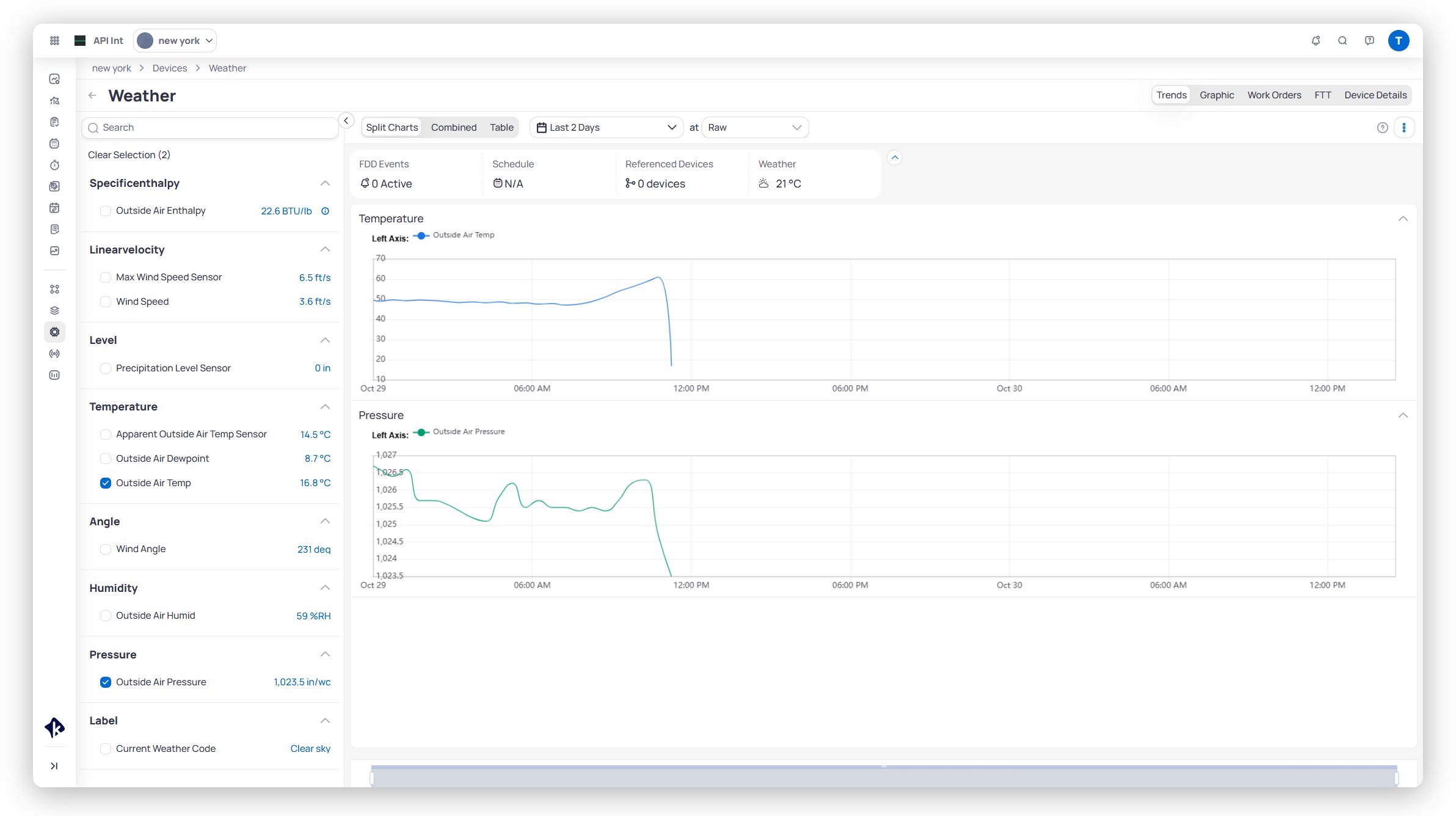
Open Weather on Devices and trend outdoor conditions next to equipment
Check Usage and Replace Usage in Building BI
Retiring a data source no longer means hunting through every dashboard by hand.From the data source row menu, chooseCheck Usage to see how many published and unpublished dashboards read from that source. Choose Replace Usage to map columns, metrics, calculated columns, URLs, actions, and parameters onto another data source in the same organization.Auto Resolve matches items with the same internal name and data type. Map the rest by hand, review unmapped items, then keep the original source or delete it after the move. Both sources lock while the job runs. Widgets that still point at a deleted source show a clear error instead of failing silently.Dashboard templates and Building Data Hub pipelines stay on the original source. Replace Usage moves dashboard and filter references only.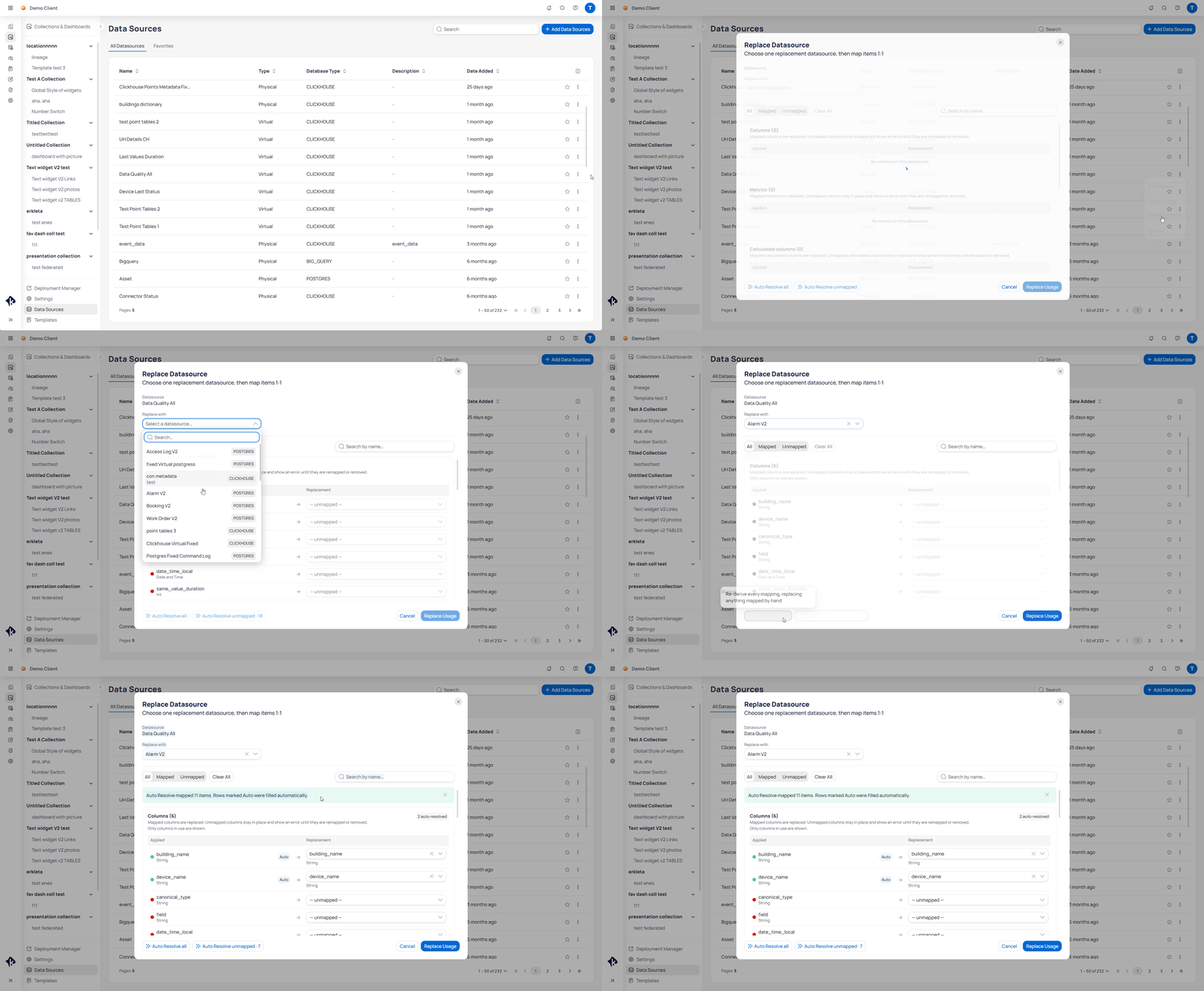
Check usage, map fields, and replace references in one guided flow
Assisted meter mapping in EnerG
The portfolio Meters page is one workspace for browsing meters, editing properties, and mapping meters to buildings and spaces.In Map meters mode, EnerG proposes buildings with a 0–100 match score, evidence reasons, and competing candidates. Approve one meter, a selection, or all eligible suggestions in the current filters. A high score alone does not commit a mapping.Batch updates change permitted fields across many meters and can be reversed. Excel download and upload support offline reference mapping with a preview of ready, blocked, unchanged, and skipped rows.Learn more about assisted meter mappingFull release notes
User-facing product updates in 3.20.KODE API — Automations and building data
- Public KODE API — Authenticate with a service account, then work with buildings, data sources, devices, points, timeseries, schedules, ontology, users, spaces, tenants, meters, actions, and AssetOps work orders. See What is the KODE API?.
- Bulk writes and executions — Batch point writes, mass write across buildings with validate-and-track operations, batch device create/update/delete, templating apply and clear, and data source action invoke. See Write to points and Apply templates to points.
- Ingest and connectors — Create devices and points on a KODE API data source, send current or historical values, and manage KODE API connectors. See Ingest device data and Connect your own devices.
KODE OS — Devices, graphics, and Trends
- Weather device — Cloud BMS buildings get a KODE-managed Weather device (
externalWeather) with outdoor temperature, humidity, pressure, wind, precipitation, weather code, and enthalpy points. Recommended weather FDD rules are available in the KODE routine library. See Weather device. - Floor plan sections — Draw nested sections on one floor graphic so detail appears only when viewers click or zoom in. Canvas images support up to 3840×2160. See Floor plan sections.
- Trends usability — Points group by ontology under each device. Collapse devices, use Select all, and open a tabular raw data view for up to one week. See Trends.
Building BI — Data sources
- Check Usage and Replace Usage — From the data source row menu, review Published and Unpublished dashboard counts, map references to another source, or delete with a defined error state for dependent widgets and filters. Dashboard templates and Building Data Hub pipelines are not migrated. See Replace or delete a data source.
- Replace datasources permission — Launchpad includes a
Replace datasourceswrite permission next toDelete datasources. See Permissions reference.
EnerG — Meters
- Meter management and assisted mapping — Browse, Edit properties, and Map meters modes on portfolio Meters. Match scores, bulk approval, batch property updates, and Excel reference mapping. See Portfolio meters.