

September 15th, 2026
KODE 3.18 adds Stream Mode for live event monitoring and adds a Camera widget for . We’ve also shipped accumulator and differential readings for Manual Meters in , FTT parameter permissions, six new API connectors, and AssetOps filtering and import improvements.Stream Mode in FDD
Stream Mode inserts new events automatically. Open the full-page Event Stream for a command-center display or facility TV. New rows land at the top, highlight for one to two seconds, and show a Just Now badge while they are fresh. Filters stay active. Sorting stays locked to Most Recent.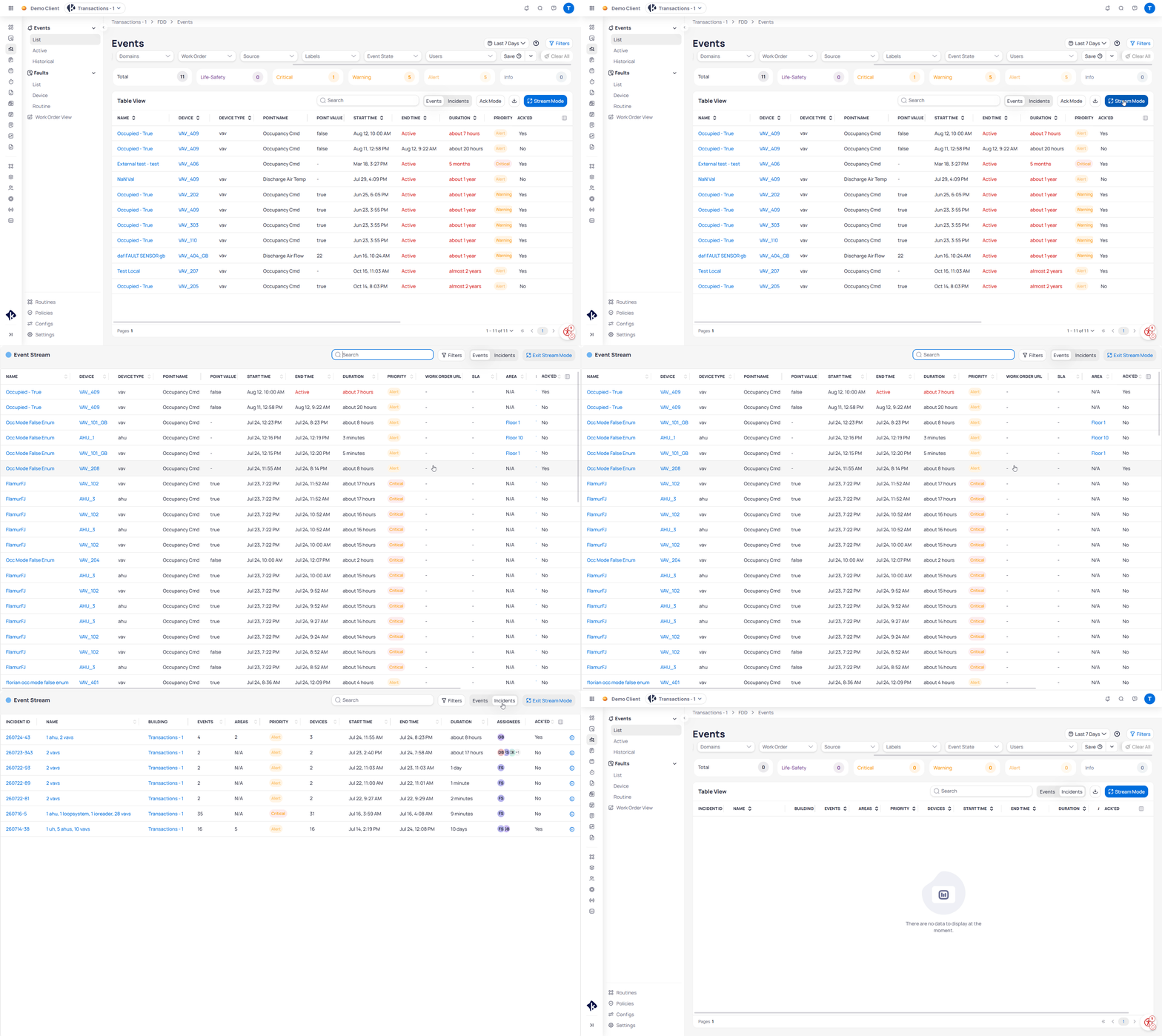
Enter Stream Mode to monitor new events, then exit when you need bulk actions.
Camera widget in Building BI
Add a live camera feed to any dashboard from the Chart List. Search for Camera, set Camera Type (for example, iFrame), paste a Source URL, and select Embed. Resize and reposition the widget like any other chart.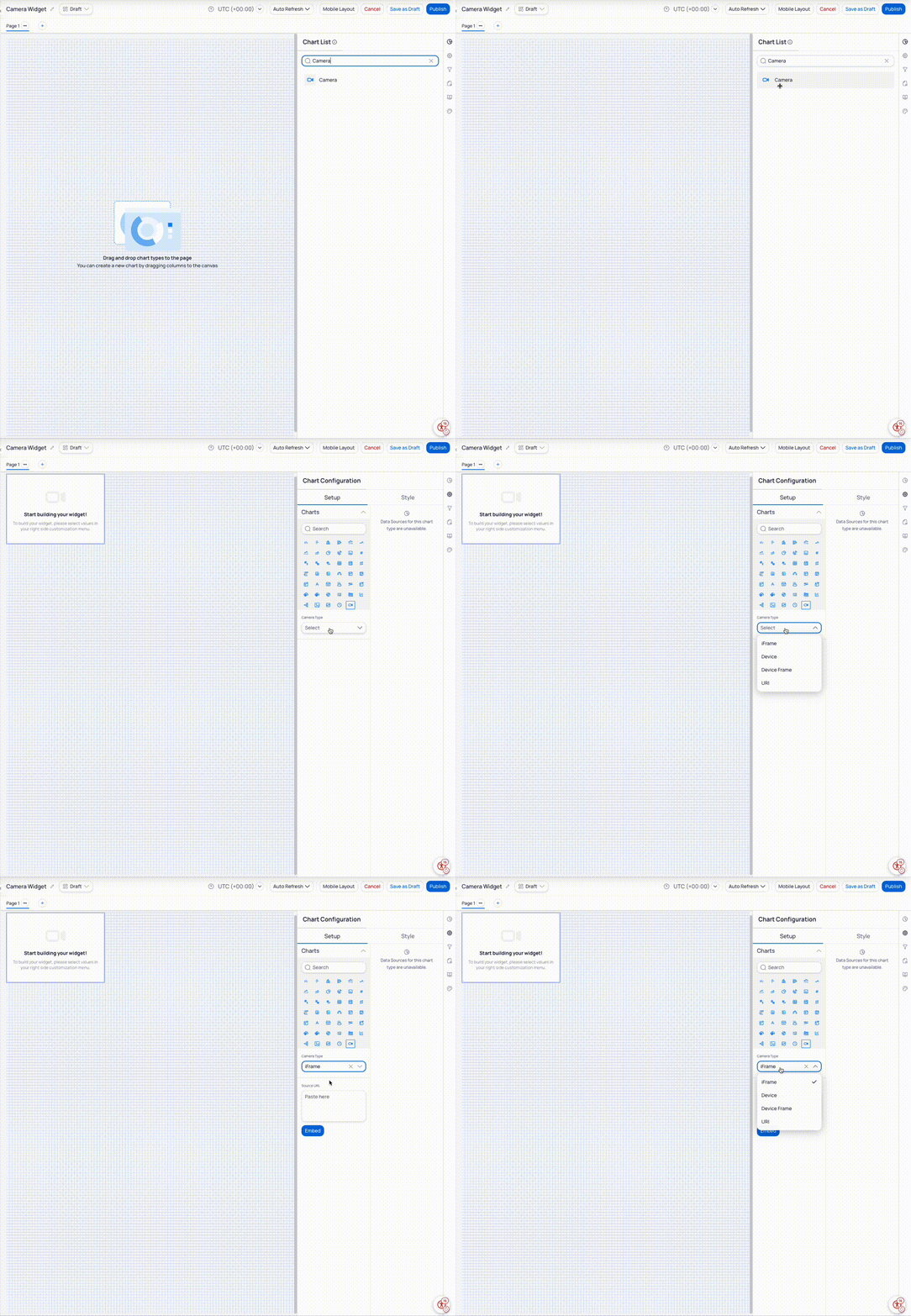
Add Camera from the Chart List, then configure Camera Type and Source URL.
Full release notes
User-facing product updates in 3.18.Integrations (API)
- Kastle API — Collect card access and alarm events through Event Connect REST API v3. Historical collection supports a 90-day lookback. See Kastle.
- Veolia API — Collect electric meter status, cumulative energy, and demand from EMSYS or HUBGRADE. See Veolia.
- MaintainX API — Collect assets, current meter readings, and work orders from MaintainX. See MaintainX.
- Johnson Controls Metasys API — Collect equipment, points, historical trends, alarms, and audits through Metasys REST API v6. Supported environments can also expose point commands. See Johnson Controls Metasys.
- Framery API — Monitor smart pod occupancy and connection status. Collect usage sessions and up to 12 months of session history. See Framery.
- Lambent Spaces API — Collect Wi-Fi-derived occupancy, utilization, and capacity for building levels and zones. See Lambent Spaces.
- TKE Service Record API 3.0 — Service records now include ticket priority and localized service category in KODE OS work orders. See TKE Elevator.
FDD — Fault Detection and Diagnostics
- Stream Mode — Automatic event insertion without manual refresh. Blue highlight for one to two seconds. Just Now badge under one minute. Sort locked to Most Recent. Filters persist. See Stream Mode.
- Create individual work orders in bulk — Select several events and create one work order for each. Review required fields, send ready records together, and retry incomplete items. See Create work orders per event.
FTT — Functional Testing Tool
- View FTT Parameters for Manual Test — Separate Write permission that shows or hides editable parameters for manual tests only. Operators can still run preconfigured tests when parameters are hidden. See the permissions reference and Run a test on a single device.
KODE OS — Manual meters
- Accumulator and differential readings — Enter meter displays or pre-calculated consumption for electric, energy, water, gas, and steam meters. Existing meters receive a differential point. Choose Reading type when you add a reading on web or mobile. See Manual meters and Manual meters on mobile.
Document Management
- CSI divisions — Classify documents with a required CSI division and optional specification code. Browse the Division tab in Grouped view, filter by division or code, and reclassify existing files with bulk edit. See CSI divisions.
AssetOps
- Asset type filters — Filter work orders and schedules by asset type to focus on equipment such as fan coil units. See Building work orders and Building schedules.
- Download import sheets — Download the existing file from an AssetOps data source to review an import or prepare the next one. See Asset discovery.
Building BI — Dashboards
- Camera widget — Add a live camera feed from the Chart List. Choose iFrame, URI, or Device, then resize and position the widget with your charts. See Camera widget.
Improvements and bug fixes
KODE OS
- Device and navigation reliability — Device Details accepts new Device Class, Tenant, and Zone values. Site switching now keeps building identity and data aligned, and Tenant Details opens space links in a new tab.
- FDD access controls — The No active events and Go to FDD badge appears only for buildings with FDD access.
- Device modeling — Review Entities prioritizes devices with missing fields or ontology errors. Its pagination menu remains accessible.
- Graphics and trends — Graphics excludes empty pseudo devices, batch-update graphic columns display consistently, and trend date ranges stay within available data. Trend states now use each point’s read-map colors.
- Virtual devices — Deleting virtual or pseudo devices returns their points to their original folders.
- Connector and help status — Tunnel status updates automatically, and in-product help links now open
docs.kodelabs.com.
AssetOps
- Graphics stability — Graphics tabs no longer freeze during loading. Smart Config lists remain visible, negative values persist, and zooming preserves device and arrow placement.
- Accurate displays — Area Plans honor point precision, graphics upload guidance reflects supported file types, and empty pseudo devices no longer appear.
- Asset and site administration — Asset matching returns more likely matches. Climate zones load consistently, search-menu selections apply correctly, and read-only address fields remain protected.
Building BI
- Chart colors and labels — Treemap colors, line-chart tooltip colors, mark-area names, and reference-line names update correctly. The custom color picker scrolls through every option.
- Filters and inputs — Slicer minimum and maximum values update when you change source types. Date filters, multi-trend checkboxes, and table tooltip sizing behave consistently.
- Templates and previews — Invalid multi-trend templates return useful validation, pivot tables show accurate errors, and empty data sources retain sample-table column headers.
- Dashboard controls — Favorite-dashboard actions handle empty lists, time-series tooltips remain visible in small widgets, and rapid site switching no longer interrupts dashboard loading.