Roll out FTT across a building: draft projects, calibrate parameters, and set production schedules in Cloud BMS.
Use this guide when you roll out FTT for operators and commissioning teams. It covers draft projects, small-scale calibration, client review, and production schedules.If you have not run a single test yet, complete Run a test on a single device first. Confirm how scores are produced before you schedule building-wide work.
Who this guide is for
Building engineers and operators who will review weekly results
Commissioning agents who calibrate thresholds and seasonal cadence
Implementation teams who set the first recurring projects
Custom workflow authoring is separate. See the Workflow creator guide only when the library does not cover the sequence you need.
Standard workflows
The following workflows are the standard set for buildings with compatible equipment:
Workflow
Device type
VAV Induced Heating
VAV
VAV Damper Min/Max
VAV
FCU Heating
FCU
FCU Cooling
FCU
AHU Heating Operation
AHU
AHU Mixed Damper Operation
AHU
Additional workflows
Deploy these workflows as needed based on site requirements:
Workflow
When to use
VAV Stuck Damper Testing
When Min/Max flow is not compatible, or the site needs a simpler damper test
VAV Airflow Setpoint Tracking
When the airflow setpoint is writable but the damper is not
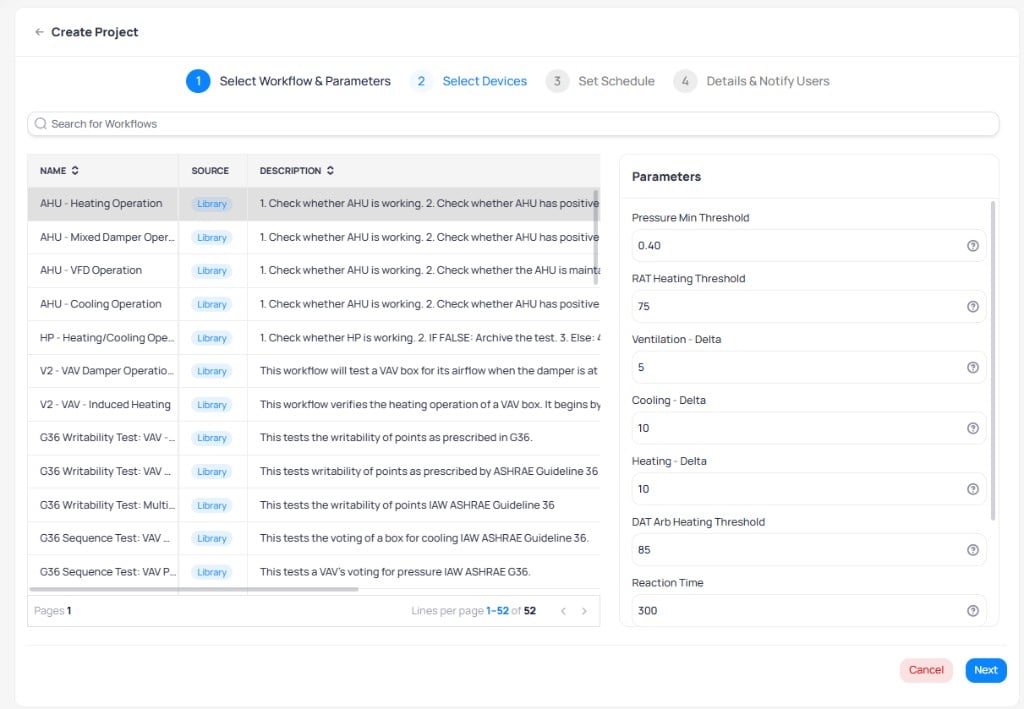
Create projects for each applicable workflow and save them as drafts. Select a workflow from the library and review its parameters before assigning devices.
Select a workflow from the library and review its default parameters
2
Review compatibility
Review the compatibility results for each project. Devices that lack required points or writable points appear as incompatible. Address templating or write-access issues before proceeding.
Phase 2: calibrate and validate
1
Run small-scale tests
For each workflow, test five devices or one floor. The goal is to validate the following:
Points are writable
Equipment responds to commands
Parameters are adequately adjusted
At least 80% of tests pass or produce valid results
2
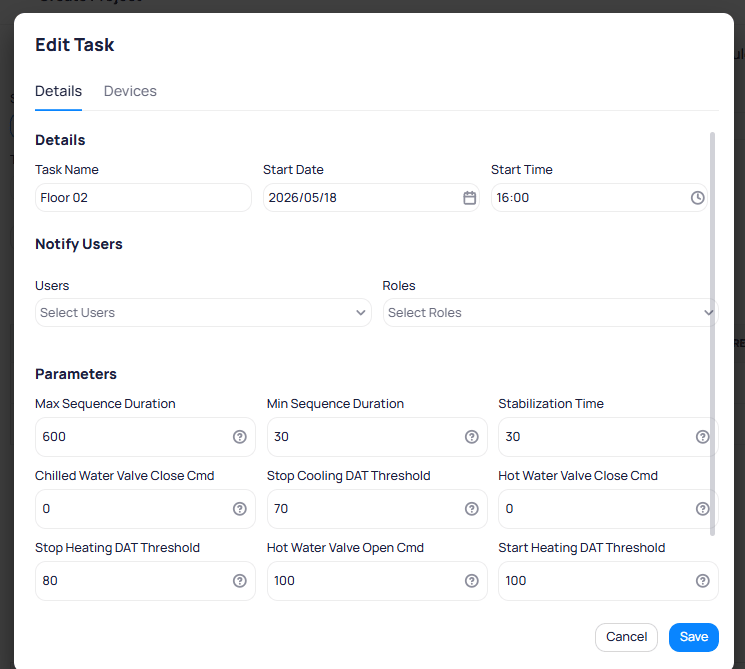
Tune parameters
Adjust workflow parameters based on initial results. Common adjustments include increasing max sequence duration for slower equipment or modifying threshold multipliers for different equipment generations.
Edit individual task parameters to fine-tune thresholds for specific floors or equipment
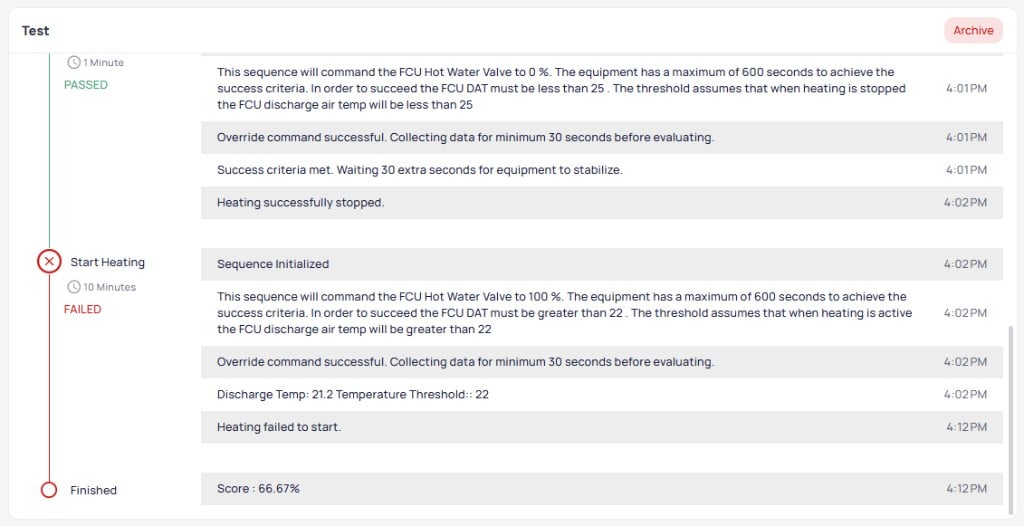
When a sequence fails, open the test report and compare the sensor reading to the threshold. See How to read a score. Retune only after you confirm the command wrote successfully.
3
Review results with the client
Present initial test results and discuss findings. The test detail report shows the step-by-step sequence with pass/fail indicators for each stage.
A completed test result showing passed and failed sequences with a final score
Use this opportunity to confirm the testing schedule and set expectations.
Phase 3: set the testing schedule
After calibration, work with the building team to establish a production testing schedule.
Scheduling recommendations
Weekly testing on low-occupancy days: creates a manageable workload and cadence for operators to review results
Late afternoon timing: equipment runs at steady state compared to startup hours, and late afternoon minimizes occupant impact
Daily batches of 10 devices: takes less than 30 minutes and systematically covers the entire building over time
Recurring projects: set up annual or continuous testing cycles for ongoing commissioning
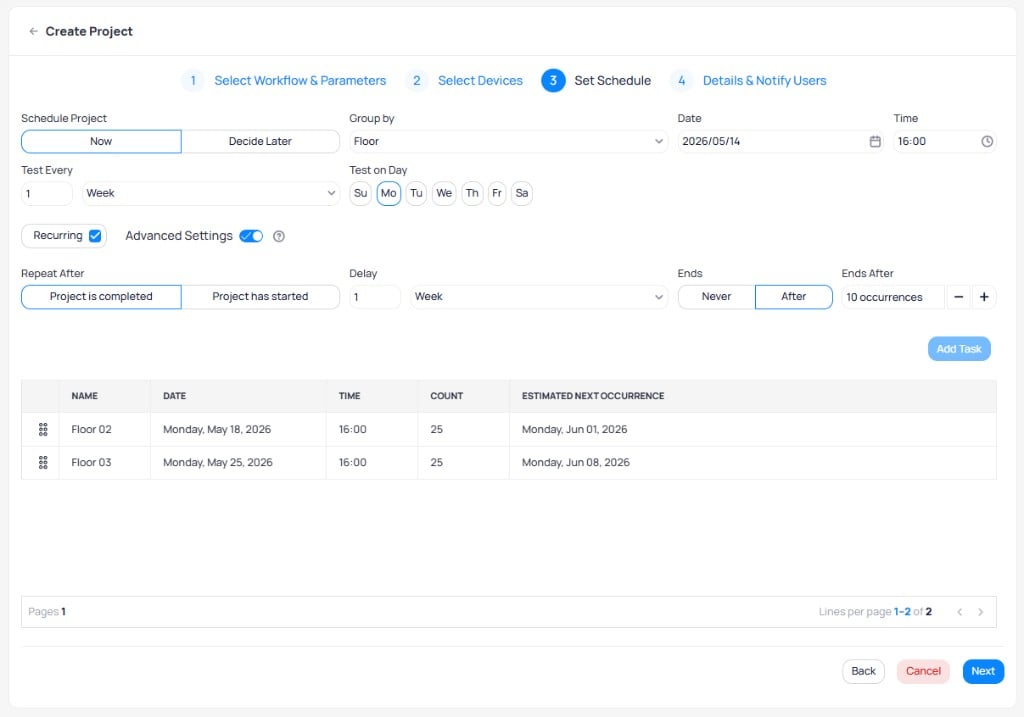
Choose floor, device-count, or single-group scheduling in the project wizard. See FTT projects for grouping guidance.
Configure recurring schedules with advanced settings for continuous commissioning
Product support
The KODE Labs product team maintains and supports the FTT workflow library:
New workflow variations are added within seven days of receiving clear requirements
Product support is available for consulting on workflow needs
Review and validate workflows at the project level before escalating to product support
Next steps
FTT projects
Create and manage automated testing projects.
Test results
Read scores and investigate failed sequences after calibration runs.
Workflow creator guide
Build custom workflows when the library does not cover your sequence.
VAV workflows
Explore the VAV workflow library with parameters and success criteria.
Last modified on October 20, 2026
Was this page helpful?
{"docsConfig":{"theme":"aspen","$schema":"https://mintlify.com/docs.json","name":"KODE Labs - Product Documentation","colors":{"primary":"#015BFA","light":"#3A9AFF","dark":"#015BFA"},"logo":{"light":"https://mintcdn.com/kodelabs/YfYud6Al4TM68wc2/logo/logo-light.png?fit=max\u0026auto=format\u0026n=YfYud6Al4TM68wc2\u0026q=85\u0026s=00d4ffd6ad7a592e52856804d1a53d12","dark":"https://mintcdn.com/kodelabs/YfYud6Al4TM68wc2/logo/logo-dark.png?fit=max\u0026auto=format\u0026n=YfYud6Al4TM68wc2\u0026q=85\u0026s=a6769f53904d96f5a53ea0c4b3c972d6","href":"/"},"favicon":{"light":"https://mintcdn.com/kodelabs/H3HEEQdnaG21O57-/logo/favicon-light.png?fit=max\u0026auto=format\u0026n=H3HEEQdnaG21O57-\u0026q=85\u0026s=3ae881e353dfb5c2f667e175ec82c799","dark":"https://mintcdn.com/kodelabs/H3HEEQdnaG21O57-/logo/favicon-dark.png?fit=max\u0026auto=format\u0026n=H3HEEQdnaG21O57-\u0026q=85\u0026s=845431bc7d53ce5bf50f56ef53d9137f"},"api":{"params":{"expanded":"closed"},"playground":{"display":"interactive","proxy":true},"examples":{"defaults":"required","languages":["bash","javascript","python","powershell"],"prefill":true,"autogenerate":true},"url":"full"},"appearance":{"default":"light","strict":true},"background":{"color":{"light":"#ffffff","dark":"#121212"}},"navbar":{"links":[{"href":"https://kodelabs.com/contact/","label":"Contact Us"}]},"footer":{"socials":{"x":"https://twitter.com/kodelabs","instagram":"https://www.instagram.com/kode_labs","linkedin":"https://www.linkedin.com/company/kodelabs","youtube":"https://www.youtube.com/channel/UCKCnsgnYtugWxMPzu3UEHkw"},"links":[{"header":"Platform","items":[{"label":"KODE OS","href":"https://kodelabs.com"},{"label":"Integrations","href":"https://kodelabs.com/partners/integrations-library"},{"label":"Security","href":"https://kodelabs.com/security"}]},{"header":"Resources","items":[{"label":"Blog","href":"https://kodelabs.com/blog"},{"label":"Reports \u0026 Guides","href":"https://kodelabs.com/resources"},{"label":"Podcasts \u0026 Webinars","href":"https://kodelabs.com/resources"},{"label":"Case Studies","href":"https://kodelabs.com/case-studies"},{"label":"News","href":"https://kodelabs.com/news"}]},{"header":"Solutions","items":[{"label":"Commercial","href":"https://kodelabs.com/solutions/commercial-real-estate"},{"label":"Corporate","href":"https://kodelabs.com/solutions/corporate"},{"label":"Retail","href":"https://kodelabs.com/solutions/retail"},{"label":"Healthcare","href":"https://kodelabs.com/solutions/healthcare"},{"label":"Education","href":"https://kodelabs.com/solutions/education"}]},{"header":"Company","items":[{"label":"About","href":"https://kodelabs.com/about"},{"label":"Careers","href":"https://kodelabs.com/careers"},{"label":"Internships","href":"https://kodelabs.com/internships"},{"label":"Contact Us","href":"https://kodelabs.com/contact"}]}]},"search":{"prompt":"Search our docs..."},"fonts":{"heading":{"family":"Manrope","weight":600},"body":{"family":"Inter"}},"icons":{"library":"lucide"},"styling":{"eyebrows":"section","codeblocks":{"theme":{"light":"github-light","dark":"github-dark"}},"latex":false},"integrations":{"ga4":{"measurementId":"G-WKYQEE1T4B"}},"banner":{"content":"KODE 3.20 is live. See [what's new in November 2026](/whats-new/2026/v3.20-november-2026).","dismissible":true,"color":{"light":"#015BFA","dark":"#015BFA"}},"errors":{"404":{"redirect":false,"title":"We're working on it!","description":"If you're not seeing this page, we're definitely updating it."}},"contextual":{"options":["copy","view",{"title":"Email KODE support","description":"Contact KODE Labs support for help","icon":"mail","href":"mailto:support@kodelabs.com"}],"display":"toc"},"interaction":{"drilldown":false},"metadata":{"timestamp":true},"navigation":{"global":{"anchors":[{"anchor":"Home","icon":"house","href":"/"},{"anchor":"What's New","icon":"megaphone","href":"/whats-new/2026/v3.20-november-2026"}]},"pages":[]}},"deployment":{"deploymentMetadataValue":{"subdomain":"kodelabs","hasAudioNarration":false,"actualSubdomain":"kodelabs","customDomains":["docs.kodelabs.com"],"gitSource":{"type":"github","owner":"kode-labs","repo":"docs","deployBranch":"main","contentDirectory":"","isPrivate":true,"mountPath":"","label":""},"feedback":{"thumbs":true,"agentFeedback":true},"entitlements":{"AI_CHAT":{"status":"ENABLED"},"REMOVE_BRANDING":{"status":"ENABLED"},"CONTEXTUAL_FEEDBACK":{"status":"ENABLED"},"CODE_SNIPPET_FEEDBACK":{"status":"ENABLED"},"WEB_MCP":{"status":"ENABLED"},"NARRATION":{"status":"ENABLED"}},"buildId":"6af8e4f300819710da52c87a","clientVersion":"0.0.4227","searchFilterCounts":[{"language":"default","tag":"Integrations","count":214},{"language":"default","tag":"All Integrations","count":205},{"language":"default","tag":"KODE API","count":143},{"language":"default","tag":"API reference","count":132},{"language":"default","tag":"EnerG","count":61},{"language":"default","tag":"Meters","count":37},{"language":"default","tag":"Building BI","count":35},{"language":"default","tag":"AssetOps","count":32},{"language":"default","tag":"Cloud BMS","count":31},{"language":"default","tag":"Reference","count":29}],"searchSettings":{"showContentSnippets":true,"isFiltersEnabled":true,"maxResults":10}},"assistantConfig":{"enableStarterQuestions":true,"enableContextualStarterQuestions":true},"basePath":"","hasChatPermissions":true,"hasWebMcpPermissions":true,"toggles":[],"googleFontsInlined":true},"customCss":[{"filePath":"custom.css","href":"/_mintlify/custom/kodelabs/fd6257d3326e3afa/custom.css"}]}
{"page":{"pagePath":"products/ftt/deployment","slug":"/products/ftt/deployment","pageMetadata":{"title":"Deployment guide","sidebarTitle":"Deployment","description":"Roll out FTT across a building: draft projects, calibrate parameters, and set production schedules in Cloud BMS.","icon":"rocket","keywords":["FTT","deployment","calibration","commissioning","best practices","Cloud BMS"],"href":"/products/ftt/deployment"},"description":{"compiledSource":"\"use strict\";\nconst {jsx: _jsx} = arguments[0];\nconst {useMDXComponents: _provideComponents} = arguments[0];\nfunction _createMdxContent(props) {\n const _components = {\n p: \"p\",\n ..._provideComponents(),\n ...props.components\n };\n return _jsx(_components.p, {\n children: \"Roll out FTT across a building: draft projects, calibrate parameters, and set production schedules in Cloud BMS.\"\n });\n}\nfunction MDXContent(props = {}) {\n const {wrapper: MDXLayout} = {\n ..._provideComponents(),\n ...props.components\n };\n return MDXLayout ? _jsx(MDXLayout, {\n ...props,\n children: _jsx(_createMdxContent, {\n ...props\n })\n }) : _createMdxContent(props);\n}\nreturn {\n default: MDXContent\n};\n","frontmatter":{},"scope":{}},"pageType":"default","mdx":{"mdxSource":{"compiledSource":"\"use strict\";const{Fragment:_Fragment,jsx:_jsx,jsxs:_jsxs}=arguments[0];const{useMDXComponents:_provideComponents}=arguments[0];function _createMdxContent(props){const _components={a:`a`,li:`li`,p:`p`,strong:`strong`,tbody:`tbody`,td:`td`,th:`th`,thead:`thead`,tr:`tr`,ul:`ul`,..._provideComponents(),...props.components},{Card,CardGroup,Frame,Heading,OptimizedImage,Step,Steps,Table}=_components;if(!Card)_missingMdxReference(`Card`,true);if(!CardGroup)_missingMdxReference(`CardGroup`,true);if(!Frame)_missingMdxReference(`Frame`,true);if(!Heading)_missingMdxReference(`Heading`,true);if(!OptimizedImage)_missingMdxReference(`OptimizedImage`,true);if(!Step)_missingMdxReference(`Step`,true);if(!Steps)_missingMdxReference(`Steps`,true);if(!Table)_missingMdxReference(`Table`,true);return _jsxs(_Fragment,{children:[_jsx(_components.p,{children:`Use this guide when you roll out FTT for operators and commissioning teams. It covers draft projects, small-scale calibration, client review, and production schedules.`}),`\n`,_jsxs(_components.p,{children:[`If you have not run a single test yet, complete `,_jsx(_components.a,{href:`/products/ftt/test-results#run-a-test-on-a-single-device`,children:`Run a test on a single device`}),` first. Confirm how scores are produced before you schedule building-wide work.`]}),`\n`,_jsx(Heading,{level:`2`,id:`who-this-guide-is-for`,children:`Who this guide is for`}),`\n`,_jsxs(_components.ul,{children:[`\n`,_jsx(_components.li,{children:`Building engineers and operators who will review weekly results`}),`\n`,_jsx(_components.li,{children:`Commissioning agents who calibrate thresholds and seasonal cadence`}),`\n`,_jsx(_components.li,{children:`Implementation teams who set the first recurring projects`}),`\n`]}),`\n`,_jsxs(_components.p,{children:[`Custom workflow authoring is separate. See the `,_jsx(_components.a,{href:`/products/ftt/workflow-creator-guide`,children:`Workflow creator guide`}),` only when the library does not cover the sequence you need.`]}),`\n`,_jsx(Heading,{level:`2`,id:`standard-workflows`,children:`Standard workflows`}),`\n`,_jsx(_components.p,{children:`The following workflows are the standard set for buildings with compatible equipment:`}),`\n`,_jsxs(Table,{children:[_jsx(_components.thead,{children:_jsxs(_components.tr,{children:[_jsx(_components.th,{children:`Workflow`}),_jsx(_components.th,{children:`Device type`})]})}),_jsxs(_components.tbody,{children:[_jsxs(_components.tr,{children:[_jsx(_components.td,{children:`VAV Induced Heating`}),_jsx(_components.td,{children:`VAV`})]}),_jsxs(_components.tr,{children:[_jsx(_components.td,{children:`VAV Damper Min/Max`}),_jsx(_components.td,{children:`VAV`})]}),_jsxs(_components.tr,{children:[_jsx(_components.td,{children:`FCU Heating`}),_jsx(_components.td,{children:`FCU`})]}),_jsxs(_components.tr,{children:[_jsx(_components.td,{children:`FCU Cooling`}),_jsx(_components.td,{children:`FCU`})]}),_jsxs(_components.tr,{children:[_jsx(_components.td,{children:`AHU Heating Operation`}),_jsx(_components.td,{children:`AHU`})]}),_jsxs(_components.tr,{children:[_jsx(_components.td,{children:`AHU Mixed Damper Operation`}),_jsx(_components.td,{children:`AHU`})]})]})]}),`\n`,_jsx(Heading,{level:`3`,id:`additional-workflows`,children:`Additional workflows`}),`\n`,_jsx(_components.p,{children:`Deploy these workflows as needed based on site requirements:`}),`\n`,_jsxs(Table,{children:[_jsx(_components.thead,{children:_jsxs(_components.tr,{children:[_jsx(_components.th,{children:`Workflow`}),_jsx(_components.th,{children:`When to use`})]})}),_jsxs(_components.tbody,{children:[_jsxs(_components.tr,{children:[_jsx(_components.td,{children:`VAV Stuck Damper Testing`}),_jsx(_components.td,{children:`When Min/Max flow is not compatible, or the site needs a simpler damper test`})]}),_jsxs(_components.tr,{children:[_jsx(_components.td,{children:`VAV Airflow Setpoint Tracking`}),_jsx(_components.td,{children:`When the airflow setpoint is writable but the damper is not`})]})]})]}),`\n`,_jsx(Heading,{level:`2`,id:`choose-workflows-by-season`,children:`Choose workflows by season`}),`\n`,_jsxs(Table,{children:[_jsx(_components.thead,{children:_jsxs(_components.tr,{children:[_jsx(_components.th,{children:`Season`}),_jsx(_components.th,{children:`Recommended workflows`})]})}),_jsxs(_components.tbody,{children:[_jsxs(_components.tr,{children:[_jsx(_components.td,{children:`Spring through summer`}),_jsx(_components.td,{children:`VAV Damper Operation, FCU Cooling`})]}),_jsxs(_components.tr,{children:[_jsx(_components.td,{children:`Fall through winter`}),_jsx(_components.td,{children:`VAV Induced Heating, FCU Heating`})]})]})]}),`\n`,_jsxs(_components.p,{children:[`Match the library page to the component you need to score. See `,_jsx(_components.a,{href:`/products/ftt/vav-workflows`,children:`VAV workflows`}),`, `,_jsx(_components.a,{href:`/products/ftt/fcu-workflows`,children:`FCU workflows`}),`, `,_jsx(_components.a,{href:`/products/ftt/ahu-workflows`,children:`AHU workflows`}),`, and `,_jsx(_components.a,{href:`/products/ftt/hp-workflows`,children:`Heat pump workflows`}),`.`]}),`\n`,_jsx(Heading,{level:`2`,id:`phase-1-create-projects-and-check-compatibility`,children:`Phase 1: create projects and check compatibility`}),`\n`,_jsxs(Steps,{children:[_jsxs(Step,{title:`Create draft projects`,children:[_jsx(_components.p,{children:`Create projects for each applicable workflow and save them as drafts. Select a workflow from the library and review its parameters before assigning devices.`}),_jsx(Frame,{caption:`Select a workflow from the library and review its default parameters`,children:_jsx(OptimizedImage,{src:`https://mintcdn.com/kodelabs/i9tCc_I6OZNqDXAw/images/kode-os/ftt/ftt-create-project-workflow.png?fit=max\u0026auto=format\u0026n=i9tCc_I6OZNqDXAw\u0026q=85\u0026s=d09da9c684f85827ce019464e830d985`,alt:`Create Project step 1 showing workflow list with AHU Heating Operation, AHU Mixed Damper Operation, AHU VFD Operation, AHU Cooling Operation, HP Heating Cooling Operation, V2 VAV Damper Operation, and V2 VAV Induced Heating from Library source, with Parameters panel showing Pressure Min Threshold 0.40, RAT Heating Threshold 75, Ventilation Delta 5, Cooling Delta 10, Heating Delta 10, DAT Arb Heating Threshold 85, and Reaction Time 300`,\"data-og-width\":`1024`,width:`1024`,\"data-og-height\":`709`,height:`709`,\"data-path\":`images/kode-os/ftt/ftt-create-project-workflow.png`,\"data-optimize\":`true`,\"data-opv\":`3`,srcset:`https://mintcdn.com/kodelabs/i9tCc_I6OZNqDXAw/images/kode-os/ftt/ftt-create-project-workflow.png?w=280\u0026fit=max\u0026auto=format\u0026n=i9tCc_I6OZNqDXAw\u0026q=85\u0026s=45920bb8440c2ff5ab9bc5ef995f4aee 280w, https://mintcdn.com/kodelabs/i9tCc_I6OZNqDXAw/images/kode-os/ftt/ftt-create-project-workflow.png?w=560\u0026fit=max\u0026auto=format\u0026n=i9tCc_I6OZNqDXAw\u0026q=85\u0026s=542c35bd6f46afb42dc3f9ac120d0693 560w, https://mintcdn.com/kodelabs/i9tCc_I6OZNqDXAw/images/kode-os/ftt/ftt-create-project-workflow.png?w=840\u0026fit=max\u0026auto=format\u0026n=i9tCc_I6OZNqDXAw\u0026q=85\u0026s=993f206178caeaebd85e48089c187697 840w, https://mintcdn.com/kodelabs/i9tCc_I6OZNqDXAw/images/kode-os/ftt/ftt-create-project-workflow.png?w=1100\u0026fit=max\u0026auto=format\u0026n=i9tCc_I6OZNqDXAw\u0026q=85\u0026s=54a099394c6501ae220842c292da4c1a 1100w, https://mintcdn.com/kodelabs/i9tCc_I6OZNqDXAw/images/kode-os/ftt/ftt-create-project-workflow.png?w=1650\u0026fit=max\u0026auto=format\u0026n=i9tCc_I6OZNqDXAw\u0026q=85\u0026s=94cdb5ee4551ee2a111daf0368c71927 1650w, https://mintcdn.com/kodelabs/i9tCc_I6OZNqDXAw/images/kode-os/ftt/ftt-create-project-workflow.png?w=2500\u0026fit=max\u0026auto=format\u0026n=i9tCc_I6OZNqDXAw\u0026q=85\u0026s=cb91fa166626affde4cc953cd88efdb9 2500w`})})]}),_jsx(Step,{title:`Review compatibility`,children:_jsx(_components.p,{children:`Review the compatibility results for each project. Devices that lack required points or writable points appear as incompatible. Address templating or write-access issues before proceeding.`})})]}),`\n`,_jsx(Heading,{level:`2`,id:`phase-2-calibrate-and-validate`,children:`Phase 2: calibrate and validate`}),`\n`,_jsxs(Steps,{children:[_jsxs(Step,{title:`Run small-scale tests`,children:[_jsx(_components.p,{children:`For each workflow, test five devices or one floor. The goal is to validate the following:`}),_jsxs(_components.ul,{children:[`\n`,_jsx(_components.li,{children:`Points are writable`}),`\n`,_jsx(_components.li,{children:`Equipment responds to commands`}),`\n`,_jsx(_components.li,{children:`Parameters are adequately adjusted`}),`\n`,_jsx(_components.li,{children:`At least 80% of tests pass or produce valid results`}),`\n`]})]}),_jsxs(Step,{title:`Tune parameters`,children:[_jsx(_components.p,{children:`Adjust workflow parameters based on initial results. Common adjustments include increasing max sequence duration for slower equipment or modifying threshold multipliers for different equipment generations.`}),_jsx(Frame,{caption:`Edit individual task parameters to fine-tune thresholds for specific floors or equipment`,children:_jsx(OptimizedImage,{src:`https://mintcdn.com/kodelabs/i9tCc_I6OZNqDXAw/images/kode-os/ftt/ftt-edit-task-details.png?fit=max\u0026auto=format\u0026n=i9tCc_I6OZNqDXAw\u0026q=85\u0026s=4a51c95eaaaa0bd1a8e27e3669d354e9`,alt:`Edit Task dialog Details tab showing Task Name Floor 02, Start Date 2026-05-18, Start Time 16:00, Notify Users and Roles dropdowns, and Parameters section with Max Sequence Duration 600, Min Sequence Duration 30, Stabilization Time 30, Chilled Water Valve Close Cmd 0, Stop Cooling DAT Threshold 70, Hot Water Valve Close Cmd 0, Stop Heating DAT Threshold 80, Hot Water Valve Open Cmd 100, and Start Heating DAT Threshold 100`,\"data-og-width\":`745`,width:`745`,\"data-og-height\":`669`,height:`669`,\"data-path\":`images/kode-os/ftt/ftt-edit-task-details.png`,\"data-optimize\":`true`,\"data-opv\":`3`,srcset:`https://mintcdn.com/kodelabs/i9tCc_I6OZNqDXAw/images/kode-os/ftt/ftt-edit-task-details.png?w=280\u0026fit=max\u0026auto=format\u0026n=i9tCc_I6OZNqDXAw\u0026q=85\u0026s=584d3bcc187ee745e733e8d741baa626 280w, https://mintcdn.com/kodelabs/i9tCc_I6OZNqDXAw/images/kode-os/ftt/ftt-edit-task-details.png?w=560\u0026fit=max\u0026auto=format\u0026n=i9tCc_I6OZNqDXAw\u0026q=85\u0026s=4453bf298535e1a23817ed473a390710 560w, https://mintcdn.com/kodelabs/i9tCc_I6OZNqDXAw/images/kode-os/ftt/ftt-edit-task-details.png?w=840\u0026fit=max\u0026auto=format\u0026n=i9tCc_I6OZNqDXAw\u0026q=85\u0026s=bc5b289418bc847fb681386811242bae 840w, https://mintcdn.com/kodelabs/i9tCc_I6OZNqDXAw/images/kode-os/ftt/ftt-edit-task-details.png?w=1100\u0026fit=max\u0026auto=format\u0026n=i9tCc_I6OZNqDXAw\u0026q=85\u0026s=9b1014d0e7931fe9e73db5273fe220d7 1100w, https://mintcdn.com/kodelabs/i9tCc_I6OZNqDXAw/images/kode-os/ftt/ftt-edit-task-details.png?w=1650\u0026fit=max\u0026auto=format\u0026n=i9tCc_I6OZNqDXAw\u0026q=85\u0026s=15056e75f81e1bdf1b7c72e157433588 1650w, https://mintcdn.com/kodelabs/i9tCc_I6OZNqDXAw/images/kode-os/ftt/ftt-edit-task-details.png?w=2500\u0026fit=max\u0026auto=format\u0026n=i9tCc_I6OZNqDXAw\u0026q=85\u0026s=70a9e56ecaa5301eec11ed0be9b05a23 2500w`})}),_jsxs(_components.p,{children:[`When a sequence fails, open the test report and compare the sensor reading to the threshold. See `,_jsx(_components.a,{href:`/products/ftt/test-results#how-to-read-a-score`,children:`How to read a score`}),`. Retune only after you confirm the command wrote successfully.`]})]}),_jsxs(Step,{title:`Review results with the client`,children:[_jsx(_components.p,{children:`Present initial test results and discuss findings. The test detail report shows the step-by-step sequence with pass/fail indicators for each stage.`}),_jsx(Frame,{caption:`A completed test result showing passed and failed sequences with a final score`,children:_jsx(OptimizedImage,{src:`https://mintcdn.com/kodelabs/1vjgtnWf-CUbC2z9/images/kode-os/ftt/ftt-test-failed-score.png?fit=max\u0026auto=format\u0026n=1vjgtnWf-CUbC2z9\u0026q=85\u0026s=6735b702794cd88a57b061cee571c6b3`,alt:`Test sequence showing Start Heating step FAILED after 10 minutes with Discharge Temp 21.2 versus Temperature Threshold 22, Heating failed to start, and Finished step showing final Score 66.67 percent with red indicators`,\"data-og-width\":`1024`,width:`1024`,\"data-og-height\":`526`,height:`526`,\"data-path\":`images/kode-os/ftt/ftt-test-failed-score.png`,\"data-optimize\":`true`,\"data-opv\":`3`,srcset:`https://mintcdn.com/kodelabs/1vjgtnWf-CUbC2z9/images/kode-os/ftt/ftt-test-failed-score.png?w=280\u0026fit=max\u0026auto=format\u0026n=1vjgtnWf-CUbC2z9\u0026q=85\u0026s=f271aa1c4646b8aedd8cc5de32557dbf 280w, https://mintcdn.com/kodelabs/1vjgtnWf-CUbC2z9/images/kode-os/ftt/ftt-test-failed-score.png?w=560\u0026fit=max\u0026auto=format\u0026n=1vjgtnWf-CUbC2z9\u0026q=85\u0026s=0b19cdb1c888f219a4702e3f94dc025e 560w, https://mintcdn.com/kodelabs/1vjgtnWf-CUbC2z9/images/kode-os/ftt/ftt-test-failed-score.png?w=840\u0026fit=max\u0026auto=format\u0026n=1vjgtnWf-CUbC2z9\u0026q=85\u0026s=843d62cc7992dcbb1eee7d534d12f2b1 840w, https://mintcdn.com/kodelabs/1vjgtnWf-CUbC2z9/images/kode-os/ftt/ftt-test-failed-score.png?w=1100\u0026fit=max\u0026auto=format\u0026n=1vjgtnWf-CUbC2z9\u0026q=85\u0026s=06b9d6bb867db78c6ecbc8a615fb4a8c 1100w, https://mintcdn.com/kodelabs/1vjgtnWf-CUbC2z9/images/kode-os/ftt/ftt-test-failed-score.png?w=1650\u0026fit=max\u0026auto=format\u0026n=1vjgtnWf-CUbC2z9\u0026q=85\u0026s=2692e3ce45214bc2c67801c3e9b840b4 1650w, https://mintcdn.com/kodelabs/1vjgtnWf-CUbC2z9/images/kode-os/ftt/ftt-test-failed-score.png?w=2500\u0026fit=max\u0026auto=format\u0026n=1vjgtnWf-CUbC2z9\u0026q=85\u0026s=05ae3405d5ea1bb37e2aecb720c3a443 2500w`})}),_jsx(_components.p,{children:`Use this opportunity to confirm the testing schedule and set expectations.`})]})]}),`\n`,_jsx(Heading,{level:`2`,id:`phase-3-set-the-testing-schedule`,children:`Phase 3: set the testing schedule`}),`\n`,_jsx(_components.p,{children:`After calibration, work with the building team to establish a production testing schedule.`}),`\n`,_jsx(Heading,{level:`3`,id:`scheduling-recommendations`,children:`Scheduling recommendations`}),`\n`,_jsxs(_components.ul,{children:[`\n`,_jsxs(_components.li,{children:[_jsx(_components.strong,{children:`Weekly testing on low-occupancy days`}),`: creates a manageable workload and cadence for operators to review results`]}),`\n`,_jsxs(_components.li,{children:[_jsx(_components.strong,{children:`Late afternoon timing`}),`: equipment runs at steady state compared to startup hours, and late afternoon minimizes occupant impact`]}),`\n`,_jsxs(_components.li,{children:[_jsx(_components.strong,{children:`Daily batches of 10 devices`}),`: takes less than 30 minutes and systematically covers the entire building over time`]}),`\n`,_jsxs(_components.li,{children:[_jsx(_components.strong,{children:`Recurring projects`}),`: set up annual or continuous testing cycles for ongoing commissioning`]}),`\n`]}),`\n`,_jsxs(_components.p,{children:[`Choose floor, device-count, or single-group scheduling in the project wizard. See `,_jsx(_components.a,{href:`/products/ftt/projects`,children:`FTT projects`}),` for grouping guidance.`]}),`\n`,_jsx(Frame,{caption:`Configure recurring schedules with advanced settings for continuous commissioning`,children:_jsx(OptimizedImage,{src:`https://mintcdn.com/kodelabs/1vjgtnWf-CUbC2z9/images/kode-os/ftt/ftt-schedule-advanced-recurrence.png?fit=max\u0026auto=format\u0026n=1vjgtnWf-CUbC2z9\u0026q=85\u0026s=c73b7b43c5765ec58f55a603618da99a`,alt:`Schedule step with Recurring and Advanced Settings enabled, showing Repeat After set to Project is completed, Delay of 1 Week, Ends After 10 occurrences, and task preview with Floor 02 and Floor 03 showing Estimated Next Occurrence dates of Jun 01 and Jun 08 2026`,\"data-og-width\":`1024`,width:`1024`,\"data-og-height\":`717`,height:`717`,\"data-path\":`images/kode-os/ftt/ftt-schedule-advanced-recurrence.png`,\"data-optimize\":`true`,\"data-opv\":`3`,srcset:`https://mintcdn.com/kodelabs/1vjgtnWf-CUbC2z9/images/kode-os/ftt/ftt-schedule-advanced-recurrence.png?w=280\u0026fit=max\u0026auto=format\u0026n=1vjgtnWf-CUbC2z9\u0026q=85\u0026s=c86e63071f2270b64194d401a76cbb50 280w, https://mintcdn.com/kodelabs/1vjgtnWf-CUbC2z9/images/kode-os/ftt/ftt-schedule-advanced-recurrence.png?w=560\u0026fit=max\u0026auto=format\u0026n=1vjgtnWf-CUbC2z9\u0026q=85\u0026s=7767203ef1a2afdd6511f4d807904964 560w, https://mintcdn.com/kodelabs/1vjgtnWf-CUbC2z9/images/kode-os/ftt/ftt-schedule-advanced-recurrence.png?w=840\u0026fit=max\u0026auto=format\u0026n=1vjgtnWf-CUbC2z9\u0026q=85\u0026s=9ee60e83267a07e0ea7b6074a6f1ad54 840w, https://mintcdn.com/kodelabs/1vjgtnWf-CUbC2z9/images/kode-os/ftt/ftt-schedule-advanced-recurrence.png?w=1100\u0026fit=max\u0026auto=format\u0026n=1vjgtnWf-CUbC2z9\u0026q=85\u0026s=52a554be2d57a9033ca8c43459c35426 1100w, https://mintcdn.com/kodelabs/1vjgtnWf-CUbC2z9/images/kode-os/ftt/ftt-schedule-advanced-recurrence.png?w=1650\u0026fit=max\u0026auto=format\u0026n=1vjgtnWf-CUbC2z9\u0026q=85\u0026s=3787328941e8b0475981083f0bc4d8fb 1650w, https://mintcdn.com/kodelabs/1vjgtnWf-CUbC2z9/images/kode-os/ftt/ftt-schedule-advanced-recurrence.png?w=2500\u0026fit=max\u0026auto=format\u0026n=1vjgtnWf-CUbC2z9\u0026q=85\u0026s=47e4d2982940001691e1dfc782fdef33 2500w`})}),`\n`,_jsx(Heading,{level:`2`,id:`product-support`,children:`Product support`}),`\n`,_jsx(_components.p,{children:`The KODE Labs product team maintains and supports the FTT workflow library:`}),`\n`,_jsxs(_components.ul,{children:[`\n`,_jsx(_components.li,{children:`New workflow variations are added within seven days of receiving clear requirements`}),`\n`,_jsx(_components.li,{children:`Product support is available for consulting on workflow needs`}),`\n`,_jsx(_components.li,{children:`Review and validate workflows at the project level before escalating to product support`}),`\n`]}),`\n`,_jsx(Heading,{level:`2`,id:`next-steps`,children:`Next steps`}),`\n`,_jsxs(CardGroup,{cols:2,children:[_jsx(Card,{title:`FTT projects`,icon:`folder-kanban`,href:`/products/ftt/projects`,arrow:true,children:_jsx(_components.p,{children:`Create and manage automated testing projects.`})}),_jsx(Card,{title:`Test results`,icon:`clipboard-check`,href:`/products/ftt/test-results`,arrow:true,children:_jsx(_components.p,{children:`Read scores and investigate failed sequences after calibration runs.`})}),_jsx(Card,{title:`Workflow creator guide`,icon:`drafting-compass`,href:`/products/ftt/workflow-creator-guide`,arrow:true,children:_jsx(_components.p,{children:`Build custom workflows when the library does not cover your sequence.`})}),_jsx(Card,{title:`VAV workflows`,icon:`fan`,href:`/products/ftt/vav-workflows`,arrow:true,children:_jsx(_components.p,{children:`Explore the VAV workflow library with parameters and success criteria.`})})]})]})}function MDXContent(props={}){const{wrapper:MDXLayout}={..._provideComponents(),...props.components};return MDXLayout?_jsx(MDXLayout,{...props,children:_jsx(_createMdxContent,{...props})}):_createMdxContent(props)}return{default:MDXContent};function _missingMdxReference(id,component){throw new Error(`Expected `+(component?`component`:`object`)+\" `\"+id+\"` to be defined: you likely forgot to import, pass, or provide it.\")}","frontmatter":{},"scope":{"codeStyling":{"theme":{"light":"github-light","dark":"github-dark"}},"config":{},"pageMetadata":{"title":"Deployment guide","sidebarTitle":"Deployment","description":"Roll out FTT across a building: draft projects, calibrate parameters, and set production schedules in Cloud BMS.","icon":"rocket","keywords":["FTT","deployment","calibration","commissioning","best practices","Cloud BMS"],"href":"/products/ftt/deployment"}}},"mdxSourceWithNoJs":null},"mdxExtracts":{"tableOfContents":[{"title":"Who this guide is for","slug":"who-this-guide-is-for","depth":2,"children":[]},{"title":"Standard workflows","slug":"standard-workflows","depth":2,"children":[{"title":"Additional workflows","slug":"additional-workflows","depth":3,"children":[]}]},{"title":"Choose workflows by season","slug":"choose-workflows-by-season","depth":2,"children":[]},{"title":"Phase 1: create projects and check compatibility","slug":"phase-1-create-projects-and-check-compatibility","depth":2,"children":[]},{"title":"Phase 2: calibrate and validate","slug":"phase-2-calibrate-and-validate","depth":2,"children":[]},{"title":"Phase 3: set the testing schedule","slug":"phase-3-set-the-testing-schedule","depth":2,"children":[{"title":"Scheduling recommendations","slug":"scheduling-recommendations","depth":3,"children":[]}]},{"title":"Product support","slug":"product-support","depth":2,"children":[]},{"title":"Next steps","slug":"next-steps","depth":2,"children":[]}],"codeExamples":{}},"jsLinks":["/_mintlify/custom/kodelabs/ce5d3bd08e955b7b/navbar-assistant.js"],"subdomain":"kodelabs","siteName":"KODE Labs - Product Documentation","title":"Deployment guide - KODE Labs - Product Documentation","contextualStarterQuestions":[{"_id":"6ad7cd3b46ba2bb8df34e922","deploymentId":"67fd4d9635f314f3a994be65","questionText":"Which workflows suit my building?","status":"active","generatedBy":"contextual","path":"products/ftt/deployment","createdAt":"2026-10-20T20:21:15.338Z","updatedAt":"2026-10-20T20:21:15.338Z","__v":0},{"_id":"6ad7cd3b46ba2bb8df34e924","deploymentId":"67fd4d9635f314f3a994be65","questionText":"What's the deployment sequence?","status":"active","generatedBy":"contextual","path":"products/ftt/deployment","createdAt":"2026-10-20T20:21:15.338Z","updatedAt":"2026-10-20T20:21:15.338Z","__v":0},{"_id":"6ad7cd3b46ba2bb8df34e923","deploymentId":"67fd4d9635f314f3a994be65","questionText":"How do I calibrate thresholds?","status":"active","generatedBy":"contextual","path":"products/ftt/deployment","createdAt":"2026-10-20T20:21:15.338Z","updatedAt":"2026-10-20T20:21:15.338Z","__v":0}],"navMaps":{"firstHrefInVersion":{},"firstHrefInLanguage":{}},"lastModified":"2026-10-20T20:20:52.081Z","gitLastModified":"2026-10-20T20:20:04.000Z","originalFileLocation":"products/ftt/deployment.mdx"},"headHtml":"\u003cscript data-mint-head>(function(){var d=document.documentElement,p=\"light\";if(!p){try{p=localStorage.getItem(\"isDarkMode\")}catch(e){}if(p==='true')p='dark';else if(p==='false')p='light';if(p!=='light'\u0026\u0026p!=='dark'\u0026\u0026p!=='system')p=\"light\"}var r=p==='system'?(matchMedia(\"(prefers-color-scheme: dark)\").matches?'dark':'light'):p;d.classList.remove(r==='dark'?'light':'dark');d.classList.add(r);d.setAttribute(\"data-theme-preference\",p)})();\u003c/script>\u003cmeta data-mint-head name=\"description\" content=\"Roll out FTT across a building: draft projects, calibrate parameters, and set production schedules in Cloud BMS.\">\u003cmeta data-mint-head name=\"application-name\" content=\"KODE Labs - Product Documentation\">\u003cmeta data-mint-head name=\"generator\" content=\"Mintlify\">\u003clink data-mint-head rel=\"icon\" type=\"image/png\" sizes=\"192x192\" href=\"/mintlify-assets/_mintlify/favicons/kodelabs/vtcGE1gj2AkAE1l2/_generated/favicon/android-chrome-192x192.png\" media=\"(prefers-color-scheme: light)\">\u003clink data-mint-head rel=\"apple-touch-icon\" type=\"image/png\" sizes=\"180x180\" href=\"/mintlify-assets/_mintlify/favicons/kodelabs/vtcGE1gj2AkAE1l2/_generated/favicon/apple-touch-icon.png\">\u003clink data-mint-head rel=\"icon\" type=\"image/png\" sizes=\"16x16\" href=\"/mintlify-assets/_mintlify/favicons/kodelabs/vtcGE1gj2AkAE1l2/_generated/favicon/favicon-16x16.png\" media=\"(prefers-color-scheme: light)\">\u003clink data-mint-head rel=\"icon\" type=\"image/png\" sizes=\"32x32\" href=\"/mintlify-assets/_mintlify/favicons/kodelabs/vtcGE1gj2AkAE1l2/_generated/favicon/favicon-32x32.png\" media=\"(prefers-color-scheme: light)\">\u003clink data-mint-head rel=\"shortcut icon\" type=\"image/x-icon\" href=\"/mintlify-assets/_mintlify/favicons/kodelabs/vtcGE1gj2AkAE1l2/_generated/favicon/favicon.ico\" media=\"(prefers-color-scheme: light)\">\u003clink data-mint-head rel=\"icon\" type=\"image/png\" sizes=\"192x192\" href=\"/mintlify-assets/_mintlify/favicons/kodelabs/vtcGE1gj2AkAE1l2/_generated/favicon-dark/android-chrome-192x192.png\" media=\"(prefers-color-scheme: dark)\">\u003clink data-mint-head rel=\"icon\" type=\"image/png\" sizes=\"16x16\" href=\"/mintlify-assets/_mintlify/favicons/kodelabs/vtcGE1gj2AkAE1l2/_generated/favicon-dark/favicon-16x16.png\" media=\"(prefers-color-scheme: dark)\">\u003clink data-mint-head rel=\"icon\" type=\"image/png\" sizes=\"32x32\" href=\"/mintlify-assets/_mintlify/favicons/kodelabs/vtcGE1gj2AkAE1l2/_generated/favicon-dark/favicon-32x32.png\" media=\"(prefers-color-scheme: dark)\">\u003clink data-mint-head rel=\"shortcut icon\" type=\"image/x-icon\" href=\"/mintlify-assets/_mintlify/favicons/kodelabs/vtcGE1gj2AkAE1l2/_generated/favicon-dark/favicon.ico\" media=\"(prefers-color-scheme: dark)\">\u003cmeta data-mint-head property=\"og:title\" content=\"Deployment guide - KODE Labs - Product Documentation\">\u003cmeta data-mint-head property=\"og:description\" content=\"Roll out FTT across a building: draft projects, calibrate parameters, and set production schedules in Cloud BMS.\">\u003cmeta data-mint-head property=\"og:site_name\" content=\"KODE Labs - Product Documentation\">\u003cmeta data-mint-head property=\"og:url\" content=\"https://docs.kodelabs.com/products/ftt/deployment\">\u003cmeta data-mint-head property=\"og:type\" content=\"website\">\u003cmeta data-mint-head property=\"og:image\" content=\"https://kodelabs.mintlify.site/_mintlify/api/og/v2?division=Deployment\u0026amp;title=Deployment+guide\u0026amp;description=Roll+out+FTT+across+a+building%3A+draft+projects%2C+calibrate+parameters%2C+and+set+production+schedules+in+Cloud+BMS.\u0026amp;theme=ac252318c016362b89abdbd3\u0026amp;signature=c0b4cfc866178c8c18b64a67da277ab374b5c6d9f68c07d5cb42304e8c7315d7\">\u003cmeta data-mint-head property=\"og:image:width\" content=\"1200\">\u003cmeta data-mint-head property=\"og:image:height\" content=\"630\">\u003cmeta data-mint-head name=\"twitter:card\" content=\"summary_large_image\">\u003cmeta data-mint-head name=\"twitter:title\" content=\"Deployment guide - KODE Labs - Product Documentation\">\u003cmeta data-mint-head name=\"twitter:description\" content=\"Roll out FTT across a building: draft projects, calibrate parameters, and set production schedules in Cloud BMS.\">\u003cmeta data-mint-head name=\"twitter:image\" content=\"https://kodelabs.mintlify.site/_mintlify/api/og/v2?division=Deployment\u0026amp;title=Deployment+guide\u0026amp;description=Roll+out+FTT+across+a+building%3A+draft+projects%2C+calibrate+parameters%2C+and+set+production+schedules+in+Cloud+BMS.\u0026amp;theme=ac252318c016362b89abdbd3\u0026amp;signature=c0b4cfc866178c8c18b64a67da277ab374b5c6d9f68c07d5cb42304e8c7315d7\">\u003cmeta data-mint-head name=\"twitter:image:width\" content=\"1200\">\u003cmeta data-mint-head name=\"twitter:image:height\" content=\"630\">\u003cmeta data-mint-head name=\"msapplication-config\" content=\"/mintlify-assets/_mintlify/favicons/kodelabs/vtcGE1gj2AkAE1l2/_generated/favicon/browserconfig.xml\">\u003cmeta data-mint-head name=\"apple-mobile-web-app-title\" content=\"KODE Labs - Product Documentation\">\u003cmeta data-mint-head name=\"msapplication-TileColor\" content=\"#015BFA\">\u003clink data-mint-head rel=\"canonical\" href=\"https://docs.kodelabs.com/products/ftt/deployment\">\u003clink data-mint-head rel=\"alternate\" type=\"application/xml\" href=\"/sitemap.xml\">\u003clink data-mint-head rel=\"alternate\" type=\"text/markdown\" href=\"/products/ftt/deployment.md\">\u003cscript data-mint-head type=\"application/ld+json\">{\"@context\":\"https://schema.org\",\"@graph\":[{\"@type\":\"Organization\",\"@id\":\"https://docs.kodelabs.com/#organization\",\"name\":\"KODE Labs - Product Documentation\",\"url\":\"https://docs.kodelabs.com\",\"logo\":{\"@type\":\"ImageObject\",\"url\":\"https://mintcdn.com/kodelabs/YfYud6Al4TM68wc2/logo/logo-light.png?fit=max\u0026auto=format\u0026n=YfYud6Al4TM68wc2\u0026q=85\u0026s=00d4ffd6ad7a592e52856804d1a53d12\"}},{\"@type\":\"WebSite\",\"@id\":\"https://docs.kodelabs.com#website\",\"name\":\"KODE Labs - Product Documentation\",\"url\":\"https://docs.kodelabs.com\",\"publisher\":{\"@id\":\"https://docs.kodelabs.com/#organization\"}},{\"@type\":\"WebPage\",\"@id\":\"https://docs.kodelabs.com/products/ftt/deployment#webpage\",\"url\":\"https://docs.kodelabs.com/products/ftt/deployment\",\"name\":\"Deployment guide\",\"description\":\"Roll out FTT across a building: draft projects, calibrate parameters, and set production schedules in Cloud BMS.\",\"dateModified\":\"2026-10-20T20:20:04.000Z\",\"isPartOf\":{\"@id\":\"https://docs.kodelabs.com#website\"},\"breadcrumb\":{\"@id\":\"https://docs.kodelabs.com/products/ftt/deployment#breadcrumb\"}},{\"@type\":\"BreadcrumbList\",\"@id\":\"https://docs.kodelabs.com/products/ftt/deployment#breadcrumb\",\"itemListElement\":[{\"@type\":\"ListItem\",\"position\":1,\"name\":\"KODE Labs - Product Documentation\",\"item\":\"https://docs.kodelabs.com\"},{\"@type\":\"ListItem\",\"position\":2,\"name\":\"Deployment guide\",\"item\":\"https://docs.kodelabs.com/products/ftt/deployment\"}]},{\"@type\":[\"Article\",\"TechArticle\"],\"@id\":\"https://docs.kodelabs.com/products/ftt/deployment#article\",\"headline\":\"Deployment guide\",\"name\":\"Deployment guide\",\"description\":\"Roll out FTT across a building: draft projects, calibrate parameters, and set production schedules in Cloud BMS.\",\"url\":\"https://docs.kodelabs.com/products/ftt/deployment\",\"mainEntityOfPage\":{\"@id\":\"https://docs.kodelabs.com/products/ftt/deployment#webpage\"},\"dateModified\":\"2026-10-20T20:20:04.000Z\",\"keywords\":\"FTT, deployment, calibration, commissioning, best practices, Cloud BMS\",\"publisher\":{\"@id\":\"https://docs.kodelabs.com/#organization\"},\"isPartOf\":{\"@id\":\"https://docs.kodelabs.com#website\"}}]}\u003c/script>","agentPointerHref":"/products/ftt/deployment.md","siteName":"KODE Labs - Product Documentation","nav":{"global":{"anchors":[{"anchor":"Home","icon":"house","href":"/"},{"anchor":"What's New","icon":"megaphone","href":"/whats-new/2026/v3.20-november-2026"}]},"products":[{"product":"Cloud BMS","icon":"https://mintlify.s3.us-west-1.amazonaws.com/kodelabs/images/cloud-bms.svg","description":"Cloud building management, graphics, and control","pages":[{"title":"Cloud BMS","href":"/products/kode-os/get-started/introduction"}]},{"product":"Building BI","icon":"https://mintlify.s3.us-west-1.amazonaws.com/kodelabs/images/bbi.svg","description":"Dashboards and analytics for building performance","pages":[{"title":"Building BI","href":"/products/building-bi/overview"}]},{"product":"FDD","icon":"https://mintlify.s3.us-west-1.amazonaws.com/kodelabs/images/fdd.svg","description":"Fault detection and diagnostics for equipment","pages":[{"title":"FDD","href":"/products/fdd/overview"}]},{"product":"FTT","icon":"https://mintlify.s3.us-west-1.amazonaws.com/kodelabs/images/ftt.svg","description":"Automated functional testing and commissioning","groups":[{"group":"Get Started","pages":[{"title":"What is Functional Testing?","sidebarTitle":"Introduction","icon":"rocket","href":"/products/ftt/overview"}]},{"group":"Testing","pages":[{"title":"Test results","sidebarTitle":"Test results","icon":"list-checks","href":"/products/ftt/test-results"},{"title":"FTT projects","sidebarTitle":"Projects","icon":"clipboard-list","href":"/products/ftt/projects"}]},{"group":"Workflows","pages":[{"title":"Workflows","sidebarTitle":"Workflows","icon":"workflow","href":"/products/ftt/workflows"},{"title":"Workflow logic blocks","sidebarTitle":"Logic blocks","icon":"puzzle","href":"/products/ftt/workflow-logic-blocks"},{"title":"Workflow creator guide","sidebarTitle":"Creator guide","icon":"drafting-compass","href":"/products/ftt/workflow-creator-guide"},{"group":"Workflow library","icon":"library","expanded":false,"pages":[{"title":"VAV workflow library","sidebarTitle":"VAV workflows","icon":"fan","href":"/products/ftt/vav-workflows"},{"title":"FCU workflow library","sidebarTitle":"FCU workflows","icon":"thermometer","href":"/products/ftt/fcu-workflows"},{"title":"AHU workflows","sidebarTitle":"AHU workflows","icon":"wind","href":"/products/ftt/ahu-workflows"},{"title":"Heat pump workflow library","sidebarTitle":"HP workflows","description":"Reference for the heat pump functional testing workflow covering combined heating and cooling operation with fan verification.","icon":"flame","href":"/products/ftt/hp-workflows"}]}]},{"group":"Deployment","pages":[{"title":"Deployment guide","sidebarTitle":"Deployment","icon":"rocket","href":"/products/ftt/deployment"}]},{"group":"Reference","icon":"book-a","pages":[{"title":"KODE glossary","sidebarTitle":"Glossary","description":"Definitions of common KODE Labs terms across Cloud BMS, Launchpad, Building BI, AssetOps, EnerG, FDD, FTT, and related products.","icon":"book-a","href":"/products/ftt/glossary"}]}]},{"product":"AssetOps","icon":"https://mintlify.s3.us-west-1.amazonaws.com/kodelabs/images/assetops.svg","description":"Asset and maintenance operations","pages":[{"title":"AssetOps","href":"/products/assetops/quickstart/overview"}]},{"product":"EnerG","icon":"https://mintlify.s3.us-west-1.amazonaws.com/kodelabs/images/enerG.svg","description":"Energy management and sustainability reporting","pages":[{"title":"EnerG","href":"/products/energ/get-started/introduction"}]},{"product":"Launchpad","icon":"https://mintlify.s3.us-west-1.amazonaws.com/kodelabs/images/launchpad.svg","description":"Dynamic management for apps, users, and buildings","pages":[{"title":"Launchpad","href":"/products/launchpad/get-started/introduction"}]},{"product":"Mobile app","icon":"https://mintlify.s3.us-west-1.amazonaws.com/kodelabs/images/mobile-app.svg","description":"Monitor and operate buildings from iOS and Android","pages":[{"title":"Mobile app","href":"/products/mobile-app/overview"}]},{"product":"KODE API","icon":"braces","description":"Build services and integrations with KODE OS","pages":[{"title":"KODE API","href":"/products/kode-api"}]},{"product":"Integrations","icon":"cable","description":"Connect 200+ building systems to KODE OS","pages":[{"title":"Integrations","href":"/products/integrations/get-started/introduction"}]},{"product":"What's New","icon":"megaphone","description":"KODE platform release notes and updates","pages":[{"title":"What's New","href":"/whats-new/2026/v3.20-november-2026"}]}]},"basePath":"","title":"Deployment guide - KODE Labs - Product Documentation","deploymentId":"dpl_vSEmv961Ncyvz1psVwgUnTXQMSYk","buildId":"dpl_vSEmv961Ncyvz1psVwgUnTXQMSYk","dynamics":["10e4515597","07c022d89b","a74be98ba7"],"chunks":["BannerMarkdown-DnSAhvaM.js","dist-DIfYWxfm.js","lib-DMeTj1gb.js","lib-B8HbPgcC.js","katex-Dbtb6Wk7.js","html-void-elements-mCSPHezU.js","marked.esm-CZWythHk.js","Frame-BRsfsIIG.js","DynamicMarkdown-NFqqduU7.js","zoom-image-lightbox-BguUeq2N.js","lightbox-handle-r17bVUz3.js"]}