Send commands to writable points from device details, a floor plan, or a Building BI table.
Command and control is a building-level feature. Select a building from the sites list before you command points.
Commanding and controlling equipment lets you adjust setpoints and variables to influence how equipment operates. You can only perform these actions on writable points.The command dialog is the same across integrations. BACnet devices, API thermostats, and other connectors all use this write-back flow. The underlying protocol depends on the data source, not on the dialog itself.
Writable points
Writable points accept commands from Cloud BMS. Read-only points report measurements and status but do not accept writes. See Points for the difference between read-only and writable point types.To enable or disable writability on a point, modify it from device details or use points batch update.
Access command and control
You can command a point from device details, a floor plan, or Building BI. Each path opens the same command dialog.
From a floor plan
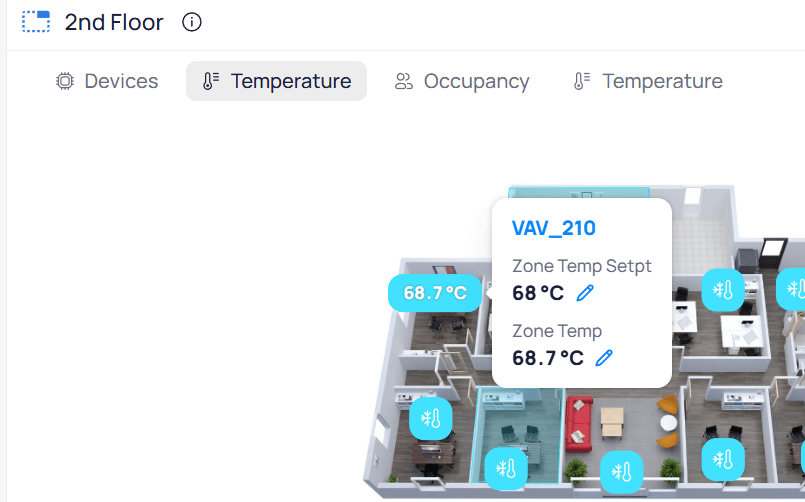
Open an area floor plan and click a smart marker. That click opens the command dialog for the device’s writable points.You can also hover a device marker to expand its point values. Writable points display an edit icon next to the value.
Writable points on a floor plan display an edit icon next to the point value
Click the edit icon to open the command dialog, or click the device name to open device details.
From Building BI
In Building BI, click a point in a chart or table. That click opens the command dialog for the point.
Navigate to device details
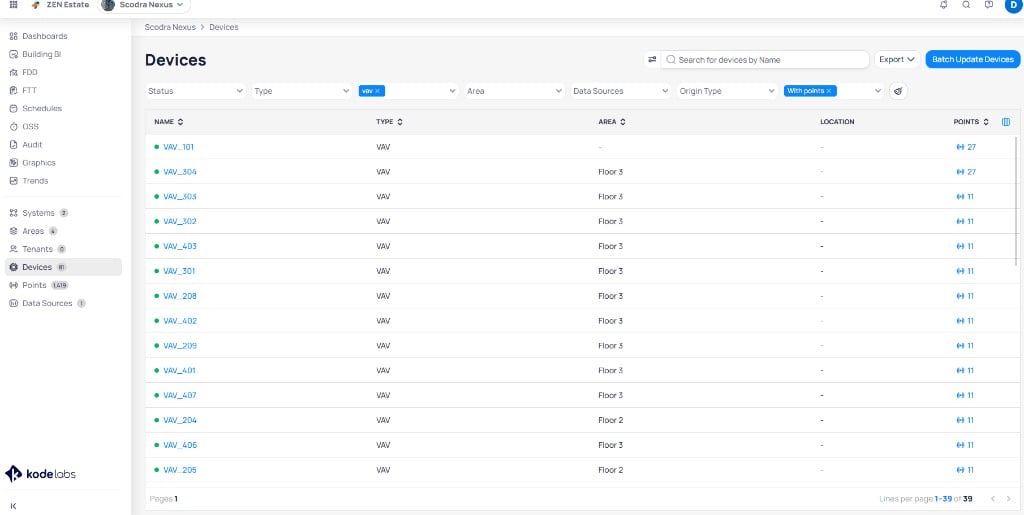
Use any of these paths to open the device details page:
Open the building dashboard, select Devices, then select the device from the list
Search for a device using universal search
The Devices list shows all equipment in the building with filters and search
On the device details page, hover over a point value. Writable points display a blue box indicating the point accepts commands.
Send a command
1
Open the command dialog
From device details, click a writable point value. From a floor plan, click a smart marker, or click the edit icon next to a writable point. From Building BI, click the point in a chart or table.
2
Configure the command
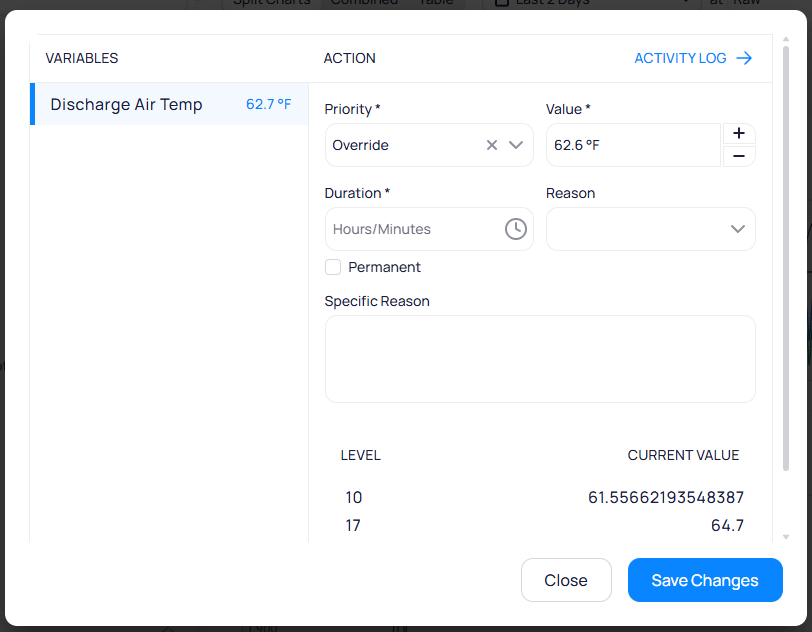
Set the command parameters in the Action section.
The command dialog shows action, value, duration, and reason fields with current levels at the bottom
Hide Command parameters
Field
Description
Priority
The command action to apply (Override, Set, Auto, or Release). See the action mappings below.
Value
The value to write (for example, 62.6 °F for a temperature setpoint). Use the + and - buttons to adjust.
Duration
How long the command remains active before auto-reverting (hours and minutes)
Reason
A predefined reason from the dropdown
Permanent
Check this to make the command persist without auto-reverting
Specific Reason
A free-text note explaining why you made the change
The bottom of the dialog displays the current levels and their values. Click Activity Log in the upper-right corner to view the full command history for this point.
3
Submit the command
Click Save Changes to send the command to the device.
Command actions and priority levels
Cloud BMS uses a BACnet-inspired priority model for writable points. The same command dialog appears for BACnet and non-BACnet integrations, such as REST API thermostats. How each action maps on the device depends on the connector.BACnet points that accept commands have 16 priority levels (1 is highest, 16 is lowest). When every level is empty (null), the point uses a fallback / default value (Relinquish_Default in BACnet). That fallback is not a 17th BACnet priority. Some interfaces label it as level 17 for display only.Override and Set turn different knobs under the hood, even when the visible value looks the same.
Action
What it writes*
Description
Override
Priority 8*
Temporary exception in the priority array. Takes precedence over lower-priority automation.
Set
Fallback / default*
Changes the fallback or default value.
Auto
—
Clears an Override
Release
—
Clears a Set
*Typical for most BACnet and Niagara deployments. Connectors and site standards can differ.The integration also limits which actions appear. Some APIs support Set only. Others support Override only. The command dialog lists the actions that connector allows.MQTT connectors that use the KODE command format accept priority 8 for Override and Auto, and priority 16 for Set and Release.Override, Auto, and Set borrow Niagara-style action names. Release is a Cloud BMS action that clears a Set.In Niagara-style control, Set keeps a non-null fallback so sequences and logic keep a reliable baseline. Use the priority array (including Override) for programmed automation and temporary exceptions.To make Set write to priority 16 instead of the fallback or default, enable Set in Slot16 (Niagara) on the point. Configure that option from device details, device templates, or points batch update.
Schedules, OSS, and FTT can also write to points at specific priority levels. When a schedule is actively commanding a point, the command dialog shows the schedule’s priority level. See schedule command levels for details.
View device details, trends, and point lists for individual equipment.
Areas
Command writable points from interactive floor plans.
Mass write
Write multiple points across buildings in a single tracked job.
Points batch update
Enable or disable writability across many points at once.
Last modified on October 20, 2026
Was this page helpful?
{"docsConfig":{"theme":"aspen","$schema":"https://mintlify.com/docs.json","name":"KODE Labs - Product Documentation","colors":{"primary":"#015BFA","light":"#3A9AFF","dark":"#015BFA"},"logo":{"light":"https://mintcdn.com/kodelabs/YfYud6Al4TM68wc2/logo/logo-light.png?fit=max\u0026auto=format\u0026n=YfYud6Al4TM68wc2\u0026q=85\u0026s=00d4ffd6ad7a592e52856804d1a53d12","dark":"https://mintcdn.com/kodelabs/YfYud6Al4TM68wc2/logo/logo-dark.png?fit=max\u0026auto=format\u0026n=YfYud6Al4TM68wc2\u0026q=85\u0026s=a6769f53904d96f5a53ea0c4b3c972d6","href":"/"},"favicon":{"light":"https://mintcdn.com/kodelabs/H3HEEQdnaG21O57-/logo/favicon-light.png?fit=max\u0026auto=format\u0026n=H3HEEQdnaG21O57-\u0026q=85\u0026s=3ae881e353dfb5c2f667e175ec82c799","dark":"https://mintcdn.com/kodelabs/H3HEEQdnaG21O57-/logo/favicon-dark.png?fit=max\u0026auto=format\u0026n=H3HEEQdnaG21O57-\u0026q=85\u0026s=845431bc7d53ce5bf50f56ef53d9137f"},"api":{"params":{"expanded":"closed"},"playground":{"display":"interactive","proxy":true},"examples":{"defaults":"required","languages":["bash","javascript","python","powershell"],"prefill":true,"autogenerate":true},"url":"full"},"appearance":{"default":"light","strict":true},"background":{"color":{"light":"#ffffff","dark":"#121212"}},"navbar":{"links":[{"href":"https://kodelabs.com/contact/","label":"Contact Us"}]},"footer":{"socials":{"x":"https://twitter.com/kodelabs","instagram":"https://www.instagram.com/kode_labs","linkedin":"https://www.linkedin.com/company/kodelabs","youtube":"https://www.youtube.com/channel/UCKCnsgnYtugWxMPzu3UEHkw"},"links":[{"header":"Platform","items":[{"label":"KODE OS","href":"https://kodelabs.com"},{"label":"Integrations","href":"https://kodelabs.com/partners/integrations-library"},{"label":"Security","href":"https://kodelabs.com/security"}]},{"header":"Resources","items":[{"label":"Blog","href":"https://kodelabs.com/blog"},{"label":"Reports \u0026 Guides","href":"https://kodelabs.com/resources"},{"label":"Podcasts \u0026 Webinars","href":"https://kodelabs.com/resources"},{"label":"Case Studies","href":"https://kodelabs.com/case-studies"},{"label":"News","href":"https://kodelabs.com/news"}]},{"header":"Solutions","items":[{"label":"Commercial","href":"https://kodelabs.com/solutions/commercial-real-estate"},{"label":"Corporate","href":"https://kodelabs.com/solutions/corporate"},{"label":"Retail","href":"https://kodelabs.com/solutions/retail"},{"label":"Healthcare","href":"https://kodelabs.com/solutions/healthcare"},{"label":"Education","href":"https://kodelabs.com/solutions/education"}]},{"header":"Company","items":[{"label":"About","href":"https://kodelabs.com/about"},{"label":"Careers","href":"https://kodelabs.com/careers"},{"label":"Internships","href":"https://kodelabs.com/internships"},{"label":"Contact Us","href":"https://kodelabs.com/contact"}]}]},"search":{"prompt":"Search our docs..."},"fonts":{"heading":{"family":"Manrope","weight":600},"body":{"family":"Inter"}},"icons":{"library":"lucide"},"styling":{"eyebrows":"section","codeblocks":{"theme":{"light":"github-light","dark":"github-dark"}},"latex":false},"integrations":{"ga4":{"measurementId":"G-WKYQEE1T4B"}},"banner":{"content":"KODE 3.20 is live. See [what's new in November 2026](/whats-new/2026/v3.20-november-2026).","dismissible":true,"color":{"light":"#015BFA","dark":"#015BFA"}},"errors":{"404":{"redirect":false,"title":"We're working on it!","description":"If you're not seeing this page, we're definitely updating it."}},"contextual":{"options":["copy","view",{"title":"Email KODE support","description":"Contact KODE Labs support for help","icon":"mail","href":"mailto:support@kodelabs.com"}],"display":"toc"},"interaction":{"drilldown":false},"metadata":{"timestamp":true},"navigation":{"global":{"anchors":[{"anchor":"Home","icon":"house","href":"/"},{"anchor":"What's New","icon":"megaphone","href":"/whats-new/2026/v3.20-november-2026"}]},"pages":[]}},"deployment":{"deploymentMetadataValue":{"subdomain":"kodelabs","hasAudioNarration":false,"actualSubdomain":"kodelabs","customDomains":["docs.kodelabs.com"],"gitSource":{"type":"github","owner":"kode-labs","repo":"docs","deployBranch":"main","contentDirectory":"","isPrivate":true,"mountPath":"","label":""},"feedback":{"thumbs":true,"agentFeedback":true},"entitlements":{"AI_CHAT":{"status":"ENABLED"},"REMOVE_BRANDING":{"status":"ENABLED"},"CONTEXTUAL_FEEDBACK":{"status":"ENABLED"},"CODE_SNIPPET_FEEDBACK":{"status":"ENABLED"},"WEB_MCP":{"status":"ENABLED"},"NARRATION":{"status":"ENABLED"}},"buildId":"6af8e4f300819710da52c87a","clientVersion":"0.0.4227","searchFilterCounts":[{"language":"default","tag":"Integrations","count":214},{"language":"default","tag":"All Integrations","count":205},{"language":"default","tag":"KODE API","count":143},{"language":"default","tag":"API reference","count":132},{"language":"default","tag":"EnerG","count":61},{"language":"default","tag":"Meters","count":37},{"language":"default","tag":"Building BI","count":35},{"language":"default","tag":"AssetOps","count":32},{"language":"default","tag":"Cloud BMS","count":31},{"language":"default","tag":"Reference","count":29}],"searchSettings":{"showContentSnippets":true,"isFiltersEnabled":true,"maxResults":10}},"assistantConfig":{"enableStarterQuestions":true,"enableContextualStarterQuestions":true},"basePath":"","hasChatPermissions":true,"hasWebMcpPermissions":true,"toggles":[{"name":"kill-isr","enabled":true,"variant":{"name":"disabled","enabled":false,"feature_enabled":true},"impressionData":false},{"name":"custom-rbac-roles","enabled":true,"variant":{"name":"disabled","enabled":false,"feature_enabled":true},"impressionData":false},{"name":"agent-mintlify-slack","enabled":true,"variant":{"name":"disabled","enabled":false,"feature_enabled":true},"impressionData":false},{"name":"agent-integrations-settings","enabled":true,"variant":{"name":"disabled","enabled":false,"feature_enabled":true},"impressionData":false},{"name":"rbac-expansion","enabled":true,"variant":{"name":"disabled","enabled":false,"feature_enabled":true},"impressionData":false},{"name":"automations-pr-grouping","enabled":true,"variant":{"name":"disabled","enabled":false,"feature_enabled":true},"impressionData":false},{"name":"custom-prefix","enabled":true,"variant":{"name":"disabled","enabled":false,"feature_enabled":true},"impressionData":false},{"name":"analytics-v7","enabled":true,"variant":{"name":"disabled","enabled":false,"feature_enabled":true},"impressionData":false},{"name":"user-flows-analytics","enabled":true,"variant":{"name":"disabled","enabled":false,"feature_enabled":true},"impressionData":false},{"name":"no-publish-flow","enabled":true,"variant":{"name":"disabled","enabled":false,"feature_enabled":true},"impressionData":false},{"name":"workos-onboarding","enabled":true,"variant":{"name":"disabled","enabled":false,"feature_enabled":true},"impressionData":false},{"name":"snapshot-serving-live","enabled":true,"variant":{"name":"disabled","enabled":false,"feature_enabled":true},"impressionData":false},{"name":"stripTemperatureMiddleware","enabled":true,"variant":{"name":"disabled","enabled":false,"feature_enabled":true},"impressionData":false},{"name":"support-platform-pylon-zendesk","enabled":true,"variant":{"name":"disabled","enabled":false,"feature_enabled":true},"impressionData":false},{"name":"snapshot-serving","enabled":true,"variant":{"name":"disabled","enabled":false,"feature_enabled":true},"impressionData":false},{"name":"instant-rollback","enabled":true,"variant":{"name":"disabled","enabled":false,"feature_enabled":true},"impressionData":false},{"name":"granular-notifications-server","enabled":true,"variant":{"name":"disabled","enabled":false,"feature_enabled":true},"impressionData":false},{"name":"granular-notifications","enabled":true,"variant":{"name":"disabled","enabled":false,"feature_enabled":true},"impressionData":false},{"name":"automations-fable","enabled":true,"variant":{"name":"disabled","enabled":false,"feature_enabled":true},"impressionData":false},{"name":"fixed-ai-action-pricing","enabled":true,"variant":{"name":"disabled","enabled":false,"feature_enabled":true},"impressionData":false},{"name":"automation-resolve-merge-conflict","enabled":true,"variant":{"name":"disabled","enabled":false,"feature_enabled":true},"impressionData":false},{"name":"scoped-publishing","enabled":true,"variant":{"name":"disabled","enabled":false,"feature_enabled":true},"impressionData":false},{"name":"mintql","enabled":true,"variant":{"name":"disabled","enabled":false,"feature_enabled":true},"impressionData":false},{"name":"page-level-analytics","enabled":true,"variant":{"name":"disabled","enabled":false,"feature_enabled":true},"impressionData":false},{"name":"editor-version-history-v2","enabled":true,"variant":{"name":"disabled","enabled":false,"feature_enabled":true},"impressionData":false},{"name":"billing-page-v2","enabled":true,"variant":{"name":"disabled","enabled":false,"feature_enabled":true},"impressionData":false},{"name":"full-page-search","enabled":true,"variant":{"name":"disabled","enabled":false,"feature_enabled":true},"impressionData":false},{"name":"workspace-projects","enabled":true,"variant":{"name":"disabled","enabled":false,"feature_enabled":true},"impressionData":false},{"name":"assistant-v5","enabled":true,"variant":{"name":"disabled","enabled":false,"feature_enabled":true},"impressionData":false},{"name":"fork-pr-previews","enabled":true,"variant":{"name":"disabled","enabled":false,"feature_enabled":true},"impressionData":false},{"name":"revalidation-jwt","enabled":true,"variant":{"name":"disabled","enabled":false,"feature_enabled":true},"impressionData":false},{"name":"workos-sso-scim","enabled":true,"variant":{"name":"disabled","enabled":false,"feature_enabled":true},"impressionData":false},{"name":"hobby-abuse-scan","enabled":true,"variant":{"name":"disabled","enabled":false,"feature_enabled":true},"impressionData":false},{"name":"dashboard-inbox","enabled":true,"variant":{"name":"disabled","enabled":false,"feature_enabled":true},"impressionData":false},{"name":"workos-signup","enabled":true,"variant":{"name":"disabled","enabled":false,"feature_enabled":true},"impressionData":false},{"name":"turbopuffer-dual-write","enabled":true,"variant":{"name":"disabled","enabled":false,"feature_enabled":true},"impressionData":false},{"name":"workos-enabled","enabled":true,"variant":{"name":"disabled","enabled":false,"feature_enabled":true},"impressionData":false},{"name":"approve-review-flow","enabled":true,"variant":{"name":"disabled","enabled":false,"feature_enabled":true},"impressionData":false},{"name":"editor-metadata","enabled":true,"variant":{"name":"disabled","enabled":false,"feature_enabled":true},"impressionData":false},{"name":"sso-setup-deadline-banner","enabled":true,"variant":{"name":"disabled","enabled":false,"feature_enabled":true},"impressionData":false},{"name":"turbopuffer-serve","enabled":true,"variant":{"name":"disabled","enabled":false,"feature_enabled":true},"impressionData":false},{"name":"live-agents","enabled":true,"variant":{"name":"disabled","enabled":false,"feature_enabled":true},"impressionData":false},{"name":"starter-pricing","enabled":true,"variant":{"name":"control","enabled":true,"payload":{"type":"string","value":"control"},"feature_enabled":true},"impressionData":false},{"name":"llms-txt-v2","enabled":true,"variant":{"name":"disabled","enabled":false,"feature_enabled":true},"impressionData":false},{"name":"wildcard-email-auth","enabled":true,"variant":{"name":"disabled","enabled":false,"feature_enabled":true},"impressionData":false}],"googleFontsInlined":true},"customCss":[{"filePath":"custom.css","href":"/_mintlify/custom/kodelabs/fd6257d3326e3afa/custom.css"}]}
{"page":{"pagePath":"products/kode-os/points/commanding-points","slug":"/products/kode-os/points/commanding-points","pageMetadata":{"title":"Command and control points","sidebarTitle":"Command points","description":"Send commands to writable points from device details, a floor plan, or a Building BI table.","icon":"sliders-horizontal","keywords":["points","writable","command","override","setpoint","priority","Cloud BMS"],"href":"/products/kode-os/points/commanding-points"},"description":{"compiledSource":"\"use strict\";\nconst {jsx: _jsx} = arguments[0];\nconst {useMDXComponents: _provideComponents} = arguments[0];\nfunction _createMdxContent(props) {\n const _components = {\n p: \"p\",\n ..._provideComponents(),\n ...props.components\n };\n return _jsx(_components.p, {\n children: \"Send commands to writable points from device details, a floor plan, or a Building BI table.\"\n });\n}\nfunction MDXContent(props = {}) {\n const {wrapper: MDXLayout} = {\n ..._provideComponents(),\n ...props.components\n };\n return MDXLayout ? _jsx(MDXLayout, {\n ...props,\n children: _jsx(_createMdxContent, {\n ...props\n })\n }) : _createMdxContent(props);\n}\nreturn {\n default: MDXContent\n};\n","frontmatter":{},"scope":{}},"pageType":"default","mdx":{"mdxSource":{"compiledSource":"\"use strict\";const{Fragment:_Fragment,jsx:_jsx,jsxs:_jsxs}=arguments[0];const{useMDXComponents:_provideComponents}=arguments[0];function _createMdxContent(props){const _components={a:`a`,code:`code`,li:`li`,p:`p`,strong:`strong`,tbody:`tbody`,td:`td`,th:`th`,thead:`thead`,tr:`tr`,ul:`ul`,..._provideComponents(),...props.components},{Card,CardGroup,Expandable,Frame,Heading,Info,Note,OptimizedImage,Step,Steps,Table}=_components;if(!Card)_missingMdxReference(`Card`,true);if(!CardGroup)_missingMdxReference(`CardGroup`,true);if(!Expandable)_missingMdxReference(`Expandable`,true);if(!Frame)_missingMdxReference(`Frame`,true);if(!Heading)_missingMdxReference(`Heading`,true);if(!Info)_missingMdxReference(`Info`,true);if(!Note)_missingMdxReference(`Note`,true);if(!OptimizedImage)_missingMdxReference(`OptimizedImage`,true);if(!Step)_missingMdxReference(`Step`,true);if(!Steps)_missingMdxReference(`Steps`,true);if(!Table)_missingMdxReference(`Table`,true);return _jsxs(_Fragment,{children:[_jsx(Info,{children:_jsxs(_components.p,{children:[`Command and control is a building-level feature. Select a building from the `,_jsx(_components.a,{href:`/products/kode-os/sites-and-map`,children:`sites list`}),` before you command points.`]})}),`\n`,_jsxs(_components.p,{children:[`Commanding and controlling equipment lets you adjust setpoints and variables to influence how equipment operates. You can only perform these actions on `,_jsx(_components.strong,{children:`writable points`}),`.`]}),`\n`,_jsx(_components.p,{children:`The command dialog is the same across integrations. BACnet devices, API thermostats, and other connectors all use this write-back flow. The underlying protocol depends on the data source, not on the dialog itself.`}),`\n`,_jsx(Heading,{level:`2`,id:`writable-points`,children:`Writable points`}),`\n`,_jsxs(_components.p,{children:[`Writable points accept commands from Cloud BMS. Read-only points report measurements and status but do not accept writes. See `,_jsx(_components.a,{href:`/products/kode-os/points/points#point-types`,children:`Points`}),` for the difference between read-only and writable point types.`]}),`\n`,_jsxs(_components.p,{children:[`To enable or disable writability on a point, modify it from `,_jsx(_components.a,{href:`/products/kode-os/devices/devices`,children:`device details`}),` or use `,_jsx(_components.a,{href:`/products/kode-os/points/points-batch-update`,children:`points batch update`}),`.`]}),`\n`,_jsx(Heading,{level:`2`,id:`access-command-and-control`,children:`Access command and control`}),`\n`,_jsx(_components.p,{children:`You can command a point from device details, a floor plan, or Building BI. Each path opens the same command dialog.`}),`\n`,_jsx(Heading,{level:`3`,id:`from-a-floor-plan`,children:`From a floor plan`}),`\n`,_jsxs(_components.p,{children:[`Open an `,_jsx(_components.a,{href:`/products/kode-os/areas`,children:`area floor plan`}),` and click a smart marker. That click opens the command dialog for the device’s writable points.`]}),`\n`,_jsx(_components.p,{children:`You can also hover a device marker to expand its point values. Writable points display an edit icon next to the value.`}),`\n`,_jsx(Frame,{caption:`Writable points on a floor plan display an edit icon next to the point value`,children:_jsx(OptimizedImage,{src:`https://mintcdn.com/kodelabs/euAGYgyin2AxlZ4b/images/kode-os/areas/kode-os-areas-device-hover.png?fit=max\u0026auto=format\u0026n=euAGYgyin2AxlZ4b\u0026q=85\u0026s=abf27db266f26f459dd549d66539c8e3`,alt:`Expanded device marker for VAV_210 showing Zone Temp Setpt and Zone Temp values with edit icons`,\"data-og-width\":`805`,width:`805`,\"data-og-height\":`502`,height:`502`,\"data-path\":`images/kode-os/areas/kode-os-areas-device-hover.png`,\"data-optimize\":`true`,\"data-opv\":`3`,srcset:`https://mintcdn.com/kodelabs/euAGYgyin2AxlZ4b/images/kode-os/areas/kode-os-areas-device-hover.png?w=280\u0026fit=max\u0026auto=format\u0026n=euAGYgyin2AxlZ4b\u0026q=85\u0026s=3f27d7aebaa510fa1e392abc2d9cbb8f 280w, https://mintcdn.com/kodelabs/euAGYgyin2AxlZ4b/images/kode-os/areas/kode-os-areas-device-hover.png?w=560\u0026fit=max\u0026auto=format\u0026n=euAGYgyin2AxlZ4b\u0026q=85\u0026s=391e70f6f86e33eab689c03a5b5d5c62 560w, https://mintcdn.com/kodelabs/euAGYgyin2AxlZ4b/images/kode-os/areas/kode-os-areas-device-hover.png?w=840\u0026fit=max\u0026auto=format\u0026n=euAGYgyin2AxlZ4b\u0026q=85\u0026s=edfb72e2f9aab8c59092b0c9cb59593b 840w, https://mintcdn.com/kodelabs/euAGYgyin2AxlZ4b/images/kode-os/areas/kode-os-areas-device-hover.png?w=1100\u0026fit=max\u0026auto=format\u0026n=euAGYgyin2AxlZ4b\u0026q=85\u0026s=81fc167be923fe69e51c6d4c3568068f 1100w, https://mintcdn.com/kodelabs/euAGYgyin2AxlZ4b/images/kode-os/areas/kode-os-areas-device-hover.png?w=1650\u0026fit=max\u0026auto=format\u0026n=euAGYgyin2AxlZ4b\u0026q=85\u0026s=06c2d7dcbc7ba45f570b278ae87f1176 1650w, https://mintcdn.com/kodelabs/euAGYgyin2AxlZ4b/images/kode-os/areas/kode-os-areas-device-hover.png?w=2500\u0026fit=max\u0026auto=format\u0026n=euAGYgyin2AxlZ4b\u0026q=85\u0026s=91867dbe9e3869c78978457eac4e68d9 2500w`})}),`\n`,_jsx(_components.p,{children:`Click the edit icon to open the command dialog, or click the device name to open device details.`}),`\n`,_jsx(Heading,{level:`3`,id:`from-building-bi`,children:`From Building BI`}),`\n`,_jsx(_components.p,{children:`In Building BI, click a point in a chart or table. That click opens the command dialog for the point.`}),`\n`,_jsx(Heading,{level:`3`,id:`navigate-to-device-details`,children:`Navigate to device details`}),`\n`,_jsx(_components.p,{children:`Use any of these paths to open the device details page:`}),`\n`,_jsxs(_components.ul,{children:[`\n`,_jsxs(_components.li,{children:[`Open the building dashboard, select `,_jsx(_components.strong,{children:_jsx(_components.code,{children:`Devices`})}),`, then select the device from the list`]}),`\n`,_jsxs(_components.li,{children:[`Search for a device using `,_jsx(_components.strong,{children:`universal search`})]}),`\n`]}),`\n`,_jsx(Frame,{caption:`The Devices list shows all equipment in the building with filters and search`,children:_jsx(OptimizedImage,{src:`https://mintcdn.com/kodelabs/njejy12QoNdTJ3U4/images/kode-os/devices/kode-os-devices-list.png?fit=max\u0026auto=format\u0026n=njejy12QoNdTJ3U4\u0026q=85\u0026s=3e39d1f6875e34bd77d977ec2315c0ae`,alt:`Devices list with columns for name, type, area, location, and points, with filter options at the top`,\"data-og-width\":`1024`,width:`1024`,\"data-og-height\":`515`,height:`515`,\"data-path\":`images/kode-os/devices/kode-os-devices-list.png`,\"data-optimize\":`true`,\"data-opv\":`3`,srcset:`https://mintcdn.com/kodelabs/njejy12QoNdTJ3U4/images/kode-os/devices/kode-os-devices-list.png?w=280\u0026fit=max\u0026auto=format\u0026n=njejy12QoNdTJ3U4\u0026q=85\u0026s=df88429e21dc204c600a1fc18fe927a3 280w, https://mintcdn.com/kodelabs/njejy12QoNdTJ3U4/images/kode-os/devices/kode-os-devices-list.png?w=560\u0026fit=max\u0026auto=format\u0026n=njejy12QoNdTJ3U4\u0026q=85\u0026s=42ee4e007a705156b61564b66d3dd841 560w, https://mintcdn.com/kodelabs/njejy12QoNdTJ3U4/images/kode-os/devices/kode-os-devices-list.png?w=840\u0026fit=max\u0026auto=format\u0026n=njejy12QoNdTJ3U4\u0026q=85\u0026s=8ac81335ed99a6b6f933e2e98819e1f7 840w, https://mintcdn.com/kodelabs/njejy12QoNdTJ3U4/images/kode-os/devices/kode-os-devices-list.png?w=1100\u0026fit=max\u0026auto=format\u0026n=njejy12QoNdTJ3U4\u0026q=85\u0026s=3f8aebba4c83dea0c12a11108ea3f989 1100w, https://mintcdn.com/kodelabs/njejy12QoNdTJ3U4/images/kode-os/devices/kode-os-devices-list.png?w=1650\u0026fit=max\u0026auto=format\u0026n=njejy12QoNdTJ3U4\u0026q=85\u0026s=310a971c63f741052a5bf879371e7053 1650w, https://mintcdn.com/kodelabs/njejy12QoNdTJ3U4/images/kode-os/devices/kode-os-devices-list.png?w=2500\u0026fit=max\u0026auto=format\u0026n=njejy12QoNdTJ3U4\u0026q=85\u0026s=a0068dd95f7aa9e9f66a64ef8727b93a 2500w`})}),`\n`,_jsx(_components.p,{children:`On the device details page, hover over a point value. Writable points display a blue box indicating the point accepts commands.`}),`\n`,_jsx(Heading,{level:`2`,id:`send-a-command`,children:`Send a command`}),`\n`,_jsxs(Steps,{children:[_jsx(Step,{title:`Open the command dialog`,children:_jsx(_components.p,{children:`From device details, click a writable point value. From a floor plan, click a smart marker, or click the edit icon next to a writable point. From Building BI, click the point in a chart or table.`})}),_jsxs(Step,{title:`Configure the command`,children:[_jsx(_components.p,{children:`Set the command parameters in the Action section.`}),_jsx(Frame,{caption:`The command dialog shows action, value, duration, and reason fields with current levels at the bottom`,children:_jsx(OptimizedImage,{src:`https://mintcdn.com/kodelabs/njejy12QoNdTJ3U4/images/kode-os/devices/kode-os-devices-command-dialog.png?fit=max\u0026auto=format\u0026n=njejy12QoNdTJ3U4\u0026q=85\u0026s=614858cf3b4bc6e1aef9603ebb3812bf`,alt:`Command dialog for Discharge Air Temp showing Override action, value field, duration, reason, permanent checkbox, and current levels including priority 8 and fallback`,\"data-og-width\":`812`,width:`812`,\"data-og-height\":`632`,height:`632`,\"data-path\":`images/kode-os/devices/kode-os-devices-command-dialog.png`,\"data-optimize\":`true`,\"data-opv\":`3`,srcset:`https://mintcdn.com/kodelabs/njejy12QoNdTJ3U4/images/kode-os/devices/kode-os-devices-command-dialog.png?w=280\u0026fit=max\u0026auto=format\u0026n=njejy12QoNdTJ3U4\u0026q=85\u0026s=8c82f78878c6b3da2fcac1594854ce06 280w, https://mintcdn.com/kodelabs/njejy12QoNdTJ3U4/images/kode-os/devices/kode-os-devices-command-dialog.png?w=560\u0026fit=max\u0026auto=format\u0026n=njejy12QoNdTJ3U4\u0026q=85\u0026s=33a9f4f3a6a69ec3ce43ed4fefbf6780 560w, https://mintcdn.com/kodelabs/njejy12QoNdTJ3U4/images/kode-os/devices/kode-os-devices-command-dialog.png?w=840\u0026fit=max\u0026auto=format\u0026n=njejy12QoNdTJ3U4\u0026q=85\u0026s=ef9bcf7a20067478db57579f8be8204c 840w, https://mintcdn.com/kodelabs/njejy12QoNdTJ3U4/images/kode-os/devices/kode-os-devices-command-dialog.png?w=1100\u0026fit=max\u0026auto=format\u0026n=njejy12QoNdTJ3U4\u0026q=85\u0026s=ccab150c197425595900acd929ead310 1100w, https://mintcdn.com/kodelabs/njejy12QoNdTJ3U4/images/kode-os/devices/kode-os-devices-command-dialog.png?w=1650\u0026fit=max\u0026auto=format\u0026n=njejy12QoNdTJ3U4\u0026q=85\u0026s=e54fb9582eb12f31691d642eac18c424 1650w, https://mintcdn.com/kodelabs/njejy12QoNdTJ3U4/images/kode-os/devices/kode-os-devices-command-dialog.png?w=2500\u0026fit=max\u0026auto=format\u0026n=njejy12QoNdTJ3U4\u0026q=85\u0026s=a7a0eddd56c44a2886b89a0c3b8bfc1c 2500w`})}),_jsx(Expandable,{defaultOpen:true,title:`Command parameters`,children:_jsxs(Table,{children:[_jsx(_components.thead,{children:_jsxs(_components.tr,{children:[_jsx(_components.th,{children:`Field`}),_jsx(_components.th,{children:`Description`})]})}),_jsxs(_components.tbody,{children:[_jsxs(_components.tr,{children:[_jsx(_components.td,{children:_jsx(_components.code,{children:`Priority`})}),_jsxs(_components.td,{children:[`The command action to apply (`,_jsx(_components.code,{children:`Override`}),`, `,_jsx(_components.code,{children:`Set`}),`, `,_jsx(_components.code,{children:`Auto`}),`, or `,_jsx(_components.code,{children:`Release`}),`). See the action mappings below.`]})]}),_jsxs(_components.tr,{children:[_jsx(_components.td,{children:_jsx(_components.code,{children:`Value`})}),_jsxs(_components.td,{children:[`The value to write (for example, `,_jsx(_components.code,{children:`62.6 °F`}),` for a temperature setpoint). Use the `,_jsx(_components.code,{children:`+`}),` and `,_jsx(_components.code,{children:`-`}),` buttons to adjust.`]})]}),_jsxs(_components.tr,{children:[_jsx(_components.td,{children:_jsx(_components.code,{children:`Duration`})}),_jsx(_components.td,{children:`How long the command remains active before auto-reverting (hours and minutes)`})]}),_jsxs(_components.tr,{children:[_jsx(_components.td,{children:_jsx(_components.code,{children:`Reason`})}),_jsx(_components.td,{children:`A predefined reason from the dropdown`})]}),_jsxs(_components.tr,{children:[_jsx(_components.td,{children:_jsx(_components.code,{children:`Permanent`})}),_jsx(_components.td,{children:`Check this to make the command persist without auto-reverting`})]}),_jsxs(_components.tr,{children:[_jsx(_components.td,{children:_jsx(_components.code,{children:`Specific Reason`})}),_jsx(_components.td,{children:`A free-text note explaining why you made the change`})]})]})]})}),_jsxs(_components.p,{children:[`The bottom of the dialog displays the current levels and their values. Click `,_jsx(_components.code,{children:`Activity Log`}),` in the upper-right corner to view the full command history for this point.`]})]}),_jsx(Step,{title:`Submit the command`,children:_jsxs(_components.p,{children:[`Click `,_jsx(_components.code,{children:`Save Changes`}),` to send the command to the device.`]})})]}),`\n`,_jsxs(Info,{children:[_jsx(Heading,{level:`3`,id:`command-actions-and-priority-levels`,children:`Command actions and priority levels`}),_jsx(_components.p,{children:`Cloud BMS uses a BACnet-inspired priority model for writable points. The same command dialog appears for BACnet and non-BACnet integrations, such as REST API thermostats. How each action maps on the device depends on the connector.`}),_jsxs(_components.p,{children:[`BACnet points that accept commands have `,_jsx(_components.strong,{children:`16 priority levels`}),` (1 is highest, 16 is lowest). When every level is empty (`,_jsx(_components.code,{children:`null`}),`), the point uses a `,_jsx(_components.strong,{children:`fallback / default`}),` value (`,_jsx(_components.code,{children:`Relinquish_Default`}),` in BACnet). That fallback is `,_jsx(_components.strong,{children:`not`}),` a 17th BACnet priority. Some interfaces label it as level 17 for display only.`]}),_jsxs(_components.p,{children:[_jsx(_components.code,{children:`Override`}),` and `,_jsx(_components.code,{children:`Set`}),` turn different knobs under the hood, even when the visible value looks the same.`]}),_jsxs(Table,{children:[_jsx(_components.thead,{children:_jsxs(_components.tr,{children:[_jsx(_components.th,{children:`Action`}),_jsx(_components.th,{children:`What it writes*`}),_jsx(_components.th,{children:`Description`})]})}),_jsxs(_components.tbody,{children:[_jsxs(_components.tr,{children:[_jsx(_components.td,{children:_jsx(_components.code,{children:`Override`})}),_jsx(_components.td,{children:`Priority 8*`}),_jsx(_components.td,{children:`Temporary exception in the priority array. Takes precedence over lower-priority automation.`})]}),_jsxs(_components.tr,{children:[_jsx(_components.td,{children:_jsx(_components.code,{children:`Set`})}),_jsx(_components.td,{children:`Fallback / default*`}),_jsx(_components.td,{children:`Changes the fallback or default value.`})]}),_jsxs(_components.tr,{children:[_jsx(_components.td,{children:_jsx(_components.code,{children:`Auto`})}),_jsx(_components.td,{children:`—`}),_jsxs(_components.td,{children:[`Clears an `,_jsx(_components.code,{children:`Override`})]})]}),_jsxs(_components.tr,{children:[_jsx(_components.td,{children:_jsx(_components.code,{children:`Release`})}),_jsx(_components.td,{children:`—`}),_jsxs(_components.td,{children:[`Clears a `,_jsx(_components.code,{children:`Set`})]})]})]})]}),_jsx(_components.p,{children:`*Typical for most BACnet and Niagara deployments. Connectors and site standards can differ.`}),_jsxs(_components.p,{children:[`The integration also limits which actions appear. Some APIs support `,_jsx(_components.code,{children:`Set`}),` only. Others support `,_jsx(_components.code,{children:`Override`}),` only. The command dialog lists the actions that connector allows.`]}),_jsxs(_components.p,{children:[`MQTT connectors that use the KODE command format accept priority 8 for `,_jsx(_components.code,{children:`Override`}),` and `,_jsx(_components.code,{children:`Auto`}),`, and priority 16 for `,_jsx(_components.code,{children:`Set`}),` and `,_jsx(_components.code,{children:`Release`}),`.`]}),_jsxs(_components.p,{children:[_jsx(_components.code,{children:`Override`}),`, `,_jsx(_components.code,{children:`Auto`}),`, and `,_jsx(_components.code,{children:`Set`}),` borrow Niagara-style action names. `,_jsx(_components.code,{children:`Release`}),` is a Cloud BMS action that clears a `,_jsx(_components.code,{children:`Set`}),`.`]}),_jsxs(_components.p,{children:[`In Niagara-style control, `,_jsx(_components.code,{children:`Set`}),` keeps a non-null fallback so sequences and logic keep a reliable baseline. Use the priority array (including `,_jsx(_components.code,{children:`Override`}),`) for programmed automation and temporary exceptions.`]}),_jsxs(_components.p,{children:[`To make `,_jsx(_components.code,{children:`Set`}),` write to priority 16 instead of the fallback or default, enable `,_jsx(_components.strong,{children:_jsx(_components.code,{children:`Set in Slot16`})}),` (Niagara) on the point. Configure that option from `,_jsx(_components.a,{href:`/products/kode-os/devices/devices#view-and-edit-points`,children:`device details`}),`, `,_jsx(_components.a,{href:`/products/kode-os/devices/device-templates`,children:`device templates`}),`, or `,_jsx(_components.a,{href:`/products/kode-os/points/points-batch-update`,children:`points batch update`}),`.`]})]}),`\n`,_jsx(Note,{children:_jsxs(_components.p,{children:[`Schedules, OSS, and FTT can also write to points at specific priority levels. When a schedule is actively commanding a point, the command dialog shows the schedule’s priority level. See `,_jsx(_components.a,{href:`/products/kode-os/schedules#schedule-command-levels`,children:`schedule command levels`}),` for details.`]})}),`\n`,_jsx(Heading,{level:`2`,id:`command-from-other-views`,children:`Command from other views`}),`\n`,_jsxs(_components.p,{children:[`The same command dialog is available when you click writable points on `,_jsx(_components.a,{href:`/products/kode-os/systems`,children:`system graphics`}),`, `,_jsx(_components.a,{href:`/products/kode-os/graphics/device-graphics`,children:`device graphics`}),`, and `,_jsx(_components.a,{href:`/products/kode-os/areas`,children:`area floor plans`}),`.`]}),`\n`,_jsxs(_components.p,{children:[`To write values to many points at once, use `,_jsx(_components.a,{href:`/products/kode-os/mass-write`,children:`mass write`}),` from the portfolio view.`]}),`\n`,_jsx(Heading,{level:`2`,id:`next-steps`,children:`Next steps`}),`\n`,_jsxs(CardGroup,{cols:2,children:[_jsx(Card,{title:`Devices`,icon:`cpu`,href:`/products/kode-os/devices/devices`,arrow:true,cta:`Explore`,children:_jsx(_components.p,{children:`View device details, trends, and point lists for individual equipment.`})}),_jsx(Card,{title:`Areas`,icon:`map-pin`,href:`/products/kode-os/areas`,arrow:true,cta:`Navigate`,children:_jsx(_components.p,{children:`Command writable points from interactive floor plans.`})}),_jsx(Card,{title:`Mass write`,icon:`pen-line`,href:`/products/kode-os/mass-write`,arrow:true,cta:`Scale`,children:_jsx(_components.p,{children:`Write multiple points across buildings in a single tracked job.`})}),_jsx(Card,{title:`Points batch update`,icon:`layers`,href:`/products/kode-os/points/points-batch-update`,arrow:true,cta:`Configure`,children:_jsx(_components.p,{children:`Enable or disable writability across many points at once.`})})]})]})}function MDXContent(props={}){const{wrapper:MDXLayout}={..._provideComponents(),...props.components};return MDXLayout?_jsx(MDXLayout,{...props,children:_jsx(_createMdxContent,{...props})}):_createMdxContent(props)}return{default:MDXContent};function _missingMdxReference(id,component){throw new Error(`Expected `+(component?`component`:`object`)+\" `\"+id+\"` to be defined: you likely forgot to import, pass, or provide it.\")}","frontmatter":{},"scope":{"codeStyling":{"theme":{"light":"github-light","dark":"github-dark"}},"config":{},"pageMetadata":{"title":"Command and control points","sidebarTitle":"Command points","description":"Send commands to writable points from device details, a floor plan, or a Building BI table.","icon":"sliders-horizontal","keywords":["points","writable","command","override","setpoint","priority","Cloud BMS"],"href":"/products/kode-os/points/commanding-points"}}},"mdxSourceWithNoJs":null},"mdxExtracts":{"tableOfContents":[{"title":"Writable points","slug":"writable-points","depth":2,"children":[]},{"title":"Access command and control","slug":"access-command-and-control","depth":2,"children":[{"title":"From a floor plan","slug":"from-a-floor-plan","depth":3,"children":[]},{"title":"From Building BI","slug":"from-building-bi","depth":3,"children":[]},{"title":"Navigate to device details","slug":"navigate-to-device-details","depth":3,"children":[]}]},{"title":"Send a command","slug":"send-a-command","depth":2,"children":[{"title":"Command actions and priority levels","slug":"command-actions-and-priority-levels","depth":3,"children":[]}]},{"title":"Command from other views","slug":"command-from-other-views","depth":2,"children":[]},{"title":"Next steps","slug":"next-steps","depth":2,"children":[]}],"codeExamples":{}},"jsLinks":["/_mintlify/custom/kodelabs/ce5d3bd08e955b7b/navbar-assistant.js"],"subdomain":"kodelabs","siteName":"KODE Labs - Product Documentation","title":"Command and control points - KODE Labs - Product Documentation","contextualStarterQuestions":[{"_id":"6ad7d18c338c51afa09694f3","deploymentId":"67fd4d9635f314f3a994be65","questionText":"How do I command writable points?","status":"active","generatedBy":"contextual","path":"products/kode-os/points/commanding-points","createdAt":"2026-10-20T20:39:40.346Z","updatedAt":"2026-10-20T20:39:40.346Z","__v":0},{"_id":"6ad7d18c338c51afa09694f4","deploymentId":"67fd4d9635f314f3a994be65","questionText":"Where can I access command controls?","status":"active","generatedBy":"contextual","path":"products/kode-os/points/commanding-points","createdAt":"2026-10-20T20:39:40.346Z","updatedAt":"2026-10-20T20:39:40.346Z","__v":0}],"navMaps":{"firstHrefInVersion":{},"firstHrefInLanguage":{}},"lastModified":"2026-10-20T20:39:19.204Z","gitLastModified":"2026-10-20T20:38:42.000Z","originalFileLocation":"products/kode-os/points/commanding-points.mdx"},"headHtml":"\u003cscript data-mint-head>(function(){var d=document.documentElement,p=\"light\";if(!p){try{p=localStorage.getItem(\"isDarkMode\")}catch(e){}if(p==='true')p='dark';else if(p==='false')p='light';if(p!=='light'\u0026\u0026p!=='dark'\u0026\u0026p!=='system')p=\"light\"}var r=p==='system'?(matchMedia(\"(prefers-color-scheme: dark)\").matches?'dark':'light'):p;d.classList.remove(r==='dark'?'light':'dark');d.classList.add(r);d.setAttribute(\"data-theme-preference\",p)})();\u003c/script>\u003cmeta data-mint-head name=\"description\" content=\"Send commands to writable points from device details, a floor plan, or a Building BI table.\">\u003cmeta data-mint-head name=\"application-name\" content=\"KODE Labs - Product Documentation\">\u003cmeta data-mint-head name=\"generator\" content=\"Mintlify\">\u003clink data-mint-head rel=\"icon\" type=\"image/png\" sizes=\"192x192\" href=\"/mintlify-assets/_mintlify/favicons/kodelabs/vtcGE1gj2AkAE1l2/_generated/favicon/android-chrome-192x192.png\" media=\"(prefers-color-scheme: light)\">\u003clink data-mint-head rel=\"apple-touch-icon\" type=\"image/png\" sizes=\"180x180\" href=\"/mintlify-assets/_mintlify/favicons/kodelabs/vtcGE1gj2AkAE1l2/_generated/favicon/apple-touch-icon.png\">\u003clink data-mint-head rel=\"icon\" type=\"image/png\" sizes=\"16x16\" href=\"/mintlify-assets/_mintlify/favicons/kodelabs/vtcGE1gj2AkAE1l2/_generated/favicon/favicon-16x16.png\" media=\"(prefers-color-scheme: light)\">\u003clink data-mint-head rel=\"icon\" type=\"image/png\" sizes=\"32x32\" href=\"/mintlify-assets/_mintlify/favicons/kodelabs/vtcGE1gj2AkAE1l2/_generated/favicon/favicon-32x32.png\" media=\"(prefers-color-scheme: light)\">\u003clink data-mint-head rel=\"shortcut icon\" type=\"image/x-icon\" href=\"/mintlify-assets/_mintlify/favicons/kodelabs/vtcGE1gj2AkAE1l2/_generated/favicon/favicon.ico\" media=\"(prefers-color-scheme: light)\">\u003clink data-mint-head rel=\"icon\" type=\"image/png\" sizes=\"192x192\" href=\"/mintlify-assets/_mintlify/favicons/kodelabs/vtcGE1gj2AkAE1l2/_generated/favicon-dark/android-chrome-192x192.png\" media=\"(prefers-color-scheme: dark)\">\u003clink data-mint-head rel=\"icon\" type=\"image/png\" sizes=\"16x16\" href=\"/mintlify-assets/_mintlify/favicons/kodelabs/vtcGE1gj2AkAE1l2/_generated/favicon-dark/favicon-16x16.png\" media=\"(prefers-color-scheme: dark)\">\u003clink data-mint-head rel=\"icon\" type=\"image/png\" sizes=\"32x32\" href=\"/mintlify-assets/_mintlify/favicons/kodelabs/vtcGE1gj2AkAE1l2/_generated/favicon-dark/favicon-32x32.png\" media=\"(prefers-color-scheme: dark)\">\u003clink data-mint-head rel=\"shortcut icon\" type=\"image/x-icon\" href=\"/mintlify-assets/_mintlify/favicons/kodelabs/vtcGE1gj2AkAE1l2/_generated/favicon-dark/favicon.ico\" media=\"(prefers-color-scheme: dark)\">\u003cmeta data-mint-head property=\"og:title\" content=\"Command and control points - KODE Labs - Product Documentation\">\u003cmeta data-mint-head property=\"og:description\" content=\"Send commands to writable points from device details, a floor plan, or a Building BI table.\">\u003cmeta data-mint-head property=\"og:site_name\" content=\"KODE Labs - Product Documentation\">\u003cmeta data-mint-head property=\"og:url\" content=\"https://docs.kodelabs.com/products/kode-os/points/commanding-points\">\u003cmeta data-mint-head property=\"og:type\" content=\"website\">\u003cmeta data-mint-head property=\"og:image\" content=\"https://kodelabs.mintlify.site/_mintlify/api/og/v2?division=Points\u0026amp;title=Command+and+control+points\u0026amp;description=Send+commands+to+writable+points+from+device+details%2C+a+floor+plan%2C+or+a+Building+BI+table.\u0026amp;theme=ac252318c016362b89abdbd3\u0026amp;signature=7411188d926565872b4253bfbf807f901cb195256dd6d4d796ddf80d50d98799\">\u003cmeta data-mint-head property=\"og:image:width\" content=\"1200\">\u003cmeta data-mint-head property=\"og:image:height\" content=\"630\">\u003cmeta data-mint-head name=\"twitter:card\" content=\"summary_large_image\">\u003cmeta data-mint-head name=\"twitter:title\" content=\"Command and control points - KODE Labs - Product Documentation\">\u003cmeta data-mint-head name=\"twitter:description\" content=\"Send commands to writable points from device details, a floor plan, or a Building BI table.\">\u003cmeta data-mint-head name=\"twitter:image\" content=\"https://kodelabs.mintlify.site/_mintlify/api/og/v2?division=Points\u0026amp;title=Command+and+control+points\u0026amp;description=Send+commands+to+writable+points+from+device+details%2C+a+floor+plan%2C+or+a+Building+BI+table.\u0026amp;theme=ac252318c016362b89abdbd3\u0026amp;signature=7411188d926565872b4253bfbf807f901cb195256dd6d4d796ddf80d50d98799\">\u003cmeta data-mint-head name=\"twitter:image:width\" content=\"1200\">\u003cmeta data-mint-head name=\"twitter:image:height\" content=\"630\">\u003cmeta data-mint-head name=\"msapplication-config\" content=\"/mintlify-assets/_mintlify/favicons/kodelabs/vtcGE1gj2AkAE1l2/_generated/favicon/browserconfig.xml\">\u003cmeta data-mint-head name=\"apple-mobile-web-app-title\" content=\"KODE Labs - Product Documentation\">\u003cmeta data-mint-head name=\"msapplication-TileColor\" content=\"#015BFA\">\u003clink data-mint-head rel=\"canonical\" href=\"https://docs.kodelabs.com/products/kode-os/points/commanding-points\">\u003clink data-mint-head rel=\"alternate\" type=\"application/xml\" href=\"/sitemap.xml\">\u003clink data-mint-head rel=\"alternate\" type=\"text/markdown\" href=\"/products/kode-os/points/commanding-points.md\">\u003cscript data-mint-head type=\"application/ld+json\">{\"@context\":\"https://schema.org\",\"@graph\":[{\"@type\":\"Organization\",\"@id\":\"https://docs.kodelabs.com/#organization\",\"name\":\"KODE Labs - Product Documentation\",\"url\":\"https://docs.kodelabs.com\",\"logo\":{\"@type\":\"ImageObject\",\"url\":\"https://mintcdn.com/kodelabs/YfYud6Al4TM68wc2/logo/logo-light.png?fit=max\u0026auto=format\u0026n=YfYud6Al4TM68wc2\u0026q=85\u0026s=00d4ffd6ad7a592e52856804d1a53d12\"}},{\"@type\":\"WebSite\",\"@id\":\"https://docs.kodelabs.com#website\",\"name\":\"KODE Labs - Product Documentation\",\"url\":\"https://docs.kodelabs.com\",\"publisher\":{\"@id\":\"https://docs.kodelabs.com/#organization\"}},{\"@type\":\"WebPage\",\"@id\":\"https://docs.kodelabs.com/products/kode-os/points/commanding-points#webpage\",\"url\":\"https://docs.kodelabs.com/products/kode-os/points/commanding-points\",\"name\":\"Command and control points\",\"description\":\"Send commands to writable points from device details, a floor plan, or a Building BI table.\",\"dateModified\":\"2026-10-20T20:38:42.000Z\",\"isPartOf\":{\"@id\":\"https://docs.kodelabs.com#website\"},\"breadcrumb\":{\"@id\":\"https://docs.kodelabs.com/products/kode-os/points/commanding-points#breadcrumb\"}},{\"@type\":\"BreadcrumbList\",\"@id\":\"https://docs.kodelabs.com/products/kode-os/points/commanding-points#breadcrumb\",\"itemListElement\":[{\"@type\":\"ListItem\",\"position\":1,\"name\":\"Points\",\"item\":\"https://docs.kodelabs.com/products/kode-os/points/points\"},{\"@type\":\"ListItem\",\"position\":2,\"name\":\"Command and control points\",\"item\":\"https://docs.kodelabs.com/products/kode-os/points/commanding-points\"}]},{\"@type\":[\"Article\",\"TechArticle\"],\"@id\":\"https://docs.kodelabs.com/products/kode-os/points/commanding-points#article\",\"headline\":\"Command and control points\",\"name\":\"Command and control points\",\"description\":\"Send commands to writable points from device details, a floor plan, or a Building BI table.\",\"url\":\"https://docs.kodelabs.com/products/kode-os/points/commanding-points\",\"mainEntityOfPage\":{\"@id\":\"https://docs.kodelabs.com/products/kode-os/points/commanding-points#webpage\"},\"dateModified\":\"2026-10-20T20:38:42.000Z\",\"keywords\":\"points, writable, command, override, setpoint, priority, Cloud BMS\",\"publisher\":{\"@id\":\"https://docs.kodelabs.com/#organization\"},\"isPartOf\":{\"@id\":\"https://docs.kodelabs.com#website\"}}]}\u003c/script>","agentPointerHref":"/products/kode-os/points/commanding-points.md","siteName":"KODE Labs - Product Documentation","nav":{"global":{"anchors":[{"anchor":"Home","icon":"house","href":"/"},{"anchor":"What's New","icon":"megaphone","href":"/whats-new/2026/v3.20-november-2026"}]},"products":[{"product":"Cloud BMS","icon":"https://mintlify.s3.us-west-1.amazonaws.com/kodelabs/images/cloud-bms.svg","description":"Cloud building management, graphics, and control","groups":[{"group":"Get Started","pages":[{"title":"What is Cloud BMS?","sidebarTitle":"Introduction","icon":"rocket","tag":"Must Read","href":"/products/kode-os/get-started/introduction"}]},{"group":"Portfolio Level","pages":[{"title":"Sites and map view","sidebarTitle":"Sites \u0026 Map","icon":"map","href":"/products/kode-os/sites-and-map"},{"title":"Settings","sidebarTitle":"Settings","icon":"settings","href":"/products/kode-os/settings"},{"title":"Mass write","sidebarTitle":"Mass write","icon":"pen-line","href":"/products/kode-os/mass-write"}]},{"group":"Data Sources","pages":[{"title":"Data sources","sidebarTitle":"Data Sources","icon":"database","href":"/products/kode-os/data-sources"},{"title":"Device discovery","sidebarTitle":"Device Discovery","icon":"radar","href":"/products/kode-os/device-discovery"}]},{"group":"Devices","pages":[{"title":"Devices","sidebarTitle":"Devices","icon":"cpu","href":"/products/kode-os/devices/devices"},{"title":"Weather device","sidebarTitle":"Weather","icon":"cloud-sun","href":"/products/kode-os/devices/weather"},{"title":"Device templates and modeling","sidebarTitle":"Device Templates","icon":"copy","href":"/products/kode-os/devices/device-templates"},{"title":"Batch update devices","sidebarTitle":"Batch Update","icon":"layers","href":"/products/kode-os/devices/device-batch-update"},{"title":"Device referencing","sidebarTitle":"Device Referencing","icon":"git-branch","href":"/products/kode-os/devices/device-referencing"},{"title":"Virtual devices","sidebarTitle":"Virtual Devices","icon":"box","href":"/products/kode-os/devices/virtual-devices"},{"title":"Copied points","sidebarTitle":"Copied Points","icon":"copy","href":"/products/kode-os/devices/copied-points"},{"title":"Create and manage manual meters","sidebarTitle":"Manual Meters","icon":"gauge","href":"/products/kode-os/devices/manual-meters"}]},{"group":"Points","pages":[{"title":"Points","sidebarTitle":"Points","description":"Understand and manage the individual data values associated with your building equipment in Cloud BMS.","icon":"circle-dot","href":"/products/kode-os/points/points"},{"title":"Command and control points","sidebarTitle":"Command points","icon":"sliders-horizontal","href":"/products/kode-os/points/commanding-points"},{"title":"Points batch update","sidebarTitle":"Batch Update","description":"Make mass edits to point metadata, writability, normalization, and units across multiple points at once.","icon":"layers","href":"/products/kode-os/points/points-batch-update"}]},{"group":"Systems \u0026 Areas","pages":[{"title":"Systems","sidebarTitle":"Systems","icon":"network","href":"/products/kode-os/systems"},{"title":"Areas","sidebarTitle":"Areas","icon":"map-pin","href":"/products/kode-os/areas"}]},{"group":"Graphics","pages":[{"title":"Graphic Tool","sidebarTitle":"Graphic Tool","icon":"pen-tool","href":"/products/kode-os/graphics/graphic-tool"},{"title":"Floor plan graphics","sidebarTitle":"Floor Plans","icon":"map","href":"/products/kode-os/graphics/floor-plans"},{"title":"System graphics","sidebarTitle":"System Graphics","icon":"layout-dashboard","href":"/products/kode-os/graphics/system-graphics"},{"title":"Device graphics","sidebarTitle":"Device Graphics","icon":"monitor","href":"/products/kode-os/graphics/device-graphics"}]},{"group":"Scheduling \u0026 Optimization","pages":[{"title":"Schedules","sidebarTitle":"Schedules","icon":"clock","href":"/products/kode-os/schedules"},{"title":"Optimized Start/Stop (OSS)","sidebarTitle":"OSS","icon":"zap","href":"/products/kode-os/oss"}]},{"group":"Trends","pages":[{"title":"Trends","sidebarTitle":"Trends","icon":"chart-line","href":"/products/kode-os/trends"}]},{"group":"Documents","pages":[{"title":"Document management","sidebarTitle":"Documents","icon":"file-text","href":"/products/kode-os/documents/overview"}]},{"group":"AssetOps","pages":[{"title":"AssetOps and work orders in Cloud BMS","sidebarTitle":"AssetOps work orders","icon":"clipboard-list","href":"/products/kode-os/assetops/work-orders"}]},{"group":"Reference","icon":"book-a","pages":[{"title":"Accessibility in KODE OS","sidebarTitle":"Accessibility","icon":"accessibility","href":"/products/kode-os/accessibility"},{"title":"KODE glossary","sidebarTitle":"Glossary","icon":"book-a","href":"/products/kode-os/glossary"},{"title":"Ontology field catalog","sidebarTitle":"Ontology catalog","icon":"network","href":"/products/kode-os/reference/ontology"}]}]},{"product":"Building BI","icon":"https://mintlify.s3.us-west-1.amazonaws.com/kodelabs/images/bbi.svg","description":"Dashboards and analytics for building performance","pages":[{"title":"Building BI","href":"/products/building-bi/overview"}]},{"product":"FDD","icon":"https://mintlify.s3.us-west-1.amazonaws.com/kodelabs/images/fdd.svg","description":"Fault detection and diagnostics for equipment","pages":[{"title":"FDD","href":"/products/fdd/overview"}]},{"product":"FTT","icon":"https://mintlify.s3.us-west-1.amazonaws.com/kodelabs/images/ftt.svg","description":"Automated functional testing and commissioning","pages":[{"title":"FTT","href":"/products/ftt/overview"}]},{"product":"AssetOps","icon":"https://mintlify.s3.us-west-1.amazonaws.com/kodelabs/images/assetops.svg","description":"Asset and maintenance operations","pages":[{"title":"AssetOps","href":"/products/assetops/quickstart/overview"}]},{"product":"EnerG","icon":"https://mintlify.s3.us-west-1.amazonaws.com/kodelabs/images/enerG.svg","description":"Energy management and sustainability reporting","pages":[{"title":"EnerG","href":"/products/energ/get-started/introduction"}]},{"product":"Launchpad","icon":"https://mintlify.s3.us-west-1.amazonaws.com/kodelabs/images/launchpad.svg","description":"Dynamic management for apps, users, and buildings","pages":[{"title":"Launchpad","href":"/products/launchpad/get-started/introduction"}]},{"product":"Mobile app","icon":"https://mintlify.s3.us-west-1.amazonaws.com/kodelabs/images/mobile-app.svg","description":"Monitor and operate buildings from iOS and Android","pages":[{"title":"Mobile app","href":"/products/mobile-app/overview"}]},{"product":"KODE API","icon":"braces","description":"Build services and integrations with KODE OS","pages":[{"title":"KODE API","href":"/products/kode-api"}]},{"product":"Integrations","icon":"cable","description":"Connect 200+ building systems to KODE OS","pages":[{"title":"Integrations","href":"/products/integrations/get-started/introduction"}]},{"product":"What's New","icon":"megaphone","description":"KODE platform release notes and updates","pages":[{"title":"What's New","href":"/whats-new/2026/v3.20-november-2026"}]}]},"basePath":"","title":"Command and control points - KODE Labs - Product Documentation","deploymentId":"dpl_vSEmv961Ncyvz1psVwgUnTXQMSYk","buildId":"dpl_vSEmv961Ncyvz1psVwgUnTXQMSYk","dynamics":["10e4515597","07c022d89b","a74be98ba7"],"chunks":["BannerMarkdown-DnSAhvaM.js","dist-DIfYWxfm.js","lib-DMeTj1gb.js","lib-B8HbPgcC.js","katex-Dbtb6Wk7.js","html-void-elements-mCSPHezU.js","marked.esm-CZWythHk.js","Frame-BRsfsIIG.js","DynamicMarkdown-NFqqduU7.js","zoom-image-lightbox-BguUeq2N.js","lightbox-handle-r17bVUz3.js"]}