Set up and manage fault detection rules, device monitoring parameters, notification policies, and multi-config folders for your building equipment.
FDD configuration is where you activate and customize monitoring rules (routines) for your building equipment. You define which devices to monitor, what thresholds trigger alerts, and how notifications are delivered.All routines you create on the Routines page automatically become available for configuration here. KODE also provides a set of pre-built library routines that are available by default to every client. Library routines cover common fault conditions across airside, chilled water, and hot water systems.
Navigate to FDD from the left sidebar, open the secondary sidebar, and select Configs.
Key capabilities
Configure events for real-time alarms
Apply routines from the KODE Library or custom rules
Set device-specific parameters and thresholds
Manage notification policies and priority levels
Use folders for granular control
Batch configure multiple routines simultaneously
The Configs list
The Configs list displays all available routines and their current state. Each row provides a summary of the routine’s configuration. Use the search bar and filter dropdowns (Status, Priority, Policy, Source, Recommended Type) to find specific routines. Select Clear All to reset filters.
The Batch Configuration page lists all routines available for configuration, including both library and locally created routines
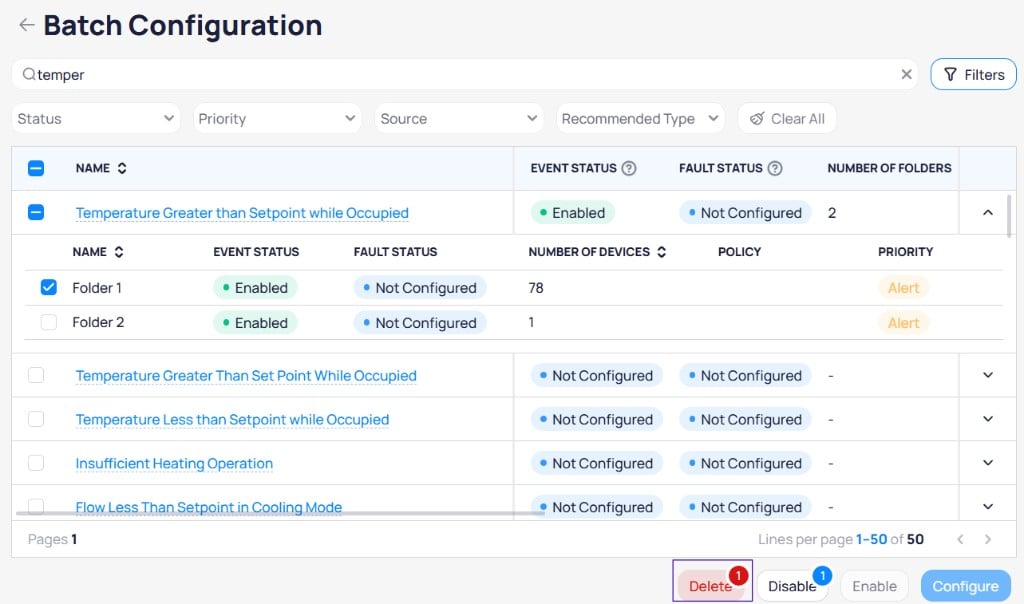
Expand a routine row to view its Multi-Config folders with individual device counts, statuses, and priorities.
Expanded routine showing Multi-Config folders with device counts and priorities
Column
Description
Name
Routine name. Select to open detailed configuration.
Event Status
Current state: Not Configured, Disabled, Enabled, or Mixed
Fault Status
Indicates whether fault tracking is active
Number of Folders
Count of Multi-Config folders
Number of Devices
Count of devices assigned to the routine
Policy
Assigned notification policy
Priority
Priority level for generated events
Source
Origin of the routine: Local or Library
Recommended Type
Suggested equipment type for the routine
Description
Summary of what the routine monitors
Status definitions
Status
Meaning
Not Configured
No devices or parameters assigned yet
Disabled
Configured but not actively generating events
Enabled
Actively monitoring devices and generating events
Mixed
Multi-Config folders have different enabled or disabled states
Configure routines
Choose quick configuration for default settings across many routines, or detailed configuration to tune one routine at a time.
Quick configuration
Detailed configuration
Use quick configuration to apply default settings to multiple routines at once.
Select routines using checkboxes to access bulk actions in the bottom toolbar
1
Select routines
Select the checkboxes next to one or more routines in the Configs list.
2
Choose a notification policy
Select the Configure button in the toolbar. Choose a notification policy from the dropdown.
3
Apply the configuration
Select Configure to find compatible devices, create the configuration, and apply default parameters without enabling monitoring yet.Select Configure and Enable when you want the same batch action to start monitoring immediately after configuration.
Select a routine name in the Configs list to open its Config Details page. Use detailed configuration to fine-tune parameters, select specific devices, and set notification preferences for individual routines. Each folder maintains its own independent configuration — you can set different parameters, status setup, notification settings, base settings, and possible solutions per folder.
1
Open the config details
Select the routine name link from the Configs list. The Config Details page has three areas:
Top tabs: Navigate between Overview and individual Multi-Config folders (for example, VAVs, FCUs) with a + button to add folders
Main panel: View and select devices with search and filters
Right panel: Adjust Routine Params, Status Setup, Notification Settings, External Data Source, Base Settings, and Possible Solutions
The Config Details page with device list, routine parameters, and folder tabs
2
Select devices to monitor
The main panel lists all compatible devices automatically. Select individual device checkboxes, use Select All, or search by name. Expand a device row to view its main point and other points.For devices with multiple point options, choose the correct combination from the dropdown next to each device.
3
Configure parameters
The Routine Params panel on the right displays adjustable parameters with default values and info tooltips. Adjust values based on your equipment and environment.
Parameter
Purpose
Arbitrary Heating Setpoint
Temperature threshold for heating faults
Alarm On Delay
Duration a fault condition must persist before generating an event
Arbitrary Cooling Setpoint
Temperature threshold for cooling faults
Start Delay
Wait time after system startup before monitoring begins
Heating Setpoint Deadband
Acceptable deviation from the heating setpoint
Cooling Setpoint Deadband
Acceptable deviation from the cooling setpoint
Single Setpoint Deadband
Acceptable deviation when a single setpoint is used
Return to Normal Delay
Duration a condition must be normal before closing the event
Use tighter tolerances for critical spaces like server rooms. Apply longer delays for equipment with startup fluctuations. Set wider dead band values for older equipment to reduce false positives.
4
Configure status setup
The Status Setup section controls whether the routine generates events, faults, and actively monitors devices.
Status Setup with Event Config, Fault Config, and Routine Config toggles
Event Config: Events are real time and used to monitor critical assets and send high priority notifications.
Fault Config: Faults are generated daily and used to analyze non-critical comfort, energy, and mechanical issues.
Routine Config: Enable to start monitoring devices in this folder.
5
Set notification settings
The Notification Settings section defines how events from this routine are grouped and delivered.
Notification Settings with grouping policy, priority, and notification policy
Grouping Policy
None: Sends individual notifications for each event. Use for critical alarms that need individual attention.
: Groups related events by ontology relationships to reduce notification volume and form incidents.
: Groups events by data source. Use for connectivity routines such as Datasource Down or Device Down.
Priority: Select the priority level for events generated by this routine (Life Safety, Critical, Warning, Alert, or Info).Notification Policy: Select the policy that defines which contacts receive notifications and through which channels.
6
Add external data source
The External Data Source section lets you connect an external system for work order delivery from this config. Select + Add External Source to configure a connection. This section is optional.If you configure an external data source here, it applies only to this configuration and overrides any external data source set on the notification policy.
7
Configure base settings
The Base Settings section defines the content included in event notifications. Default values use dynamic tokens that pull from the routine definition.
Base Settings with event naming, descriptions, notes, and possible solutions
Event Name: The name displayed for generated events. Defaults to {{routines.name}}.
On Create Description: Text included when an event is created. Defaults to {{routines.description}}.
On Create Notes: Additional notes attached to the event at creation.
On End Description: Text included when an event closes. Defaults to {{routines.description}}.
On End Notes: Additional notes attached when the event closes.
Possible Solutions: Add possible solutions that appear in event reports to guide troubleshooting. Select + Add/Sort Solution to add entries.
8
Save the folder
Select Save Folder to apply your configuration. Repeat for each folder as needed.
When you save a folder, the config appears as Disabled in the Configs list. You must enable it separately from the list.
Enable or disable configs
After saving your configuration, return to the Configs list to enable event generation.
1
Find the config
Search for the routine name in the Configs list. The newly configured routine displays as Disabled.
After saving, the config appears as Disabled in the Configs list with its folder and device counts
2
Enable the config
Select the checkbox next to the routine and select Enable from the bottom toolbar.
Select the routine and click Enable to start generating events
Disabled configs retain their configuration but stop generating new events. Re-enable a config to resume monitoring without reconfiguring.
Multi-Config folders
folders let you apply different configurations to the same routine across different groups of devices.
When to use folders
Different thresholds for server rooms versus standard offices
Separate notification policies for critical versus non-critical equipment
Distinct priority levels based on equipment location or function
Varying operating parameters for different equipment generations
Create a folder
1
Add the folder
Select + Folder in the top menu of the Config Details page. Enter a descriptive name and select Create.
2
Configure devices
Select devices for this folder and configure parameters, status setup, notification settings, base settings, and possible solutions independently from other folders.
Manage folders
Switch between folders using the top tabs. Each folder maintains its own device selection, routine parameters, status setup, notification settings, external data source, base settings, and possible solutions. Save each folder before switching to another.
A routine’s status displays as Mixed when its folders have different enabled or disabled states.
Best practices
Deployment strategy
Start with critical equipment that has the highest operational impact.
Use recommended routine types matched to your equipment.
Test with a small group of devices before rolling out broadly.
Review event output after one week and adjust thresholds as needed.
Document any customizations for future reference.
Parameter tuning
Equipment type
Recommendation
New equipment
Start with default parameters and refine after observing initial output
Older equipment
Increase tolerances and deadbands to account for sensor drift
Critical spaces
Minimize delays and tighten tolerances for faster response
Troubleshooting
No compatible devices found
Verify that your devices have the correct point templating applied. Routines match devices based on canonical point types defined in the ontology.
Configuration does not save
Check for error messages or red-highlighted fields in the configuration panel. All required fields must be completed before saving.
Too many notifications
Increase tolerances and delay values to filter out transient conditions. Consider using Reference-based grouping to consolidate related events.
Events not generating
Confirm that Enable Event Streaming is toggled on. Review threshold values to verify they match actual operating conditions. Check the routine status to confirm it is Enabled.
Next steps
Routines
Create and test custom fault detection rules using the logic builder.
Routine logic blocks
Explore the available logic blocks for building routine workflows.
FDD introduction
Review core FDD concepts including events, incidents, and faults.
Last modified on August 19, 2026
Was this page helpful?
{"docsConfig":{"theme":"aspen","$schema":"https://mintlify.com/docs.json","name":"KODE Labs - Product Documentation","colors":{"primary":"#015BFA","light":"#3A9AFF","dark":"#015BFA"},"logo":{"light":"https://mintcdn.com/kodelabs/YfYud6Al4TM68wc2/logo/logo-light.png?fit=max\u0026auto=format\u0026n=YfYud6Al4TM68wc2\u0026q=85\u0026s=00d4ffd6ad7a592e52856804d1a53d12","dark":"https://mintcdn.com/kodelabs/YfYud6Al4TM68wc2/logo/logo-dark.png?fit=max\u0026auto=format\u0026n=YfYud6Al4TM68wc2\u0026q=85\u0026s=a6769f53904d96f5a53ea0c4b3c972d6","href":"/"},"favicon":{"light":"https://mintcdn.com/kodelabs/H3HEEQdnaG21O57-/logo/favicon-light.png?fit=max\u0026auto=format\u0026n=H3HEEQdnaG21O57-\u0026q=85\u0026s=3ae881e353dfb5c2f667e175ec82c799","dark":"https://mintcdn.com/kodelabs/H3HEEQdnaG21O57-/logo/favicon-dark.png?fit=max\u0026auto=format\u0026n=H3HEEQdnaG21O57-\u0026q=85\u0026s=845431bc7d53ce5bf50f56ef53d9137f"},"api":{"params":{"expanded":"closed"},"playground":{"display":"interactive","proxy":true},"examples":{"defaults":"required","languages":["bash","javascript","python","powershell"],"prefill":true,"autogenerate":true},"url":"full"},"appearance":{"default":"light","strict":true},"background":{"color":{"light":"#ffffff","dark":"#121212"}},"navbar":{"links":[{"href":"https://kodelabs.com/contact/","label":"Contact Us"}]},"footer":{"socials":{"x":"https://twitter.com/kodelabs","instagram":"https://www.instagram.com/kode_labs","linkedin":"https://www.linkedin.com/company/kodelabs","youtube":"https://www.youtube.com/channel/UCKCnsgnYtugWxMPzu3UEHkw"},"links":[{"header":"Platform","items":[{"label":"KODE OS","href":"https://kodelabs.com"},{"label":"Integrations","href":"https://kodelabs.com/partners/integrations-library"},{"label":"Security","href":"https://kodelabs.com/security"}]},{"header":"Resources","items":[{"label":"Blog","href":"https://kodelabs.com/blog"},{"label":"Reports \u0026 Guides","href":"https://kodelabs.com/resources"},{"label":"Podcasts \u0026 Webinars","href":"https://kodelabs.com/resources"},{"label":"Case Studies","href":"https://kodelabs.com/case-studies"},{"label":"News","href":"https://kodelabs.com/news"}]},{"header":"Solutions","items":[{"label":"Commercial","href":"https://kodelabs.com/solutions/commercial-real-estate"},{"label":"Corporate","href":"https://kodelabs.com/solutions/corporate"},{"label":"Retail","href":"https://kodelabs.com/solutions/retail"},{"label":"Healthcare","href":"https://kodelabs.com/solutions/healthcare"},{"label":"Education","href":"https://kodelabs.com/solutions/education"}]},{"header":"Company","items":[{"label":"About","href":"https://kodelabs.com/about"},{"label":"Careers","href":"https://kodelabs.com/careers"},{"label":"Internships","href":"https://kodelabs.com/internships"},{"label":"Contact Us","href":"https://kodelabs.com/contact"}]}]},"search":{"prompt":"Search our docs..."},"fonts":{"heading":{"family":"Manrope","weight":600},"body":{"family":"Inter"}},"icons":{"library":"lucide"},"styling":{"eyebrows":"section","codeblocks":{"theme":{"light":"github-light","dark":"github-dark"}},"latex":false},"integrations":{"ga4":{"measurementId":"G-WKYQEE1T4B"}},"banner":{"content":"KODE 3.20 is live. See [what's new in November 2026](/whats-new/2026/v3.20-november-2026).","dismissible":true,"color":{"light":"#015BFA","dark":"#015BFA"}},"errors":{"404":{"redirect":false,"title":"We're working on it!","description":"If you're not seeing this page, we're definitely updating it."}},"contextual":{"options":["copy","view",{"title":"Email KODE support","description":"Contact KODE Labs support for help","icon":"mail","href":"mailto:support@kodelabs.com"}],"display":"toc"},"interaction":{"drilldown":false},"metadata":{"timestamp":true},"navigation":{"global":{"anchors":[{"anchor":"Home","icon":"house","href":"/"},{"anchor":"What's New","icon":"megaphone","href":"/whats-new/2026/v3.20-november-2026"}]},"pages":[]}},"deployment":{"deploymentMetadataValue":{"subdomain":"kodelabs","hasAudioNarration":false,"actualSubdomain":"kodelabs","customDomains":["docs.kodelabs.com"],"gitSource":{"type":"github","owner":"kode-labs","repo":"docs","deployBranch":"main","contentDirectory":"","isPrivate":true,"mountPath":"","label":""},"feedback":{"thumbs":true,"agentFeedback":true},"entitlements":{"AI_CHAT":{"status":"ENABLED"},"REMOVE_BRANDING":{"status":"ENABLED"},"CONTEXTUAL_FEEDBACK":{"status":"ENABLED"},"CODE_SNIPPET_FEEDBACK":{"status":"ENABLED"},"WEB_MCP":{"status":"ENABLED"},"NARRATION":{"status":"ENABLED"}},"buildId":"6af8e4f300819710da52c87a","clientVersion":"0.0.4227","searchFilterCounts":[{"language":"default","tag":"Integrations","count":214},{"language":"default","tag":"All Integrations","count":205},{"language":"default","tag":"KODE API","count":143},{"language":"default","tag":"API reference","count":132},{"language":"default","tag":"EnerG","count":61},{"language":"default","tag":"Meters","count":37},{"language":"default","tag":"Building BI","count":35},{"language":"default","tag":"AssetOps","count":32},{"language":"default","tag":"Cloud BMS","count":31},{"language":"default","tag":"Reference","count":29}],"searchSettings":{"showContentSnippets":true,"isFiltersEnabled":true,"maxResults":10}},"assistantConfig":{"enableStarterQuestions":true,"enableContextualStarterQuestions":true},"basePath":"","hasChatPermissions":true,"hasWebMcpPermissions":true,"toggles":[],"googleFontsInlined":true},"customCss":[{"filePath":"custom.css","href":"/_mintlify/custom/kodelabs/fd6257d3326e3afa/custom.css"}]}
{"page":{"pagePath":"products/fdd/configuration","slug":"/products/fdd/configuration","pageMetadata":{"title":"FDD configuration","sidebarTitle":"Configs","description":"Set up and manage fault detection rules, device monitoring parameters, notification policies, and multi-config folders for your building equipment.","icon":"sliders-horizontal","keywords":["FDD","configuration","routines","monitoring","parameters","Cloud BMS"],"href":"/products/fdd/configuration"},"description":{"compiledSource":"\"use strict\";\nconst {jsx: _jsx} = arguments[0];\nconst {useMDXComponents: _provideComponents} = arguments[0];\nfunction _createMdxContent(props) {\n const _components = {\n p: \"p\",\n ..._provideComponents(),\n ...props.components\n };\n return _jsx(_components.p, {\n children: \"Set up and manage fault detection rules, device monitoring parameters, notification policies, and multi-config folders for your building equipment.\"\n });\n}\nfunction MDXContent(props = {}) {\n const {wrapper: MDXLayout} = {\n ..._provideComponents(),\n ...props.components\n };\n return MDXLayout ? _jsx(MDXLayout, {\n ...props,\n children: _jsx(_createMdxContent, {\n ...props\n })\n }) : _createMdxContent(props);\n}\nreturn {\n default: MDXContent\n};\n","frontmatter":{},"scope":{}},"pageType":"default","mdx":{"mdxSource":{"compiledSource":"\"use strict\";const{Fragment:_Fragment,jsx:_jsx,jsxs:_jsxs}=arguments[0];const{useMDXComponents:_provideComponents}=arguments[0];function _createMdxContent(props){const _components={a:`a`,code:`code`,li:`li`,ol:`ol`,p:`p`,strong:`strong`,tbody:`tbody`,td:`td`,th:`th`,thead:`thead`,tr:`tr`,ul:`ul`,..._provideComponents(),...props.components},{Accordion,AccordionGroup,Card,CardGroup,Frame,Heading,Info,Note,OptimizedImage,Step,Steps,Tab,Table,Tabs,Tip,Tooltip,Warning}=_components;if(!Accordion)_missingMdxReference(`Accordion`,true);if(!AccordionGroup)_missingMdxReference(`AccordionGroup`,true);if(!Card)_missingMdxReference(`Card`,true);if(!CardGroup)_missingMdxReference(`CardGroup`,true);if(!Frame)_missingMdxReference(`Frame`,true);if(!Heading)_missingMdxReference(`Heading`,true);if(!Info)_missingMdxReference(`Info`,true);if(!Note)_missingMdxReference(`Note`,true);if(!OptimizedImage)_missingMdxReference(`OptimizedImage`,true);if(!Step)_missingMdxReference(`Step`,true);if(!Steps)_missingMdxReference(`Steps`,true);if(!Tab)_missingMdxReference(`Tab`,true);if(!Table)_missingMdxReference(`Table`,true);if(!Tabs)_missingMdxReference(`Tabs`,true);if(!Tip)_missingMdxReference(`Tip`,true);if(!Tooltip)_missingMdxReference(`Tooltip`,true);if(!Warning)_missingMdxReference(`Warning`,true);return _jsxs(_Fragment,{children:[_jsx(_components.p,{children:`FDD configuration is where you activate and customize monitoring rules (routines) for your building equipment. You define which devices to monitor, what thresholds trigger alerts, and how notifications are delivered.`}),`\n`,_jsxs(_components.p,{children:[`All routines you create on the `,_jsx(_components.a,{href:`/products/fdd/routines`,children:`Routines`}),` page automatically become available for configuration here. KODE also provides a set of pre-built library routines that are available by default to every client. Library routines cover common fault conditions across airside, chilled water, and hot water systems.`]}),`\n`,_jsx(Info,{children:_jsxs(_components.p,{children:[`Navigate to `,_jsx(_components.code,{children:`FDD`}),` from the left sidebar, open the secondary sidebar, and select `,_jsx(_components.code,{children:`Configs`}),`.`]})}),`\n`,_jsx(Heading,{level:`2`,id:`key-capabilities`,children:`Key capabilities`}),`\n`,_jsxs(_components.ul,{children:[`\n`,_jsx(_components.li,{children:`Configure events for real-time alarms`}),`\n`,_jsx(_components.li,{children:`Apply routines from the KODE Library or custom rules`}),`\n`,_jsx(_components.li,{children:`Set device-specific parameters and thresholds`}),`\n`,_jsx(_components.li,{children:`Manage notification policies and priority levels`}),`\n`,_jsxs(_components.li,{children:[`Use `,_jsx(Tooltip,{tip:`Separate folders under one routine so different device groups can use different parameters, priorities, and policies.`,children:`Multi-Config`}),` folders for granular control`]}),`\n`,_jsx(_components.li,{children:`Batch configure multiple routines simultaneously`}),`\n`]}),`\n`,_jsx(Heading,{level:`2`,id:`the-configs-list`,children:`The Configs list`}),`\n`,_jsxs(_components.p,{children:[`The Configs list displays all available routines and their current state. Each row provides a summary of the routine’s configuration. Use the search bar and filter dropdowns (`,_jsx(_components.code,{children:`Status`}),`, `,_jsx(_components.code,{children:`Priority`}),`, `,_jsx(_components.code,{children:`Policy`}),`, `,_jsx(_components.code,{children:`Source`}),`, `,_jsx(_components.code,{children:`Recommended Type`}),`) to find specific routines. Select `,_jsx(_components.code,{children:`Clear All`}),` to reset filters.`]}),`\n`,_jsx(Frame,{caption:`The Batch Configuration page lists all routines available for configuration, including both library and locally created routines`,children:_jsx(OptimizedImage,{src:`https://mintcdn.com/kodelabs/njejy12QoNdTJ3U4/images/kode-os/fdd/kode-os-fdd-batch-configuration.png?fit=max\u0026auto=format\u0026n=njejy12QoNdTJ3U4\u0026q=85\u0026s=9c48c5f10c54487939fce156b04cd25b`,alt:`Batch Configuration page with search bar, filter dropdowns for Status, Priority, Policy, Source, and Recommended Type, and a table listing routines with columns for Name, Event Status, Fault Status, Number of Folders, Number of Devices, Priority, and Source showing Library and Local sources`,\"data-og-width\":`1024`,width:`1024`,\"data-og-height\":`461`,height:`461`,\"data-path\":`images/kode-os/fdd/kode-os-fdd-batch-configuration.png`,\"data-optimize\":`true`,\"data-opv\":`3`,srcset:`https://mintcdn.com/kodelabs/njejy12QoNdTJ3U4/images/kode-os/fdd/kode-os-fdd-batch-configuration.png?w=280\u0026fit=max\u0026auto=format\u0026n=njejy12QoNdTJ3U4\u0026q=85\u0026s=79add399e15761f6f9b7daf2d213d97b 280w, https://mintcdn.com/kodelabs/njejy12QoNdTJ3U4/images/kode-os/fdd/kode-os-fdd-batch-configuration.png?w=560\u0026fit=max\u0026auto=format\u0026n=njejy12QoNdTJ3U4\u0026q=85\u0026s=a4d296bfbea3a654271420fda808c032 560w, https://mintcdn.com/kodelabs/njejy12QoNdTJ3U4/images/kode-os/fdd/kode-os-fdd-batch-configuration.png?w=840\u0026fit=max\u0026auto=format\u0026n=njejy12QoNdTJ3U4\u0026q=85\u0026s=985d538e200c32b21f4d7d478228537c 840w, https://mintcdn.com/kodelabs/njejy12QoNdTJ3U4/images/kode-os/fdd/kode-os-fdd-batch-configuration.png?w=1100\u0026fit=max\u0026auto=format\u0026n=njejy12QoNdTJ3U4\u0026q=85\u0026s=3a38fce0282cfb8438917e227be46511 1100w, https://mintcdn.com/kodelabs/njejy12QoNdTJ3U4/images/kode-os/fdd/kode-os-fdd-batch-configuration.png?w=1650\u0026fit=max\u0026auto=format\u0026n=njejy12QoNdTJ3U4\u0026q=85\u0026s=737c874ff0f8f8b8e3a9474c0c8f9a3b 1650w, https://mintcdn.com/kodelabs/njejy12QoNdTJ3U4/images/kode-os/fdd/kode-os-fdd-batch-configuration.png?w=2500\u0026fit=max\u0026auto=format\u0026n=njejy12QoNdTJ3U4\u0026q=85\u0026s=cf59e486c97cb1e320e17026d23e692d 2500w`})}),`\n`,_jsx(_components.p,{children:`Expand a routine row to view its Multi-Config folders with individual device counts, statuses, and priorities.`}),`\n`,_jsx(Frame,{caption:`Expanded routine showing Multi-Config folders with device counts and priorities`,children:_jsx(OptimizedImage,{src:`https://mintcdn.com/kodelabs/SxbaONoYYoMWCQfA/images/kode-os/fdd/kode-os-fdd-configs-list.png?fit=max\u0026auto=format\u0026n=SxbaONoYYoMWCQfA\u0026q=85\u0026s=b083f86751256517c188916f9d392799`,alt:`Configs list with an expanded routine showing Folder 1 and Folder 2 with device counts and Alert priority levels`,\"data-og-width\":`1024`,width:`1024`,\"data-og-height\":`604`,height:`604`,\"data-path\":`images/kode-os/fdd/kode-os-fdd-configs-list.png`,\"data-optimize\":`true`,\"data-opv\":`3`,srcset:`https://mintcdn.com/kodelabs/SxbaONoYYoMWCQfA/images/kode-os/fdd/kode-os-fdd-configs-list.png?w=280\u0026fit=max\u0026auto=format\u0026n=SxbaONoYYoMWCQfA\u0026q=85\u0026s=204bf95a6bba2709318fa43faac52482 280w, https://mintcdn.com/kodelabs/SxbaONoYYoMWCQfA/images/kode-os/fdd/kode-os-fdd-configs-list.png?w=560\u0026fit=max\u0026auto=format\u0026n=SxbaONoYYoMWCQfA\u0026q=85\u0026s=014867919e03e44b32ee84e6fd7d2572 560w, https://mintcdn.com/kodelabs/SxbaONoYYoMWCQfA/images/kode-os/fdd/kode-os-fdd-configs-list.png?w=840\u0026fit=max\u0026auto=format\u0026n=SxbaONoYYoMWCQfA\u0026q=85\u0026s=4f617d81bbf5b813ec0e5bb37cfa07c0 840w, https://mintcdn.com/kodelabs/SxbaONoYYoMWCQfA/images/kode-os/fdd/kode-os-fdd-configs-list.png?w=1100\u0026fit=max\u0026auto=format\u0026n=SxbaONoYYoMWCQfA\u0026q=85\u0026s=f6b4c6b64827674e1bd52c6ff2480be9 1100w, https://mintcdn.com/kodelabs/SxbaONoYYoMWCQfA/images/kode-os/fdd/kode-os-fdd-configs-list.png?w=1650\u0026fit=max\u0026auto=format\u0026n=SxbaONoYYoMWCQfA\u0026q=85\u0026s=23493ced46cd666292e1ce27c17decb9 1650w, https://mintcdn.com/kodelabs/SxbaONoYYoMWCQfA/images/kode-os/fdd/kode-os-fdd-configs-list.png?w=2500\u0026fit=max\u0026auto=format\u0026n=SxbaONoYYoMWCQfA\u0026q=85\u0026s=8587a2430e5cd14a604712188476967a 2500w`})}),`\n`,_jsxs(Table,{children:[_jsx(_components.thead,{children:_jsxs(_components.tr,{children:[_jsx(_components.th,{children:`Column`}),_jsx(_components.th,{children:`Description`})]})}),_jsxs(_components.tbody,{children:[_jsxs(_components.tr,{children:[_jsx(_components.td,{children:_jsx(_components.code,{children:`Name`})}),_jsx(_components.td,{children:`Routine name. Select to open detailed configuration.`})]}),_jsxs(_components.tr,{children:[_jsx(_components.td,{children:_jsx(_components.code,{children:`Event Status`})}),_jsx(_components.td,{children:`Current state: Not Configured, Disabled, Enabled, or Mixed`})]}),_jsxs(_components.tr,{children:[_jsx(_components.td,{children:_jsx(_components.code,{children:`Fault Status`})}),_jsx(_components.td,{children:`Indicates whether fault tracking is active`})]}),_jsxs(_components.tr,{children:[_jsx(_components.td,{children:_jsx(_components.code,{children:`Number of Folders`})}),_jsx(_components.td,{children:`Count of Multi-Config folders`})]}),_jsxs(_components.tr,{children:[_jsx(_components.td,{children:_jsx(_components.code,{children:`Number of Devices`})}),_jsx(_components.td,{children:`Count of devices assigned to the routine`})]}),_jsxs(_components.tr,{children:[_jsx(_components.td,{children:_jsx(_components.code,{children:`Policy`})}),_jsx(_components.td,{children:`Assigned notification policy`})]}),_jsxs(_components.tr,{children:[_jsx(_components.td,{children:_jsx(_components.code,{children:`Priority`})}),_jsx(_components.td,{children:`Priority level for generated events`})]}),_jsxs(_components.tr,{children:[_jsx(_components.td,{children:_jsx(_components.code,{children:`Source`})}),_jsx(_components.td,{children:`Origin of the routine: Local or Library`})]}),_jsxs(_components.tr,{children:[_jsx(_components.td,{children:_jsx(_components.code,{children:`Recommended Type`})}),_jsx(_components.td,{children:`Suggested equipment type for the routine`})]}),_jsxs(_components.tr,{children:[_jsx(_components.td,{children:_jsx(_components.code,{children:`Description`})}),_jsx(_components.td,{children:`Summary of what the routine monitors`})]})]})]}),`\n`,_jsx(Heading,{level:`3`,id:`status-definitions`,children:`Status definitions`}),`\n`,_jsxs(Table,{children:[_jsx(_components.thead,{children:_jsxs(_components.tr,{children:[_jsx(_components.th,{children:`Status`}),_jsx(_components.th,{children:`Meaning`})]})}),_jsxs(_components.tbody,{children:[_jsxs(_components.tr,{children:[_jsx(_components.td,{children:_jsx(_components.strong,{children:`Not Configured`})}),_jsx(_components.td,{children:`No devices or parameters assigned yet`})]}),_jsxs(_components.tr,{children:[_jsx(_components.td,{children:_jsx(_components.strong,{children:`Disabled`})}),_jsx(_components.td,{children:`Configured but not actively generating events`})]}),_jsxs(_components.tr,{children:[_jsx(_components.td,{children:_jsx(_components.strong,{children:`Enabled`})}),_jsx(_components.td,{children:`Actively monitoring devices and generating events`})]}),_jsxs(_components.tr,{children:[_jsx(_components.td,{children:_jsx(_components.strong,{children:`Mixed`})}),_jsx(_components.td,{children:`Multi-Config folders have different enabled or disabled states`})]})]})]}),`\n`,_jsx(Heading,{level:`2`,id:`configure-routines`,children:`Configure routines`}),`\n`,_jsx(_components.p,{children:`Choose quick configuration for default settings across many routines, or detailed configuration to tune one routine at a time.`}),`\n`,_jsxs(Tabs,{children:[_jsxs(Tab,{title:`Quick configuration`,icon:`zap`,id:`quick-configuration`,children:[_jsx(_components.p,{children:`Use quick configuration to apply default settings to multiple routines at once.`}),_jsx(Frame,{caption:`Select routines using checkboxes to access bulk actions in the bottom toolbar`,children:_jsx(OptimizedImage,{src:`https://mintcdn.com/kodelabs/SxbaONoYYoMWCQfA/images/kode-os/fdd/kode-os-fdd-configs-select.png?fit=max\u0026auto=format\u0026n=SxbaONoYYoMWCQfA\u0026q=85\u0026s=36944f6b681fd58ecab022229e6ec272`,alt:`Batch Configuration list with one routine selected and bottom toolbar showing Delete, Disable, Enable, and Configure buttons`,\"data-og-width\":`1024`,width:`1024`,\"data-og-height\":`494`,height:`494`,\"data-path\":`images/kode-os/fdd/kode-os-fdd-configs-select.png`,\"data-optimize\":`true`,\"data-opv\":`3`,srcset:`https://mintcdn.com/kodelabs/SxbaONoYYoMWCQfA/images/kode-os/fdd/kode-os-fdd-configs-select.png?w=280\u0026fit=max\u0026auto=format\u0026n=SxbaONoYYoMWCQfA\u0026q=85\u0026s=6e45aca7caeba568b15322393d3a3b5f 280w, https://mintcdn.com/kodelabs/SxbaONoYYoMWCQfA/images/kode-os/fdd/kode-os-fdd-configs-select.png?w=560\u0026fit=max\u0026auto=format\u0026n=SxbaONoYYoMWCQfA\u0026q=85\u0026s=670d8ef4e2bbde057f4544d5f9481309 560w, https://mintcdn.com/kodelabs/SxbaONoYYoMWCQfA/images/kode-os/fdd/kode-os-fdd-configs-select.png?w=840\u0026fit=max\u0026auto=format\u0026n=SxbaONoYYoMWCQfA\u0026q=85\u0026s=9de743c9399fcf848a05329a42f63968 840w, https://mintcdn.com/kodelabs/SxbaONoYYoMWCQfA/images/kode-os/fdd/kode-os-fdd-configs-select.png?w=1100\u0026fit=max\u0026auto=format\u0026n=SxbaONoYYoMWCQfA\u0026q=85\u0026s=c128841c32fb638d42b444bc11cafee5 1100w, https://mintcdn.com/kodelabs/SxbaONoYYoMWCQfA/images/kode-os/fdd/kode-os-fdd-configs-select.png?w=1650\u0026fit=max\u0026auto=format\u0026n=SxbaONoYYoMWCQfA\u0026q=85\u0026s=ab17cf3791562f8bd78f103ad6609556 1650w, https://mintcdn.com/kodelabs/SxbaONoYYoMWCQfA/images/kode-os/fdd/kode-os-fdd-configs-select.png?w=2500\u0026fit=max\u0026auto=format\u0026n=SxbaONoYYoMWCQfA\u0026q=85\u0026s=5fc343ca896c57a5136617a168f7799c 2500w`})}),_jsxs(Steps,{children:[_jsx(Step,{title:`Select routines`,children:_jsx(_components.p,{children:`Select the checkboxes next to one or more routines in the Configs list.`})}),_jsx(Step,{title:`Choose a notification policy`,children:_jsxs(_components.p,{children:[`Select the `,_jsx(_components.code,{children:`Configure`}),` button in the toolbar. Choose a notification policy from the dropdown.`]})}),_jsxs(Step,{title:`Apply the configuration`,children:[_jsxs(_components.p,{children:[`Select `,_jsx(_components.code,{children:`Configure`}),` to find compatible devices, create the configuration, and apply default parameters without enabling monitoring yet.`]}),_jsxs(_components.p,{children:[`Select `,_jsx(_components.code,{children:`Configure and Enable`}),` when you want the same batch action to start monitoring immediately after configuration.`]})]})]})]}),_jsxs(Tab,{title:`Detailed configuration`,icon:`sliders-horizontal`,id:`detailed-configuration`,children:[_jsx(_components.p,{children:`Select a routine name in the Configs list to open its Config Details page. Use detailed configuration to fine-tune parameters, select specific devices, and set notification preferences for individual routines. Each folder maintains its own independent configuration — you can set different parameters, status setup, notification settings, base settings, and possible solutions per folder.`}),_jsxs(Steps,{children:[_jsxs(Step,{title:`Open the config details`,children:[_jsx(_components.p,{children:`Select the routine name link from the Configs list. The Config Details page has three areas:`}),_jsxs(_components.ul,{children:[`\n`,_jsxs(_components.li,{children:[_jsx(_components.strong,{children:`Top tabs`}),`: Navigate between `,_jsx(_components.code,{children:`Overview`}),` and individual Multi-Config folders (for example, `,_jsx(_components.code,{children:`VAVs`}),`, `,_jsx(_components.code,{children:`FCUs`}),`) with a `,_jsx(_components.code,{children:`+`}),` button to add folders`]}),`\n`,_jsxs(_components.li,{children:[_jsx(_components.strong,{children:`Main panel`}),`: View and select devices with search and filters`]}),`\n`,_jsxs(_components.li,{children:[_jsx(_components.strong,{children:`Right panel`}),`: Adjust `,_jsx(_components.code,{children:`Routine Params`}),`, `,_jsx(_components.code,{children:`Status Setup`}),`, `,_jsx(_components.code,{children:`Notification Settings`}),`, `,_jsx(_components.code,{children:`External Data Source`}),`, `,_jsx(_components.code,{children:`Base Settings`}),`, and `,_jsx(_components.code,{children:`Possible Solutions`})]}),`\n`]}),_jsx(Frame,{caption:`The Config Details page with device list, routine parameters, and folder tabs`,children:_jsx(OptimizedImage,{src:`https://mintcdn.com/kodelabs/SxbaONoYYoMWCQfA/images/kode-os/fdd/kode-os-fdd-config-devices.png?fit=max\u0026auto=format\u0026n=SxbaONoYYoMWCQfA\u0026q=85\u0026s=d68d447beeae50cf48790d94f16b9b97`,alt:`Config Details page for Temperature Less than Setpoint while Occupied showing Overview and Folder 1 tabs, a device table listing FCU208, VAV_406, VAV_204, VAV_407, VAV_401, VAV_209, VAV_104, VAV_103, and FCU_207 with area and point count columns, and Routine Params panel showing parameter values`,\"data-og-width\":`1024`,width:`1024`,\"data-og-height\":`490`,height:`490`,\"data-path\":`images/kode-os/fdd/kode-os-fdd-config-devices.png`,\"data-optimize\":`true`,\"data-opv\":`3`,srcset:`https://mintcdn.com/kodelabs/SxbaONoYYoMWCQfA/images/kode-os/fdd/kode-os-fdd-config-devices.png?w=280\u0026fit=max\u0026auto=format\u0026n=SxbaONoYYoMWCQfA\u0026q=85\u0026s=93712c1df3d3be68a73c99d7eacc07a8 280w, https://mintcdn.com/kodelabs/SxbaONoYYoMWCQfA/images/kode-os/fdd/kode-os-fdd-config-devices.png?w=560\u0026fit=max\u0026auto=format\u0026n=SxbaONoYYoMWCQfA\u0026q=85\u0026s=0cefa41780f666cf388e2799fef2ef41 560w, https://mintcdn.com/kodelabs/SxbaONoYYoMWCQfA/images/kode-os/fdd/kode-os-fdd-config-devices.png?w=840\u0026fit=max\u0026auto=format\u0026n=SxbaONoYYoMWCQfA\u0026q=85\u0026s=3d0e8071eadfe76d39873985bb0ddf86 840w, https://mintcdn.com/kodelabs/SxbaONoYYoMWCQfA/images/kode-os/fdd/kode-os-fdd-config-devices.png?w=1100\u0026fit=max\u0026auto=format\u0026n=SxbaONoYYoMWCQfA\u0026q=85\u0026s=e817743eacf1e21f60606954b995cfd9 1100w, https://mintcdn.com/kodelabs/SxbaONoYYoMWCQfA/images/kode-os/fdd/kode-os-fdd-config-devices.png?w=1650\u0026fit=max\u0026auto=format\u0026n=SxbaONoYYoMWCQfA\u0026q=85\u0026s=1c494af4701456aa45e51831a847bf03 1650w, https://mintcdn.com/kodelabs/SxbaONoYYoMWCQfA/images/kode-os/fdd/kode-os-fdd-config-devices.png?w=2500\u0026fit=max\u0026auto=format\u0026n=SxbaONoYYoMWCQfA\u0026q=85\u0026s=1b7f142f2f9c29d3e44c43142e90da86 2500w`})})]}),_jsxs(Step,{title:`Select devices to monitor`,children:[_jsxs(_components.p,{children:[`The main panel lists all compatible devices automatically. Select individual device checkboxes, use `,_jsx(_components.code,{children:`Select All`}),`, or search by name. Expand a device row to view its main point and other points.`]}),_jsx(_components.p,{children:`For devices with multiple point options, choose the correct combination from the dropdown next to each device.`})]}),_jsxs(Step,{title:`Configure parameters`,children:[_jsxs(_components.p,{children:[`The `,_jsx(_components.code,{children:`Routine Params`}),` panel on the right displays adjustable parameters with default values and info tooltips. Adjust values based on your equipment and environment.`]}),_jsxs(Table,{children:[_jsx(_components.thead,{children:_jsxs(_components.tr,{children:[_jsx(_components.th,{children:`Parameter`}),_jsx(_components.th,{children:`Purpose`})]})}),_jsxs(_components.tbody,{children:[_jsxs(_components.tr,{children:[_jsx(_components.td,{children:_jsx(_components.code,{children:`Arbitrary Heating Setpoint`})}),_jsx(_components.td,{children:`Temperature threshold for heating faults`})]}),_jsxs(_components.tr,{children:[_jsx(_components.td,{children:_jsx(_components.code,{children:`Alarm On Delay`})}),_jsx(_components.td,{children:`Duration a fault condition must persist before generating an event`})]}),_jsxs(_components.tr,{children:[_jsx(_components.td,{children:_jsx(_components.code,{children:`Arbitrary Cooling Setpoint`})}),_jsx(_components.td,{children:`Temperature threshold for cooling faults`})]}),_jsxs(_components.tr,{children:[_jsx(_components.td,{children:_jsx(_components.code,{children:`Start Delay`})}),_jsx(_components.td,{children:`Wait time after system startup before monitoring begins`})]}),_jsxs(_components.tr,{children:[_jsx(_components.td,{children:_jsx(_components.code,{children:`Heating Setpoint Deadband`})}),_jsx(_components.td,{children:`Acceptable deviation from the heating setpoint`})]}),_jsxs(_components.tr,{children:[_jsx(_components.td,{children:_jsx(_components.code,{children:`Cooling Setpoint Deadband`})}),_jsx(_components.td,{children:`Acceptable deviation from the cooling setpoint`})]}),_jsxs(_components.tr,{children:[_jsx(_components.td,{children:_jsx(_components.code,{children:`Single Setpoint Deadband`})}),_jsx(_components.td,{children:`Acceptable deviation when a single setpoint is used`})]}),_jsxs(_components.tr,{children:[_jsx(_components.td,{children:_jsx(_components.code,{children:`Return to Normal Delay`})}),_jsx(_components.td,{children:`Duration a condition must be normal before closing the event`})]})]})]}),_jsx(Tip,{children:_jsx(_components.p,{children:`Use tighter tolerances for critical spaces like server rooms. Apply longer delays for equipment with startup fluctuations. Set wider dead band values for older equipment to reduce false positives.`})})]}),_jsxs(Step,{title:`Configure status setup`,children:[_jsxs(_components.p,{children:[`The `,_jsx(_components.code,{children:`Status Setup`}),` section controls whether the routine generates events, faults, and actively monitors devices.`]}),_jsx(Frame,{caption:`Status Setup with Event Config, Fault Config, and Routine Config toggles`,children:_jsx(OptimizedImage,{src:`https://mintcdn.com/kodelabs/SxbaONoYYoMWCQfA/images/kode-os/fdd/kode-os-fdd-config-status-setup.png?fit=max\u0026auto=format\u0026n=SxbaONoYYoMWCQfA\u0026q=85\u0026s=4b2f62ff563ef69f986f2fea685e38fd`,alt:`Status Setup section showing Event Config toggle enabled with description about real-time monitoring, Fault Config toggle disabled with description about daily non-critical analysis, and Routine Config toggle enabled with description about monitoring devices in this folder`,\"data-og-width\":`301`,width:`301`,\"data-og-height\":`354`,height:`354`,\"data-path\":`images/kode-os/fdd/kode-os-fdd-config-status-setup.png`,\"data-optimize\":`true`,\"data-opv\":`3`,srcset:`https://mintcdn.com/kodelabs/SxbaONoYYoMWCQfA/images/kode-os/fdd/kode-os-fdd-config-status-setup.png?w=280\u0026fit=max\u0026auto=format\u0026n=SxbaONoYYoMWCQfA\u0026q=85\u0026s=acab55eb89eb64a23bc7cb958e6f5dbf 280w, https://mintcdn.com/kodelabs/SxbaONoYYoMWCQfA/images/kode-os/fdd/kode-os-fdd-config-status-setup.png?w=560\u0026fit=max\u0026auto=format\u0026n=SxbaONoYYoMWCQfA\u0026q=85\u0026s=586b012b3ca0602b95a2e8d94eb14228 560w, https://mintcdn.com/kodelabs/SxbaONoYYoMWCQfA/images/kode-os/fdd/kode-os-fdd-config-status-setup.png?w=840\u0026fit=max\u0026auto=format\u0026n=SxbaONoYYoMWCQfA\u0026q=85\u0026s=23ea663077266df997936c0982fd925d 840w, https://mintcdn.com/kodelabs/SxbaONoYYoMWCQfA/images/kode-os/fdd/kode-os-fdd-config-status-setup.png?w=1100\u0026fit=max\u0026auto=format\u0026n=SxbaONoYYoMWCQfA\u0026q=85\u0026s=40cdae7fe797d2716bc967ee43b4e839 1100w, https://mintcdn.com/kodelabs/SxbaONoYYoMWCQfA/images/kode-os/fdd/kode-os-fdd-config-status-setup.png?w=1650\u0026fit=max\u0026auto=format\u0026n=SxbaONoYYoMWCQfA\u0026q=85\u0026s=b42d6848fba13759d16a7f6b7ee887dd 1650w, https://mintcdn.com/kodelabs/SxbaONoYYoMWCQfA/images/kode-os/fdd/kode-os-fdd-config-status-setup.png?w=2500\u0026fit=max\u0026auto=format\u0026n=SxbaONoYYoMWCQfA\u0026q=85\u0026s=adc85103e907b526610bf8c000097f58 2500w`})}),_jsxs(_components.ul,{children:[`\n`,_jsxs(_components.li,{children:[_jsx(_components.strong,{children:`Event Config`}),`: Events are real time and used to monitor critical assets and send high priority notifications.`]}),`\n`,_jsxs(_components.li,{children:[_jsx(_components.strong,{children:`Fault Config`}),`: Faults are generated daily and used to analyze non-critical comfort, energy, and mechanical issues.`]}),`\n`,_jsxs(_components.li,{children:[_jsx(_components.strong,{children:`Routine Config`}),`: Enable to start monitoring devices in this folder.`]}),`\n`]})]}),_jsxs(Step,{title:`Set notification settings`,children:[_jsxs(_components.p,{children:[`The `,_jsx(_components.code,{children:`Notification Settings`}),` section defines how events from this routine are grouped and delivered.`]}),_jsx(Frame,{caption:`Notification Settings with grouping policy, priority, and notification policy`,children:_jsx(OptimizedImage,{src:`https://mintcdn.com/kodelabs/SxbaONoYYoMWCQfA/images/kode-os/fdd/kode-os-fdd-config-notification-settings.png?fit=max\u0026auto=format\u0026n=SxbaONoYYoMWCQfA\u0026q=85\u0026s=9f15652bd51aa9781384d7a3cd7f959f`,alt:`Notification Settings panel showing Grouping Policy set to None, Priority set to Alert, and Notification Policy set to Alert Notification`,\"data-og-width\":`305`,width:`305`,\"data-og-height\":`726`,height:`726`,\"data-path\":`images/kode-os/fdd/kode-os-fdd-config-notification-settings.png`,\"data-optimize\":`true`,\"data-opv\":`3`,srcset:`https://mintcdn.com/kodelabs/SxbaONoYYoMWCQfA/images/kode-os/fdd/kode-os-fdd-config-notification-settings.png?w=280\u0026fit=max\u0026auto=format\u0026n=SxbaONoYYoMWCQfA\u0026q=85\u0026s=83564ab59561da56d8f579f85bcc3588 280w, https://mintcdn.com/kodelabs/SxbaONoYYoMWCQfA/images/kode-os/fdd/kode-os-fdd-config-notification-settings.png?w=560\u0026fit=max\u0026auto=format\u0026n=SxbaONoYYoMWCQfA\u0026q=85\u0026s=72b944dd956f8cadbf50033201ce7247 560w, https://mintcdn.com/kodelabs/SxbaONoYYoMWCQfA/images/kode-os/fdd/kode-os-fdd-config-notification-settings.png?w=840\u0026fit=max\u0026auto=format\u0026n=SxbaONoYYoMWCQfA\u0026q=85\u0026s=7d63112cf32dfaa7b21dd1eb80730442 840w, https://mintcdn.com/kodelabs/SxbaONoYYoMWCQfA/images/kode-os/fdd/kode-os-fdd-config-notification-settings.png?w=1100\u0026fit=max\u0026auto=format\u0026n=SxbaONoYYoMWCQfA\u0026q=85\u0026s=aaa317a05a5448d83b8c89c3184eaffc 1100w, https://mintcdn.com/kodelabs/SxbaONoYYoMWCQfA/images/kode-os/fdd/kode-os-fdd-config-notification-settings.png?w=1650\u0026fit=max\u0026auto=format\u0026n=SxbaONoYYoMWCQfA\u0026q=85\u0026s=7565cb401adcc5c7c327cddc04ecf679 1650w, https://mintcdn.com/kodelabs/SxbaONoYYoMWCQfA/images/kode-os/fdd/kode-os-fdd-config-notification-settings.png?w=2500\u0026fit=max\u0026auto=format\u0026n=SxbaONoYYoMWCQfA\u0026q=85\u0026s=63cf85b20fcf3cecc618a1fcf578d74f 2500w`})}),_jsx(_components.p,{children:_jsx(_components.strong,{children:`Grouping Policy`})}),_jsxs(_components.ul,{children:[`\n`,_jsxs(_components.li,{children:[_jsx(_components.strong,{children:`None`}),`: Sends individual notifications for each event. Use for critical alarms that need individual attention.`]}),`\n`,_jsxs(_components.li,{children:[_jsx(_components.strong,{children:_jsx(Tooltip,{tip:`Groups related events by ontology relationships to form incidents and reduce notification volume.`,children:`Reference-based`})}),`: Groups related events by ontology relationships to reduce notification volume and form incidents.`]}),`\n`,_jsxs(_components.li,{children:[_jsx(_components.strong,{children:_jsx(Tooltip,{tip:`Groups events by the connected data source. Use for Datasource Down or Device Down routines.`,children:`Data Source`})}),`: Groups events by data source. Use for connectivity routines such as Datasource Down or Device Down.`]}),`\n`]}),_jsxs(_components.p,{children:[_jsx(_components.strong,{children:`Priority`}),`: Select the priority level for events generated by this routine (Life Safety, Critical, Warning, Alert, or Info).`]}),_jsxs(_components.p,{children:[_jsx(_components.strong,{children:`Notification Policy`}),`: Select the policy that defines which contacts receive notifications and through which channels.`]})]}),_jsxs(Step,{title:`Add external data source`,children:[_jsxs(_components.p,{children:[`The `,_jsx(_components.code,{children:`External Data Source`}),` section lets you connect an external system for work order delivery from this config. Select `,_jsx(_components.code,{children:`+ Add External Source`}),` to configure a connection. This section is optional.`]}),_jsxs(_components.p,{children:[`If you configure an external data source here, it applies only to this configuration and overrides any external data source set on the `,_jsx(_components.a,{href:`/products/fdd/notification-policies`,children:`notification policy`}),`.`]})]}),_jsxs(Step,{title:`Configure base settings`,children:[_jsxs(_components.p,{children:[`The `,_jsx(_components.code,{children:`Base Settings`}),` section defines the content included in event notifications. Default values use dynamic tokens that pull from the routine definition.`]}),_jsx(Frame,{caption:`Base Settings with event naming, descriptions, notes, and possible solutions`,children:_jsx(OptimizedImage,{src:`https://mintcdn.com/kodelabs/SxbaONoYYoMWCQfA/images/kode-os/fdd/kode-os-fdd-config-base-settings.png?fit=max\u0026auto=format\u0026n=SxbaONoYYoMWCQfA\u0026q=85\u0026s=e352605fd4be8905dde5398239da6fda`,alt:`Base Settings panel showing Event Name with routines.name token, On Create Description and On End Description with routines.description token, On Create Notes and On End Notes fields, and Possible Solutions with Add Solution button`,\"data-og-width\":`297`,width:`297`,\"data-og-height\":`712`,height:`712`,\"data-path\":`images/kode-os/fdd/kode-os-fdd-config-base-settings.png`,\"data-optimize\":`true`,\"data-opv\":`3`,srcset:`https://mintcdn.com/kodelabs/SxbaONoYYoMWCQfA/images/kode-os/fdd/kode-os-fdd-config-base-settings.png?w=280\u0026fit=max\u0026auto=format\u0026n=SxbaONoYYoMWCQfA\u0026q=85\u0026s=404767a0ec55faae54688b72c4fb0094 280w, https://mintcdn.com/kodelabs/SxbaONoYYoMWCQfA/images/kode-os/fdd/kode-os-fdd-config-base-settings.png?w=560\u0026fit=max\u0026auto=format\u0026n=SxbaONoYYoMWCQfA\u0026q=85\u0026s=b25e52256fe5b54f6253db9ed7f7813c 560w, https://mintcdn.com/kodelabs/SxbaONoYYoMWCQfA/images/kode-os/fdd/kode-os-fdd-config-base-settings.png?w=840\u0026fit=max\u0026auto=format\u0026n=SxbaONoYYoMWCQfA\u0026q=85\u0026s=0367f51d1f9b261ec9f27c24140d46d2 840w, https://mintcdn.com/kodelabs/SxbaONoYYoMWCQfA/images/kode-os/fdd/kode-os-fdd-config-base-settings.png?w=1100\u0026fit=max\u0026auto=format\u0026n=SxbaONoYYoMWCQfA\u0026q=85\u0026s=571cf67824d53e5e6ec1becbe05b1f8a 1100w, https://mintcdn.com/kodelabs/SxbaONoYYoMWCQfA/images/kode-os/fdd/kode-os-fdd-config-base-settings.png?w=1650\u0026fit=max\u0026auto=format\u0026n=SxbaONoYYoMWCQfA\u0026q=85\u0026s=aa40a9e8f29960df33640331e3157d10 1650w, https://mintcdn.com/kodelabs/SxbaONoYYoMWCQfA/images/kode-os/fdd/kode-os-fdd-config-base-settings.png?w=2500\u0026fit=max\u0026auto=format\u0026n=SxbaONoYYoMWCQfA\u0026q=85\u0026s=ae1d31473f514becab2b69df9ce514fe 2500w`})}),_jsxs(_components.ul,{children:[`\n`,_jsxs(_components.li,{children:[_jsx(_components.strong,{children:`Event Name`}),`: The name displayed for generated events. Defaults to `,_jsx(_components.code,{children:`{{routines.name}}`}),`.`]}),`\n`,_jsxs(_components.li,{children:[_jsx(_components.strong,{children:`On Create Description`}),`: Text included when an event is created. Defaults to `,_jsx(_components.code,{children:`{{routines.description}}`}),`.`]}),`\n`,_jsxs(_components.li,{children:[_jsx(_components.strong,{children:`On Create Notes`}),`: Additional notes attached to the event at creation.`]}),`\n`,_jsxs(_components.li,{children:[_jsx(_components.strong,{children:`On End Description`}),`: Text included when an event closes. Defaults to `,_jsx(_components.code,{children:`{{routines.description}}`}),`.`]}),`\n`,_jsxs(_components.li,{children:[_jsx(_components.strong,{children:`On End Notes`}),`: Additional notes attached when the event closes.`]}),`\n`,_jsxs(_components.li,{children:[_jsx(_components.strong,{children:`Possible Solutions`}),`: Add possible solutions that appear in event reports to guide troubleshooting. Select `,_jsx(_components.code,{children:`+ Add/Sort Solution`}),` to add entries.`]}),`\n`]})]}),_jsxs(Step,{title:`Save the folder`,children:[_jsxs(_components.p,{children:[`Select `,_jsx(_components.code,{children:`Save Folder`}),` to apply your configuration. Repeat for each folder as needed.`]}),_jsx(Warning,{children:_jsxs(_components.p,{children:[`When you save a folder, the config appears as `,_jsx(_components.code,{children:`Disabled`}),` in the Configs list. You must enable it separately from the list.`]})})]})]})]})]}),`\n`,_jsx(Heading,{level:`2`,id:`enable-or-disable-configs`,children:`Enable or disable configs`}),`\n`,_jsx(_components.p,{children:`After saving your configuration, return to the Configs list to enable event generation.`}),`\n`,_jsxs(Steps,{children:[_jsxs(Step,{title:`Find the config`,children:[_jsxs(_components.p,{children:[`Search for the routine name in the Configs list. The newly configured routine displays as `,_jsx(_components.code,{children:`Disabled`}),`.`]}),_jsx(Frame,{caption:`After saving, the config appears as Disabled in the Configs list with its folder and device counts`,children:_jsx(OptimizedImage,{src:`https://mintcdn.com/kodelabs/SxbaONoYYoMWCQfA/images/kode-os/fdd/kode-os-fdd-configs-disabled.png?fit=max\u0026auto=format\u0026n=SxbaONoYYoMWCQfA\u0026q=85\u0026s=86671d844ef9980c53005114446027b2`,alt:`Batch Configuration list showing Temperature Less than Setpoint while Occupied with Disabled status, 2 folders, 4 devices, Critical priority, and Library source`,\"data-og-width\":`1024`,width:`1024`,\"data-og-height\":`454`,height:`454`,\"data-path\":`images/kode-os/fdd/kode-os-fdd-configs-disabled.png`,\"data-optimize\":`true`,\"data-opv\":`3`,srcset:`https://mintcdn.com/kodelabs/SxbaONoYYoMWCQfA/images/kode-os/fdd/kode-os-fdd-configs-disabled.png?w=280\u0026fit=max\u0026auto=format\u0026n=SxbaONoYYoMWCQfA\u0026q=85\u0026s=0376551be434f6154870ffc34bf03c35 280w, https://mintcdn.com/kodelabs/SxbaONoYYoMWCQfA/images/kode-os/fdd/kode-os-fdd-configs-disabled.png?w=560\u0026fit=max\u0026auto=format\u0026n=SxbaONoYYoMWCQfA\u0026q=85\u0026s=e0b88559fdbfc02e9fcf860d3dca03b1 560w, https://mintcdn.com/kodelabs/SxbaONoYYoMWCQfA/images/kode-os/fdd/kode-os-fdd-configs-disabled.png?w=840\u0026fit=max\u0026auto=format\u0026n=SxbaONoYYoMWCQfA\u0026q=85\u0026s=aaeb64ecab34e0f49fab26515bfe9edf 840w, https://mintcdn.com/kodelabs/SxbaONoYYoMWCQfA/images/kode-os/fdd/kode-os-fdd-configs-disabled.png?w=1100\u0026fit=max\u0026auto=format\u0026n=SxbaONoYYoMWCQfA\u0026q=85\u0026s=a4084101886dd4a72942456bf77a6c91 1100w, https://mintcdn.com/kodelabs/SxbaONoYYoMWCQfA/images/kode-os/fdd/kode-os-fdd-configs-disabled.png?w=1650\u0026fit=max\u0026auto=format\u0026n=SxbaONoYYoMWCQfA\u0026q=85\u0026s=cac255c2ac2881aa3055bcb44462dad2 1650w, https://mintcdn.com/kodelabs/SxbaONoYYoMWCQfA/images/kode-os/fdd/kode-os-fdd-configs-disabled.png?w=2500\u0026fit=max\u0026auto=format\u0026n=SxbaONoYYoMWCQfA\u0026q=85\u0026s=247e6adc6bb7e133ad1a4f224b0dfe27 2500w`})})]}),_jsxs(Step,{title:`Enable the config`,children:[_jsxs(_components.p,{children:[`Select the checkbox next to the routine and select `,_jsx(_components.code,{children:`Enable`}),` from the bottom toolbar.`]}),_jsx(Frame,{caption:`Select the routine and click Enable to start generating events`,children:_jsx(OptimizedImage,{src:`https://mintcdn.com/kodelabs/SxbaONoYYoMWCQfA/images/kode-os/fdd/kode-os-fdd-configs-enabled.png?fit=max\u0026auto=format\u0026n=SxbaONoYYoMWCQfA\u0026q=85\u0026s=4fe7c81af79ca00257a69dbe473982da`,alt:`Batch Configuration list with Temperature Less than Setpoint while Occupied now showing Enabled status after selecting Enable from the toolbar`,\"data-og-width\":`1024`,width:`1024`,\"data-og-height\":`464`,height:`464`,\"data-path\":`images/kode-os/fdd/kode-os-fdd-configs-enabled.png`,\"data-optimize\":`true`,\"data-opv\":`3`,srcset:`https://mintcdn.com/kodelabs/SxbaONoYYoMWCQfA/images/kode-os/fdd/kode-os-fdd-configs-enabled.png?w=280\u0026fit=max\u0026auto=format\u0026n=SxbaONoYYoMWCQfA\u0026q=85\u0026s=c08c37677d3bae14accda7faf8ec5183 280w, https://mintcdn.com/kodelabs/SxbaONoYYoMWCQfA/images/kode-os/fdd/kode-os-fdd-configs-enabled.png?w=560\u0026fit=max\u0026auto=format\u0026n=SxbaONoYYoMWCQfA\u0026q=85\u0026s=4fd49b1289a33b6bc2fe589a9dadbc42 560w, https://mintcdn.com/kodelabs/SxbaONoYYoMWCQfA/images/kode-os/fdd/kode-os-fdd-configs-enabled.png?w=840\u0026fit=max\u0026auto=format\u0026n=SxbaONoYYoMWCQfA\u0026q=85\u0026s=03f2c0c423e8bd081c6e036a5dff0bd9 840w, https://mintcdn.com/kodelabs/SxbaONoYYoMWCQfA/images/kode-os/fdd/kode-os-fdd-configs-enabled.png?w=1100\u0026fit=max\u0026auto=format\u0026n=SxbaONoYYoMWCQfA\u0026q=85\u0026s=5efd9337a9ded10ca11cd4f0113dcee5 1100w, https://mintcdn.com/kodelabs/SxbaONoYYoMWCQfA/images/kode-os/fdd/kode-os-fdd-configs-enabled.png?w=1650\u0026fit=max\u0026auto=format\u0026n=SxbaONoYYoMWCQfA\u0026q=85\u0026s=fcfb32783a1bfa49388c32115daf4b6a 1650w, https://mintcdn.com/kodelabs/SxbaONoYYoMWCQfA/images/kode-os/fdd/kode-os-fdd-configs-enabled.png?w=2500\u0026fit=max\u0026auto=format\u0026n=SxbaONoYYoMWCQfA\u0026q=85\u0026s=d4953790f6ee984f2e6e50d503161954 2500w`})})]})]}),`\n`,_jsx(Note,{children:_jsx(_components.p,{children:`Disabled configs retain their configuration but stop generating new events. Re-enable a config to resume monitoring without reconfiguring.`})}),`\n`,_jsx(Heading,{level:`2`,id:`multi-config-folders`,children:`Multi-Config folders`}),`\n`,_jsxs(_components.p,{children:[_jsx(Tooltip,{tip:`Separate folders under one routine so different device groups can use different parameters, priorities, and policies.`,children:`Multi-Config`}),` folders let you apply different configurations to the same routine across different groups of devices.`]}),`\n`,_jsx(Heading,{level:`3`,id:`when-to-use-folders`,children:`When to use folders`}),`\n`,_jsxs(_components.ul,{children:[`\n`,_jsx(_components.li,{children:`Different thresholds for server rooms versus standard offices`}),`\n`,_jsx(_components.li,{children:`Separate notification policies for critical versus non-critical equipment`}),`\n`,_jsx(_components.li,{children:`Distinct priority levels based on equipment location or function`}),`\n`,_jsx(_components.li,{children:`Varying operating parameters for different equipment generations`}),`\n`]}),`\n`,_jsx(Heading,{level:`3`,id:`create-a-folder`,children:`Create a folder`}),`\n`,_jsxs(Steps,{children:[_jsx(Step,{title:`Add the folder`,children:_jsxs(_components.p,{children:[`Select `,_jsx(_components.code,{children:`+ Folder`}),` in the top menu of the Config Details page. Enter a descriptive name and select `,_jsx(_components.code,{children:`Create`}),`.`]})}),_jsx(Step,{title:`Configure devices`,children:_jsx(_components.p,{children:`Select devices for this folder and configure parameters, status setup, notification settings, base settings, and possible solutions independently from other folders.`})})]}),`\n`,_jsx(Heading,{level:`3`,id:`manage-folders`,children:`Manage folders`}),`\n`,_jsx(_components.p,{children:`Switch between folders using the top tabs. Each folder maintains its own device selection, routine parameters, status setup, notification settings, external data source, base settings, and possible solutions. Save each folder before switching to another.`}),`\n`,_jsx(Note,{children:_jsx(_components.p,{children:`A routine’s status displays as Mixed when its folders have different enabled or disabled states.`})}),`\n`,_jsx(Heading,{level:`2`,id:`best-practices`,children:`Best practices`}),`\n`,_jsx(Heading,{level:`3`,id:`deployment-strategy`,children:`Deployment strategy`}),`\n`,_jsxs(_components.ol,{children:[`\n`,_jsx(_components.li,{children:`Start with critical equipment that has the highest operational impact.`}),`\n`,_jsx(_components.li,{children:`Use recommended routine types matched to your equipment.`}),`\n`,_jsx(_components.li,{children:`Test with a small group of devices before rolling out broadly.`}),`\n`,_jsx(_components.li,{children:`Review event output after one week and adjust thresholds as needed.`}),`\n`,_jsx(_components.li,{children:`Document any customizations for future reference.`}),`\n`]}),`\n`,_jsx(Heading,{level:`3`,id:`parameter-tuning`,children:`Parameter tuning`}),`\n`,_jsxs(Table,{children:[_jsx(_components.thead,{children:_jsxs(_components.tr,{children:[_jsx(_components.th,{children:`Equipment type`}),_jsx(_components.th,{children:`Recommendation`})]})}),_jsxs(_components.tbody,{children:[_jsxs(_components.tr,{children:[_jsx(_components.td,{children:_jsx(_components.strong,{children:`New equipment`})}),_jsx(_components.td,{children:`Start with default parameters and refine after observing initial output`})]}),_jsxs(_components.tr,{children:[_jsx(_components.td,{children:_jsx(_components.strong,{children:`Older equipment`})}),_jsx(_components.td,{children:`Increase tolerances and deadbands to account for sensor drift`})]}),_jsxs(_components.tr,{children:[_jsx(_components.td,{children:_jsx(_components.strong,{children:`Critical spaces`})}),_jsx(_components.td,{children:`Minimize delays and tighten tolerances for faster response`})]})]})]}),`\n`,_jsx(Heading,{level:`2`,id:`troubleshooting`,children:`Troubleshooting`}),`\n`,_jsxs(AccordionGroup,{children:[_jsx(Accordion,{title:`No compatible devices found`,id:`no-compatible-devices-found`,children:_jsx(_components.p,{children:`Verify that your devices have the correct point templating applied. Routines match devices based on canonical point types defined in the ontology.`})}),_jsx(Accordion,{title:`Configuration does not save`,id:`configuration-does-not-save`,children:_jsx(_components.p,{children:`Check for error messages or red-highlighted fields in the configuration panel. All required fields must be completed before saving.`})}),_jsx(Accordion,{title:`Too many notifications`,id:`too-many-notifications`,children:_jsx(_components.p,{children:`Increase tolerances and delay values to filter out transient conditions. Consider using Reference-based grouping to consolidate related events.`})}),_jsx(Accordion,{title:`Events not generating`,id:`events-not-generating`,children:_jsxs(_components.p,{children:[`Confirm that `,_jsx(_components.code,{children:`Enable Event Streaming`}),` is toggled on. Review threshold values to verify they match actual operating conditions. Check the routine status to confirm it is Enabled.`]})})]}),`\n`,_jsx(Heading,{level:`2`,id:`next-steps`,children:`Next steps`}),`\n`,_jsxs(CardGroup,{cols:2,children:[_jsx(Card,{title:`Routines`,icon:`workflow`,href:`/products/fdd/routines`,arrow:true,children:_jsx(_components.p,{children:`Create and test custom fault detection rules using the logic builder.`})}),_jsx(Card,{title:`Routine logic blocks`,icon:`puzzle`,href:`/products/fdd/routine-logic-blocks`,arrow:true,children:_jsx(_components.p,{children:`Explore the available logic blocks for building routine workflows.`})}),_jsx(Card,{title:`FDD introduction`,icon:`rocket`,href:`/products/fdd/overview`,arrow:true,children:_jsx(_components.p,{children:`Review core FDD concepts including events, incidents, and faults.`})})]})]})}function MDXContent(props={}){const{wrapper:MDXLayout}={..._provideComponents(),...props.components};return MDXLayout?_jsx(MDXLayout,{...props,children:_jsx(_createMdxContent,{...props})}):_createMdxContent(props)}return{default:MDXContent};function _missingMdxReference(id,component){throw new Error(`Expected `+(component?`component`:`object`)+\" `\"+id+\"` to be defined: you likely forgot to import, pass, or provide it.\")}","frontmatter":{},"scope":{"codeStyling":{"theme":{"light":"github-light","dark":"github-dark"}},"config":{},"pageMetadata":{"title":"FDD configuration","sidebarTitle":"Configs","description":"Set up and manage fault detection rules, device monitoring parameters, notification policies, and multi-config folders for your building equipment.","icon":"sliders-horizontal","keywords":["FDD","configuration","routines","monitoring","parameters","Cloud BMS"],"href":"/products/fdd/configuration"}}},"mdxSourceWithNoJs":null},"mdxExtracts":{"tableOfContents":[{"title":"Key capabilities","slug":"key-capabilities","depth":2,"children":[]},{"title":"The Configs list","slug":"the-configs-list","depth":2,"children":[{"title":"Status definitions","slug":"status-definitions","depth":3,"children":[]}]},{"title":"Configure routines","slug":"configure-routines","depth":2,"children":[]},{"title":"Enable or disable configs","slug":"enable-or-disable-configs","depth":2,"children":[]},{"title":"Multi-Config folders","slug":"multi-config-folders","depth":2,"children":[{"title":"When to use folders","slug":"when-to-use-folders","depth":3,"children":[]},{"title":"Create a folder","slug":"create-a-folder","depth":3,"children":[]},{"title":"Manage folders","slug":"manage-folders","depth":3,"children":[]}]},{"title":"Best practices","slug":"best-practices","depth":2,"children":[{"title":"Deployment strategy","slug":"deployment-strategy","depth":3,"children":[]},{"title":"Parameter tuning","slug":"parameter-tuning","depth":3,"children":[]}]},{"title":"Troubleshooting","slug":"troubleshooting","depth":2,"children":[]},{"title":"Next steps","slug":"next-steps","depth":2,"children":[]}],"codeExamples":{}},"jsLinks":["/_mintlify/custom/kodelabs/ce5d3bd08e955b7b/navbar-assistant.js"],"subdomain":"kodelabs","siteName":"KODE Labs - Product Documentation","title":"FDD configuration - KODE Labs - Product Documentation","contextualStarterQuestions":[{"_id":"6a88bb891af966f81de13dc4","deploymentId":"67fd4d9635f314f3a994be65","questionText":"How do I filter routines?","status":"active","generatedBy":"contextual","path":"products/fdd/configuration","createdAt":"2026-08-21T20:56:41.543Z","updatedAt":"2026-08-21T20:56:41.543Z","__v":0},{"_id":"6a88bb891af966f81de13dc2","deploymentId":"67fd4d9635f314f3a994be65","questionText":"How do I set up monitoring rules?","status":"active","generatedBy":"contextual","path":"products/fdd/configuration","createdAt":"2026-08-21T20:56:41.543Z","updatedAt":"2026-08-21T20:56:41.543Z","__v":0},{"_id":"6a88bb891af966f81de13dc3","deploymentId":"67fd4d9635f314f3a994be65","questionText":"What are Multi-Config folders?","status":"active","generatedBy":"contextual","path":"products/fdd/configuration","createdAt":"2026-08-21T20:56:41.543Z","updatedAt":"2026-08-21T20:56:41.543Z","__v":0}],"navMaps":{"firstHrefInVersion":{},"firstHrefInLanguage":{}},"lastModified":"2026-08-19T11:09:39.623Z","gitLastModified":"2026-08-19T11:07:50.000Z","originalFileLocation":"products/fdd/configuration.mdx"},"headHtml":"\u003cscript data-mint-head>(function(){var d=document.documentElement,p=\"light\";if(!p){try{p=localStorage.getItem(\"isDarkMode\")}catch(e){}if(p==='true')p='dark';else if(p==='false')p='light';if(p!=='light'\u0026\u0026p!=='dark'\u0026\u0026p!=='system')p=\"light\"}var r=p==='system'?(matchMedia(\"(prefers-color-scheme: dark)\").matches?'dark':'light'):p;d.classList.remove(r==='dark'?'light':'dark');d.classList.add(r);d.setAttribute(\"data-theme-preference\",p)})();\u003c/script>\u003cmeta data-mint-head name=\"description\" content=\"Set up and manage fault detection rules, device monitoring parameters, notification policies, and multi-config folders for your building equipment.\">\u003cmeta data-mint-head name=\"application-name\" content=\"KODE Labs - Product Documentation\">\u003cmeta data-mint-head name=\"generator\" content=\"Mintlify\">\u003clink data-mint-head rel=\"icon\" type=\"image/png\" sizes=\"192x192\" href=\"/mintlify-assets/_mintlify/favicons/kodelabs/vtcGE1gj2AkAE1l2/_generated/favicon/android-chrome-192x192.png\" media=\"(prefers-color-scheme: light)\">\u003clink data-mint-head rel=\"apple-touch-icon\" type=\"image/png\" sizes=\"180x180\" href=\"/mintlify-assets/_mintlify/favicons/kodelabs/vtcGE1gj2AkAE1l2/_generated/favicon/apple-touch-icon.png\">\u003clink data-mint-head rel=\"icon\" type=\"image/png\" sizes=\"16x16\" href=\"/mintlify-assets/_mintlify/favicons/kodelabs/vtcGE1gj2AkAE1l2/_generated/favicon/favicon-16x16.png\" media=\"(prefers-color-scheme: light)\">\u003clink data-mint-head rel=\"icon\" type=\"image/png\" sizes=\"32x32\" href=\"/mintlify-assets/_mintlify/favicons/kodelabs/vtcGE1gj2AkAE1l2/_generated/favicon/favicon-32x32.png\" media=\"(prefers-color-scheme: light)\">\u003clink data-mint-head rel=\"shortcut icon\" type=\"image/x-icon\" href=\"/mintlify-assets/_mintlify/favicons/kodelabs/vtcGE1gj2AkAE1l2/_generated/favicon/favicon.ico\" media=\"(prefers-color-scheme: light)\">\u003clink data-mint-head rel=\"icon\" type=\"image/png\" sizes=\"192x192\" href=\"/mintlify-assets/_mintlify/favicons/kodelabs/vtcGE1gj2AkAE1l2/_generated/favicon-dark/android-chrome-192x192.png\" media=\"(prefers-color-scheme: dark)\">\u003clink data-mint-head rel=\"icon\" type=\"image/png\" sizes=\"16x16\" href=\"/mintlify-assets/_mintlify/favicons/kodelabs/vtcGE1gj2AkAE1l2/_generated/favicon-dark/favicon-16x16.png\" media=\"(prefers-color-scheme: dark)\">\u003clink data-mint-head rel=\"icon\" type=\"image/png\" sizes=\"32x32\" href=\"/mintlify-assets/_mintlify/favicons/kodelabs/vtcGE1gj2AkAE1l2/_generated/favicon-dark/favicon-32x32.png\" media=\"(prefers-color-scheme: dark)\">\u003clink data-mint-head rel=\"shortcut icon\" type=\"image/x-icon\" href=\"/mintlify-assets/_mintlify/favicons/kodelabs/vtcGE1gj2AkAE1l2/_generated/favicon-dark/favicon.ico\" media=\"(prefers-color-scheme: dark)\">\u003cmeta data-mint-head property=\"og:title\" content=\"FDD configuration - KODE Labs - Product Documentation\">\u003cmeta data-mint-head property=\"og:description\" content=\"Set up and manage fault detection rules, device monitoring parameters, notification policies, and multi-config folders for your building equipment.\">\u003cmeta data-mint-head property=\"og:site_name\" content=\"KODE Labs - Product Documentation\">\u003cmeta data-mint-head property=\"og:url\" content=\"https://docs.kodelabs.com/products/fdd/configuration\">\u003cmeta data-mint-head property=\"og:type\" content=\"website\">\u003cmeta data-mint-head property=\"og:image\" content=\"https://kodelabs.mintlify.site/_mintlify/api/og/v2?division=Administration\u0026amp;title=FDD+configuration\u0026amp;description=Set+up+and+manage+fault+detection+rules%2C+device+monitoring+parameters%2C+notification+policies%2C+and+multi-config+folders+for+your+building+equipment.\u0026amp;theme=ac252318c016362b89abdbd3\u0026amp;signature=f3343369a614b0ff0398ab3c13287c05466382e0803ec4067aaf3b1a49170270\">\u003cmeta data-mint-head property=\"og:image:width\" content=\"1200\">\u003cmeta data-mint-head property=\"og:image:height\" content=\"630\">\u003cmeta data-mint-head name=\"twitter:card\" content=\"summary_large_image\">\u003cmeta data-mint-head name=\"twitter:title\" content=\"FDD configuration - KODE Labs - Product Documentation\">\u003cmeta data-mint-head name=\"twitter:description\" content=\"Set up and manage fault detection rules, device monitoring parameters, notification policies, and multi-config folders for your building equipment.\">\u003cmeta data-mint-head name=\"twitter:image\" content=\"https://kodelabs.mintlify.site/_mintlify/api/og/v2?division=Administration\u0026amp;title=FDD+configuration\u0026amp;description=Set+up+and+manage+fault+detection+rules%2C+device+monitoring+parameters%2C+notification+policies%2C+and+multi-config+folders+for+your+building+equipment.\u0026amp;theme=ac252318c016362b89abdbd3\u0026amp;signature=f3343369a614b0ff0398ab3c13287c05466382e0803ec4067aaf3b1a49170270\">\u003cmeta data-mint-head name=\"twitter:image:width\" content=\"1200\">\u003cmeta data-mint-head name=\"twitter:image:height\" content=\"630\">\u003cmeta data-mint-head name=\"msapplication-config\" content=\"/mintlify-assets/_mintlify/favicons/kodelabs/vtcGE1gj2AkAE1l2/_generated/favicon/browserconfig.xml\">\u003cmeta data-mint-head name=\"apple-mobile-web-app-title\" content=\"KODE Labs - Product Documentation\">\u003cmeta data-mint-head name=\"msapplication-TileColor\" content=\"#015BFA\">\u003clink data-mint-head rel=\"canonical\" href=\"https://docs.kodelabs.com/products/fdd/configuration\">\u003clink data-mint-head rel=\"alternate\" type=\"application/xml\" href=\"/sitemap.xml\">\u003clink data-mint-head rel=\"alternate\" type=\"text/markdown\" href=\"/products/fdd/configuration.md\">\u003cscript data-mint-head type=\"application/ld+json\">{\"@context\":\"https://schema.org\",\"@graph\":[{\"@type\":\"Organization\",\"@id\":\"https://docs.kodelabs.com/#organization\",\"name\":\"KODE Labs - Product Documentation\",\"url\":\"https://docs.kodelabs.com\",\"logo\":{\"@type\":\"ImageObject\",\"url\":\"https://mintcdn.com/kodelabs/YfYud6Al4TM68wc2/logo/logo-light.png?fit=max\u0026auto=format\u0026n=YfYud6Al4TM68wc2\u0026q=85\u0026s=00d4ffd6ad7a592e52856804d1a53d12\"}},{\"@type\":\"WebSite\",\"@id\":\"https://docs.kodelabs.com#website\",\"name\":\"KODE Labs - Product Documentation\",\"url\":\"https://docs.kodelabs.com\",\"publisher\":{\"@id\":\"https://docs.kodelabs.com/#organization\"}},{\"@type\":\"WebPage\",\"@id\":\"https://docs.kodelabs.com/products/fdd/configuration#webpage\",\"url\":\"https://docs.kodelabs.com/products/fdd/configuration\",\"name\":\"FDD configuration\",\"description\":\"Set up and manage fault detection rules, device monitoring parameters, notification policies, and multi-config folders for your building equipment.\",\"dateModified\":\"2026-08-19T11:07:50.000Z\",\"isPartOf\":{\"@id\":\"https://docs.kodelabs.com#website\"},\"breadcrumb\":{\"@id\":\"https://docs.kodelabs.com/products/fdd/configuration#breadcrumb\"}},{\"@type\":\"BreadcrumbList\",\"@id\":\"https://docs.kodelabs.com/products/fdd/configuration#breadcrumb\",\"itemListElement\":[{\"@type\":\"ListItem\",\"position\":1,\"name\":\"KODE Labs - Product Documentation\",\"item\":\"https://docs.kodelabs.com\"},{\"@type\":\"ListItem\",\"position\":2,\"name\":\"FDD configuration\",\"item\":\"https://docs.kodelabs.com/products/fdd/configuration\"}]},{\"@type\":[\"Article\",\"TechArticle\"],\"@id\":\"https://docs.kodelabs.com/products/fdd/configuration#article\",\"headline\":\"FDD configuration\",\"name\":\"FDD configuration\",\"description\":\"Set up and manage fault detection rules, device monitoring parameters, notification policies, and multi-config folders for your building equipment.\",\"url\":\"https://docs.kodelabs.com/products/fdd/configuration\",\"mainEntityOfPage\":{\"@id\":\"https://docs.kodelabs.com/products/fdd/configuration#webpage\"},\"dateModified\":\"2026-08-19T11:07:50.000Z\",\"keywords\":\"FDD, configuration, routines, monitoring, parameters, Cloud BMS\",\"publisher\":{\"@id\":\"https://docs.kodelabs.com/#organization\"},\"isPartOf\":{\"@id\":\"https://docs.kodelabs.com#website\"}}]}\u003c/script>","agentPointerHref":"/products/fdd/configuration.md","siteName":"KODE Labs - Product Documentation","nav":{"global":{"anchors":[{"anchor":"Home","icon":"house","href":"/"},{"anchor":"What's New","icon":"megaphone","href":"/whats-new/2026/v3.20-november-2026"}]},"products":[{"product":"Cloud BMS","icon":"https://mintlify.s3.us-west-1.amazonaws.com/kodelabs/images/cloud-bms.svg","description":"Cloud building management, graphics, and control","pages":[{"title":"Cloud BMS","href":"/products/kode-os/get-started/introduction"}]},{"product":"Building BI","icon":"https://mintlify.s3.us-west-1.amazonaws.com/kodelabs/images/bbi.svg","description":"Dashboards and analytics for building performance","pages":[{"title":"Building BI","href":"/products/building-bi/overview"}]},{"product":"FDD","icon":"https://mintlify.s3.us-west-1.amazonaws.com/kodelabs/images/fdd.svg","description":"Fault detection and diagnostics for equipment","groups":[{"group":"Get Started","pages":[{"title":"What is Fault Detection and Diagnostics?","sidebarTitle":"Introduction","icon":"radar","href":"/products/fdd/overview"},{"group":"Tutorials","icon":"graduation-cap","expanded":true,"pages":[{"title":"Build your first FDD routine","sidebarTitle":"First routine","icon":"graduation-cap","mode":"wide","href":"/products/fdd/tutorials/build-your-first-routine"}]}]},{"group":"Monitoring","pages":[{"title":"Events and incidents","sidebarTitle":"Events","icon":"bell","href":"/products/fdd/events"},{"title":"FDD dashboards","sidebarTitle":"Dashboards","icon":"layout-dashboard","href":"/products/fdd/dashboards"},{"title":"Faults","sidebarTitle":"Faults","icon":"triangle-alert","href":"/products/fdd/faults"}]},{"group":"Routines","pages":[{"title":"Routines","sidebarTitle":"Routines","icon":"repeat","href":"/products/fdd/routines"},{"title":"Routine logic blocks","sidebarTitle":"Logic blocks","icon":"puzzle","href":"/products/fdd/routine-logic-blocks"},{"title":"KODE routine library","sidebarTitle":"Routine library","icon":"library","href":"/products/fdd/routine-library"}]},{"group":"Response","pages":[{"title":"Notification policies","sidebarTitle":"Policies","icon":"shield","href":"/products/fdd/notification-policies"},{"title":"Work order integration","sidebarTitle":"Work orders","description":"Configure automatic work order generation from FDD events and track work order status through the Work Order View.","icon":"clipboard-list","href":"/products/fdd/work-orders"}]},{"group":"Administration","pages":[{"title":"FDD configuration","sidebarTitle":"Configs","icon":"sliders-horizontal","href":"/products/fdd/configuration"},{"title":"Handling FDD updates","sidebarTitle":"Handling updates","description":"Understand how changes to FDD configurations, devices, points, and routines affect active events, incidents, and monitoring behavior.","icon":"refresh-cw","href":"/products/fdd/handling-updates"},{"title":"FDD settings","sidebarTitle":"Settings","icon":"settings","href":"/products/fdd/settings"}]},{"group":"Reference","icon":"book-a","pages":[{"title":"KODE glossary","sidebarTitle":"Glossary","icon":"book-a","href":"/products/fdd/glossary"}]}]},{"product":"FTT","icon":"https://mintlify.s3.us-west-1.amazonaws.com/kodelabs/images/ftt.svg","description":"Automated functional testing and commissioning","pages":[{"title":"FTT","href":"/products/ftt/overview"}]},{"product":"AssetOps","icon":"https://mintlify.s3.us-west-1.amazonaws.com/kodelabs/images/assetops.svg","description":"Asset and maintenance operations","pages":[{"title":"AssetOps","href":"/products/assetops/quickstart/overview"}]},{"product":"EnerG","icon":"https://mintlify.s3.us-west-1.amazonaws.com/kodelabs/images/enerG.svg","description":"Energy management and sustainability reporting","pages":[{"title":"EnerG","href":"/products/energ/get-started/introduction"}]},{"product":"Launchpad","icon":"https://mintlify.s3.us-west-1.amazonaws.com/kodelabs/images/launchpad.svg","description":"Dynamic management for apps, users, and buildings","pages":[{"title":"Launchpad","href":"/products/launchpad/get-started/introduction"}]},{"product":"Mobile app","icon":"https://mintlify.s3.us-west-1.amazonaws.com/kodelabs/images/mobile-app.svg","description":"Monitor and operate buildings from iOS and Android","pages":[{"title":"Mobile app","href":"/products/mobile-app/overview"}]},{"product":"KODE API","icon":"braces","description":"Build services and integrations with KODE OS","pages":[{"title":"KODE API","href":"/products/kode-api"}]},{"product":"Integrations","icon":"cable","description":"Connect 200+ building systems to KODE OS","pages":[{"title":"Integrations","href":"/products/integrations/get-started/introduction"}]},{"product":"What's New","icon":"megaphone","description":"KODE platform release notes and updates","pages":[{"title":"What's New","href":"/whats-new/2026/v3.20-november-2026"}]}]},"basePath":"","title":"FDD configuration - KODE Labs - Product Documentation","deploymentId":"dpl_vSEmv961Ncyvz1psVwgUnTXQMSYk","buildId":"dpl_vSEmv961Ncyvz1psVwgUnTXQMSYk","dynamics":["10e4515597","07c022d89b","a74be98ba7"],"chunks":["BannerMarkdown-DnSAhvaM.js","dist-DIfYWxfm.js","lib-DMeTj1gb.js","lib-B8HbPgcC.js","katex-Dbtb6Wk7.js","html-void-elements-mCSPHezU.js","marked.esm-CZWythHk.js","Frame-BRsfsIIG.js","DynamicMarkdown-NFqqduU7.js","zoom-image-lightbox-BguUeq2N.js","lightbox-handle-r17bVUz3.js"]}