Create, test, import, export, and manage FDD routines using the logic builder and debugger to define custom fault rules for your equipment.
FDD routines define the logical rules that monitor your building equipment for specific fault conditions. Cloud BMS provides a pre-configured library of routines and a logic builder for creating custom rules.
Navigate to FDD from the left sidebar, then select Routines from the secondary sidebar.
Routines list
The Routines list displays routines built in your client environment. Use the search bar and Filters button to find specific routines.
Global routines from the FDD library are not available on this page. Access library routines through FDD configuration.
The Routines page lists all routines with search, filters, and action buttons for creating, exporting, and importing
Column
Description
Name
Routine name
Description
Summary of the fault condition the routine detects
Domain
Equipment domain the routine applies to
Priority
Default priority level for generated events
Grouping Policy
How related events are consolidated
Row actions
Select the three-dot menu on any routine row to access available actions:
Edit Routine: Open the routine in the logic builder
Export Routine: Download the routine as a file for sharing or backup
Duplicate Routine: Create a copy of the routine with a new name
Delete Routine: Permanently remove the routine
The three-dot menu on each routine row provides Edit, Export, Duplicate, and Delete actions
Create a routine
1
Set routine details
Select + Create Routine from the toolbar. The Workflow Details tab opens.
The Workflow Details tab contains the routine name, description, recommended type, domains, grouping, priority, and device configuration
Complete the following fields:
Field
Description
Name
A descriptive name for the fault condition
Description
Explanation of what the routine detects
Domains
Equipment domains this routine applies to
Events Grouping
How events from this routine are grouped
Priority
Default priority level for generated events
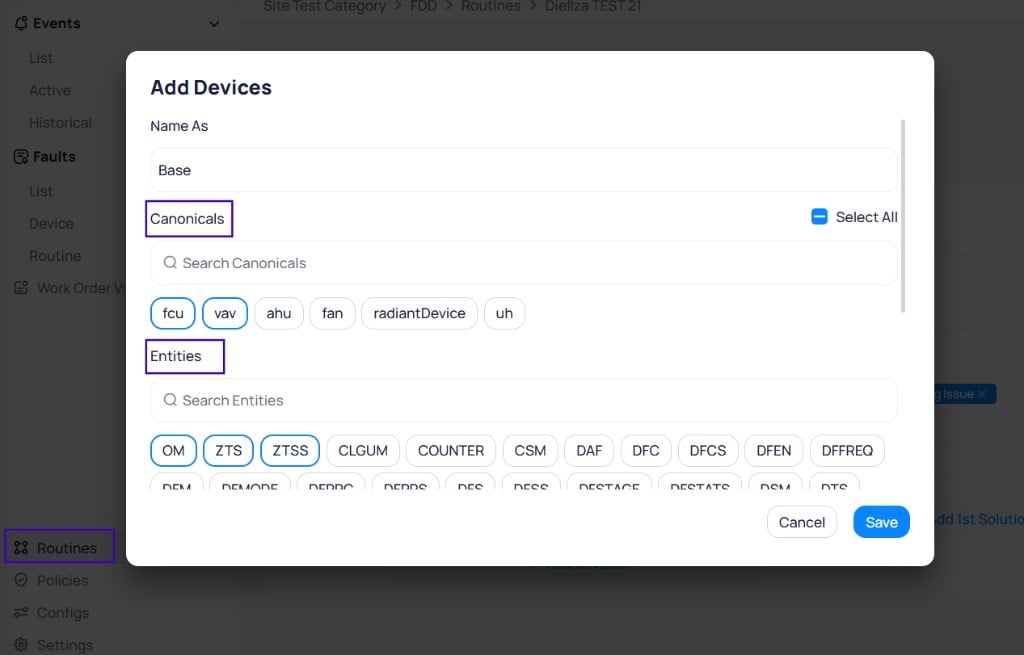
Canonical Types
Equipment types for base and reference devices
Entities
Entity definitions for base and reference devices
When you select entities in Add Devices, the first click includes the entity as a required field. A second click marks the entity in red. A red (excluded) entity means the routine looks for devices that have the other required entities and do not contain that excluded entity. Use exclusion when you need to filter out devices that carry an unwanted field.
The Add Devices dialog lets you select Canonicals and Entities for base and reference devices
2
Build the logic
Open the Logic tab. The left panel contains available logic blocks organized by category: Read, Parameters, Organize, Constants, Arithmetical, Arrays, Conditional, Switches, Logical, Comparison, Timing, Buffering, Schedule, and Alarming.Drag blocks from the left panel onto the canvas to build the routine logic. Connect blocks in sequence to create the logical path from data input to alarm output. Each routine must start with at least one Read block and end with an Alarm Trigger block.
The Logic tab provides a visual canvas for connecting blocks into a logic sequence
See Routine logic blocks for a complete reference of available block types and their functions.
3
Test with the debugger
Open the Debugger tab. The left sidebar displays PARAMS (adjustable parameter values) and INPUTS (simulated device data). The main screen shows the Simulator output.
The Debugger tab shows parameters and inputs on the left, with the Start Simulation button in the center
Review the PARAMS section and adjust parameter values as needed.
Select Start Simulation to begin the test.
Update INPUT values to simulate different conditions, then select Send.
After sending input values, the Simulator logs actions with timestamps
Verify that the routine produces the expected response for each scenario.
Delay times run in real time during simulation. To speed up testing, temporarily change time units to seconds on timer logic blocks. Return to the correct units before deploying.
Test boundary values thoroughly. Verify conditions that should trigger events and conditions that should not. This catches threshold errors before deployment.
4
Save the routine
Select Save. The routine appears in the Routines list and becomes available for configuration on the Configs page.
Export and import routines
Transfer routines between environments as .json files. Export downloads proven rules. Import uploads them without rebuilding logic.
Export
Import
The export feature lets you download routines as files for sharing or transferring to other environments.
1
Select routines to export
Select the checkboxes next to the routines you want to export. The Export button at the bottom right shows the count of selected routines.
Select routines from the list using checkboxes, then select Export
2
Name the export file
Enter a name for the export file in the File Name dialog and select Save.
Assign a name to the export file
3
Download the file
The file downloads to your computer as a .json file.
The exported routines download as a JSON file
The import feature lets you upload routines from exported files to add proven rules without rebuilding them.
1
Open the import dialog
Select Import at the top right of the Routines page. The Import Routines dialog opens with a file upload area.
The Import Routines dialog accepts a file upload or drag and drop
2
Upload and review routines
Select a file from your computer or drag and drop it into the upload area. The dialog displays the imported routines with editable fields for name, description, priority, and grouping policy.In the Replace column, choose how to handle conflicts with existing routines:
Replace overwrites the existing routine with the imported version
Keep both retains the existing routine and adds the imported version
Keep old ignores the imported routine and retains the existing version
Review imported routines, edit details, and choose how to handle conflicts
3
Complete the import
Select Import to finalize. The imported routines appear in your routines list. Select Discard to cancel without importing.
Data and permissions
Routines are the intellectual property of the party that created them. Neither KODE Labs nor partners hold exclusive rights over general fault concepts.Export and import permissions are managed at the role level. Only super admins can access these features. Backend logs track who created, exported, and imported each routine.
This feature works for both FDD routines and FTT workflows. The same export and import process applies to both module types.
Next steps
Routine logic blocks
Explore the available block types for building routine logic.
Routine library
Browse pre-configured routines for air-side, chilled water, and hot water systems.
FDD configuration
Apply routines to your devices and configure monitoring parameters.
Last modified on October 20, 2026
Was this page helpful?
{"docsConfig":{"theme":"aspen","$schema":"https://mintlify.com/docs.json","name":"KODE Labs - Product Documentation","colors":{"primary":"#015BFA","light":"#3A9AFF","dark":"#015BFA"},"logo":{"light":"https://mintcdn.com/kodelabs/YfYud6Al4TM68wc2/logo/logo-light.png?fit=max\u0026auto=format\u0026n=YfYud6Al4TM68wc2\u0026q=85\u0026s=00d4ffd6ad7a592e52856804d1a53d12","dark":"https://mintcdn.com/kodelabs/YfYud6Al4TM68wc2/logo/logo-dark.png?fit=max\u0026auto=format\u0026n=YfYud6Al4TM68wc2\u0026q=85\u0026s=a6769f53904d96f5a53ea0c4b3c972d6","href":"/"},"favicon":{"light":"https://mintcdn.com/kodelabs/H3HEEQdnaG21O57-/logo/favicon-light.png?fit=max\u0026auto=format\u0026n=H3HEEQdnaG21O57-\u0026q=85\u0026s=3ae881e353dfb5c2f667e175ec82c799","dark":"https://mintcdn.com/kodelabs/H3HEEQdnaG21O57-/logo/favicon-dark.png?fit=max\u0026auto=format\u0026n=H3HEEQdnaG21O57-\u0026q=85\u0026s=845431bc7d53ce5bf50f56ef53d9137f"},"api":{"params":{"expanded":"closed"},"playground":{"display":"interactive","proxy":true},"examples":{"defaults":"required","languages":["bash","javascript","python","powershell"],"prefill":true,"autogenerate":true},"url":"full"},"appearance":{"default":"light","strict":true},"background":{"color":{"light":"#ffffff","dark":"#121212"}},"navbar":{"links":[{"href":"https://kodelabs.com/contact/","label":"Contact Us"}]},"footer":{"socials":{"x":"https://twitter.com/kodelabs","instagram":"https://www.instagram.com/kode_labs","linkedin":"https://www.linkedin.com/company/kodelabs","youtube":"https://www.youtube.com/channel/UCKCnsgnYtugWxMPzu3UEHkw"},"links":[{"header":"Platform","items":[{"label":"KODE OS","href":"https://kodelabs.com"},{"label":"Integrations","href":"https://kodelabs.com/partners/integrations-library"},{"label":"Security","href":"https://kodelabs.com/security"}]},{"header":"Resources","items":[{"label":"Blog","href":"https://kodelabs.com/blog"},{"label":"Reports \u0026 Guides","href":"https://kodelabs.com/resources"},{"label":"Podcasts \u0026 Webinars","href":"https://kodelabs.com/resources"},{"label":"Case Studies","href":"https://kodelabs.com/case-studies"},{"label":"News","href":"https://kodelabs.com/news"}]},{"header":"Solutions","items":[{"label":"Commercial","href":"https://kodelabs.com/solutions/commercial-real-estate"},{"label":"Corporate","href":"https://kodelabs.com/solutions/corporate"},{"label":"Retail","href":"https://kodelabs.com/solutions/retail"},{"label":"Healthcare","href":"https://kodelabs.com/solutions/healthcare"},{"label":"Education","href":"https://kodelabs.com/solutions/education"}]},{"header":"Company","items":[{"label":"About","href":"https://kodelabs.com/about"},{"label":"Careers","href":"https://kodelabs.com/careers"},{"label":"Internships","href":"https://kodelabs.com/internships"},{"label":"Contact Us","href":"https://kodelabs.com/contact"}]}]},"search":{"prompt":"Search our docs..."},"fonts":{"heading":{"family":"Manrope","weight":600},"body":{"family":"Inter"}},"icons":{"library":"lucide"},"styling":{"eyebrows":"section","codeblocks":{"theme":{"light":"github-light","dark":"github-dark"}},"latex":false},"integrations":{"ga4":{"measurementId":"G-WKYQEE1T4B"}},"banner":{"content":"KODE 3.20 is live. See [what's new in November 2026](/whats-new/2026/v3.20-november-2026).","dismissible":true,"color":{"light":"#015BFA","dark":"#015BFA"}},"errors":{"404":{"redirect":false,"title":"We're working on it!","description":"If you're not seeing this page, we're definitely updating it."}},"contextual":{"options":["copy","view",{"title":"Email KODE support","description":"Contact KODE Labs support for help","icon":"mail","href":"mailto:support@kodelabs.com"}],"display":"toc"},"interaction":{"drilldown":false},"metadata":{"timestamp":true},"navigation":{"global":{"anchors":[{"anchor":"Home","icon":"house","href":"/"},{"anchor":"What's New","icon":"megaphone","href":"/whats-new/2026/v3.20-november-2026"}]},"pages":[]}},"deployment":{"deploymentMetadataValue":{"subdomain":"kodelabs","hasAudioNarration":false,"actualSubdomain":"kodelabs","customDomains":["docs.kodelabs.com"],"gitSource":{"type":"github","owner":"kode-labs","repo":"docs","deployBranch":"main","contentDirectory":"","isPrivate":true,"mountPath":"","label":""},"feedback":{"thumbs":true,"agentFeedback":true},"entitlements":{"AI_CHAT":{"status":"ENABLED"},"REMOVE_BRANDING":{"status":"ENABLED"},"CONTEXTUAL_FEEDBACK":{"status":"ENABLED"},"CODE_SNIPPET_FEEDBACK":{"status":"ENABLED"},"WEB_MCP":{"status":"ENABLED"},"NARRATION":{"status":"ENABLED"}},"buildId":"6af8e4f300819710da52c87a","clientVersion":"0.0.4227","searchFilterCounts":[{"language":"default","tag":"Integrations","count":214},{"language":"default","tag":"All Integrations","count":205},{"language":"default","tag":"KODE API","count":143},{"language":"default","tag":"API reference","count":132},{"language":"default","tag":"EnerG","count":61},{"language":"default","tag":"Meters","count":37},{"language":"default","tag":"Building BI","count":35},{"language":"default","tag":"AssetOps","count":32},{"language":"default","tag":"Cloud BMS","count":31},{"language":"default","tag":"Reference","count":29}],"searchSettings":{"showContentSnippets":true,"isFiltersEnabled":true,"maxResults":10}},"assistantConfig":{"enableStarterQuestions":true,"enableContextualStarterQuestions":true},"basePath":"","hasChatPermissions":true,"hasWebMcpPermissions":true,"toggles":[{"name":"kill-isr","enabled":true,"variant":{"name":"disabled","enabled":false,"feature_enabled":true},"impressionData":false},{"name":"custom-rbac-roles","enabled":true,"variant":{"name":"disabled","enabled":false,"feature_enabled":true},"impressionData":false},{"name":"agent-mintlify-slack","enabled":true,"variant":{"name":"disabled","enabled":false,"feature_enabled":true},"impressionData":false},{"name":"agent-integrations-settings","enabled":true,"variant":{"name":"disabled","enabled":false,"feature_enabled":true},"impressionData":false},{"name":"rbac-expansion","enabled":true,"variant":{"name":"disabled","enabled":false,"feature_enabled":true},"impressionData":false},{"name":"automations-pr-grouping","enabled":true,"variant":{"name":"disabled","enabled":false,"feature_enabled":true},"impressionData":false},{"name":"custom-prefix","enabled":true,"variant":{"name":"disabled","enabled":false,"feature_enabled":true},"impressionData":false},{"name":"analytics-v7","enabled":true,"variant":{"name":"disabled","enabled":false,"feature_enabled":true},"impressionData":false},{"name":"user-flows-analytics","enabled":true,"variant":{"name":"disabled","enabled":false,"feature_enabled":true},"impressionData":false},{"name":"no-publish-flow","enabled":true,"variant":{"name":"disabled","enabled":false,"feature_enabled":true},"impressionData":false},{"name":"workos-onboarding","enabled":true,"variant":{"name":"disabled","enabled":false,"feature_enabled":true},"impressionData":false},{"name":"snapshot-serving-live","enabled":true,"variant":{"name":"disabled","enabled":false,"feature_enabled":true},"impressionData":false},{"name":"stripTemperatureMiddleware","enabled":true,"variant":{"name":"disabled","enabled":false,"feature_enabled":true},"impressionData":false},{"name":"support-platform-pylon-zendesk","enabled":true,"variant":{"name":"disabled","enabled":false,"feature_enabled":true},"impressionData":false},{"name":"snapshot-serving","enabled":true,"variant":{"name":"disabled","enabled":false,"feature_enabled":true},"impressionData":false},{"name":"instant-rollback","enabled":true,"variant":{"name":"disabled","enabled":false,"feature_enabled":true},"impressionData":false},{"name":"granular-notifications-server","enabled":true,"variant":{"name":"disabled","enabled":false,"feature_enabled":true},"impressionData":false},{"name":"granular-notifications","enabled":true,"variant":{"name":"disabled","enabled":false,"feature_enabled":true},"impressionData":false},{"name":"automations-fable","enabled":true,"variant":{"name":"disabled","enabled":false,"feature_enabled":true},"impressionData":false},{"name":"fixed-ai-action-pricing","enabled":true,"variant":{"name":"disabled","enabled":false,"feature_enabled":true},"impressionData":false},{"name":"automation-resolve-merge-conflict","enabled":true,"variant":{"name":"disabled","enabled":false,"feature_enabled":true},"impressionData":false},{"name":"scoped-publishing","enabled":true,"variant":{"name":"disabled","enabled":false,"feature_enabled":true},"impressionData":false},{"name":"mintql","enabled":true,"variant":{"name":"disabled","enabled":false,"feature_enabled":true},"impressionData":false},{"name":"page-level-analytics","enabled":true,"variant":{"name":"disabled","enabled":false,"feature_enabled":true},"impressionData":false},{"name":"editor-version-history-v2","enabled":true,"variant":{"name":"disabled","enabled":false,"feature_enabled":true},"impressionData":false},{"name":"billing-page-v2","enabled":true,"variant":{"name":"disabled","enabled":false,"feature_enabled":true},"impressionData":false},{"name":"full-page-search","enabled":true,"variant":{"name":"disabled","enabled":false,"feature_enabled":true},"impressionData":false},{"name":"workspace-projects","enabled":true,"variant":{"name":"disabled","enabled":false,"feature_enabled":true},"impressionData":false},{"name":"assistant-v5","enabled":true,"variant":{"name":"disabled","enabled":false,"feature_enabled":true},"impressionData":false},{"name":"fork-pr-previews","enabled":true,"variant":{"name":"disabled","enabled":false,"feature_enabled":true},"impressionData":false},{"name":"revalidation-jwt","enabled":true,"variant":{"name":"disabled","enabled":false,"feature_enabled":true},"impressionData":false},{"name":"workos-sso-scim","enabled":true,"variant":{"name":"disabled","enabled":false,"feature_enabled":true},"impressionData":false},{"name":"hobby-abuse-scan","enabled":true,"variant":{"name":"disabled","enabled":false,"feature_enabled":true},"impressionData":false},{"name":"dashboard-inbox","enabled":true,"variant":{"name":"disabled","enabled":false,"feature_enabled":true},"impressionData":false},{"name":"workos-signup","enabled":true,"variant":{"name":"disabled","enabled":false,"feature_enabled":true},"impressionData":false},{"name":"turbopuffer-dual-write","enabled":true,"variant":{"name":"disabled","enabled":false,"feature_enabled":true},"impressionData":false},{"name":"workos-enabled","enabled":true,"variant":{"name":"disabled","enabled":false,"feature_enabled":true},"impressionData":false},{"name":"approve-review-flow","enabled":true,"variant":{"name":"disabled","enabled":false,"feature_enabled":true},"impressionData":false},{"name":"editor-metadata","enabled":true,"variant":{"name":"disabled","enabled":false,"feature_enabled":true},"impressionData":false},{"name":"sso-setup-deadline-banner","enabled":true,"variant":{"name":"disabled","enabled":false,"feature_enabled":true},"impressionData":false},{"name":"turbopuffer-serve","enabled":true,"variant":{"name":"disabled","enabled":false,"feature_enabled":true},"impressionData":false},{"name":"live-agents","enabled":true,"variant":{"name":"disabled","enabled":false,"feature_enabled":true},"impressionData":false},{"name":"starter-pricing","enabled":true,"variant":{"name":"control","enabled":true,"payload":{"type":"string","value":"control"},"feature_enabled":true},"impressionData":false},{"name":"llms-txt-v2","enabled":true,"variant":{"name":"disabled","enabled":false,"feature_enabled":true},"impressionData":false},{"name":"wildcard-email-auth","enabled":true,"variant":{"name":"disabled","enabled":false,"feature_enabled":true},"impressionData":false}],"googleFontsInlined":true},"customCss":[{"filePath":"custom.css","href":"/_mintlify/custom/kodelabs/fd6257d3326e3afa/custom.css"}]}
{"page":{"pagePath":"products/fdd/routines","slug":"/products/fdd/routines","pageMetadata":{"title":"Routines","sidebarTitle":"Routines","description":"Create, test, import, export, and manage FDD routines using the logic builder and debugger to define custom fault rules for your equipment.","icon":"repeat","keywords":["FDD","routines","logic builder","faults","debugger","Cloud BMS"],"href":"/products/fdd/routines"},"description":{"compiledSource":"\"use strict\";\nconst {jsx: _jsx} = arguments[0];\nconst {useMDXComponents: _provideComponents} = arguments[0];\nfunction _createMdxContent(props) {\n const _components = {\n p: \"p\",\n ..._provideComponents(),\n ...props.components\n };\n return _jsx(_components.p, {\n children: \"Create, test, import, export, and manage FDD routines using the logic builder and debugger to define custom fault rules for your equipment.\"\n });\n}\nfunction MDXContent(props = {}) {\n const {wrapper: MDXLayout} = {\n ..._provideComponents(),\n ...props.components\n };\n return MDXLayout ? _jsx(MDXLayout, {\n ...props,\n children: _jsx(_createMdxContent, {\n ...props\n })\n }) : _createMdxContent(props);\n}\nreturn {\n default: MDXContent\n};\n","frontmatter":{},"scope":{}},"pageType":"default","mdx":{"mdxSource":{"compiledSource":"\"use strict\";const{Fragment:_Fragment,jsx:_jsx,jsxs:_jsxs}=arguments[0];const{useMDXComponents:_provideComponents}=arguments[0];function _createMdxContent(props){const _components={a:`a`,code:`code`,li:`li`,ol:`ol`,p:`p`,strong:`strong`,tbody:`tbody`,td:`td`,th:`th`,thead:`thead`,tr:`tr`,ul:`ul`,..._provideComponents(),...props.components},{Card,CardGroup,Frame,Heading,Info,Note,OptimizedImage,Step,Steps,Tab,Table,Tabs,Tip}=_components;if(!Card)_missingMdxReference(`Card`,true);if(!CardGroup)_missingMdxReference(`CardGroup`,true);if(!Frame)_missingMdxReference(`Frame`,true);if(!Heading)_missingMdxReference(`Heading`,true);if(!Info)_missingMdxReference(`Info`,true);if(!Note)_missingMdxReference(`Note`,true);if(!OptimizedImage)_missingMdxReference(`OptimizedImage`,true);if(!Step)_missingMdxReference(`Step`,true);if(!Steps)_missingMdxReference(`Steps`,true);if(!Tab)_missingMdxReference(`Tab`,true);if(!Table)_missingMdxReference(`Table`,true);if(!Tabs)_missingMdxReference(`Tabs`,true);if(!Tip)_missingMdxReference(`Tip`,true);return _jsxs(_Fragment,{children:[_jsx(_components.p,{children:`FDD routines define the logical rules that monitor your building equipment for specific fault conditions. Cloud BMS provides a pre-configured library of routines and a logic builder for creating custom rules.`}),`\n`,_jsx(Info,{children:_jsxs(_components.p,{children:[`Navigate to `,_jsx(_components.code,{children:`FDD`}),` from the left sidebar, then select `,_jsx(_components.code,{children:`Routines`}),` from the secondary sidebar.`]})}),`\n`,_jsx(Heading,{level:`2`,id:`routines-list`,children:`Routines list`}),`\n`,_jsxs(_components.p,{children:[`The Routines list displays routines built in your client environment. Use the search bar and `,_jsx(_components.code,{children:`Filters`}),` button to find specific routines.`]}),`\n`,_jsx(Note,{children:_jsxs(_components.p,{children:[`Global routines from the FDD library are not available on this page. Access library routines through `,_jsx(_components.a,{href:`/products/fdd/configuration`,children:`FDD configuration`}),`.`]})}),`\n`,_jsx(Frame,{caption:`The Routines page lists all routines with search, filters, and action buttons for creating, exporting, and importing`,children:_jsx(OptimizedImage,{src:`https://mintcdn.com/kodelabs/i9tCc_I6OZNqDXAw/images/kode-os/fdd/kode-os-fdd-routines-list-full.png?fit=max\u0026auto=format\u0026n=i9tCc_I6OZNqDXAw\u0026q=85\u0026s=67fa3d79c7ef62b277654a2e1c6d8d0d`,alt:`Routines page showing the FDD secondary sidebar with Events, Faults, Routines, Policies, configuration, and Settings, a search bar, Filters button, Create Routine button, Export and Import buttons, and a table listing routines like Heating Fully Open for Long Periods FCUs CV6-Way and Cooling Fully Open for Long Periods with columns for Name, Description, Domain, Priority, Grouping Policy, and Recommended Type, showing 507 routines across 11 pages`,\"data-og-width\":`1024`,width:`1024`,\"data-og-height\":`597`,height:`597`,\"data-path\":`images/kode-os/fdd/kode-os-fdd-routines-list-full.png`,\"data-optimize\":`true`,\"data-opv\":`3`,srcset:`https://mintcdn.com/kodelabs/i9tCc_I6OZNqDXAw/images/kode-os/fdd/kode-os-fdd-routines-list-full.png?w=280\u0026fit=max\u0026auto=format\u0026n=i9tCc_I6OZNqDXAw\u0026q=85\u0026s=a4f1ff9fc6a0bb9301af160dce965cda 280w, https://mintcdn.com/kodelabs/i9tCc_I6OZNqDXAw/images/kode-os/fdd/kode-os-fdd-routines-list-full.png?w=560\u0026fit=max\u0026auto=format\u0026n=i9tCc_I6OZNqDXAw\u0026q=85\u0026s=889aae4999eb1e6ae2bd7f578bda692d 560w, https://mintcdn.com/kodelabs/i9tCc_I6OZNqDXAw/images/kode-os/fdd/kode-os-fdd-routines-list-full.png?w=840\u0026fit=max\u0026auto=format\u0026n=i9tCc_I6OZNqDXAw\u0026q=85\u0026s=30643b1b28c8ac26cfea6b9a455cba33 840w, https://mintcdn.com/kodelabs/i9tCc_I6OZNqDXAw/images/kode-os/fdd/kode-os-fdd-routines-list-full.png?w=1100\u0026fit=max\u0026auto=format\u0026n=i9tCc_I6OZNqDXAw\u0026q=85\u0026s=0da257997f1edf2615c35689d06dab4e 1100w, https://mintcdn.com/kodelabs/i9tCc_I6OZNqDXAw/images/kode-os/fdd/kode-os-fdd-routines-list-full.png?w=1650\u0026fit=max\u0026auto=format\u0026n=i9tCc_I6OZNqDXAw\u0026q=85\u0026s=58303a7de6bb708b20e94491de87211d 1650w, https://mintcdn.com/kodelabs/i9tCc_I6OZNqDXAw/images/kode-os/fdd/kode-os-fdd-routines-list-full.png?w=2500\u0026fit=max\u0026auto=format\u0026n=i9tCc_I6OZNqDXAw\u0026q=85\u0026s=c6211055b3f1a293f8e50eec87edaaa8 2500w`})}),`\n`,_jsxs(Table,{children:[_jsx(_components.thead,{children:_jsxs(_components.tr,{children:[_jsx(_components.th,{children:`Column`}),_jsx(_components.th,{children:`Description`})]})}),_jsxs(_components.tbody,{children:[_jsxs(_components.tr,{children:[_jsx(_components.td,{children:_jsx(_components.code,{children:`Name`})}),_jsx(_components.td,{children:`Routine name`})]}),_jsxs(_components.tr,{children:[_jsx(_components.td,{children:_jsx(_components.code,{children:`Description`})}),_jsx(_components.td,{children:`Summary of the fault condition the routine detects`})]}),_jsxs(_components.tr,{children:[_jsx(_components.td,{children:_jsx(_components.code,{children:`Domain`})}),_jsx(_components.td,{children:`Equipment domain the routine applies to`})]}),_jsxs(_components.tr,{children:[_jsx(_components.td,{children:_jsx(_components.code,{children:`Priority`})}),_jsx(_components.td,{children:`Default priority level for generated events`})]}),_jsxs(_components.tr,{children:[_jsx(_components.td,{children:_jsx(_components.code,{children:`Grouping Policy`})}),_jsx(_components.td,{children:`How related events are consolidated`})]})]})]}),`\n`,_jsx(Heading,{level:`3`,id:`row-actions`,children:`Row actions`}),`\n`,_jsx(_components.p,{children:`Select the three-dot menu on any routine row to access available actions:`}),`\n`,_jsxs(_components.ul,{children:[`\n`,_jsxs(_components.li,{children:[_jsx(_components.strong,{children:`Edit Routine`}),`: Open the routine in the logic builder`]}),`\n`,_jsxs(_components.li,{children:[_jsx(_components.strong,{children:`Export Routine`}),`: Download the routine as a file for sharing or backup`]}),`\n`,_jsxs(_components.li,{children:[_jsx(_components.strong,{children:`Duplicate Routine`}),`: Create a copy of the routine with a new name`]}),`\n`,_jsxs(_components.li,{children:[_jsx(_components.strong,{children:`Delete Routine`}),`: Permanently remove the routine`]}),`\n`]}),`\n`,_jsx(Frame,{caption:`The three-dot menu on each routine row provides Edit, Export, Duplicate, and Delete actions`,children:_jsx(OptimizedImage,{src:`https://mintcdn.com/kodelabs/i9tCc_I6OZNqDXAw/images/kode-os/fdd/kode-os-fdd-routine-row-actions.png?fit=max\u0026auto=format\u0026n=i9tCc_I6OZNqDXAw\u0026q=85\u0026s=5c95cd0c98042e70956b1e8dfe2cd482`,alt:`Routines page with a search filtered to temperature gr showing Temperature Greater Than Set Point While Occupied routine with domain Cooling Operation Failure, priority Alert, grouping policy None, and an open three-dot menu displaying Edit Routine, Export Routine, Duplicate Routine, and Delete Routine options`,\"data-og-width\":`1024`,width:`1024`,\"data-og-height\":`297`,height:`297`,\"data-path\":`images/kode-os/fdd/kode-os-fdd-routine-row-actions.png`,\"data-optimize\":`true`,\"data-opv\":`3`,srcset:`https://mintcdn.com/kodelabs/i9tCc_I6OZNqDXAw/images/kode-os/fdd/kode-os-fdd-routine-row-actions.png?w=280\u0026fit=max\u0026auto=format\u0026n=i9tCc_I6OZNqDXAw\u0026q=85\u0026s=be7051452004a993526d119c65051ee9 280w, https://mintcdn.com/kodelabs/i9tCc_I6OZNqDXAw/images/kode-os/fdd/kode-os-fdd-routine-row-actions.png?w=560\u0026fit=max\u0026auto=format\u0026n=i9tCc_I6OZNqDXAw\u0026q=85\u0026s=e07edf0a2e9281ef5930ef3f68137595 560w, https://mintcdn.com/kodelabs/i9tCc_I6OZNqDXAw/images/kode-os/fdd/kode-os-fdd-routine-row-actions.png?w=840\u0026fit=max\u0026auto=format\u0026n=i9tCc_I6OZNqDXAw\u0026q=85\u0026s=ea7a9a786e026de37790bfa5ca7a6aba 840w, https://mintcdn.com/kodelabs/i9tCc_I6OZNqDXAw/images/kode-os/fdd/kode-os-fdd-routine-row-actions.png?w=1100\u0026fit=max\u0026auto=format\u0026n=i9tCc_I6OZNqDXAw\u0026q=85\u0026s=be95cb0a35399ea347d3d2aceb3adee4 1100w, https://mintcdn.com/kodelabs/i9tCc_I6OZNqDXAw/images/kode-os/fdd/kode-os-fdd-routine-row-actions.png?w=1650\u0026fit=max\u0026auto=format\u0026n=i9tCc_I6OZNqDXAw\u0026q=85\u0026s=a11fc18447063c04428ee97a9063a2d3 1650w, https://mintcdn.com/kodelabs/i9tCc_I6OZNqDXAw/images/kode-os/fdd/kode-os-fdd-routine-row-actions.png?w=2500\u0026fit=max\u0026auto=format\u0026n=i9tCc_I6OZNqDXAw\u0026q=85\u0026s=17ddceddbed05bfed6b95d09925cacbd 2500w`})}),`\n`,_jsx(Heading,{level:`2`,id:`create-a-routine`,children:`Create a routine`}),`\n`,_jsxs(Steps,{children:[_jsxs(Step,{title:`Set routine details`,children:[_jsxs(_components.p,{children:[`Select `,_jsx(_components.code,{children:`+ Create Routine`}),` from the toolbar. The `,_jsx(_components.code,{children:`Workflow Details`}),` tab opens.`]}),_jsx(Frame,{caption:`The Workflow Details tab contains the routine name, description, recommended type, domains, grouping, priority, and device configuration`,children:_jsx(OptimizedImage,{src:`https://mintcdn.com/kodelabs/i9tCc_I6OZNqDXAw/images/kode-os/fdd/kode-os-fdd-routine-workflow-details.png?fit=max\u0026auto=format\u0026n=i9tCc_I6OZNqDXAw\u0026q=85\u0026s=c00c5d75924a8c57f63dff5e7ddf4baf`,alt:`Workflow Details tab for Heating Fully Open for Long Periods FCUs CV6-Way showing Name field, Description field with detailed routine logic explanation, Recommended Type set to Event, Domains set to Heating Issue, Events Grouping set to Reference Based, Priority set to Alert, a Base device group with Add Devices button, and an Add 1st Solution button, with Cancel and Save buttons`,\"data-og-width\":`1024`,width:`1024`,\"data-og-height\":`688`,height:`688`,\"data-path\":`images/kode-os/fdd/kode-os-fdd-routine-workflow-details.png`,\"data-optimize\":`true`,\"data-opv\":`3`,srcset:`https://mintcdn.com/kodelabs/i9tCc_I6OZNqDXAw/images/kode-os/fdd/kode-os-fdd-routine-workflow-details.png?w=280\u0026fit=max\u0026auto=format\u0026n=i9tCc_I6OZNqDXAw\u0026q=85\u0026s=acda3f1a8fe42b1aa4720904339e2873 280w, https://mintcdn.com/kodelabs/i9tCc_I6OZNqDXAw/images/kode-os/fdd/kode-os-fdd-routine-workflow-details.png?w=560\u0026fit=max\u0026auto=format\u0026n=i9tCc_I6OZNqDXAw\u0026q=85\u0026s=deb64d038345ad57cb8c467ccb1bd65d 560w, https://mintcdn.com/kodelabs/i9tCc_I6OZNqDXAw/images/kode-os/fdd/kode-os-fdd-routine-workflow-details.png?w=840\u0026fit=max\u0026auto=format\u0026n=i9tCc_I6OZNqDXAw\u0026q=85\u0026s=fbce8a56078d043cec3afed9b81ae4cc 840w, https://mintcdn.com/kodelabs/i9tCc_I6OZNqDXAw/images/kode-os/fdd/kode-os-fdd-routine-workflow-details.png?w=1100\u0026fit=max\u0026auto=format\u0026n=i9tCc_I6OZNqDXAw\u0026q=85\u0026s=d069e144f992eb6878e0d8e0a19f0f25 1100w, https://mintcdn.com/kodelabs/i9tCc_I6OZNqDXAw/images/kode-os/fdd/kode-os-fdd-routine-workflow-details.png?w=1650\u0026fit=max\u0026auto=format\u0026n=i9tCc_I6OZNqDXAw\u0026q=85\u0026s=e6a8f1090c978804e71012066ddcedb7 1650w, https://mintcdn.com/kodelabs/i9tCc_I6OZNqDXAw/images/kode-os/fdd/kode-os-fdd-routine-workflow-details.png?w=2500\u0026fit=max\u0026auto=format\u0026n=i9tCc_I6OZNqDXAw\u0026q=85\u0026s=848bc77b16729880d4c309da0773ba8e 2500w`})}),_jsx(_components.p,{children:`Complete the following fields:`}),_jsxs(Table,{children:[_jsx(_components.thead,{children:_jsxs(_components.tr,{children:[_jsx(_components.th,{children:`Field`}),_jsx(_components.th,{children:`Description`})]})}),_jsxs(_components.tbody,{children:[_jsxs(_components.tr,{children:[_jsx(_components.td,{children:_jsx(_components.code,{children:`Name`})}),_jsx(_components.td,{children:`A descriptive name for the fault condition`})]}),_jsxs(_components.tr,{children:[_jsx(_components.td,{children:_jsx(_components.code,{children:`Description`})}),_jsx(_components.td,{children:`Explanation of what the routine detects`})]}),_jsxs(_components.tr,{children:[_jsx(_components.td,{children:_jsx(_components.code,{children:`Domains`})}),_jsx(_components.td,{children:`Equipment domains this routine applies to`})]}),_jsxs(_components.tr,{children:[_jsx(_components.td,{children:_jsx(_components.code,{children:`Events Grouping`})}),_jsx(_components.td,{children:`How events from this routine are grouped`})]}),_jsxs(_components.tr,{children:[_jsx(_components.td,{children:_jsx(_components.code,{children:`Priority`})}),_jsx(_components.td,{children:`Default priority level for generated events`})]}),_jsxs(_components.tr,{children:[_jsx(_components.td,{children:_jsx(_components.code,{children:`Canonical Types`})}),_jsx(_components.td,{children:`Equipment types for base and reference devices`})]}),_jsxs(_components.tr,{children:[_jsx(_components.td,{children:_jsx(_components.code,{children:`Entities`})}),_jsx(_components.td,{children:`Entity definitions for base and reference devices`})]})]})]}),_jsxs(_components.p,{children:[`When you select entities in `,_jsx(_components.strong,{children:`Add Devices`}),`, the first click includes the entity as a required field. A second click marks the entity in red. A red (excluded) entity means the routine looks for devices that have the other required entities and do `,_jsx(_components.strong,{children:`not`}),` contain that excluded entity. Use exclusion when you need to filter out devices that carry an unwanted field.`]}),_jsx(Frame,{caption:`The Add Devices dialog lets you select Canonicals and Entities for base and reference devices`,children:_jsx(OptimizedImage,{src:`https://mintcdn.com/kodelabs/i9tCc_I6OZNqDXAw/images/kode-os/fdd/kode-os-fdd-routine-add-devices.png?fit=max\u0026auto=format\u0026n=i9tCc_I6OZNqDXAw\u0026q=85\u0026s=b3d5efab3bf591b83fbab980d599af0a`,alt:`Add Devices dialog with Name As set to Base, a Canonicals section showing selectable tags for fcu, vav, ahu, fan, radiant device, and uh with a search field, and an Entities section showing selectable tags for OM, ZTS, ZTSS, CLGUM, COUNTER, CSM, DAF, DFC, DFCS, DFEN, DFFREQ, DFM, DFMODE, DFRPC, DFRPS, DFS, DFSS, DFSTAGE, DFSTATS, DSM, DTS and more with a search field, Cancel and Save buttons`,\"data-og-width\":`1024`,width:`1024`,\"data-og-height\":`655`,height:`655`,\"data-path\":`images/kode-os/fdd/kode-os-fdd-routine-add-devices.png`,\"data-optimize\":`true`,\"data-opv\":`3`,srcset:`https://mintcdn.com/kodelabs/i9tCc_I6OZNqDXAw/images/kode-os/fdd/kode-os-fdd-routine-add-devices.png?w=280\u0026fit=max\u0026auto=format\u0026n=i9tCc_I6OZNqDXAw\u0026q=85\u0026s=db05a334260537fbd039aaabb81e4866 280w, https://mintcdn.com/kodelabs/i9tCc_I6OZNqDXAw/images/kode-os/fdd/kode-os-fdd-routine-add-devices.png?w=560\u0026fit=max\u0026auto=format\u0026n=i9tCc_I6OZNqDXAw\u0026q=85\u0026s=9d32468c0c53e663f5ee7476738c6a4c 560w, https://mintcdn.com/kodelabs/i9tCc_I6OZNqDXAw/images/kode-os/fdd/kode-os-fdd-routine-add-devices.png?w=840\u0026fit=max\u0026auto=format\u0026n=i9tCc_I6OZNqDXAw\u0026q=85\u0026s=5b7cbdb17ca5b7649c4b7e12b1990191 840w, https://mintcdn.com/kodelabs/i9tCc_I6OZNqDXAw/images/kode-os/fdd/kode-os-fdd-routine-add-devices.png?w=1100\u0026fit=max\u0026auto=format\u0026n=i9tCc_I6OZNqDXAw\u0026q=85\u0026s=b6ac344b5685414dce5d2c4014ff143f 1100w, https://mintcdn.com/kodelabs/i9tCc_I6OZNqDXAw/images/kode-os/fdd/kode-os-fdd-routine-add-devices.png?w=1650\u0026fit=max\u0026auto=format\u0026n=i9tCc_I6OZNqDXAw\u0026q=85\u0026s=d12b4c01602dcfd8033ea216291151e6 1650w, https://mintcdn.com/kodelabs/i9tCc_I6OZNqDXAw/images/kode-os/fdd/kode-os-fdd-routine-add-devices.png?w=2500\u0026fit=max\u0026auto=format\u0026n=i9tCc_I6OZNqDXAw\u0026q=85\u0026s=76ad7bad375fda7f966a318dfdf4fd41 2500w`})})]}),_jsxs(Step,{title:`Build the logic`,children:[_jsxs(_components.p,{children:[`Open the `,_jsx(_components.code,{children:`Logic`}),` tab. The left panel contains available logic blocks organized by category: Read, Parameters, Organize, Constants, Arithmetical, Arrays, Conditional, Switches, Logical, Comparison, Timing, Buffering, Schedule, and Alarming.`]}),_jsx(_components.p,{children:`Drag blocks from the left panel onto the canvas to build the routine logic. Connect blocks in sequence to create the logical path from data input to alarm output. Each routine must start with at least one Read block and end with an Alarm Trigger block.`}),_jsx(Frame,{caption:`The Logic tab provides a visual canvas for connecting blocks into a logic sequence`,children:_jsx(OptimizedImage,{src:`https://mintcdn.com/kodelabs/i9tCc_I6OZNqDXAw/images/kode-os/fdd/kode-os-fdd-routine-logic-builder.png?fit=max\u0026auto=format\u0026n=i9tCc_I6OZNqDXAw\u0026q=85\u0026s=1f75dfb4e8d4a7d9962fc68b6c81eef4`,alt:`Logic tab for Heating Fully Open for Long Periods FCUs CV6-Way showing the left panel with block categories including Read, Parameters, Organize, and Constants, and a visual canvas with connected blocks: Enum Point for Discharge Fan Status, Enum Builder with On Off Unknown values, Number Point for CV6 with primary loop valve position, Parameters block with Start Delay, Alarm On Delay, Return to Normal Delay, and Heating Valve Command, a Delayed Check block, Less Than Equal comparison, And logic gate, and a Delayed Alarm Trigger ending in an Alarm Trigger block`,\"data-og-width\":`1024`,width:`1024`,\"data-og-height\":`691`,height:`691`,\"data-path\":`images/kode-os/fdd/kode-os-fdd-routine-logic-builder.png`,\"data-optimize\":`true`,\"data-opv\":`3`,srcset:`https://mintcdn.com/kodelabs/i9tCc_I6OZNqDXAw/images/kode-os/fdd/kode-os-fdd-routine-logic-builder.png?w=280\u0026fit=max\u0026auto=format\u0026n=i9tCc_I6OZNqDXAw\u0026q=85\u0026s=553d986d6b4028ecba4f8012d4c76bf0 280w, https://mintcdn.com/kodelabs/i9tCc_I6OZNqDXAw/images/kode-os/fdd/kode-os-fdd-routine-logic-builder.png?w=560\u0026fit=max\u0026auto=format\u0026n=i9tCc_I6OZNqDXAw\u0026q=85\u0026s=8c85f92283adbec0eb7bd64eae79034b 560w, https://mintcdn.com/kodelabs/i9tCc_I6OZNqDXAw/images/kode-os/fdd/kode-os-fdd-routine-logic-builder.png?w=840\u0026fit=max\u0026auto=format\u0026n=i9tCc_I6OZNqDXAw\u0026q=85\u0026s=2dd45fb6c33b12b54602da68f66505d1 840w, https://mintcdn.com/kodelabs/i9tCc_I6OZNqDXAw/images/kode-os/fdd/kode-os-fdd-routine-logic-builder.png?w=1100\u0026fit=max\u0026auto=format\u0026n=i9tCc_I6OZNqDXAw\u0026q=85\u0026s=911c7ff2b403251f62e021c49be50222 1100w, https://mintcdn.com/kodelabs/i9tCc_I6OZNqDXAw/images/kode-os/fdd/kode-os-fdd-routine-logic-builder.png?w=1650\u0026fit=max\u0026auto=format\u0026n=i9tCc_I6OZNqDXAw\u0026q=85\u0026s=81ee61280a5b3c750c043359c5d1b14a 1650w, https://mintcdn.com/kodelabs/i9tCc_I6OZNqDXAw/images/kode-os/fdd/kode-os-fdd-routine-logic-builder.png?w=2500\u0026fit=max\u0026auto=format\u0026n=i9tCc_I6OZNqDXAw\u0026q=85\u0026s=b3f4de7ccf9f5924a4b0b3adb83cf77d 2500w`})}),_jsx(Note,{children:_jsxs(_components.p,{children:[`See `,_jsx(_components.a,{href:`/products/fdd/routine-logic-blocks`,children:`Routine logic blocks`}),` for a complete reference of available block types and their functions.`]})})]}),_jsxs(Step,{title:`Test with the debugger`,children:[_jsxs(_components.p,{children:[`Open the `,_jsx(_components.code,{children:`Debugger`}),` tab. The left sidebar displays `,_jsx(_components.code,{children:`PARAMS`}),` (adjustable parameter values) and `,_jsx(_components.code,{children:`INPUTS`}),` (simulated device data). The main screen shows the Simulator output.`]}),_jsx(Frame,{caption:`The Debugger tab shows parameters and inputs on the left, with the Start Simulation button in the center`,children:_jsx(OptimizedImage,{src:`https://mintcdn.com/kodelabs/SxbaONoYYoMWCQfA/images/kode-os/fdd/kode-os-fdd-debugger-start.png?fit=max\u0026auto=format\u0026n=SxbaONoYYoMWCQfA\u0026q=85\u0026s=fb70b55f5726369d8ea8e41381aafa4f`,alt:`Debugger tab for Heating Fully Open for Long Periods FCUs CV6-Way showing PARAMS section with Start Delay 30, Alarm On Delay 60, Return to Normal Delay 15, and Heating Valve Command -90, INPUTS section with CV6 value field and Status ok, Discharge Fan Status with Select Value dropdown and Status ok, a Send button, and the main Simulator area displaying a Start Simulation button with Stop and Restart controls`,\"data-og-width\":`1024`,width:`1024`,\"data-og-height\":`679`,height:`679`,\"data-path\":`images/kode-os/fdd/kode-os-fdd-debugger-start.png`,\"data-optimize\":`true`,\"data-opv\":`3`,srcset:`https://mintcdn.com/kodelabs/SxbaONoYYoMWCQfA/images/kode-os/fdd/kode-os-fdd-debugger-start.png?w=280\u0026fit=max\u0026auto=format\u0026n=SxbaONoYYoMWCQfA\u0026q=85\u0026s=5ffda64ff28e99a4a241420fff9825e1 280w, https://mintcdn.com/kodelabs/SxbaONoYYoMWCQfA/images/kode-os/fdd/kode-os-fdd-debugger-start.png?w=560\u0026fit=max\u0026auto=format\u0026n=SxbaONoYYoMWCQfA\u0026q=85\u0026s=df32b7d0c60bd1110b8ef999bb471e0a 560w, https://mintcdn.com/kodelabs/SxbaONoYYoMWCQfA/images/kode-os/fdd/kode-os-fdd-debugger-start.png?w=840\u0026fit=max\u0026auto=format\u0026n=SxbaONoYYoMWCQfA\u0026q=85\u0026s=a867678f12b9409ec99e1b7e8174d714 840w, https://mintcdn.com/kodelabs/SxbaONoYYoMWCQfA/images/kode-os/fdd/kode-os-fdd-debugger-start.png?w=1100\u0026fit=max\u0026auto=format\u0026n=SxbaONoYYoMWCQfA\u0026q=85\u0026s=c3aec42e5fead2db25baed382d0f4996 1100w, https://mintcdn.com/kodelabs/SxbaONoYYoMWCQfA/images/kode-os/fdd/kode-os-fdd-debugger-start.png?w=1650\u0026fit=max\u0026auto=format\u0026n=SxbaONoYYoMWCQfA\u0026q=85\u0026s=62a8a54ff9eb76f0e9dbe586e9555a2c 1650w, https://mintcdn.com/kodelabs/SxbaONoYYoMWCQfA/images/kode-os/fdd/kode-os-fdd-debugger-start.png?w=2500\u0026fit=max\u0026auto=format\u0026n=SxbaONoYYoMWCQfA\u0026q=85\u0026s=b7da1fc87c5811e3e1954f6c0dfe2ea1 2500w`})}),_jsxs(_components.ol,{children:[`\n`,_jsxs(_components.li,{children:[`Review the `,_jsx(_components.code,{children:`PARAMS`}),` section and adjust parameter values as needed.`]}),`\n`,_jsxs(_components.li,{children:[`Select `,_jsx(_components.code,{children:`Start Simulation`}),` to begin the test.`]}),`\n`,_jsxs(_components.li,{children:[`Update `,_jsx(_components.code,{children:`INPUT`}),` values to simulate different conditions, then select `,_jsx(_components.code,{children:`Send`}),`.`]}),`\n`]}),_jsx(Frame,{caption:`After sending input values, the Simulator logs actions with timestamps`,children:_jsx(OptimizedImage,{src:`https://mintcdn.com/kodelabs/SxbaONoYYoMWCQfA/images/kode-os/fdd/kode-os-fdd-debugger-send.png?fit=max\u0026auto=format\u0026n=SxbaONoYYoMWCQfA\u0026q=85\u0026s=25f812499df33ad763fa8bba1dcf1fc9`,alt:`Debugger tab with PARAMS showing Start Delay 30, Alarm On Delay 60, Return to Normal Delay 15, and Heating Valve Command -90, INPUTS showing CV6 value 50, Status ok, Discharge Fan Status set to On, Status ok, and the Simulator showing Starting status with Action Heating Fully Open for Long Periods FCUs CV6-Way logged at 10:09 AM`,\"data-og-width\":`1024`,width:`1024`,\"data-og-height\":`683`,height:`683`,\"data-path\":`images/kode-os/fdd/kode-os-fdd-debugger-send.png`,\"data-optimize\":`true`,\"data-opv\":`3`,srcset:`https://mintcdn.com/kodelabs/SxbaONoYYoMWCQfA/images/kode-os/fdd/kode-os-fdd-debugger-send.png?w=280\u0026fit=max\u0026auto=format\u0026n=SxbaONoYYoMWCQfA\u0026q=85\u0026s=6fa2d04d47108adadec5cdefb63e3562 280w, https://mintcdn.com/kodelabs/SxbaONoYYoMWCQfA/images/kode-os/fdd/kode-os-fdd-debugger-send.png?w=560\u0026fit=max\u0026auto=format\u0026n=SxbaONoYYoMWCQfA\u0026q=85\u0026s=7b7be99507b7a8b984176974e5d744c4 560w, https://mintcdn.com/kodelabs/SxbaONoYYoMWCQfA/images/kode-os/fdd/kode-os-fdd-debugger-send.png?w=840\u0026fit=max\u0026auto=format\u0026n=SxbaONoYYoMWCQfA\u0026q=85\u0026s=0e3f35fb6904844c369e9f0473801943 840w, https://mintcdn.com/kodelabs/SxbaONoYYoMWCQfA/images/kode-os/fdd/kode-os-fdd-debugger-send.png?w=1100\u0026fit=max\u0026auto=format\u0026n=SxbaONoYYoMWCQfA\u0026q=85\u0026s=fa011455a3248492f54ffcdeaf96dfcc 1100w, https://mintcdn.com/kodelabs/SxbaONoYYoMWCQfA/images/kode-os/fdd/kode-os-fdd-debugger-send.png?w=1650\u0026fit=max\u0026auto=format\u0026n=SxbaONoYYoMWCQfA\u0026q=85\u0026s=c3b8aec08fa28b1caeef91a4e910b156 1650w, https://mintcdn.com/kodelabs/SxbaONoYYoMWCQfA/images/kode-os/fdd/kode-os-fdd-debugger-send.png?w=2500\u0026fit=max\u0026auto=format\u0026n=SxbaONoYYoMWCQfA\u0026q=85\u0026s=49615dc62ec346b19e5494fbdbfa2d17 2500w`})}),_jsxs(_components.ol,{start:`4`,children:[`\n`,_jsx(_components.li,{children:`Verify that the routine produces the expected response for each scenario.`}),`\n`]}),_jsx(Tip,{children:_jsx(_components.p,{children:`Delay times run in real time during simulation. To speed up testing, temporarily change time units to seconds on timer logic blocks. Return to the correct units before deploying.`})}),_jsx(Tip,{children:_jsx(_components.p,{children:`Test boundary values thoroughly. Verify conditions that should trigger events and conditions that should not. This catches threshold errors before deployment.`})})]}),_jsx(Step,{title:`Save the routine`,children:_jsxs(_components.p,{children:[`Select `,_jsx(_components.code,{children:`Save`}),`. The routine appears in the Routines list and becomes available for configuration on the `,_jsx(_components.code,{children:`Configs`}),` page.`]})})]}),`\n`,_jsx(Heading,{level:`2`,id:`export-and-import-routines`,children:`Export and import routines`}),`\n`,_jsxs(_components.p,{children:[`Transfer routines between environments as `,_jsx(_components.code,{children:`.json`}),` files. Export downloads proven rules. Import uploads them without rebuilding logic.`]}),`\n`,_jsxs(Tabs,{children:[_jsxs(Tab,{title:`Export`,icon:`download`,id:`export`,children:[_jsx(_components.p,{children:`The export feature lets you download routines as files for sharing or transferring to other environments.`}),_jsxs(Steps,{children:[_jsxs(Step,{title:`Select routines to export`,children:[_jsxs(_components.p,{children:[`Select the checkboxes next to the routines you want to export. The `,_jsx(_components.code,{children:`Export`}),` button at the bottom right shows the count of selected routines.`]}),_jsx(Frame,{caption:`Select routines from the list using checkboxes, then select Export`,children:_jsx(OptimizedImage,{src:`https://mintcdn.com/kodelabs/i9tCc_I6OZNqDXAw/images/kode-os/fdd/kode-os-fdd-routines-export-select.png?fit=max\u0026auto=format\u0026n=i9tCc_I6OZNqDXAw\u0026q=85\u0026s=4fb40dfda8c191fecf3c636fbfdec727`,alt:`Routines page with two routines selected via checkboxes, with Cancel and Export buttons at the bottom showing a count of 2 selected`,\"data-og-width\":`1024`,width:`1024`,\"data-og-height\":`681`,height:`681`,\"data-path\":`images/kode-os/fdd/kode-os-fdd-routines-export-select.png`,\"data-optimize\":`true`,\"data-opv\":`3`,srcset:`https://mintcdn.com/kodelabs/i9tCc_I6OZNqDXAw/images/kode-os/fdd/kode-os-fdd-routines-export-select.png?w=280\u0026fit=max\u0026auto=format\u0026n=i9tCc_I6OZNqDXAw\u0026q=85\u0026s=ee699678dde8c98111d18fccbc8f2823 280w, https://mintcdn.com/kodelabs/i9tCc_I6OZNqDXAw/images/kode-os/fdd/kode-os-fdd-routines-export-select.png?w=560\u0026fit=max\u0026auto=format\u0026n=i9tCc_I6OZNqDXAw\u0026q=85\u0026s=064b82a92507b8951159b30a8d28b4a2 560w, https://mintcdn.com/kodelabs/i9tCc_I6OZNqDXAw/images/kode-os/fdd/kode-os-fdd-routines-export-select.png?w=840\u0026fit=max\u0026auto=format\u0026n=i9tCc_I6OZNqDXAw\u0026q=85\u0026s=f4844da2bcc7c148078bfcbe5d1b4fc5 840w, https://mintcdn.com/kodelabs/i9tCc_I6OZNqDXAw/images/kode-os/fdd/kode-os-fdd-routines-export-select.png?w=1100\u0026fit=max\u0026auto=format\u0026n=i9tCc_I6OZNqDXAw\u0026q=85\u0026s=68070862344da8ad21ae724622dc72d5 1100w, https://mintcdn.com/kodelabs/i9tCc_I6OZNqDXAw/images/kode-os/fdd/kode-os-fdd-routines-export-select.png?w=1650\u0026fit=max\u0026auto=format\u0026n=i9tCc_I6OZNqDXAw\u0026q=85\u0026s=f61e962f99720cff17fb4a4dfc298fc8 1650w, https://mintcdn.com/kodelabs/i9tCc_I6OZNqDXAw/images/kode-os/fdd/kode-os-fdd-routines-export-select.png?w=2500\u0026fit=max\u0026auto=format\u0026n=i9tCc_I6OZNqDXAw\u0026q=85\u0026s=4daa77efbe5b674e0a9d1faadfac0d49 2500w`})})]}),_jsxs(Step,{title:`Name the export file`,children:[_jsxs(_components.p,{children:[`Enter a name for the export file in the `,_jsx(_components.code,{children:`File Name`}),` dialog and select `,_jsx(_components.code,{children:`Save`}),`.`]}),_jsx(Frame,{caption:`Assign a name to the export file`,children:_jsx(OptimizedImage,{src:`https://mintcdn.com/kodelabs/i9tCc_I6OZNqDXAw/images/kode-os/fdd/kode-os-fdd-routines-export-name.png?fit=max\u0026auto=format\u0026n=i9tCc_I6OZNqDXAw\u0026q=85\u0026s=25cd049164695ebd759bdfc82f8abf6f`,alt:`File Name dialog with a Name field and Cancel and Save buttons`,\"data-og-width\":`410`,width:`410`,\"data-og-height\":`236`,height:`236`,\"data-path\":`images/kode-os/fdd/kode-os-fdd-routines-export-name.png`,\"data-optimize\":`true`,\"data-opv\":`3`,srcset:`https://mintcdn.com/kodelabs/i9tCc_I6OZNqDXAw/images/kode-os/fdd/kode-os-fdd-routines-export-name.png?w=280\u0026fit=max\u0026auto=format\u0026n=i9tCc_I6OZNqDXAw\u0026q=85\u0026s=447eb84049abe2f6c8eaa986bd53fb78 280w, https://mintcdn.com/kodelabs/i9tCc_I6OZNqDXAw/images/kode-os/fdd/kode-os-fdd-routines-export-name.png?w=560\u0026fit=max\u0026auto=format\u0026n=i9tCc_I6OZNqDXAw\u0026q=85\u0026s=4804e8ba3017aff15d1f33a5bb68e2a5 560w, https://mintcdn.com/kodelabs/i9tCc_I6OZNqDXAw/images/kode-os/fdd/kode-os-fdd-routines-export-name.png?w=840\u0026fit=max\u0026auto=format\u0026n=i9tCc_I6OZNqDXAw\u0026q=85\u0026s=7a3f0a28b176798cdcca3e39b51078a6 840w, https://mintcdn.com/kodelabs/i9tCc_I6OZNqDXAw/images/kode-os/fdd/kode-os-fdd-routines-export-name.png?w=1100\u0026fit=max\u0026auto=format\u0026n=i9tCc_I6OZNqDXAw\u0026q=85\u0026s=4504e503ec695f38eeb9f93340f76c55 1100w, https://mintcdn.com/kodelabs/i9tCc_I6OZNqDXAw/images/kode-os/fdd/kode-os-fdd-routines-export-name.png?w=1650\u0026fit=max\u0026auto=format\u0026n=i9tCc_I6OZNqDXAw\u0026q=85\u0026s=8b7475421713eafbd35dfd0637b0ed03 1650w, https://mintcdn.com/kodelabs/i9tCc_I6OZNqDXAw/images/kode-os/fdd/kode-os-fdd-routines-export-name.png?w=2500\u0026fit=max\u0026auto=format\u0026n=i9tCc_I6OZNqDXAw\u0026q=85\u0026s=5f4ab94355641febcb71a99e13579bca 2500w`})})]}),_jsxs(Step,{title:`Download the file`,children:[_jsxs(_components.p,{children:[`The file downloads to your computer as a `,_jsx(_components.code,{children:`.json`}),` file.`]}),_jsx(Frame,{caption:`The exported routines download as a JSON file`,children:_jsx(OptimizedImage,{src:`https://mintcdn.com/kodelabs/i9tCc_I6OZNqDXAw/images/kode-os/fdd/kode-os-fdd-routines-export-download.png?fit=max\u0026auto=format\u0026n=i9tCc_I6OZNqDXAw\u0026q=85\u0026s=c44e3fd81a20304e7f4913092747b795`,alt:`Browser download bar showing exported JSON file`,\"data-og-width\":`344`,width:`344`,\"data-og-height\":`125`,height:`125`,\"data-path\":`images/kode-os/fdd/kode-os-fdd-routines-export-download.png`,\"data-optimize\":`true`,\"data-opv\":`3`,srcset:`https://mintcdn.com/kodelabs/i9tCc_I6OZNqDXAw/images/kode-os/fdd/kode-os-fdd-routines-export-download.png?w=280\u0026fit=max\u0026auto=format\u0026n=i9tCc_I6OZNqDXAw\u0026q=85\u0026s=0557d9d19bac261e41e5b833701a50e3 280w, https://mintcdn.com/kodelabs/i9tCc_I6OZNqDXAw/images/kode-os/fdd/kode-os-fdd-routines-export-download.png?w=560\u0026fit=max\u0026auto=format\u0026n=i9tCc_I6OZNqDXAw\u0026q=85\u0026s=c755cd86aa7e5474aa7410af16f70669 560w, https://mintcdn.com/kodelabs/i9tCc_I6OZNqDXAw/images/kode-os/fdd/kode-os-fdd-routines-export-download.png?w=840\u0026fit=max\u0026auto=format\u0026n=i9tCc_I6OZNqDXAw\u0026q=85\u0026s=60a4ba5cc47a7bc5c723fccfbb4ae703 840w, https://mintcdn.com/kodelabs/i9tCc_I6OZNqDXAw/images/kode-os/fdd/kode-os-fdd-routines-export-download.png?w=1100\u0026fit=max\u0026auto=format\u0026n=i9tCc_I6OZNqDXAw\u0026q=85\u0026s=c5a292f46d62c4f045447bc85d68ff32 1100w, https://mintcdn.com/kodelabs/i9tCc_I6OZNqDXAw/images/kode-os/fdd/kode-os-fdd-routines-export-download.png?w=1650\u0026fit=max\u0026auto=format\u0026n=i9tCc_I6OZNqDXAw\u0026q=85\u0026s=7bfa81de1e76a1d0f1c1f262473deb54 1650w, https://mintcdn.com/kodelabs/i9tCc_I6OZNqDXAw/images/kode-os/fdd/kode-os-fdd-routines-export-download.png?w=2500\u0026fit=max\u0026auto=format\u0026n=i9tCc_I6OZNqDXAw\u0026q=85\u0026s=5e4323bca8b9d88942a4e8cd1b689e65 2500w`})})]})]})]}),_jsxs(Tab,{title:`Import`,icon:`upload`,id:`import`,children:[_jsx(_components.p,{children:`The import feature lets you upload routines from exported files to add proven rules without rebuilding them.`}),_jsxs(Steps,{children:[_jsxs(Step,{title:`Open the import dialog`,children:[_jsxs(_components.p,{children:[`Select `,_jsx(_components.code,{children:`Import`}),` at the top right of the Routines page. The Import Routines dialog opens with a file upload area.`]}),_jsx(Frame,{caption:`The Import Routines dialog accepts a file upload or drag and drop`,children:_jsx(OptimizedImage,{src:`https://mintcdn.com/kodelabs/i9tCc_I6OZNqDXAw/images/kode-os/fdd/kode-os-fdd-routines-import-upload.png?fit=max\u0026auto=format\u0026n=i9tCc_I6OZNqDXAw\u0026q=85\u0026s=5eff61a2372d68ec63653ae80b67274d`,alt:`Import Routines dialog with a dashed border upload area`,\"data-og-width\":`1024`,width:`1024`,\"data-og-height\":`683`,height:`683`,\"data-path\":`images/kode-os/fdd/kode-os-fdd-routines-import-upload.png`,\"data-optimize\":`true`,\"data-opv\":`3`,srcset:`https://mintcdn.com/kodelabs/i9tCc_I6OZNqDXAw/images/kode-os/fdd/kode-os-fdd-routines-import-upload.png?w=280\u0026fit=max\u0026auto=format\u0026n=i9tCc_I6OZNqDXAw\u0026q=85\u0026s=c04b5bac69136dceb6735905c40e2892 280w, https://mintcdn.com/kodelabs/i9tCc_I6OZNqDXAw/images/kode-os/fdd/kode-os-fdd-routines-import-upload.png?w=560\u0026fit=max\u0026auto=format\u0026n=i9tCc_I6OZNqDXAw\u0026q=85\u0026s=bc963ca415349b66ec903cec85e74257 560w, https://mintcdn.com/kodelabs/i9tCc_I6OZNqDXAw/images/kode-os/fdd/kode-os-fdd-routines-import-upload.png?w=840\u0026fit=max\u0026auto=format\u0026n=i9tCc_I6OZNqDXAw\u0026q=85\u0026s=4d99e82f9443163510ea9c6a0c275897 840w, https://mintcdn.com/kodelabs/i9tCc_I6OZNqDXAw/images/kode-os/fdd/kode-os-fdd-routines-import-upload.png?w=1100\u0026fit=max\u0026auto=format\u0026n=i9tCc_I6OZNqDXAw\u0026q=85\u0026s=0985177d1bbb135ce3acbdd1e859cc48 1100w, https://mintcdn.com/kodelabs/i9tCc_I6OZNqDXAw/images/kode-os/fdd/kode-os-fdd-routines-import-upload.png?w=1650\u0026fit=max\u0026auto=format\u0026n=i9tCc_I6OZNqDXAw\u0026q=85\u0026s=4437befafbec6a9a6cc25f3bfd0aa0fc 1650w, https://mintcdn.com/kodelabs/i9tCc_I6OZNqDXAw/images/kode-os/fdd/kode-os-fdd-routines-import-upload.png?w=2500\u0026fit=max\u0026auto=format\u0026n=i9tCc_I6OZNqDXAw\u0026q=85\u0026s=55616316b3d5bcd36be38aa5a8573c2e 2500w`})})]}),_jsxs(Step,{title:`Upload and review routines`,children:[_jsx(_components.p,{children:`Select a file from your computer or drag and drop it into the upload area. The dialog displays the imported routines with editable fields for name, description, priority, and grouping policy.`}),_jsxs(_components.p,{children:[`In the `,_jsx(_components.code,{children:`Replace`}),` column, choose how to handle conflicts with existing routines:`]}),_jsxs(_components.ul,{children:[`\n`,_jsxs(_components.li,{children:[_jsx(_components.strong,{children:`Replace`}),` overwrites the existing routine with the imported version`]}),`\n`,_jsxs(_components.li,{children:[_jsx(_components.strong,{children:`Keep both`}),` retains the existing routine and adds the imported version`]}),`\n`,_jsxs(_components.li,{children:[_jsx(_components.strong,{children:`Keep old`}),` ignores the imported routine and retains the existing version`]}),`\n`]}),_jsx(Frame,{caption:`Review imported routines, edit details, and choose how to handle conflicts`,children:_jsx(OptimizedImage,{src:`https://mintcdn.com/kodelabs/i9tCc_I6OZNqDXAw/images/kode-os/fdd/kode-os-fdd-routines-import-review.png?fit=max\u0026auto=format\u0026n=i9tCc_I6OZNqDXAw\u0026q=85\u0026s=9f03ccfb25d3a64a9cd0cd8fe1545203`,alt:`Import Routines review page with editable routine fields and conflict resolution options`,\"data-og-width\":`1024`,width:`1024`,\"data-og-height\":`563`,height:`563`,\"data-path\":`images/kode-os/fdd/kode-os-fdd-routines-import-review.png`,\"data-optimize\":`true`,\"data-opv\":`3`,srcset:`https://mintcdn.com/kodelabs/i9tCc_I6OZNqDXAw/images/kode-os/fdd/kode-os-fdd-routines-import-review.png?w=280\u0026fit=max\u0026auto=format\u0026n=i9tCc_I6OZNqDXAw\u0026q=85\u0026s=d7c379fed369bf78e679cbca7f09f00e 280w, https://mintcdn.com/kodelabs/i9tCc_I6OZNqDXAw/images/kode-os/fdd/kode-os-fdd-routines-import-review.png?w=560\u0026fit=max\u0026auto=format\u0026n=i9tCc_I6OZNqDXAw\u0026q=85\u0026s=a96e54867c51bb990f43596d7561aafc 560w, https://mintcdn.com/kodelabs/i9tCc_I6OZNqDXAw/images/kode-os/fdd/kode-os-fdd-routines-import-review.png?w=840\u0026fit=max\u0026auto=format\u0026n=i9tCc_I6OZNqDXAw\u0026q=85\u0026s=5ba675d3d948b22aedfcb2061467dc4b 840w, https://mintcdn.com/kodelabs/i9tCc_I6OZNqDXAw/images/kode-os/fdd/kode-os-fdd-routines-import-review.png?w=1100\u0026fit=max\u0026auto=format\u0026n=i9tCc_I6OZNqDXAw\u0026q=85\u0026s=ae936c9d571de3c7d3d08fcb7c093a9e 1100w, https://mintcdn.com/kodelabs/i9tCc_I6OZNqDXAw/images/kode-os/fdd/kode-os-fdd-routines-import-review.png?w=1650\u0026fit=max\u0026auto=format\u0026n=i9tCc_I6OZNqDXAw\u0026q=85\u0026s=3898d5f3cc9f2a4f884335a55084046f 1650w, https://mintcdn.com/kodelabs/i9tCc_I6OZNqDXAw/images/kode-os/fdd/kode-os-fdd-routines-import-review.png?w=2500\u0026fit=max\u0026auto=format\u0026n=i9tCc_I6OZNqDXAw\u0026q=85\u0026s=cecd56c2f796ca775c118dffc0aeac12 2500w`})})]}),_jsx(Step,{title:`Complete the import`,children:_jsxs(_components.p,{children:[`Select `,_jsx(_components.code,{children:`Import`}),` to finalize. The imported routines appear in your routines list. Select `,_jsx(_components.code,{children:`Discard`}),` to cancel without importing.`]})})]})]})]}),`\n`,_jsx(Heading,{level:`2`,id:`data-and-permissions`,children:`Data and permissions`}),`\n`,_jsx(_components.p,{children:`Routines are the intellectual property of the party that created them. Neither KODE Labs nor partners hold exclusive rights over general fault concepts.`}),`\n`,_jsx(_components.p,{children:`Export and import permissions are managed at the role level. Only super admins can access these features. Backend logs track who created, exported, and imported each routine.`}),`\n`,_jsx(Note,{children:_jsx(_components.p,{children:`This feature works for both FDD routines and FTT workflows. The same export and import process applies to both module types.`})}),`\n`,_jsx(Heading,{level:`2`,id:`next-steps`,children:`Next steps`}),`\n`,_jsxs(CardGroup,{cols:2,children:[_jsx(Card,{title:`Routine logic blocks`,icon:`puzzle`,href:`/products/fdd/routine-logic-blocks`,arrow:true,children:_jsx(_components.p,{children:`Explore the available block types for building routine logic.`})}),_jsx(Card,{title:`Routine library`,icon:`library`,href:`/products/fdd/routine-library`,arrow:true,children:_jsx(_components.p,{children:`Browse pre-configured routines for air-side, chilled water, and hot water systems.`})}),_jsx(Card,{title:`FDD configuration`,icon:`cog`,href:`/products/fdd/configuration`,arrow:true,children:_jsx(_components.p,{children:`Apply routines to your devices and configure monitoring parameters.`})})]})]})}function MDXContent(props={}){const{wrapper:MDXLayout}={..._provideComponents(),...props.components};return MDXLayout?_jsx(MDXLayout,{...props,children:_jsx(_createMdxContent,{...props})}):_createMdxContent(props)}return{default:MDXContent};function _missingMdxReference(id,component){throw new Error(`Expected `+(component?`component`:`object`)+\" `\"+id+\"` to be defined: you likely forgot to import, pass, or provide it.\")}","frontmatter":{},"scope":{"codeStyling":{"theme":{"light":"github-light","dark":"github-dark"}},"config":{},"pageMetadata":{"title":"Routines","sidebarTitle":"Routines","description":"Create, test, import, export, and manage FDD routines using the logic builder and debugger to define custom fault rules for your equipment.","icon":"repeat","keywords":["FDD","routines","logic builder","faults","debugger","Cloud BMS"],"href":"/products/fdd/routines"}}},"mdxSourceWithNoJs":null},"mdxExtracts":{"tableOfContents":[{"title":"Routines list","slug":"routines-list","depth":2,"children":[{"title":"Row actions","slug":"row-actions","depth":3,"children":[]}]},{"title":"Create a routine","slug":"create-a-routine","depth":2,"children":[]},{"title":"Export and import routines","slug":"export-and-import-routines","depth":2,"children":[]},{"title":"Data and permissions","slug":"data-and-permissions","depth":2,"children":[]},{"title":"Next steps","slug":"next-steps","depth":2,"children":[]}],"codeExamples":{}},"jsLinks":["/_mintlify/custom/kodelabs/ce5d3bd08e955b7b/navbar-assistant.js"],"subdomain":"kodelabs","siteName":"KODE Labs - Product Documentation","title":"Routines - KODE Labs - Product Documentation","contextualStarterQuestions":[{"_id":"6ad7cce8b92028d458a3bfe4","deploymentId":"67fd4d9635f314f3a994be65","questionText":"How do I search and filter routines?","status":"active","generatedBy":"contextual","path":"products/fdd/routines","createdAt":"2026-10-20T20:19:52.267Z","updatedAt":"2026-10-20T20:19:52.267Z","__v":0},{"_id":"6ad7cce8b92028d458a3bfe5","deploymentId":"67fd4d9635f314f3a994be65","questionText":"Can I export and import routines?","status":"active","generatedBy":"contextual","path":"products/fdd/routines","createdAt":"2026-10-20T20:19:52.267Z","updatedAt":"2026-10-20T20:19:52.267Z","__v":0},{"_id":"6ad7cce8b92028d458a3bfe3","deploymentId":"67fd4d9635f314f3a994be65","questionText":"How do I create a custom routine?","status":"active","generatedBy":"contextual","path":"products/fdd/routines","createdAt":"2026-10-20T20:19:52.266Z","updatedAt":"2026-10-20T20:19:52.266Z","__v":0}],"navMaps":{"firstHrefInVersion":{},"firstHrefInLanguage":{}},"lastModified":"2026-10-20T20:19:44.066Z","gitLastModified":"2026-10-20T20:19:26.000Z","originalFileLocation":"products/fdd/routines.mdx"},"headHtml":"\u003cscript data-mint-head>(function(){var d=document.documentElement,p=\"light\";if(!p){try{p=localStorage.getItem(\"isDarkMode\")}catch(e){}if(p==='true')p='dark';else if(p==='false')p='light';if(p!=='light'\u0026\u0026p!=='dark'\u0026\u0026p!=='system')p=\"light\"}var r=p==='system'?(matchMedia(\"(prefers-color-scheme: dark)\").matches?'dark':'light'):p;d.classList.remove(r==='dark'?'light':'dark');d.classList.add(r);d.setAttribute(\"data-theme-preference\",p)})();\u003c/script>\u003cmeta data-mint-head name=\"description\" content=\"Create, test, import, export, and manage FDD routines using the logic builder and debugger to define custom fault rules for your equipment.\">\u003cmeta data-mint-head name=\"application-name\" content=\"KODE Labs - Product Documentation\">\u003cmeta data-mint-head name=\"generator\" content=\"Mintlify\">\u003clink data-mint-head rel=\"icon\" type=\"image/png\" sizes=\"192x192\" href=\"/mintlify-assets/_mintlify/favicons/kodelabs/vtcGE1gj2AkAE1l2/_generated/favicon/android-chrome-192x192.png\" media=\"(prefers-color-scheme: light)\">\u003clink data-mint-head rel=\"apple-touch-icon\" type=\"image/png\" sizes=\"180x180\" href=\"/mintlify-assets/_mintlify/favicons/kodelabs/vtcGE1gj2AkAE1l2/_generated/favicon/apple-touch-icon.png\">\u003clink data-mint-head rel=\"icon\" type=\"image/png\" sizes=\"16x16\" href=\"/mintlify-assets/_mintlify/favicons/kodelabs/vtcGE1gj2AkAE1l2/_generated/favicon/favicon-16x16.png\" media=\"(prefers-color-scheme: light)\">\u003clink data-mint-head rel=\"icon\" type=\"image/png\" sizes=\"32x32\" href=\"/mintlify-assets/_mintlify/favicons/kodelabs/vtcGE1gj2AkAE1l2/_generated/favicon/favicon-32x32.png\" media=\"(prefers-color-scheme: light)\">\u003clink data-mint-head rel=\"shortcut icon\" type=\"image/x-icon\" href=\"/mintlify-assets/_mintlify/favicons/kodelabs/vtcGE1gj2AkAE1l2/_generated/favicon/favicon.ico\" media=\"(prefers-color-scheme: light)\">\u003clink data-mint-head rel=\"icon\" type=\"image/png\" sizes=\"192x192\" href=\"/mintlify-assets/_mintlify/favicons/kodelabs/vtcGE1gj2AkAE1l2/_generated/favicon-dark/android-chrome-192x192.png\" media=\"(prefers-color-scheme: dark)\">\u003clink data-mint-head rel=\"icon\" type=\"image/png\" sizes=\"16x16\" href=\"/mintlify-assets/_mintlify/favicons/kodelabs/vtcGE1gj2AkAE1l2/_generated/favicon-dark/favicon-16x16.png\" media=\"(prefers-color-scheme: dark)\">\u003clink data-mint-head rel=\"icon\" type=\"image/png\" sizes=\"32x32\" href=\"/mintlify-assets/_mintlify/favicons/kodelabs/vtcGE1gj2AkAE1l2/_generated/favicon-dark/favicon-32x32.png\" media=\"(prefers-color-scheme: dark)\">\u003clink data-mint-head rel=\"shortcut icon\" type=\"image/x-icon\" href=\"/mintlify-assets/_mintlify/favicons/kodelabs/vtcGE1gj2AkAE1l2/_generated/favicon-dark/favicon.ico\" media=\"(prefers-color-scheme: dark)\">\u003cmeta data-mint-head property=\"og:title\" content=\"Routines - KODE Labs - Product Documentation\">\u003cmeta data-mint-head property=\"og:description\" content=\"Create, test, import, export, and manage FDD routines using the logic builder and debugger to define custom fault rules for your equipment.\">\u003cmeta data-mint-head property=\"og:site_name\" content=\"KODE Labs - Product Documentation\">\u003cmeta data-mint-head property=\"og:url\" content=\"https://docs.kodelabs.com/products/fdd/routines\">\u003cmeta data-mint-head property=\"og:type\" content=\"website\">\u003cmeta data-mint-head property=\"og:image\" content=\"https://kodelabs.mintlify.site/_mintlify/api/og/v2?division=Routines\u0026amp;title=Routines\u0026amp;description=Create%2C+test%2C+import%2C+export%2C+and+manage+FDD+routines+using+the+logic+builder+and+debugger+to+define+custom+fault+rules+for+your+equipment.\u0026amp;theme=ac252318c016362b89abdbd3\u0026amp;signature=e6d1eb5ba2d7ea659dc3f3e4bab886a9d470d10f574a449ef3494c14238e1cbe\">\u003cmeta data-mint-head property=\"og:image:width\" content=\"1200\">\u003cmeta data-mint-head property=\"og:image:height\" content=\"630\">\u003cmeta data-mint-head name=\"twitter:card\" content=\"summary_large_image\">\u003cmeta data-mint-head name=\"twitter:title\" content=\"Routines - KODE Labs - Product Documentation\">\u003cmeta data-mint-head name=\"twitter:description\" content=\"Create, test, import, export, and manage FDD routines using the logic builder and debugger to define custom fault rules for your equipment.\">\u003cmeta data-mint-head name=\"twitter:image\" content=\"https://kodelabs.mintlify.site/_mintlify/api/og/v2?division=Routines\u0026amp;title=Routines\u0026amp;description=Create%2C+test%2C+import%2C+export%2C+and+manage+FDD+routines+using+the+logic+builder+and+debugger+to+define+custom+fault+rules+for+your+equipment.\u0026amp;theme=ac252318c016362b89abdbd3\u0026amp;signature=e6d1eb5ba2d7ea659dc3f3e4bab886a9d470d10f574a449ef3494c14238e1cbe\">\u003cmeta data-mint-head name=\"twitter:image:width\" content=\"1200\">\u003cmeta data-mint-head name=\"twitter:image:height\" content=\"630\">\u003cmeta data-mint-head name=\"msapplication-config\" content=\"/mintlify-assets/_mintlify/favicons/kodelabs/vtcGE1gj2AkAE1l2/_generated/favicon/browserconfig.xml\">\u003cmeta data-mint-head name=\"apple-mobile-web-app-title\" content=\"KODE Labs - Product Documentation\">\u003cmeta data-mint-head name=\"msapplication-TileColor\" content=\"#015BFA\">\u003clink data-mint-head rel=\"canonical\" href=\"https://docs.kodelabs.com/products/fdd/routines\">\u003clink data-mint-head rel=\"alternate\" type=\"application/xml\" href=\"/sitemap.xml\">\u003clink data-mint-head rel=\"alternate\" type=\"text/markdown\" href=\"/products/fdd/routines.md\">\u003cscript data-mint-head type=\"application/ld+json\">{\"@context\":\"https://schema.org\",\"@graph\":[{\"@type\":\"Organization\",\"@id\":\"https://docs.kodelabs.com/#organization\",\"name\":\"KODE Labs - Product Documentation\",\"url\":\"https://docs.kodelabs.com\",\"logo\":{\"@type\":\"ImageObject\",\"url\":\"https://mintcdn.com/kodelabs/YfYud6Al4TM68wc2/logo/logo-light.png?fit=max\u0026auto=format\u0026n=YfYud6Al4TM68wc2\u0026q=85\u0026s=00d4ffd6ad7a592e52856804d1a53d12\"}},{\"@type\":\"WebSite\",\"@id\":\"https://docs.kodelabs.com#website\",\"name\":\"KODE Labs - Product Documentation\",\"url\":\"https://docs.kodelabs.com\",\"publisher\":{\"@id\":\"https://docs.kodelabs.com/#organization\"}},{\"@type\":\"WebPage\",\"@id\":\"https://docs.kodelabs.com/products/fdd/routines#webpage\",\"url\":\"https://docs.kodelabs.com/products/fdd/routines\",\"name\":\"Routines\",\"description\":\"Create, test, import, export, and manage FDD routines using the logic builder and debugger to define custom fault rules for your equipment.\",\"dateModified\":\"2026-10-20T20:19:26.000Z\",\"isPartOf\":{\"@id\":\"https://docs.kodelabs.com#website\"},\"breadcrumb\":{\"@id\":\"https://docs.kodelabs.com/products/fdd/routines#breadcrumb\"}},{\"@type\":\"BreadcrumbList\",\"@id\":\"https://docs.kodelabs.com/products/fdd/routines#breadcrumb\",\"itemListElement\":[{\"@type\":\"ListItem\",\"position\":1,\"name\":\"KODE Labs - Product Documentation\",\"item\":\"https://docs.kodelabs.com\"},{\"@type\":\"ListItem\",\"position\":2,\"name\":\"Routines\",\"item\":\"https://docs.kodelabs.com/products/fdd/routines\"}]},{\"@type\":[\"Article\",\"TechArticle\"],\"@id\":\"https://docs.kodelabs.com/products/fdd/routines#article\",\"headline\":\"Routines\",\"name\":\"Routines\",\"description\":\"Create, test, import, export, and manage FDD routines using the logic builder and debugger to define custom fault rules for your equipment.\",\"url\":\"https://docs.kodelabs.com/products/fdd/routines\",\"mainEntityOfPage\":{\"@id\":\"https://docs.kodelabs.com/products/fdd/routines#webpage\"},\"dateModified\":\"2026-10-20T20:19:26.000Z\",\"keywords\":\"FDD, routines, logic builder, faults, debugger, Cloud BMS\",\"publisher\":{\"@id\":\"https://docs.kodelabs.com/#organization\"},\"isPartOf\":{\"@id\":\"https://docs.kodelabs.com#website\"}}]}\u003c/script>","agentPointerHref":"/products/fdd/routines.md","siteName":"KODE Labs - Product Documentation","nav":{"global":{"anchors":[{"anchor":"Home","icon":"house","href":"/"},{"anchor":"What's New","icon":"megaphone","href":"/whats-new/2026/v3.20-november-2026"}]},"products":[{"product":"Cloud BMS","icon":"https://mintlify.s3.us-west-1.amazonaws.com/kodelabs/images/cloud-bms.svg","description":"Cloud building management, graphics, and control","pages":[{"title":"Cloud BMS","href":"/products/kode-os/get-started/introduction"}]},{"product":"Building BI","icon":"https://mintlify.s3.us-west-1.amazonaws.com/kodelabs/images/bbi.svg","description":"Dashboards and analytics for building performance","pages":[{"title":"Building BI","href":"/products/building-bi/overview"}]},{"product":"FDD","icon":"https://mintlify.s3.us-west-1.amazonaws.com/kodelabs/images/fdd.svg","description":"Fault detection and diagnostics for equipment","groups":[{"group":"Get Started","pages":[{"title":"What is Fault Detection and Diagnostics?","sidebarTitle":"Introduction","icon":"radar","href":"/products/fdd/overview"},{"group":"Tutorials","icon":"graduation-cap","expanded":true,"pages":[{"title":"Build your first FDD routine","sidebarTitle":"First routine","icon":"graduation-cap","mode":"wide","href":"/products/fdd/tutorials/build-your-first-routine"}]}]},{"group":"Monitoring","pages":[{"title":"Events and incidents","sidebarTitle":"Events","icon":"bell","href":"/products/fdd/events"},{"title":"FDD dashboards","sidebarTitle":"Dashboards","icon":"layout-dashboard","href":"/products/fdd/dashboards"},{"title":"Faults","sidebarTitle":"Faults","description":"Track recurring equipment issues, analyze fault patterns across devices and routines, and manage long-term maintenance priorities.","icon":"triangle-alert","href":"/products/fdd/faults"}]},{"group":"Routines","pages":[{"title":"Routines","sidebarTitle":"Routines","icon":"repeat","href":"/products/fdd/routines"},{"title":"Routine logic blocks","sidebarTitle":"Logic blocks","description":"Reference guide for all logic block types available in the FDD routine builder, organized by palette category.","icon":"puzzle","href":"/products/fdd/routine-logic-blocks"},{"title":"KODE routine library","sidebarTitle":"Routine library","icon":"library","href":"/products/fdd/routine-library"}]},{"group":"Response","pages":[{"title":"Notification policies","sidebarTitle":"Policies","icon":"shield","href":"/products/fdd/notification-policies"},{"title":"Work order integration","sidebarTitle":"Work orders","icon":"clipboard-list","href":"/products/fdd/work-orders"}]},{"group":"Administration","pages":[{"title":"FDD configuration","sidebarTitle":"Configs","icon":"sliders-horizontal","href":"/products/fdd/configuration"},{"title":"Handling FDD updates","sidebarTitle":"Handling updates","icon":"refresh-cw","href":"/products/fdd/handling-updates"},{"title":"FDD settings","sidebarTitle":"Settings","icon":"settings","href":"/products/fdd/settings"}]},{"group":"Reference","icon":"book-a","pages":[{"title":"KODE glossary","sidebarTitle":"Glossary","icon":"book-a","href":"/products/fdd/glossary"}]}]},{"product":"FTT","icon":"https://mintlify.s3.us-west-1.amazonaws.com/kodelabs/images/ftt.svg","description":"Automated functional testing and commissioning","pages":[{"title":"FTT","href":"/products/ftt/overview"}]},{"product":"AssetOps","icon":"https://mintlify.s3.us-west-1.amazonaws.com/kodelabs/images/assetops.svg","description":"Asset and maintenance operations","pages":[{"title":"AssetOps","href":"/products/assetops/quickstart/overview"}]},{"product":"EnerG","icon":"https://mintlify.s3.us-west-1.amazonaws.com/kodelabs/images/enerG.svg","description":"Energy management and sustainability reporting","pages":[{"title":"EnerG","href":"/products/energ/get-started/introduction"}]},{"product":"Launchpad","icon":"https://mintlify.s3.us-west-1.amazonaws.com/kodelabs/images/launchpad.svg","description":"Dynamic management for apps, users, and buildings","pages":[{"title":"Launchpad","href":"/products/launchpad/get-started/introduction"}]},{"product":"Mobile app","icon":"https://mintlify.s3.us-west-1.amazonaws.com/kodelabs/images/mobile-app.svg","description":"Monitor and operate buildings from iOS and Android","pages":[{"title":"Mobile app","href":"/products/mobile-app/overview"}]},{"product":"KODE API","icon":"braces","description":"Build services and integrations with KODE OS","pages":[{"title":"KODE API","href":"/products/kode-api"}]},{"product":"Integrations","icon":"cable","description":"Connect 200+ building systems to KODE OS","pages":[{"title":"Integrations","href":"/products/integrations/get-started/introduction"}]},{"product":"What's New","icon":"megaphone","description":"KODE platform release notes and updates","pages":[{"title":"What's New","href":"/whats-new/2026/v3.20-november-2026"}]}]},"basePath":"","title":"Routines - KODE Labs - Product Documentation","deploymentId":"dpl_vSEmv961Ncyvz1psVwgUnTXQMSYk","buildId":"dpl_vSEmv961Ncyvz1psVwgUnTXQMSYk","dynamics":["10e4515597","07c022d89b","a74be98ba7"],"chunks":["BannerMarkdown-DnSAhvaM.js","dist-DIfYWxfm.js","lib-DMeTj1gb.js","lib-B8HbPgcC.js","katex-Dbtb6Wk7.js","html-void-elements-mCSPHezU.js","marked.esm-CZWythHk.js","Frame-BRsfsIIG.js","DynamicMarkdown-NFqqduU7.js","zoom-image-lightbox-BguUeq2N.js","lightbox-handle-r17bVUz3.js"]}