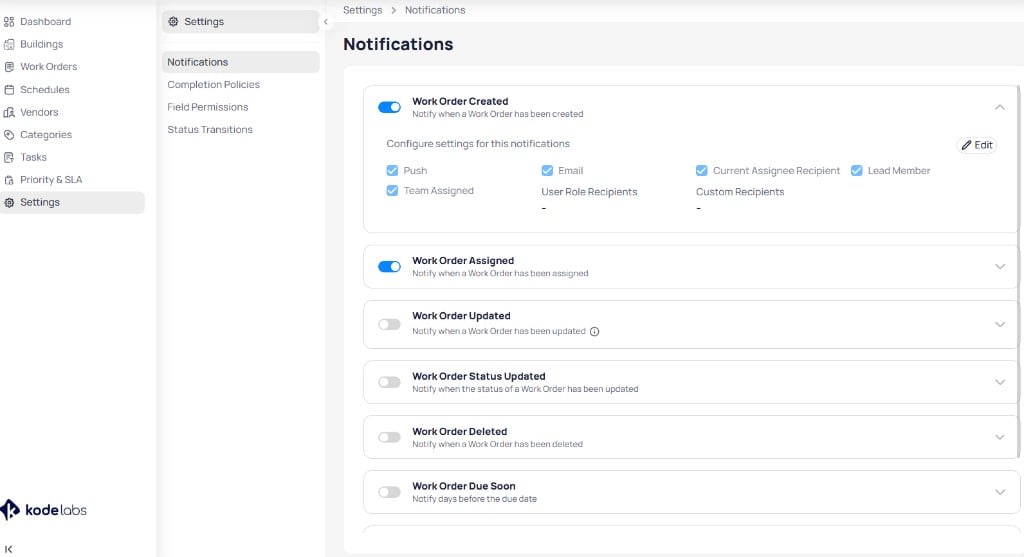
Notification settings control how AssetOps informs users about work order activity. Open Settings > Notifications at the portfolio level .
You choose which events generate alerts, how they are delivered (push or email), and who receives them.
The Notifications settings page lists work order events with enable toggles and expandable configuration
Configuration Toggle on and configure each notification event. Expand a rule to set delivery methods and recipients, then select Edit to save.
Send a notification when a new work order is created Show Configuration Options
Send a push notification to selected recipients
Send an email notification to selected recipients
Send notifications to the current assignee of the work order
Send notifications to the lead member responsible for the work order
Send notifications to all members assigned to the work order
Send notifications to users of a specific KODE OS role
Send notifications to selected users, regardless of role
Send a notification when a new work order has been assigned Show Configuration Options
Send a push notification to selected recipients
Send an email notification to selected recipients
Send notifications to the current assignee of the work order
Send notifications to the lead member responsible for the work order
Send notifications to all members assigned to the work order
Send notifications to users of a specific KODE OS role
Send notifications to selected users, regardless of role
Send a notification when a work order has been updated Show Configuration Options
Send a push notification to selected recipients
Send an email notification to selected recipients
Send notifications to the current assignee of the work order
Send notifications to the lead member responsible for the work order
Send notifications to all members assigned to the work order
Send notifications to users of a specific KODE OS role
Send notifications to selected users, regardless of role
Work Order Status Updated Send a notification when the status of a work order has been updated Show Configuration Options
Send a push notification to selected recipients
Send an email notification to selected recipients
Send notifications to the current assignee of the work order
Send notifications to users of a specific KODE OS role
Send notifications to selected users, regardless of role
Send a notification when a work order has been deleted Show Configuration Options
Send a push notification to selected recipients
Send an email notification to selected recipients
Send notifications to the current assignee of the work order
Send notifications to users of a specific KODE OS role
Send notifications to selected users, regardless of role
Send a notification when a work order is due soon for completion Show Configuration Options
Send a push notification to selected recipients
Send an email notification to selected recipients
Send notifications to the current assignee of the work order
Send notifications to the lead member responsible for the work order
Send notifications to all members assigned to the work order
Send notifications to users of a specific KODE OS role
Send notifications to selected users, regardless of role
Specifies the number of days before the due date to send the notification
Send a notification when an overdue work order remains unresolved Show Configuration Options
Send a push notification to selected recipients
Send an email notification to selected recipients
Send notifications to the current assignee of the work order
Send notifications to the lead member responsible for the work order
Send notifications to all members assigned to the work order
Send notifications to users of a specific KODE OS role
Send notifications to selected users, regardless of role
Specifies the number of days that have passed since the work order’s due date
Next steps
Notification events Look up every event, delivery method, and recipient type in one table.
Portfolio settings Return to the settings hub for policies, permissions, and status transitions.
Last modified on August 18, 2026